
PSPGameTool
Tools for Adding/Editing Games/Saves for PSP/PSVita (THIS PROGRAM ISNT BEING UPDATED: USE https://github.com/xFN10x/PSPTools INSTEAD)
Install / Use
/learn @xFN10x/PSPGameToolREADME
PSPGameTool
[!IMPORTANT] This repository has been archived. I am not going to update this anymore, or pay attension to this repository. However, I am working a new and improved version of this tool. https://github.com/xFN10x/PSPTools
 Tools for Adding/Editing Games/Saves
(Changelog at bottom)
Tools for Adding/Editing Games/Saves
(Changelog at bottom)
Features
- Simple Save Viewer/Manager
- Extract ISO files from ZIPs
- Move ISOs without opening file explorer
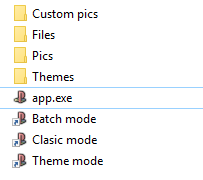
How to use PSXTOPSP
In this app, there is a button for launching PSXTOPSP. To use that button, you have to do this:
-
Download PSXTOPSP
-
Extract it and move the psx2psp_v.1.4.2 folder to where you downloaded PSPGameTool
-
Rename the folder to "psxtopsp"
-
Rename PSX2PSP.exe to app.exe
-
Now that button should work.
How To Install (Source Code)
- Download LuaRT
- Download the Source Code
- Download the latest VC Redist
- Extract Both LuaRT and the Source code
- Drag main.wlua to wrtc.exe
- Make sure Windows Desktop is selected, and make sure "Dynamic" is also selected.
- (Optional) Select icon.ico in the images folder
- Click "Generate Executable"
- Rename lua54(64bit).dll or 32bit to lua54.dll
- Double click on main.exe, and now you are running it!
Changelog v1.02-beta
- FTP support 50% done
- (Bug Fix) Selecting custom folders no longer needs a restart.
-
PSV SUPPORT! Select the pspemu folder in custom folder selection to use!
Related Skills
node-connect
348.2kDiagnose OpenClaw node connection and pairing failures for Android, iOS, and macOS companion apps
frontend-design
108.9kCreate distinctive, production-grade frontend interfaces with high design quality. Use this skill when the user asks to build web components, pages, or applications. Generates creative, polished code that avoids generic AI aesthetics.
openai-whisper-api
348.2kTranscribe audio via OpenAI Audio Transcriptions API (Whisper).
qqbot-media
348.2kQQBot 富媒体收发能力。使用 <qqmedia> 标签,系统根据文件扩展名自动识别类型(图片/语音/视频/文件)。
