
Netlistsvg
draws an SVG schematic from a JSON netlist
Install / Use
/learn @nturley/NetlistsvgREADME




netlistsvg
draws an SVG schematic from a yosys JSON netlist. This can be generated the write_json command. It uses elkjs for layout.
You can see an online demo here
Installation/Usage Instructions
Command Line Interface
Install nodejs if isn't already installed.
To install the latest version from npm:
npm install -g netlistsvg
To install the latest version from source:
git clone https://github.com/nturley/netlistsvg
cd netlistsvg
npm install # install dependencies
sudo npm install -g . # install netlistsvg to system

sudo npm uninstall -g netlistsvg # uninstall from system
You can execute netlistsvg like this.
netlistsvg input_json_file [-o output_svg_file] [--skin skin_file]
The default value for the output file is out.svg.
Should work on Linux, OSX, and Windows. Running the build scripts (makefiles and the web demo) is easiest on Linux and OSX.
Web bundle
I have a web bundle hosted on github pages here: https://nturley.github.io/netlistsvg/built/netlistsvg.bundle.js It doesn't wrap ELKjs, so you'll need to include it separately. ELK creates a global variable, so you'll need to include ELKjs before netlistsvg.
In HTML it would look something like this
<script type="text/javascript" src="https://nturley.github.io/netlistsvg/elk.bundled.js"></script>
<script type="text/javascript" src="https://nturley.github.io/netlistsvg/built/netlistsvg.bundle.js"></script>
On ObservableHQ, you can require it like this.
netlistsvg = {
  var ELK = await require('https://nturley.github.io/netlistsvg/elk.bundled.js')
  window.ELK = ELK
  return require('https://nturley.github.io/netlistsvg/built/netlistsvg.bundle.js')
}
You may want to download and host your own copy.
The web bundle includes both the analog and digital skin and an example netlist for each. Using a promise would look like this.
await netlistsvg.render(netlistsvg.digitalSkin, netlistsvg.exampleDigital);
Or to log the result to console using the callback API:
netlistsvg.render(netlistsvg.digitalSkin, netlistsvg.exampleDigital, (err, result) => console.log(result));
To turn Verilog into YosysJSON in the browser, you can use YosysJS
Development
The lib/ folder contains the main source code for netlistsvg in Typescript. The built/ folder contains said source code compiled to Javascript. When wanting to make changes to netlistsvg, one should modify the Typescript source, compile to Javascript, then test their modifications.
To compile, lint, and do self-tests, run
npm test
To build the web bundle, run
npm run build-module
Examples
Here's an digital netlist produced by Yosys along with the diagram that netlistsvg created from it.
<details> <summary>JSON Source</summary>{
"modules": {
"up3down5": {
"ports": {
"clock": {
"direction": "input",
"bits": [ 2 ]
},
"data_in": {
"direction": "input",
"bits": [ 3, 4, 5, 6, 7, 8, 9, 10, 11 ]
},
"up": {
"direction": "input",
"bits": [ 12 ]
},
"down": {
"direction": "input",
"bits": [ 13 ]
},
"carry_out": {
"direction": "output",
"bits": [ 14 ]
},
"borrow_out": {
"direction": "output",
"bits": [ 15 ]
},
"count_out": {
"direction": "output",
"bits": [ 16, 17, 18, 19, 20, 21, 22, 23, 24 ]
},
"parity_out": {
"direction": "output",
"bits": [ 25 ]
}
},
"cells": {
"$add$input.v:17$3": {
"type": "$add",
"port_directions": {
"A": "input",
"B": "input",
"Y": "output"
},
"connections": {
"A": [ 16, 17, 18, 19, 20, 21, 22, 23, 24 ],
"B": [ "1", "1" ],
"Y": [ 26, 27, 28, 29, 30, 31, 32, 33, 34, 35 ]
}
},
"$and$input.v:28$5": {
"type": "$and",
"port_directions": {
"A": "input",
"B": "input",
"Y": "output"
},
"connections": {
"A": [ 12 ],
"B": [ 35 ],
"Y": [ 36 ]
}
},
"$and$input.v:29$6": {
"type": "$and",
"port_directions": {
"A": "input",
"B": "input",
"Y": "output"
},
"connections": {
"A": [ 13 ],
"B": [ 37 ],
"Y": [ 38 ]
}
},
"$procdff$40": {
"type": "$dff",
"port_directions": {
"CLK": "input",
"D": "input",
"Q": "output"
},
"connections": {
"CLK": [ 2 ],
"D": [ 39, 40, 41, 42, 43, 44, 45, 46, 47 ],
"Q": [ 16, 17, 18, 19, 20, 21, 22, 23, 24 ]
}
},
"$procdff$41": {
"type": "$dff",
"port_directions": {
"CLK": "input",
"D": "input",
"Q": "output"
},
"connections": {
"CLK": [ 2 ],
"D": [ 36 ],
"Q": [ 14 ]
}
},
"$procdff$42": {
"type": "$dff",
"port_directions": {
"CLK": "input",
"D": "input",
"Q": "output"
},
"connections": {
"CLK": [ 2 ],
"D": [ 38 ],
"Q": [ 15 ]
}
},
"$procdff$43": {
"type": "$dff",
"port_directions": {
"CLK": "input",
"D": "input",
"Q": "output"
},
"connections": {
"CLK": [ 2 ],
"D": [ 48 ],
"Q": [ 25 ]
}
},
"$procmux$36": {
"type": "$pmux",
"port_directions": {
"A": "input",
"B": "input",
"S": "input",
"Y": "output"
},
"connections": {
"A": [ 16, 17, 18, 19, 20, 21, 22, 23, 24 ],
"B": [ 26, 27, 28, 29, 30, 31, 32, 33, 34, 49, 50, 51, 52, 53, 54, 55, 56, 57, 3, 4, 5, 6, 7, 8, 9, 10, 11 ],
"S": [ 58, 59, 60 ],
"Y": [ 39, 40, 41, 42, 43, 44, 45, 46, 47 ]
}
},
"$procmux$37_CMP0": {
"type": "$eq",
"port_directions": {
"A": "input",
"B": "input",
"Y": "output"
},
"connections": {
"A": [ 13, 12 ],
"B": [ "0", "1" ],
"Y": [ 58 ]
}
},
"$procmux$38_CMP0": {
"type": "$eq",
"port_directions": {
"A": "input",
"B": "input",
"Y": "output"
},
"connections": {
"A": [ 13, 12 ],
"B": [ "1", "0" ],
"Y": [ 59 ]
}
},
"$procmux$39_CMP0": {
"type": "$eq",
"port_directions": {
"A": "input",
"B": "input",
"Y": "output"
},
"connections": {
"A": [ 13, 12 ],
"B": [ "0", "0" ],
"Y": [ 60 ]
}
},
"$reduce_xor$input.v:27$4": {
"type": "$reduce_xor",
"port_directions": {
"A": "input",
"Y": "output"
},
"connections": {
"A": [ 39, 40, 41, 42, 43, 44, 45, 46, 47 ],
"Y": [ 48 ]
}
},
"$sub$input.v:16$2": {
"type": "$sub",
"port_directions": {
"A": "input",
"B": "input",
"Y": "output"
},
"connections": {
"A": [ 16, 17, 18, 19, 20, 21, 22, 23, 24 ],
"B": [ "1", "0", "1" ],
"Y": [ 49, 50, 51, 52, 53, 54, 55, 56, 57, 37 ]
}
}
}
}
}
}
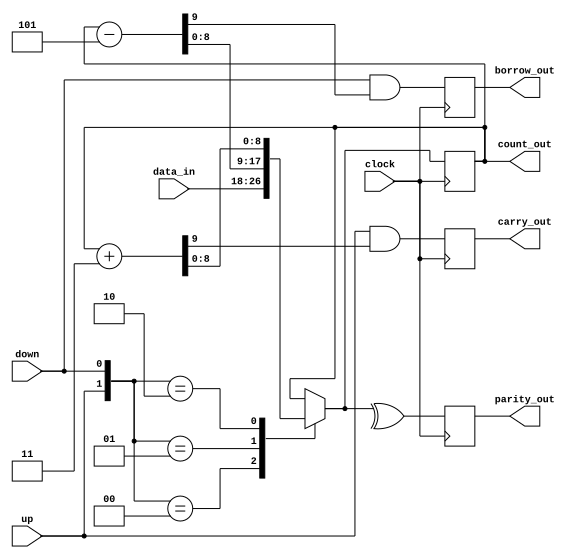
You can also write out the JSON by hand, of course. We support JSON5 syntax.
Here's an analog example.
<details> <summary>JSON Source</summary>{
"modules": {
"resistor_divider": {
"ports": {
"A": {
"direction": "input",
"bits": [2]
},
"B": {
"direction": "input",
"bits": [3]
},
"A AND B": {
"direction": "output",
"bits": [4]
}
},
"cells": {
"R1": {
"type": "r_v",
"connections": {
"A": [2],
"B": [5]
},
"attributes": {
"value":"10k"
}
},
"R2": {
"type": "r_v",
"connections": {
"A": [3],
"B": [5]
},
"attributes": {
"value":"10k"
}
},
"Q1": {
"type": "q_pnp",
"port_directions": {
"C": "input",
"B":
