
Nap
NAP Framework: real-time control & visualization platform
Install / Use
/learn @napframework/NapREADME
Description
NAP is an open source, low overhead, real-time control & visualization plaform. Create fast, modular and responsive applications to interact with the world around you. NAP is built to scale up to a large number of input and output devices: many displays, many lights, many speakers, many sensors, many servos.
Features
NAP Framework ships with many useful modules, including: a Vulkan 2D/3D render engine, a Vulkan Compute module, a multi-channel audio engine for music playback, recording and analysis, a sequencer to control parameters in real-time, an editor to author application content, a web-portal to control and monitor NAP applications in a browser, a system for creating and loading presets, a video player powered by FFmpeg and a Python programming interface.
NAP also has built in support for many common protocols and standards, including: WebSocket, MIDI, OSC, Artnet, Serial, EtherCAT, OpenCV and SQLite. NAP has been battle tested in production for years. For more information about NAP, how it is commonly used and what it can do for you, visit the nap-framework.tech website.
<br> <p align="center"> <img width=256 img src="https://docs.nap-framework.tech/content/vulkan-logo.svg" > </p>Philosophy
NAP is completely data driven and heavily influenced by modern game engine design, with one exception: it does not dictate any sort of pipeline. This allows NAP to run on any type of device: from low-power, energy efficient ARM computers such as the Raspberry Pi to industrial PCs and x86 gaming rigs.
NAP applications are lean and mean: only package and ship what you actually use. On top of that NAP is easy to extend: build you own modules, resources, devices and components. NAP wants you to be safe and validates data for you on initialization. Applications are also responsive: hot-load content changes directly in to the running application. On top of that NAP is completely cross-platform and supports all modern desktop environments.
Documentation
NAP documentation can be found online at docs.nap-framework.tech. Take note that the installation instructions on that website apply to the binary (compiled) NAP package only. Follow the instructions in this document to build and work against NAP Framework from source.
Gallery
Visit nap-labs.tech for more examples
 Between Mind and Matter by Nick Verstand, Marcel Smit and 4DSOUND
 Shylight by Studio Drift
 Habitat by Heleen Blanken, Naivi and Stijn van Beek
 4DSound System
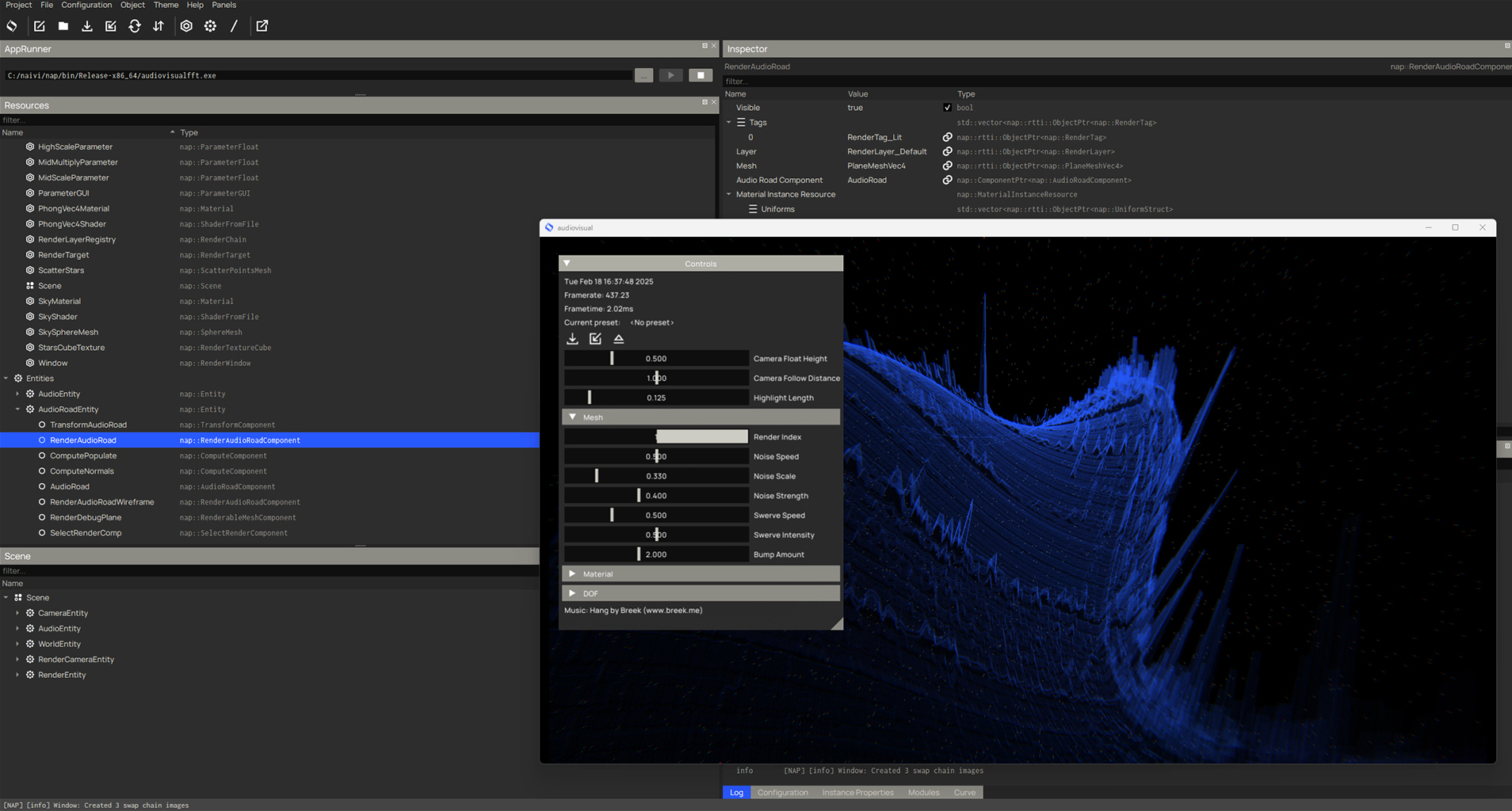 NAP Framework editor & audiovisualfft demo
 NAP Framework editor & applets
Where to Start
System Compatibility
Currently, whether working with the packaged framework release or against the framework source, we support the following architectures and operating systems:
Windows
| arch | os | version | compiler | |--------|-------------------|--------------|-------------| | x86-64 | Windows | 10, 11 | msvc 16, 17 |
The default CMake generator is Visual Studio 2019 or 2022.
Linux
| arch | os | version | compiler | |--------|-------------------|---------|-------------| | x86-64 | Ubuntu | 24.04 | gcc | | arm64 | Raspberry Pi OS | 12 | gcc |
The default CMake generator is Make.
Other Linux distributions may work, but they have not been tested and are not officially supported.
Display Server
When Wayland is configured as the display server, NAP applications will run in native wayland mode if the compositor supports wp_fifo_manager_v1; otherwise the system will revert back to XWayland for performance reasons. You can force applications to run in native wayland mode by selecting wayland as the Video Driver in the nap::RenderServiceConfiguration. Napkin is set up to always use XWayland for compatibility, but it can be run as a native Wayland application by setting the QT_QPA_PLATFORM environment variable to wayland.
Raspberry Pi
Only the Raspberry Pi 4 & 5 running Debian Bookworm (v12, arm64) is 'fully' supported. Headless applications and services without graphics should run on older models, although this has not been tested. The editor (napkin) only works on the Raspberry Pi 4 and up.
Binary Packages
Pre-compiled packages of official NAP releases are made available for download on Github for all supported platforms. Follow the framework installation instructions to get started. Continue reading below to compile, package and work with NAP from source.
Compilation
Dependencies
The editor Napkin depends on open source Qt.
Download
Download and extract the pre-compiled binaries for your target platform:
- Qt6 for x86-64: Windows (msvc)
- Qt6 for x86-64: Linux (gcc)
- Qt6 for arm64: Linux (gcc)
Alternatively
- Go to qt.io for open source users
- Download the Qt online installer
- During installation select Custom installation
- Filter on the LTS category to download and install Qt6 for your target platform
- NAP uses
Qt 6.7.2, although other versions are known to work.
Note that only only the desktop binaries (MSVC 2019 64-bit or gcc 64-bit) are required, other content is optional.
Setup
Create an environment variable called QT_DIR and point it to the directory that contains the QT libraries, for example: C:\qt\6.7.2\msvc2019_64. The build system uses this environment variable to locate QT.
Note that only the editor (Napkin) depends on Qt, NAP distributable applications do not have a dependency on Qt.
Create the Solution
Run:
check_build_environment to ensure your build environment is up to date.
On success, run:
generate_solution.bat to generate a Visual Studio Solution (Windows)<br>
generate_solution.sh to generate make files (Linux)<br>
The solution allows you to build every target and inspect the code of the demos, editor, modules, core etc. NAP uses a pre-bundled version of CMake in third-party to ensure compatibility for all platforms. The default build configuration is Release. Alternatively you can use CLion.
Run a Demo
Open the generated solution in Visual Studio, select a build configuration (Debugor Release) and a demo as target. Compile and run the demo. You can also use the build script to compile one or more projects using the command line, for example: ./build.sh helloworld.
Work Against Source
Allows you to step into the NAP Framework source code and make changes if required.
Create Application
Run tools/create_app to create a new application:
./create_app.sh myApp
This creates a new application called myApp in the apps directory. It also adds myApp to solution_info.json in the root and regenerates the solution. Run the build script inside the application directory to compile it:
./build.sh
Create Module
Run tools/create_module to create a new user module:
./create_app.sh myModule
This creates a new module called napmyModule in the modules directory. It also adds napmyModule to solution_info.json in the root and regenerates the solution. You can inlcude this module by adding it to the RequiredModules property in app.json or module.json files.
Note that when you make manual changes to the build system (by editing CMake or JSON) you must run generate_solution to update the solution.
Download Module
A list of publicly available user modules can be found at modules.nap-framework.tech. These modules are created, maintained and shared by NAP users, independent of NAP Framework.
Share Your Module
You can share your module with other NAP users by making it available on modules.nap-framework.tech. Follow the instructions here to register it.
Build Distributable NAP Package
A packaged version of NAP will include all of the following:
compiled object code (headers & binar
Related Skills
diffs
341.0kUse the diffs tool to produce real, shareable diffs (viewer URL, file artifact, or both) instead of manual edit summaries.
clearshot
Structured screenshot analysis for UI implementation and critique. Analyzes every UI screenshot with a 5×5 spatial grid, full element inventory, and design system extraction — facts and taste together, every time. Escalates to full implementation blueprint when building. Trigger on any digital interface image file (png, jpg, gif, webp — websites, apps, dashboards, mockups, wireframes) or commands like 'analyse this screenshot,' 'rebuild this,' 'match this design,' 'clone this.' Skip for non-UI images (photos, memes, charts) unless the user explicitly wants to build a UI from them. Does NOT trigger on HTML source code, CSS, SVGs, or any code pasted as text.
openpencil
1.9kThe world's first open-source AI-native vector design tool and the first to feature concurrent Agent Teams. Design-as-Code. Turn prompts into UI directly on the live canvas. A modern alternative to Pencil.
ui-ux-designer
Use this agent when you need to design, implement, or improve user interface components and user experience flows. Examples include: creating new pages or components, improving existing UI layouts, implementing responsive designs, optimizing user interactions, building forms or dashboards, analyzing existing UI through browser snapshots, or when you need to ensure UI components follow design system standards and shadcn/ui best practices.\n\n<example>\nContext: User needs to create a new dashboard page for team management.\nuser: "I need to create a team management dashboard where users can view team members, invite new members, and manage roles"\nassistant: "I'll use the ui-ux-designer agent to design and implement this dashboard with proper UX considerations, using shadcn/ui components and our design system tokens."\n</example>\n\n<example>\nContext: User wants to improve the user experience of an existing form.\nuser: "The signup form feels clunky and users are dropping off. Can you improve it?"\nassistant: "Let me use the ui-ux-designer agent to analyze the current form UX and implement improvements using our design system and shadcn/ui components."\n</example>\n\n<example>\nContext: User wants to evaluate and improve existing UI.\nuser: "Can you take a look at our pricing page and see how we can make it more appealing and user-friendly?"\nassistant: "I'll use the ui-ux-designer agent to take a snapshot of the current pricing page, analyze the UX against Notion-inspired design principles, and implement improvements using our design tokens."\n</example>
