
SFA3D
Super Fast and Accurate 3D Object Detection based on 3D LiDAR Point Clouds (The PyTorch implementation)
Install / Use
/learn @maudzung/SFA3DREADME
Super Fast and Accurate 3D Object Detection based on 3D LiDAR Point Clouds (SFA3D)


Features
- [x] Super fast and accurate 3D object detection based on LiDAR
- [x] Fast training, fast inference
- [x] An Anchor-free approach
- [x] No Non-Max-Suppression
- [x] Support distributed data parallel training
- [x] Release pre-trained models
Highlights
- [x] The technical details are described here
- [x] The great introduction and explanation from
Computer Vision and Perception for Self-Driving Cars CourseYoutube link - [x] SFA3D is used for the second course in the
Udacity Self-Driving Car Engineer Nanodegree Program: Sensor Fusion and TrackingGitHub link
Update 2020.09.06: Add ROS source code. The great work has been done by @AhmedARadwan.
The implementation is here
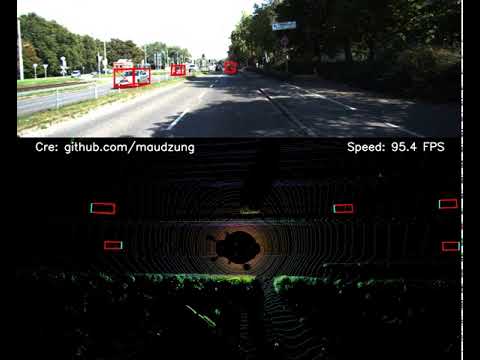
Demonstration (on a single GTX 1080Ti)
2. Getting Started
2.1. Requirement
The instructions for setting up a virtual environment is here.
git clone https://github.com/maudzung/SFA3D.git SFA3D
cd SFA3D/
pip install -r requirements.txt
2.2. Data Preparation
Download the 3D KITTI detection dataset from here.
The downloaded data includes:
- Velodyne point clouds (29 GB)
- Training labels of object data set (5 MB)
- Camera calibration matrices of object data set (16 MB)
- Left color images of object data set (12 GB) (For visualization purpose only)
Please make sure that you construct the source code & dataset directories structure as below.
2.3. How to run
2.3.1. Visualize the dataset
To visualize 3D point clouds with 3D boxes, let's execute:
cd sfa/data_process/
python kitti_dataset.py
2.3.2. Inference
The pre-trained model was pushed to this repo.
python test.py --gpu_idx 0 --peak_thresh 0.2
2.3.3. Making demonstration
python demo_2_sides.py --gpu_idx 0 --peak_thresh 0.2
The data for the demonstration will be automatically downloaded by executing the above command.
2.3.4. Training
2.3.4.1. Single machine, single gpu
python train.py --gpu_idx 0
2.3.4.2. Distributed Data Parallel Training
- Single machine (node), multiple GPUs
python train.py --multiprocessing-distributed --world-size 1 --rank 0 --batch_size 64 --num_workers 8
-
Two machines (two nodes), multiple GPUs
- First machine
python train.py --dist-url 'tcp://IP_OF_NODE1:FREEPORT' --multiprocessing-distributed --world-size 2 --rank 0 --batch_size 64 --num_workers 8- Second machine
python train.py --dist-url 'tcp://IP_OF_NODE2:FREEPORT' --multiprocessing-distributed --world-size 2 --rank 1 --batch_size 64 --num_workers 8
Tensorboard
- To track the training progress, go to the
logs/folder and
cd logs/<saved_fn>/tensorboard/
tensorboard --logdir=./
- Then go to http://localhost:6006/
Contact
If you think this work is useful, please give me a star! <br>
If you find any errors or have any suggestions, please contact me (Email: nguyenmaudung93.kstn@gmail.com). <br>
Thank you!
Citation
@misc{Super-Fast-Accurate-3D-Object-Detection-PyTorch,
  author =       {Nguyen Mau Dung},
  title =        {{Super-Fast-Accurate-3D-Object-Detection-PyTorch}},
  howpublished = {\url{https://github.com/maudzung/Super-Fast-Accurate-3D-Object-Detection}},
  year =         {2020}
}
References
[1] CenterNet: Objects as Points paper, PyTorch Implementation <br> [2] RTM3D: PyTorch Implementation <br> [3] Libra_R-CNN: PyTorch Implementation
The YOLO-based models with the same BEV maps input: <br> [4] Complex-YOLO: v4, v3, v2
3D LiDAR Point pre-processing: <br> [5] VoxelNet: PyTorch Implementation
Folder structure
${ROOT}
└── checkpoints/
    ├── fpn_resnet_18/
        ├── fpn_resnet_18_epoch_300.pth
└── dataset/
    └── kitti/
        ├──ImageSets/
        │   ├── test.txt
        │   ├── train.txt
        │   └── val.txt
        ├── training/
        │   ├── image_2/ (left color camera)
        │   ├── calib/
        │   ├── label_2/
        │   └── velodyne/
        └── testing/
        │   ├── image_2/ (left color camera)
        │   ├── calib/
        │   └── velodyne/
        └── classes_names.txt
└── sfa/
    ├── config/
    │   ├── train_config.py
    │   └── kitti_config.py
    ├── data_process/
    │   ├── kitti_dataloader.py
    │   ├── kitti_dataset.py
    │   └── kitti_data_utils.py
    ├── models/
    │   ├── fpn_resnet.py
    │   ├── resnet.py
    │   └── model_utils.py
    └── utils/
    │   ├── demo_utils.py
    │   ├── evaluation_utils.py
    │   ├── logger.py
    │   ├── misc.py
    │   ├── torch_utils.py
    │   ├── train_utils.py
    │   └── visualization_utils.py
    ├── demo_2_sides.py
    ├── demo_front.py
    ├── test.py
    └── train.py
├── README.md
└── requirements.txt
Related Skills
node-connect
332.0kDiagnose OpenClaw node connection and pairing failures for Android, iOS, and macOS companion apps
frontend-design
81.7kCreate distinctive, production-grade frontend interfaces with high design quality. Use this skill when the user asks to build web components, pages, or applications. Generates creative, polished code that avoids generic AI aesthetics.
openai-whisper-api
332.0kTranscribe audio via OpenAI Audio Transcriptions API (Whisper).
commit-push-pr
81.7kCommit, push, and open a PR
