
DurLAR
(3DV 2021) A High-fidelity 128-channel LiDAR Dataset with Panoramic Ambient and Reflectivity Imagery for Multi-modal Autonomous Driving Applications
Install / Use
/learn @l1997i/DurLARREADME




DurLAR: A High-Fidelity 128-Channel LiDAR Dataset
<!-- 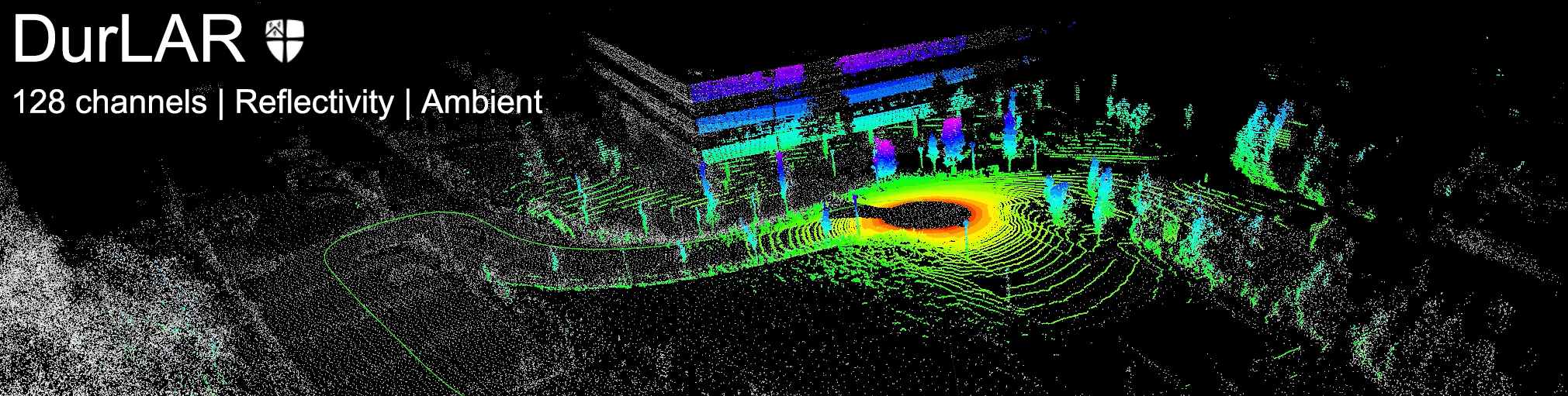 -->https://github.com/l1997i/DurLAR/assets/35445094/2c6d4056-a6de-4fad-9576-693efe2860f0
News
- [2025/03/16] We provide the download link for our DurLAR dataset hosted on Hugging Face, along with the corresponding download script.
- [2024/12/05] We provide the intrinsic parameters of our OS1-128 LiDAR [download].
Sensor placement
-
LiDAR: Ouster OS1-128 LiDAR sensor with 128 channels vertical resolution
-
Stereo Camera: Carnegie Robotics MultiSense S21 stereo camera with grayscale, colour, and IR enhanced imagers, 2048x1088 @ 2MP resolution
-
GNSS/INS: OxTS RT3000v3 global navigation satellite and inertial navigation system, supporting localization from GPS, GLONASS, BeiDou, Galileo, PPP and SBAS constellations
-
Lux Meter: Yocto Light V3, a USB ambient light sensor (lux meter), measuring ambient light up to 100,000 lux
Panoramic Imagery
<br> <p align="center"> <img src="https://github.com/l1997i/DurLAR/blob/main/reflect_center.gif?raw=true" width="100%"/> <h5 id="title" align="center">Reflectivity imagery</h5> </br> <br> <p align="center"> <img src="https://github.com/l1997i/DurLAR/blob/main/ambient_center.gif?raw=true" width="100%"/> <h5 id="title" align="center">Ambient imagery</h5> </br>File Description
Each file contains 8 topics for each frame in DurLAR dataset,
ambient/: panoramic ambient imageryreflec/: panoramic reflectivity imageryimage_01/: right camera (grayscale+synced+rectified)image_02/: left RGB camera (synced+rectified)ouster_points: ouster LiDAR point cloud (KITTI-compatible binary format)gps,imu,lux: csv file format
The structure of the provided DurLAR full dataset zip file,
DurLAR_<date>/
├── ambient/
│   ├── data/
│   │   └── <frame_number.png>   [ ..... ]
│   └── timestamp.txt
├── gps/
│   └── data.csv
├── image_01/
│   ├── data/
│   │   └── <frame_number.png>   [ ..... ]
│   └── timestamp.txt
├── image_02/
│   ├── data/
│   │   └── <frame_number.png>   [ ..... ]
│   └── timestamp.txt
├── imu/
│   └── data.csv
├── lux/
│   └── data.csv
├── ouster_points/
│   ├── data/
│   │   └── <frame_number.bin>   [ ..... ]
│   └── timestamp.txt
├── reflec/
│   ├── data/
│   │   └── <frame_number.png>   [ ..... ]
│   └── timestamp.txt
└── readme.md                    [ this README file ]
The structure of the provided calibration zip file,
DurLAR_calibs/
├── calib_cam_to_cam.txt              [ Camera to camera calibration results ]
├── calib_imu_to_lidar.txt            [ IMU to LiDAR calibration results ]
└── calib_lidar_to_cam.txt            [ LiDAR to camera calibration results ]
Get Started
- A quick look: the exemplar dataset (600 frames)
- The full dataset hosted on Hugging Face
- Download the calibration files
- Download the calibration files (v2, targetless)
- Download the exemplar ROS bag (for targetless calibration)
- Download the exemplar dataset (600 frames)
- Download the full dataset (Fill in the form to request access to the full dataset)
Note that we did not include CSV header information in the exemplar dataset (600 frames). You can refer to Header of csv files to get the first line of the
csvfiles.
calibration files (v2, targetless): Following the publication of the proposed DurLAR dataset and the corresponding paper, we identify a more advanced targetless calibration method (#4) that surpasses the LiDAR-camera calibration technique previously employed. We provide exemplar ROS bag for targetless calibration, and also corresponding calibration results (v2). Please refer to Appendix (arXiv) for more details.
Prerequisites
-
Before starting, ensure you have the Hugging Face CLI (huggingface_hub) installed:
Install it via:
pip install -U "huggingface_hub[cli]" -
Since the DurLAR dataset is a gated (restricted access) dataset on Hugging Face, you need to authenticate before downloading it.
- You first need a Hugging Face account. If you don’t have one, please register.
- Authenticate via the command line on the computer where you want to download the dataset by entering:
huggingface-cli login. Following the instructions of that command, and it will prompt you for your Hugging Face Access Token. - Open this link and login to your Hugging Face account. At the top of the page, in the section “You need to agree to share your contact information to access this dataset”, agree to the conditions and access the dataset content. If you have already agreed and been automatically granted access, the page will display: “Gated dataset: You have been granted access to this dataset.”
Note: The Hugging Face service may be restricted in certain countries or regions. In such cases, you may consider using a Hugging Face mirror (Hugging Face 镜像) as an alternative.
Download the dataset using scripts (recommended)
We provide a pre-written Bash script to download the dataset from Hugging Face. You need to manually modify the User Configuration (Modify as Needed) section at the beginning of durlar_hf_download_script.sh to match your desired paths and features.
If you encounter any issues (e.g., network problems or unexpected interruptions), you can also modify this script to fit your needs. For example, if the extraction process is interrupted, you can manually comment out the dataset download section and resume from extraction.
Manually download the dataset (fallback)
If the above script does not work, you can download the dataset manually. This option is only a fallback in case the script fails and is not recommended.
To download all dataset files from Hugging Face, use:
huggingface-cli download l1997i/DurLAR --repo-type dataset --local-dir [YOUR_DATASET_DOWNLOAD_PATH]
The parameter --local-dir is optional. For example,
# Example 1: The recommended (and default) way to download files from the Hub is to use the cache-system, without --local-dir specified
huggingface-cli download l1997i/DurLAR --repo-type dataset

# Example 2: in some cases you want to download files and move them to a specific folder. You can do that using the --local-dir option.
huggingface-cli download l1997i/DurLAR --repo-type dataset --local-dir /home/my_username/datasets/DurLAR_tar/
Merge and Extract the Dataset
Reassemble the .tar parts:
cd /home/my_username/datasets/DurLAR_tar/ # Enter the dataset local-dir folder. Note: Your path may be different from mine. Please adjust it accordingly.
cat DurLAR_dataset.tar* > DurLAR_dataset_full.tar
Extract the full dataset:
tar -xvf DurLAR_dataset_full.tar -C /your/desired/path
Optionally, If you have pigz installed, you can extract using multi-threaded pigz for faster speed:
which pigz # it should correctly return the path of pigz

tar --use-compress-program="pigz -p $(nproc)" -xvf DurLAR_dataset/DurLAR_dataset.tar -C /your/desired/path
Cleanup (Optional)
Once extracted, delete the archive parts to free up space:
rm -rf DurLAR_tar # Note: Your path may be different from mine. Please adjust it accordingly.
Now you will find the fully extracted DurLAR dataset in your /your/desired/path.
[Outdated] Early download options for the dataset (not recommended)
The following methods were the early download options for the DurLAR dataset. While they are still functional, they may suffer from drawbacks such as slow download speeds (the host server is in
