
Fsbrain
R library for structural neuroimaging. Provides high-level functions to access (read and write) and visualize surface-based brain morphometry data for individuals and groups.
Install / Use
/learn @dfsp-spirit/FsbrainREADME
fsbrain


An R package for structural neuroimaging. Provides high-level functions to access (read and write) and visualize surface-based brain morphometry data (e.g. cortical thickness) for individual subjects and groups.
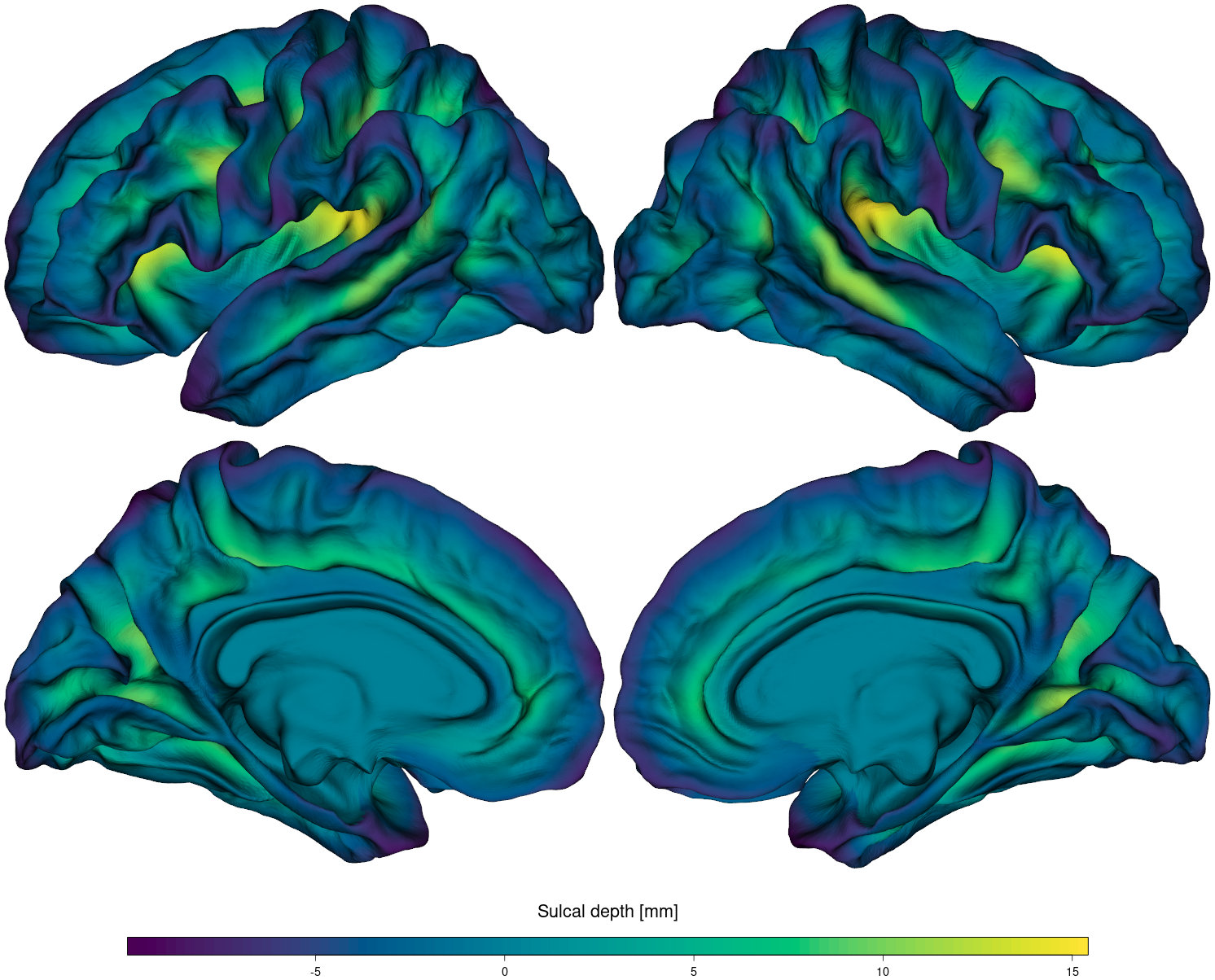
Fig.1: Visualization of sulcal depth for a subject in FreeSurfer standard space (fsaverage). See the source code to reproduce this image in an R notebook.
About | Installation | Documentation | Unit tests | License | Citation | Visualization examples | Contributing
About
The fsbrain R package provides a well-tested and consistent interface to neuroimaging data in R. It supports reading, writing, and visualizing various kinds of raw data and statistical results on brain surfaces and volumes. While the package provides a very convenient interface for working with data arranged in the standard FreeSurfer directory structure (SUBJECTS_DIR), fsbrain is not limited to this layout or FreeSurfer file formats. You can load brain meshes, volumes, and data from a range of other neuroimaging software packages and visualize them.
The plots produced by fsbrain can be integrated into R notebooks or written to high-quality bitmap image files, ready for publication. The rgl renderer used by fsbrain provides fast, hardware-accelerated rendering based on the OpenGL standard.
News
- 2025-09-09: New fsbrain version 0.5.6 released on CRAN, see the CHANGES.
- 2024-02-03: New fsbrain version 0.5.5 released on CRAN, see the CHANGES.
- 2023-06-26: New fsbrain version 0.5.4 released on CRAN, see the CHANGES.
- 2022-12-22: We are looking for help! If you have a Mac and are interested in helping fsbrain development, please contact us by email or reply to #46 here on GitHub!
- 2022-02-13: New fsbrain version 0.5.3 released on CRAN, see the CHANGES.
- 2021-11-11: New fsbrain version 0.5.1 released on CRAN, see the CHANGES.
- 2021-09-16: New fsbrain version 0.5.0 released on CRAN, see the CHANGES.
- 2021-05-12: New fsbrain version 0.4.3 released on CRAN, see the CHANGES.
- 2021-03-28: New fsbrain version 0.4.2 released on CRAN, see the CHANGES.
- 2020-09-20: The preprint of our paper T. Schaefer, C. Ecker: fsbrain: an R package for the visualization of structural neuroimaging data' is now available on biorxiv.
Installation
Recommended: install the stable fsbrain version from CRAN
You can find the fsbrain package on CRAN, so all you need to do is:
install.packages("fsbrain");
In case something goes wrong, don't worry. Just install the missing system dependencies and retry.
Risky: install the dev version of fsbrain with the latest features
This version is not guaranteed to be in a usable state, try at your own risk and run the tests before using it.
From an R session:
install.packages(c("devtools", "knitr", "markdown", "rmarkdown", "testthat", "qpdf"));
devtools::install_github("dfsp-spirit/fsbrain", build_vignettes=TRUE);
System dependencies
A system dependency is a non-R software that is needed for the installation of a package. System dependencies cannot be installed automatically using the R package system, so you need to install them manually or using the package manager of your operating system.
The fsbrain package itself does not have any system dependencies, however, it uses rgl for rendering. You can check the SystemRequirements section on the rgl page at CRAN for the full list of rgl dependencies or read on. To get GIFTI format support, you will also need libxml2-dev.
To install the system dependencies for rgl and xml2:
Linux System dependencies (or: building from source)
R packages are compiled from source by default under Linux, so you need some development libraries. Before installing fsbrain, run the following command in your system shell (not in R):
- for deb-based Linux distributions (Debian, Ubuntu, ...):
sudo apt-get install libmagick++-dev libx11-dev libgl1-mesa-dev libglu1-mesa-dev mesa-common-dev libfreetype6-dev libxml2-dev libssh-dev libcurl4-openssl-dev gfortran libblas-dev liblapack-dev libgfortran4
Note: For recent Ubuntu versions, you may have to replace libgfortan4 in the command above with libgfortan5.
- for rpm-based Linux distributions (Fedora, CentOS, RHEL, ...):
sudo yum install ImageMagick-c++-devel libX11-devel mesa-libGLU-devel freetype-devel libxml2-devel
If you want to compile the package under any other operating system, you will need the libraries as well, of course.
MacOS System dependencies
Recent MacOS versions do not ship with an X11 environment. You will have to install the xquartz X11 system if you do not have it already. If you want to create GIF movies, make sure you have imagemagick installed (easiest via homebrew: brew install imagemagick@6).
Windows Installation Hints
Under Windows 10, it seems that you will need to install these two packages manually via the install.packages command: shiny and manipulateWidget.
Installation via Docker
There are Docker images for fsbrain available on Dockerhub, see the fsbrain Dockerhub repo.
Documentation
The documentation can be accessed from within an R session after you have loaded the fsbrain package:
-
There are two online R Markdown notebooks (like Jupyter Notebook in Python) that show various example plots in combination with the code used to produce them:
- basic fsbrain example notebook: Live visualization of subject data
- advanced fsbrain example notebook: Plotting group data
- export API fsbrain example notebook: Exporting publication-ready plots
-
Detailed vignettes with explanations and examples for the functions of the package is included, run
browseVignettes("fsbrain")to see the vignettes. You can also open the vignette directly:- How to load and visualize surface-based neuroimaging data:
vignette("fsbrain")or: read online at CRAN - How to load and visualize volume-based neuroimaging data:
vignette("fsbrain_vol")or: read online at CRAN - The fsbrain FAQ:
vignette("fsbrain_faq")or: read online at CRAN
- How to load and visualize surface-based neuroimaging data:
-
Help for a specific function can be accessed in the usual R manner:
?<function>, where you replace<function>with a function name. Like this:?group.morph.native. -
Run
example(<function>)to see a live demo that uses the function<function>. Like this:example(group.morph.native). -
The unit tests that come with this package are essentially a list of examples that illustrate how to use the functions.
Unit tests and Continuous integration
This package comes with lots of unit tests. To run them, in a clean R session:
library(devtools)
library(fsbrain)
devtools::check()
Continuous integration results:
<!-- badges: start --> AppVeyor CI under Windows
GitHub Actions, Ubuntu Linux and MacOS (Note: Currently this is always "failing" because of a warning caused by the rgl package when running headless. So the simlpe "passing"/"failing" status is useless, and one needs to follow the link to check the relevant CI results in detail.)
License
The fsbrain package is free software, published under the MIT license.
Note: The file LICENSE in this repository is a CRAN license template only (as required by CRAN) and does not contain the full MIT license text. See the file LICENSE_FULL for the full license text.
Citation and Publications
You can generate the citation for our fsbrain paper by typing the following command in R:
citation("fsbrain")
This currently outputs:
To cite fsbrain in publications use:

  T
Related Skills
YC-Killer
2.7kA library of enterprise-grade AI agents designed to democratize artificial intelligence and provide free, open-source alternatives to overvalued Y Combinator startups. If you are excited about democratizing AI access & AI agents, please star ⭐️ this repository and use the link in the readme to join our open source AI research team.
best-practices-researcher
The most comprehensive Claude Code skills registry | Web Search: https://skills-registry-web.vercel.app
research_rules
Research & Verification Rules Quote Verification Protocol Primary Task "Make sure that the quote is relevant to the chapter and so you we want to make sure that we want to have it identifie
groundhog
398Groundhog's primary purpose is to teach people how Cursor and all these other coding agents work under the hood. If you understand how these coding assistants work from first principles, then you can drive these tools harder (or perhaps make your own!).
