
jupyter-mcp-server
🪐 🔧 Model Context Protocol (MCP) Server for Jupyter.
Install / Use
claude mcp add datalayer -- npx -y github:datalayer/jupyter-mcp-serverIf the server publishes to npm under a different name, use that package instead — check the repo README.
MCP Server
Model Context Protocol server
Quality Score
Category
Development & EngineeringSupported Platforms
Tags
Skill content
View source on GitHub

🪐🔧 Jupyter MCP Server
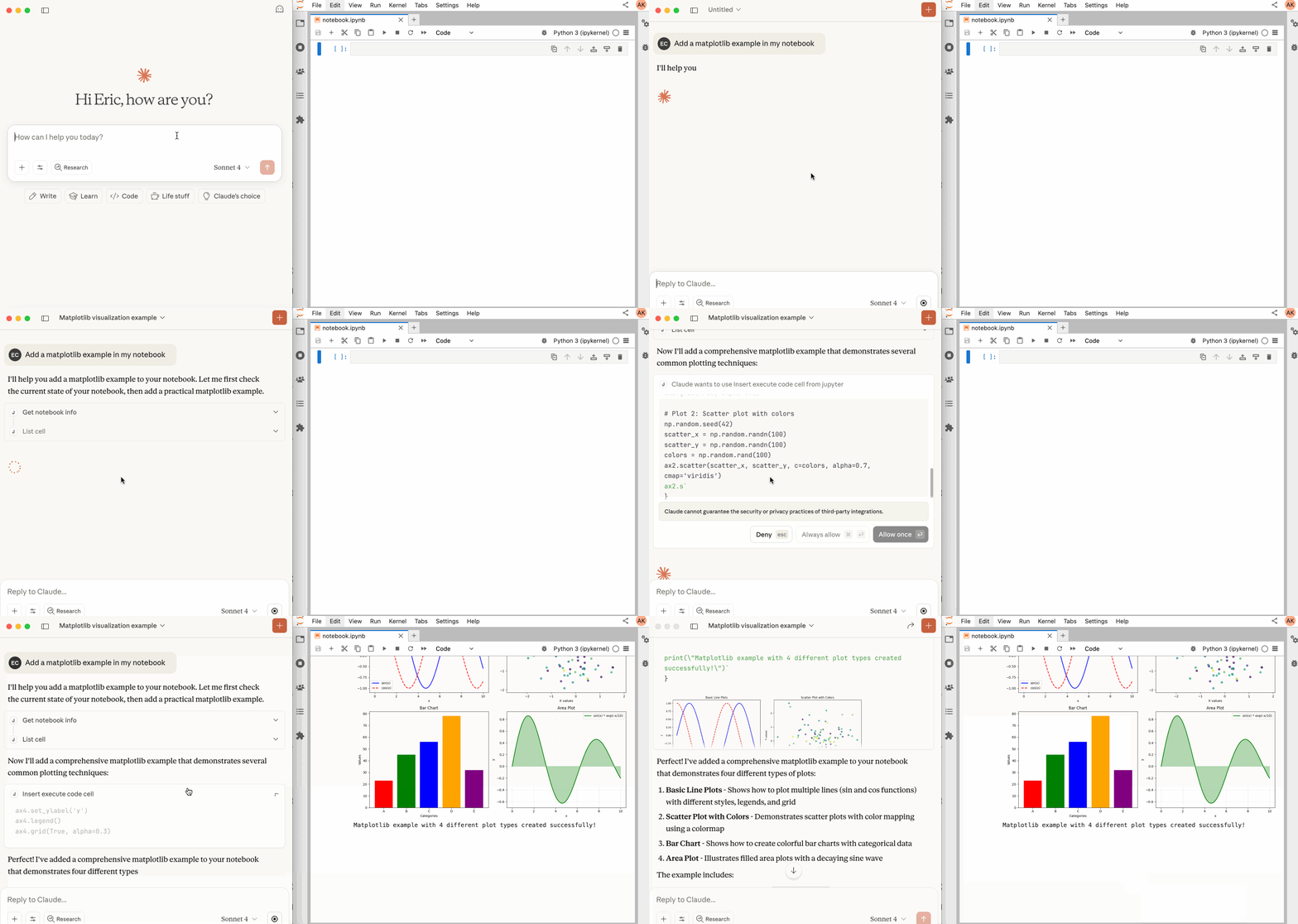
An MCP server developed for AI to connect and manage Jupyter Notebooks in real-time
Developed by Datalayer - Join our Discord




Breaking change in v1.2.0: "Runtime", aka name "Jupyter Kernel", is now called "Code Sandbox", see the migration guide.
New in v1.1.0: We are not supporting external
Sandboxes(Datalayer, Kaggle, Monty, Google Colab, Modal...).Setup details on this page
Join the conversation in our Community page - your feedback will help us prioritize features and ensure these integrations work seamlessly for your needs.
📖 Table of Contents
🚀 Key Features
- ⚡ Real-time control: Instantly view notebook changes as they happen.
- 🔁 Smart execution: Automatically adjusts when a cell run fails thanks to cell output feedback.
- 🧠 Context-aware: Understands the entire notebook context for more relevant interactions.
- 📊 Multimodal support: Support different output types, including images, plots, and text.
- 📚 Multi-notebook support: Seamlessly switch between multiple notebooks.
- 🎨 JupyterLab integration: Enhanced UI integration like automatic notebook opening.
- 🤝 MCP-compatible: Works with any MCP client, such as Claude Desktop, Cursor, Windsurf, and more.
- 🔍 Observability: Built-in hook system with OpenTelemetry integration for tracing tool calls and kernel executions.
Compatible with any Jupyter deployment (local, JupyterHub, ...) and with Datalayer hosted Notebooks.
🔧 MCP Overview
🔧 Tools Overview
The server provides a rich set of tools for interacting with Jupyter notebooks, categorized as follows. For more details on each tool, their parameters, and return values, please refer to the official Tools documentation.
Server and Code Sandbox Management Tools
| Name | Description |
| :------------------- | :---------------------------------------------------------------------------------------------------------------------------------------------------------------------------------------------------------------------------------------------------------------------------------------------- |
| list_files | List files and directories in the Jupyter server's file system. |
| list_kernels | List all available and running kernel sessions on the Jupyter server. |
| launch_sandbox | Launch a code sandbox (eval/docker/jupyter/datalayer/kaggle/google_colab/google-colab/colab/monty/modal) as an alternative execution backend for execute_code. Supports variant-specific options including GPU flavor for supported backends. Requires the jupyter_mcp_sandboxes extension. |
| list_sandboxes | List launched code sandboxes and their state (active flag, variant, status, and selected code sandbox options). Requires the jupyter_mcp_sandboxes extension. |
| use_sandbox | Select or clear the active sandbox used by execute_code, enabling dynamic routing between kernel-backed and sandbox-backed execution. Requires the jupyter_mcp_sandboxes extension. |
| terminate_sandbox | Stop and unregister a launched code sandbox. Requires the jupyter_mcp_sandboxes extension. |
| connect_to_jupyter | Connect to a Jupyter server dynamically without restarting the MCP server. Not available when running as Jupyter extension. Useful for switching servers dynamically or avoiding hardcoded configuration. |
Multi-Notebook Management Tools
| Name | Description |
| :----------------- | :------------------------------------------------------------------------- |
| use_notebook | Connect to a notebook file, create a new one, or switch between notebooks. |
| list_notebooks | List all notebooks available on the Jupyter server and their status |
| restart_notebook | Restart the kernel for a specific managed notebook. |
| unuse_notebook | Disconnect from a specific notebook and release its resources. |
| read_notebook | Read notebook cells source content with brief or detailed format options. |
Cell Operations and Execution Tools
| Name | Description |
| :------------------------- | :------------------------------------------------------------------------------------------------------------------------------------------------------------------------------------------------------------------------------------------------------------- |
| read_cell | Read the full content (Metadata, Source and Outputs) of a single cell. |
| insert_cell | Insert a new code or markdown cell at a specified position. |
| delete_cell | Delete a cell at a specified index. |
| move_cell | Move a cell from one position to another within a notebook. |
| clear_cell_output | Clear the outputs and execution count of a single code cell. |
| overwrite_cell_source | Overwrite the source code of an existing cell. |
| edit_cell_source | Apply surgical find-and-replace edits to a cell's source without full rewrite. |
| execute_cell | Execute a cell with timeout, supports multimodal output including images. |
| insert_execute_code_cell | Insert a new code cell and execute it in one step. |
| execute_code | Execute code directly in the active backend (kernel by default, or active sandbox if selected), supports magic commands and shell commands. When the selected sandbox supports streaming execution, progress/output events are consumed and returned in order. |
JupyterLab Integration
Available only when JupyterLab mode is enabled. It is enabled by default.
When running in JupyterLab mode, Jupyter MCP Server integrates with jupyter-mcp-tools to expose additional JupyterLab commands as MCP tools. By default, the following tools are enabled:
| Name | Description |
| :--------------------------- | :----------------------------------------------------- |
| notebook_run-all-cells | Execute all cells in the current notebook sequentially |
| notebook_get-selected-cell | Get information about the currently selected cell |
You can now customize which tools from jupyter-mcp-tools are available using the allowed_jupyter_mcp_tools configuration parameter. This allows you to enable additional notebook operations, console commands, file management tools, and more.
# Example: Enable additional tools via command-line
jupyter lab --port 4040 --IdentityProvider.token MY_TOKEN --JupyterMCPServerExtensionApp.allo
Truncated for display — read the full file on GitHub.
Related Skills
Agent-Reach
84.4kGive your AI agent eyes to see the entire internet. Read & search Twitter, Reddit, YouTube, GitHub, Bilibili, XiaoHongShu — one CLI, zero API fees.
headroom
73.4kCompress tool outputs, logs, files, and RAG chunks before they reach the LLM. 20% fewer tokens for coding agents, 60-95% fewer tokens for JSON, same answers. Library, proxy, MCP server.
ruflo
73.0k🌊 The original agent harness. Deploy intelligent multi-player swarms, coordinate autonomous workflows, and build conversational AI systems. Features adaptive memory, self-learning intelligence, federation, vector RAG integration, and native Claude Code / Codex / Hermes and many more Integrated
career-ops
72.4kOpen-source AI job search: scan job portals, evaluate listings into a structured A-H report with a global 1-5 score, tailor your CV, track applications — runs locally in your AI coding CLI (Claude Code, Codex, OpenCode, Antigravity…)
