
Resonite.UnitySDK
Unity SDK for Resonite social VR sandbox, allowing real-time building through the Unity Editor
Install / Use
/learn @Yellow-Dog-Man/Resonite.UnitySDKREADME
Resonite SDK for the Unity Editor. This will allow sending content from Unity Editor to Resonite easily. Built on top of ResoniteLink: https://github.com/Yellow-Dog-Man/ResoniteLink
[!CAUTION]
Beta warning
The Resonite SDK for Unity Editor is currently in beta state! This means it's not 100 % ready for full use - if you're looking to just convert your content hassle-free, please give it a little bit more time.
However if you want to start playing with it and don't mind messing with the jank, you're now free to do so!
We'd also love your help if you want to help us to polish it, whether it's by reporting issues or contributing improvements.
We are now accepting issues & PR's to help improve it!
What to expect in beta state
- SDK can break often and spew out errors
- A lot of common content will not convert yet
- Please report & upvote things that don't convert so we know what to prioritize!
- If you're willing, you can also contribute improvements for conversions (see below for info)
- UI is clunky and doesn't look pretty
- If you're interested, we're also looking for help with this!
- The focus was getting the core working and expanding from there
- Some processes and workflows are not fully fleshed out yet
What is this?
Resonite is a free social VR sandbox platform, which allows for socialization and collaborative in-game building. While game content can be fully built in-game (either in desktop or VR modes), not every user prefers this workflow. Unity SDK opens a new way to build content for Resonite, by using the Unity Editor and more traditional workflow or existing tooling.
You can get Resonite free on Steam: https://store.steampowered.com/app/2519830/Resonite/
You can:
- Use this to build brand new content for Resonite
- Bring over existing content you've already built to Resonite (e.g. content build for other platforms such as VRC)
- Worlds
- Avatars
- Props
- Expand the conversion system to handle more of your existing content or custom tailor conversion for your projects
- Use Resonite to visualize and prototype your Unity projects in VR and take advantage of Resonite's realtime collaboration
- Expand the SDK or use it as reference implementation for your own custom tooling for other engines
Getting started
Video tutorial:
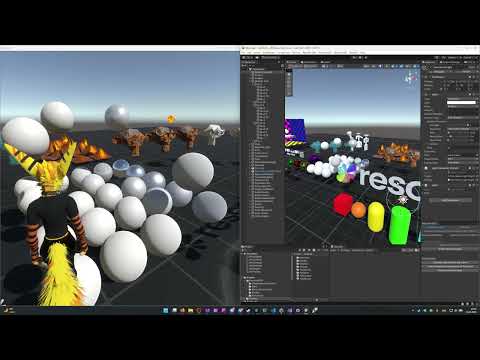
[!IMPORTANT] If you are installing a new version of the Unity SDK to a project containing older version delete the older version first! Otherwise some old files can cause conflicts and errors.
In order words: Delete old ResoniteSDK in your project before importing a new one
- Go to Releases
- Download ResoniteSDK.unitypackage for the latest release
- Note: We'll likely switch to Unity Package Manager soon(ish)
- Import the package into your Unity project
- Go to Resonite SDK in Unity Editor -> Open Resonite SDK Manager to open Resonite SDK window
- Run Resonite (make sure you got latest version)
- Create a new world (Blank template is recommended for converting worlds)
- Go to Session on dash and click "Enable Resonite Link"
- Go back to Unity Editor and the Resonite SDK window
- The session should appear under "AutoDiscovery" mode - click the connect button
- If it does not appear, you can switch to Manual mode and enter the port manually
- If you're converting an avatar, uncheck "Convert Skybox"
- Click either "Send Current Scene" or "Start Realtime Mode"
- Realtime mode will translate the changes in Editor right as you make them
How to convert an avatar
Converting avatar generally follows the same process.
- You will need to attach a special component: "BipedAvatarDescriptor" to the root of your rig
- Assign Biped reference to Animator with the humanoid "Avatar" reference that you want to convert
- Assign Head, Left Hand & Right Hand References and align them
- Feet and hips are optional
- Gizmos will render when assigned
- Blue line if forwards, green upwards and red right direction
- Click either "Send Current Scene" or "Start Realtime Mode"
- Realtime mode will translate the changes in Editor right as you make them - you can wear the avatar and attach more objects to it while testing them live in Resonite
What if something doesn't convert properly?
If you run into content that doesn't convert at all or has conversion problems, best way is to make sure it's reported!
- First, determine what exactly failed to convert:
- Individual Material / Shader
- Individual Component (e.g. colliders, properties, behaviors and so on)
- Individual Asset (e.g. garbled/missing meshes, textures not transferring on even supported materials...)
- Complex/Core Conversion (entire scene, data primitive, avatar setup)
- Something else broke (general bugs, UI, editor tools...)
- Search if there's an existing issue first
- You can click the types of conversion problems above to search by type!
- It's better to collate conversion problems in one place than making multiple issues for the same one
- However even if you do end up making a duplicate, don't fret - we'll handle it
- Create new issue / Add information to the existing issue
- Give us as much info as you can on what didn't convert properly
- Describe what were you trying to convert
- Describe what you were expecting in the conversion
- Describe what happened instead (e.g. did nothing convert at all, or did something convert incorrectly)
- Screenshots / Videos help
- If you can share an item (e.g. UnityPackage) of the problematic content - THIS HELPS TREMENDOUSLY
- You can swap out any assets you don't want to share that are not important. E.g. if shader doesn't convert, provide it with a basic sphere mesh and some public textures
- If you're technical user and you have the will to look into the issue yourself and help improve conversion, feel free!
- If you manage to improve the conversions or add missing conversion systems, feel free to open a PR to merge your fixes
- Please read the "Contributing" section below for more info on how to contribute!
Contributing
Contributions to this SDK are welcome! Converting content is a complex task and a big part of this tool is giving more power to you - the community, to create new workflows and bring more content to Resonite.
We'll also give shoutouts to contributors in the Update notes for Resonite itself!
Contributing component converters
- Improving existing converters
- E.g. handling configurations / edge cases that aren't currently handled (or not handled well)
- Adding new converters
- If there are components/behaviors that aren't converted at all - feel free to implement converters for them!
- This should avoid adding 3rd party SDK's / dependencies to this though - if you want to do that, please consult us first by creating an Issue
- At some point, we might suggest separating converters for 3rd party libraries into their own repos and just linking them here
How to PR component converter
If you want to contribute a new or improved component converter, please ensure following:
- Adds sample content to the TestScene to test conversion with
- Make sure you test all other conversions in the TestScene that would be affected by your converter
- Ideally create issue for the converter first (if it does not exist)
- You should be assigned to it first if your changes will be extensive to avoid clashes with other contributors
- Make PR with the converter changes, TestScene changes
Contributing material converters
- Improving existing converters
- Adding converters for new shaders
- These are a bit easier to contribute, as they don't technically require new C# code for the shader
- If possible, include the shader for testing in your PR
How to PR material converter
- Ideally create issue for the shader, especially if it's a complex one
- This will allow coordination with other contributors
- If possible, include the shader in the TestScene with various configurations (you can also add separate scene for it if it's extensive)
- If you're modifying existing converter, please test existing content with it to ensure your conversion doesn't break any of it
- If needed, add more testing content for that shader please, so we can avoid regressions
- Make PR with the material converter
Other contributions
You can also contribute in a number of other areas! Check the Issues page for those. In short there are:
- UI / Workflow improvements
- General conversion bugfixes
- Quality of life improvements
- Help review & test PR's from other contributors
For any larger reworks please make sure there's an issue created first and include high level proposal for your implementation. This will help prevent conflicts with changes from other contributors and make any necessary design changes before spending time implementing them.
If you're not sure what to contribute, check the "help wanted" issues: https://github.com/Yellow-Dog-Man/Resonite.UnitySDK/issues?q=is%3Aissue%20state%3Aopen%20label%3A%22help%20wanted%22
Contributions that need changes
Related Skills
node-connect
339.5kDiagnose OpenClaw node connection and pairing failures for Android, iOS, and macOS companion apps
frontend-design
83.9kCreate distinctive, production-grade frontend interfaces with high design quality. Use this skill when the user asks to build web components, pages, or applications. Generates creative, polished code that avoids generic AI aesthetics.
openai-whisper-api
339.5kTranscribe audio via OpenAI Audio Transcriptions API (Whisper).
commit-push-pr
83.9kCommit, push, and open a PR
