
VideoCaptioner
🎬 卡卡字幕助手 | VideoCaptioner - 基于 LLM 的智能字幕助手 - 视频字幕生成、断句、校正、字幕翻译全流程处理!- A powered tool for easy and efficient video subtitling.
Install / Use
/learn @WEIFENG2333/VideoCaptionerREADME
在线文档 · CLI 使用 · GUI 桌面版 · Claude Code Skill
</div>安装
pip install videocaptioner          # 仅安装 CLI(轻量,无 GUI 依赖)
pip install videocaptioner[gui]     # 安装 CLI + GUI 桌面版
免费功能(必剪语音识别、必应/谷歌翻译)无需任何配置,安装即用。
CLI 命令行
# 语音转录(免费,无需 API Key)
videocaptioner transcribe video.mp4 --asr bijian

# 字幕翻译(免费必应翻译)
videocaptioner subtitle input.srt --translator bing --target-language en

# 全流程:转录 → 优化 → 翻译 → 合成
videocaptioner process video.mp4 --target-language ja

# 字幕烧录到视频
videocaptioner synthesize video.mp4 -s subtitle.srt

# 下载在线视频
videocaptioner download "https://youtube.com/watch?v=xxx"
需要 LLM 功能(字幕优化、大模型翻译)时,配置 API Key:
videocaptioner config set llm.api_key <your-key>
videocaptioner config set llm.api_base https://api.openai.com/v1
videocaptioner config set llm.model gpt-4o-mini
配置优先级:命令行参数 > 环境变量 (VIDEOCAPTIONER_*) > 配置文件 > 默认值。运行 videocaptioner config show 查看当前配置。
| 命令 | 说明 |
|------|------|
| transcribe | 语音转字幕。引擎:faster-whisper、whisper-api、bijian(免费)、jianying(免费)、whisper-cpp |
| subtitle | 字幕优化/翻译。翻译服务:llm、bing(免费)、google(免费) |
| synthesize | 字幕烧录到视频(软字幕/硬字幕) |
| process | 全流程处理 |
| download | 下载 YouTube、B站等平台视频 |
| config | 配置管理(show、set、get、path、init) |
运行 videocaptioner <命令> --help 查看完整参数。完整 CLI 文档见 docs/cli.md。
GUI 桌面版
pip install videocaptioner[gui]
videocaptioner                      # 无参数时自动打开桌面版
Windows:从 Release 下载安装包
macOS:
curl -fsSL https://raw.githubusercontent.com/WEIFENG2333/VideoCaptioner/main/scripts/run.sh | bash
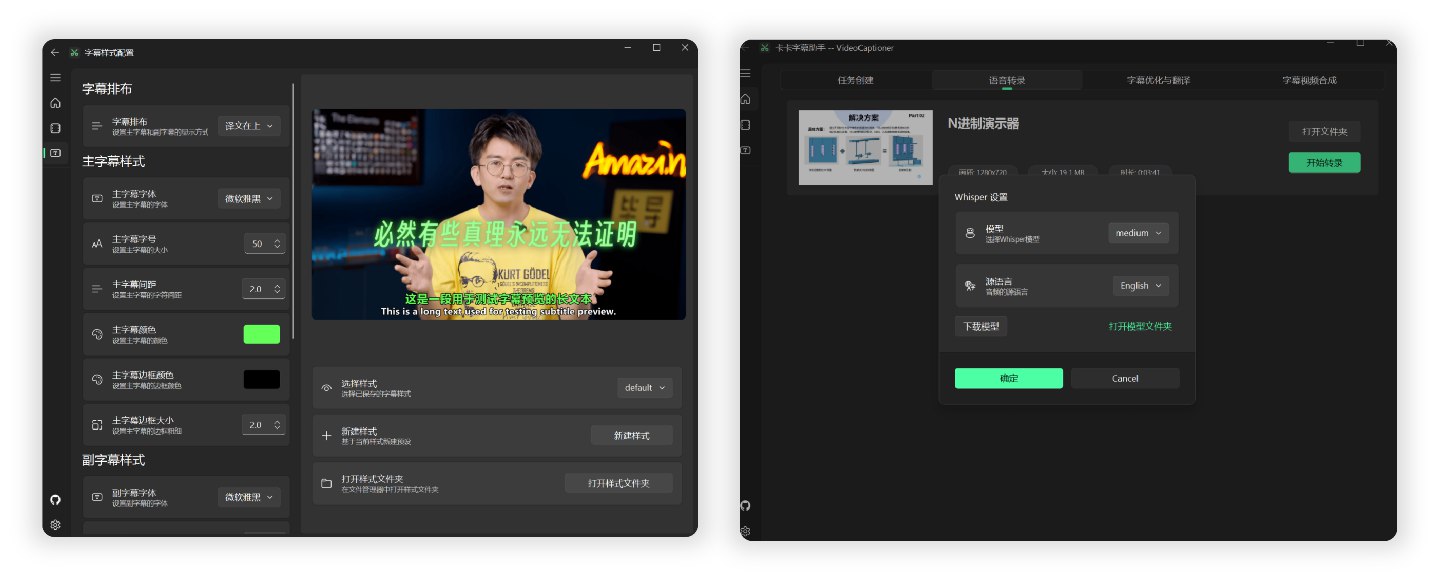
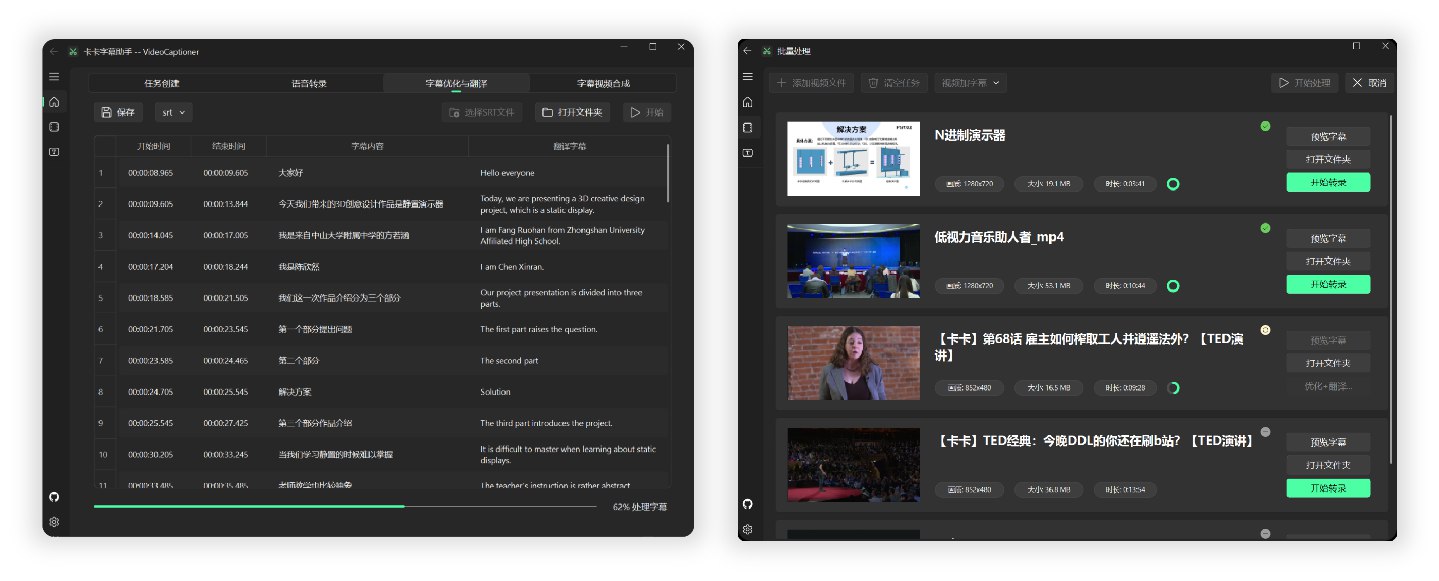
LLM API 配置
LLM 仅用于字幕优化和大模型翻译,免费功能(必剪识别、必应翻译)无需配置。
支持所有 OpenAI 兼容接口的服务商:
| 服务商 | 官网 | |--------|------| | VideoCaptioner 中转站 | api.videocaptioner.cn — 高并发,性价比高,支持 GPT/Claude/Gemini 等 | | SiliconCloud | cloud.siliconflow.cn | | DeepSeek | platform.deepseek.com |
在软件设置或 CLI 中填入 API Base URL 和 API Key 即可。详细配置教程
Claude Code Skill
本项目提供了 Claude Code Skill,让 AI 编程助手可以直接调用 VideoCaptioner 处理视频。
安装到 Claude Code:
mkdir -p ~/.claude/skills/videocaptioner
cp skills/SKILL.md ~/.claude/skills/videocaptioner/SKILL.md
然后在 Claude Code 中输入 /videocaptioner transcribe video.mp4 --asr bijian 即可使用。
工作原理
音视频输入 → 语音识别 → 字幕断句 → LLM 优化 → 翻译 → 视频合成
- 词级时间戳 + VAD 语音活动检测,识别准确率高
- LLM 语义理解断句,字幕阅读体验自然流畅
- 上下文感知翻译,支持反思优化机制
- 批量并发处理,效率高
开发
git clone https://github.com/WEIFENG2333/VideoCaptioner.git
cd VideoCaptioner
uv sync && uv run videocaptioner     # 运行 GUI
uv run videocaptioner --help          # 运行 CLI
uv run pyright                        # 类型检查
uv run pytest tests/test_cli/ -q      # 运行测试
许可证
Related Skills
docs-writer
98.7k`docs-writer` skill instructions As an expert technical writer and editor for the Gemini CLI project, you produce accurate, clear, and consistent documentation. When asked to write, edit, or revie
model-usage
330.3kUse CodexBar CLI local cost usage to summarize per-model usage for Codex or Claude, including the current (most recent) model or a full model breakdown. Trigger when asked for model-level usage/cost data from codexbar, or when you need a scriptable per-model summary from codexbar cost JSON.
arscontexta
2.8kClaude Code plugin that generates individualized knowledge systems from conversation. You describe how you think and work, have a conversation and get a complete second brain as markdown files you own.
be
Assume the personality of the Persona described in any of the document available in the @~/.ai/personas directory.
