
OpenRooms
This is the dataset and code release of the OpenRooms Dataset. For more information, please refer to our webpage below. Thanks a lot for your interest in our research!
Install / Use
/learn @ViLab-UCSD/OpenRoomsREADME
OpenRooms Dataset Release
Zhengqin Li, Ting-Wei Yu, Shen Sang, Sarah Wang, Meng Song, Yuhan Liu, Yu-Ying Yeh, Rui Zhu, Nitesh Gundavarapu, Jia Shi, Sai Bi, Zexiang Xu, Hong-Xing Yu, Kalyan Sunkavalli, Miloš Hašan, Ravi Ramamoorthi, Manmohan Chandraker
News
[03/26/24]. We update the download link and put OpenRooms on a new data server.
[06/18/23]. We released all scene configuration xml files, camera poses, furniture and layout geometry.
[09/10/21]. All the rendered ground-truths are available for downloading.
[08/07/21]. Please send an email to OpenRoomsDataset@gmail.com if you hope to receive the newest update.
[05/19/21]. We released all rendered images (Images) and Images.zip).
About
This is the release webpage for the OpenRooms dataset. We first introduce the rendered images and various ground-truths. Next, we introduce how to render your own images based on the OpenRooms dataset creation framework. For each type of data, we offer two kinds of formats, zip files and individual folders, so users may choose whether to download the whole dataset more efficiently or download individual folders for different scenes. We recommend using Rclone to avoid slow or unstable downloads.
OpenRooms is a collaboration between researchers from UCSD and Adobe. We acknowledge generous support from NSF, ONR, Adobe and Google. For any questions, please email: openroomsdataset@gmail.com.
Dataset Overview

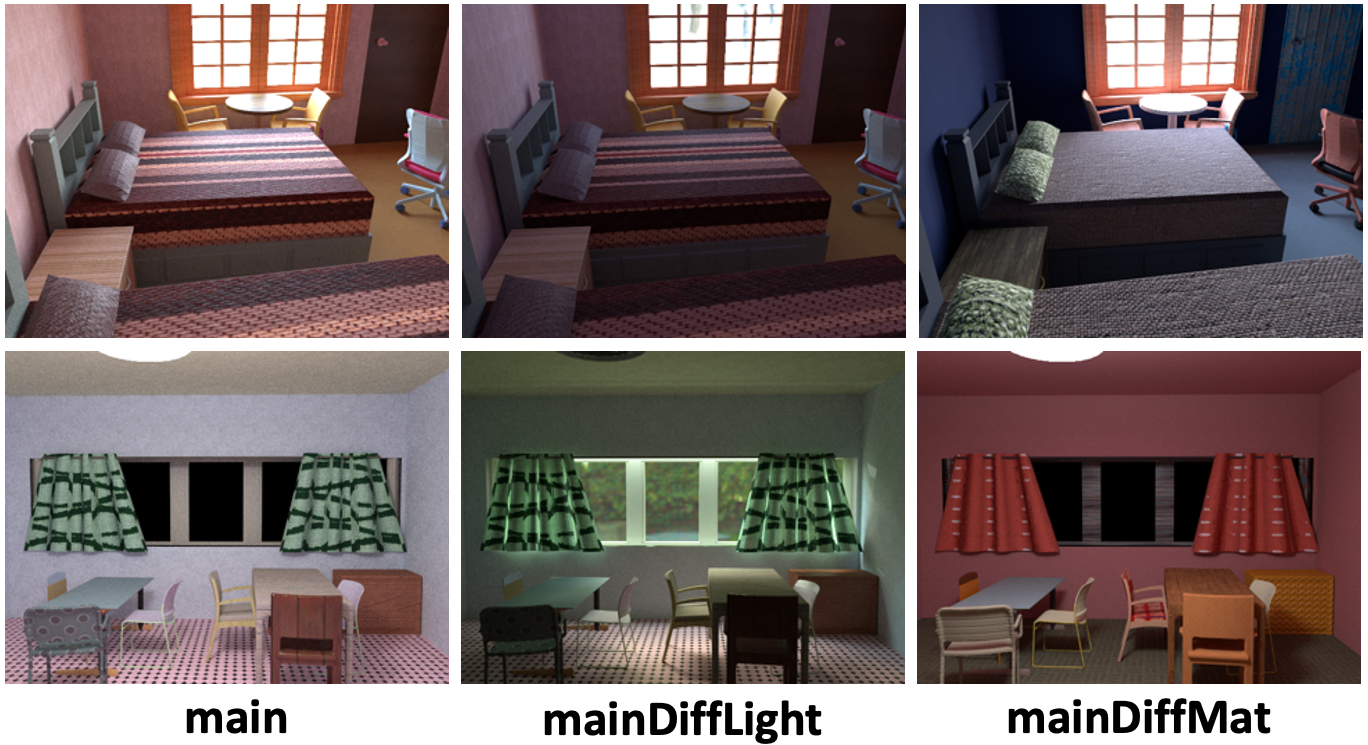
We render six versions of images for all the scenes. Those rendered results are saved in 6 folders: main_xml, main_xml1, mainDiffMat_xml, mainDiffMat_xml1, mainDiffLight_xml and mainDiffLight_xml1. All 6 versions are built with the same CAD models. main_xml, mainDiffMat_xml, mainDiffLight_xml share one set of camera views while main_xml1, mainDiffMat_xml1 and mainDiffLight_xml1 share the other set of camera views. main_xml(1) and mainDiffMat_xml(1) have the same lighting but different materials while main_xml(1) and mainDiffLight_xml(1) have the same materials but different lighting. Both the lighting and material configuration of main_xml and main_xml1 are different. We believe this configuration can potentially help us develope novel applications for image editing. Two example scenes from main_xml, mainDiffMat_xml and mainDiffLight_xml are shown in the below.
Rendered Images and Ground-truths
All rendered images and the corresponding ground-truths are saved in folder data/rendering/data/. In the following, we will detail each type of rendered data and how to read and interpret them. The training/testing split of the scenes can be found in train.txt and test.txt.
-
Image and Image.zip: The 480 × 640 HDR images
im_*.hdr, which can be read with the python command.im = cv2.imread('im_1.hdr', -1)[:, :, ::-1]We render images for
main_xml(1),mainDiffMat_xml(1)andmainDiffLight_xml(1). -
Material and Material.zip: The 480 × 640 diffuse albedo maps
imbaseColor_*.pngand roughness mapimroughness_*.png. Note that the diffuse albedo map is saved in sRGB space. To load it into linear RGB space, we can use the following python commands. The roughness map is saved in linear space and can be read directly.im = cv2.imread('imbaseColor_1.hdr')[:, :, ::-1] im = (im.astype(np.float32 ) / 255.0) ** (2.2)We only render the diffuse albedo maps and roughness maps for
main_xml(1)andmainDiffMat_xml(1)becausemainDiffLight_xml(1)share the same material maps with themain_xml(1). -
Geometry and Geometry.zip: The 480 × 640 normal maps
imnomral_*.pngand depth mapsimdepth_*.dat. The R, G, B channel of the normal map corresponds to right, up, backward direction of the image plane. To load the depth map, we can use the following python commands.with open('imdepth_1.dat', 'rb') as fIn: # Read the height and width of depth hBuffer = fIn.read(4) height = struct.unpack('i', hBuffer)[0] wBuffer = fIn.read(4) width = struct.unpack('i', wBuffer)[0] # Read depth dBuffer = fIn.read(4 * width * height ) depth = np.array( struct.unpack('f' * height * width, dBuffer ), dtype=np.float32 ) depth = depth.reshape(height, width)We render normal maps for
main_xml(1)andmainDiffMat_xml(1), and depth maps formain_xml(1). -
Mask and Mask.zip: The 480 × 460 grey scale mask
immask_*.pngfor light sources. The pixel value 0 represents the region of environment maps. The pixel value 0.5 represents the region of lamps. Otherwise, the pixel value will be 1. We render the ground-truth masks formain_xml(1)andmainDiffLight_xml(1). -
SVLighting: The (120 × 16) × (160 × 32) per-pixel environment maps
imenv_*.hdr. The spatial resolution is 120 x 160 while the environment map resolution is 16 x 32. To read the per-pixel environment maps, we can use the following python commands.# Read the envmap of resolution 1920 x 5120 x 3 in RGB format env = cv2.imread('imenv_1', -1)[:, :, ::-1] # Reshape and permute the per-pixel environment maps env = env.reshape(120, 16, 160, 32, 3) env = env.transpose(0, 2, 1, 3, 4) -
SVSG: The ground-truth spatially-varying spherical Gaussian (SG) parameters
imsgEnv_*.h5, computed from this optimization code. We generate the ground-truth SG parameters formain_xml(1),mainDiffMat_xml(1)andmainDiffLight_xml(1). For the detailed format, please refer to the optimization code. -
Shading and Shading.zip: The 120 × 160 diffuse shading
imshading_*.hdrcomputed by intergrating the per-pixel environment maps. We render shading formain_xml(1),mainDiffMat_xml(1)andmainDiffLight_xml(1). -
SVLightingDirect and SVLightingDirect.zip: The (30 × 16) × (40 × 32) per-pixel environment maps with direct illumination
imenvDirect_*.hdronly. The spatial resolution is 30 × 40 while the environment maps resolution is 16 × 32. The direct per-pixel environment maps can be load the same way as the per-pixel environment maps. We only render direct per-pixel environment maps formain_xml(1)andmainDiffLight_xml(1)because the direct illumination ofmainDiffMat_xml(1)is the same asmain_xml(1). -
ShadingDirect and ShadingDirect.zip: The 120 × 160 direct shading
imshadingDirect_*.rgbe. To load the direct shading, we can use the following python command.im = cv2.imread('imshadingDirect_1.rgbe', -1)[:, :, ::-1]Again, we only render direct shading for
main_xml(1)andmainDiffLight_xml(1) -
SemanticLabel and SemanticLabel.zip: The 480 × 640 semantic segmentation label
imsemLabel_*.npy. We provide semantic labels for 45 classes of commonly seen objects and layout for indoor scenes. The 45 classes can be found insemanticLabels.txt. We only render the semantic labels formain_xml(1). -
LightSource and LightSource.zip: The light source information, including geometry, shadow and direct shading of each light source
Related Skills
proje
Interactive vocabulary learning platform with smart flashcards and spaced repetition for effective language acquisition.
API
A learning and reflection platform designed to cultivate clarity, resilience, and antifragile thinking in an uncertain world.
openclaw-plugin-loom
Loom Learning Graph Skill This skill guides agents on how to use the Loom plugin to build and expand a learning graph over time. Purpose - Help users navigate learning paths (e.g., Nix, German)
best-practices-researcher
The most comprehensive Claude Code skills registry | Web Search: https://skills-registry-web.vercel.app

Security Score
Audited on Mar 22, 2026