
Gadgets
Gadgets for Rainmeter
Install / Use
/learn @SilverAzide/GadgetsREADME

Gadgets
System monitoring gadgets inspired by the well-known AddGadgets.com Windows Sidebar gadgets.
Arguably, some of the best and most popular Vista and Windows 7 Gadgets for system monitoring were done by AddGadgets.com. Unfortunately, with the deprecation of the Gadget platform and outright banning of gadgets by some corporate policies, these gadgets have become obsolete. Sidebar Gadgets aren't supported in Windows 8 or later without hacks and workarounds and often they break after applying Windows Updates.
In 2015, I discovered Rainmeter, a free and open-source platform that enables creating skins that run on the Windows desktop. I re-imagined the most widely used AddGadgets.com gadgets in a new suite named Rainmeter Gadgets.

Get help on the Rainmeter forums

Features
All CPU Meter

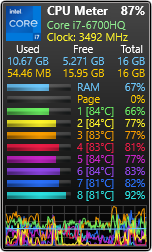
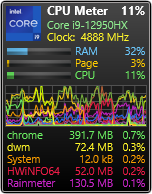
- Displays CPU utilization for an unlimited number of CPUs and processors with up to 64-cores/128-threads each.*
- Supports symmetric multiprocessing (SMP) and non-uniform memory access (NUMA) architectures (skins for up to 4 CPUs or 4 NUMA nodes are provided, but more can be added).*
- Displays processor model and clock speed.
- Shows used, free, and total RAM available (per CPU or NUMA node if applicable).
- Shows memory composition breakdown (optional).
- Shows used, free, and total page file available (optional).
- Shows core temperatures (optional, requires CoreTemp, SpeedFan, or HWiNFO; more info here).
- Shows CPU fan speed (optional, requires SpeedFan or HWiNFO; more info here).*
- Displays graphical line chart of CPU utilization, with RAM and page file percent usage (optional).
- Shows from 1 to 5 top processes by CPU usage (optional).
- Shows Task Manager or Resource Monitor when gadget is double-clicked.
- Scales to any desired size.
Battery Meter
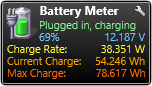
- Displays the current battery status, including time remaining and current percentage remaining.
- Shows current voltage, charge and discharge rates, current and maximum charge capacity.
- Shows battery manufacturer/model.
- Displays power in either watts or milliamps.
- Supports automatic failover on systems having multiple batteries.*
- Shows Power Options when gadget is double-clicked.*
- Scales to any desired size.
Calendar
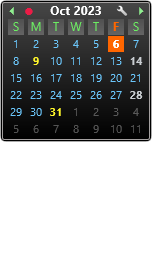

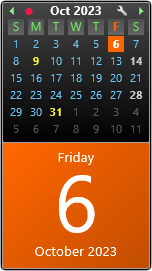
- Based on LuaCalendar, styled to match the Gadgets suite.*
- Supports localized month/day names automatically.
- Supports multiple appearance options similar to the original Windows Sidebar gadget: calendar only, calendar with large date, and large date.
- Scales to any desired size.
Chronometer

- Digital Clock displays time, date, day, week, and quarter of the year.
- Shows computer current uptime, total uptime, and session logon time (optional).
- Shows event countdown with customizable sound (optional).
- Includes configurable chime and multiple alarms with customizable sounds (optional).
- Supports Windows localized or custom time and date formats.
- Supports world times, can be adjusted for time zones and daylight saving time.*
- Supports having multiple clocks to allow monitoring time in multiple locations (info).
- Scales to any desired size.
- Includes Analog Clock variant, styled to match the Gadget suite.*
- Includes analog clocks ported from the original Windows Vista/Windows 7 Sidebar gadgets.
Drives Meter
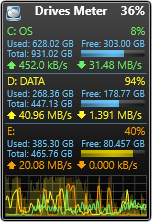
- Displays disk information for up to 26 logical drives (fixed and removable only). Gadget dynamically adjusts to handle adding and removing drives.
- Shows used, free, and total disk space available.
- Displays percent disk utilization for each drive, plus the total.
- Shows throughput for each drive (read and write).
- Shows total bytes read/written since bootup for each drive on mouseover (optional).*
- Displays disk throughput graph (optional).
- Displays disk time percentage histogram (optional).
- Drive space bar graph changes color when disks are nearing capacity.*
- Shows Explorer when gadget is double-clicked.
- Opens drive in Explorer (or runs any user-defined command) when disk label is clicked.*
- Scales to any desired size.
GPU Meter
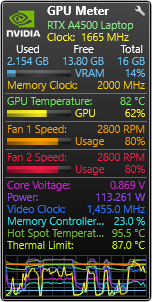
- Displays GPU model and clock speed (requires HWiNFO; more info here).
- Shows used, free, and total VRAM available (optional).
- Shows GPU temperature, core load, and memory clock speed.
- Shows GPU fan speed and percent utilization for up to 4 fans per GPU (optional).
- Shows core voltage or any 6 additional sensors per GPU (optional).
- Displays graphical line chart of RAM, core load, temperature, fan usage, and additional sensors (optional).
- Multiple GPU Meters provided to allow monitoring more than one GPU (for dedicated GPUs and 2-way SLI-equipped systems; for 4-way SLI systems, see this).*
- Scales to any desired size.
HWiNFO Meter
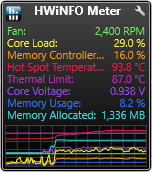
- Displays HWiNFO sensor data for up to 16 sensors (requires HWiNFO).*
- Displays graphical line chart of sensor data (optional).
- Supports having multiple HWiNFO Meters to allow monitoring multiple devices.
- Scales to any desired size.
Network Meter

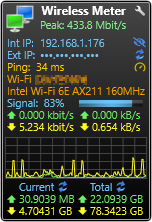
- Shows data for all or selected network interfaces (info).
- Displays internal and external IP addresses (optional).
- Displays peak network throughput.*
- Shows inbound and outbound throughput in bits/sec and bytes/sec.
- Displays graphical chart of inbound and outbound network activity (optional). Does not require guesstimating your network speed, chart dynamically scales to handle both LAN and WAN traffic.
- Shows statistics for the current session and the total to date (optional).
- Shows network ping times and a link to any speed test website (optional).
- Indi
Related Skills

Security Score
Audited on Mar 30, 2026