
UltimaHacks
Patches which add features to, and improve the usability of, the 1990s video games Ultima VII (BG and SI) and Ultima Underworld (I and II), along with a program to compile and apply these patches.
Install / Use
/learn @JohnGlassmyer/UltimaHacksREADME
Ultima Hacks
- Overview
- Ultima VII: The Black Gate, Ultima VII Part Two: Serpent Isle
- Ultima Underworld: The Stygian Abyss, Ultima Underworld II: Labyrinth of Worlds
- How to Apply the Patches
- How to Build the Patches (Advanced)
- More about UltimaPatcher
Overview
Some modifications to the video games Ultima VII: The Black Gate (1992), Ultima VII Part Two: Serpent Isle (1993), Ultima Underworld: The Stygian Abyss (1992), and Ultima Underworld II: Labyrinth of Worlds (1993), written as bits of (mostly 16-bit) x86 assembly, together with a program, written in Java, that patches them into the game's executable.
There is also a website (mentioned below) which can quickly apply pre-assembled versions of the patches, for people not interested in building the patches from source code.
The patches take the form of assembly files written in NASM syntax, and rely on some supporting macros that include metadata in the assembled output files regarding overall placement in the patched executable file as well as the locations of segment references (in particular, the segment portions of far procedure calls) which necessitate edits to the patched executable's relocation tables.
Each game with patches applied is fully playable in DOSBox and most likely on original (386/486) hardware as well (though I haven't had a chance to test the patches on original hardware).
Ultima VII: The Black Gate
Ultima VII Part Two: Serpent Isle
Changes focus on improving usability - allowing the player to do things more easily or more directly - and on adding keyboard control to what was a largely mouse-driven game.
New abilities
-
Keep moving in the same direction by pressing
qorQ.- Press either key subsequently to change speed (walk, run, sprint, stop).
-
Place a bag or backpack more easily within another, as each is now considered a flexible container, with volume corresponding to the sum of its contents, rather than being of a fixed size.
-
Cast spells by key in real-time:
/: start casting<letter>: add runeBackspace: remove last runeEnter: cast selected runes- (Hold
Shiftwhen opening or clicking the spellbook to see the rune-keys of each spell.)
-
Select party members by number in many contexts:
N: open or target Nth party memberShift+N: open or target Nth party member's backpackAlt+N: open Nth party member's stats- drag item+
N: give dragged item to Nth party member - Can be combined into compound actions:
t,2: talk to 2nd party memberf,3: feed 3rd party member- cast spell,
4: target 4th party member with a spell t,g,g,2: have 2nd party member get a nearby itemt,t,t,2: have 2nd party member attack a nearby NPC (in combat mode)
-
(U7BG) Target with crosshairs, as in U7SI, with
t. -
Use keys to talk, use, get, or attack (while targeting with crosshairs)
t: cycle NPCsr: cycle usable itemsg: cycle gettable itemsa: cycle all itemsEnter: select, use, talk, get, or attack with entire partyN: attack or get with Nth party memberEsc: cancel targeting
-
Select and use items. (Originally available only in U7SI, without open dialogs; now available in U7BG and U7SI and even with open dialogs.)
k: find and use the key for a door or chest (emulating U7SI's keyring)f: use foodm: use world mapb: use spellbook(s)p: use lockpicksw: use pocketwatchx: use sextantg: use abacus (to count party gold)o: use Orb of the Moons (U7BG)j: use Serpent Jawbone (U7SI)
-
Query items' weight, volume, and contents:
Shift+click: show item weightCtrl+click: show item volumeAlt+click: show a container's first contained itemAlt+click: show a magic scroll's spell (U7SI)
-
Control conversations with keys
←→↑↓,Tab,Shift+Tab: move cursor among optionsEnter,Ctrl,Space: advance text; select option at cursor- These keys also advance the text of books, scrolls, and signs.
-
Control dialogs more easily:
- close most dialogs by right-clicking
- cycle open inventories with
Tab - select slots on the Save dialog with number keys or
↑↓ - select quantities with
←→,Shift+←→,↑↓, andEnter.
-
Use additional keys in key-mouse mode (initiated with
Space):Space: stop key-mouseEsc: stop key-mouse, close inventories
-
Toggle cheats in-game by pressing
Alt+Backslash. -
Press
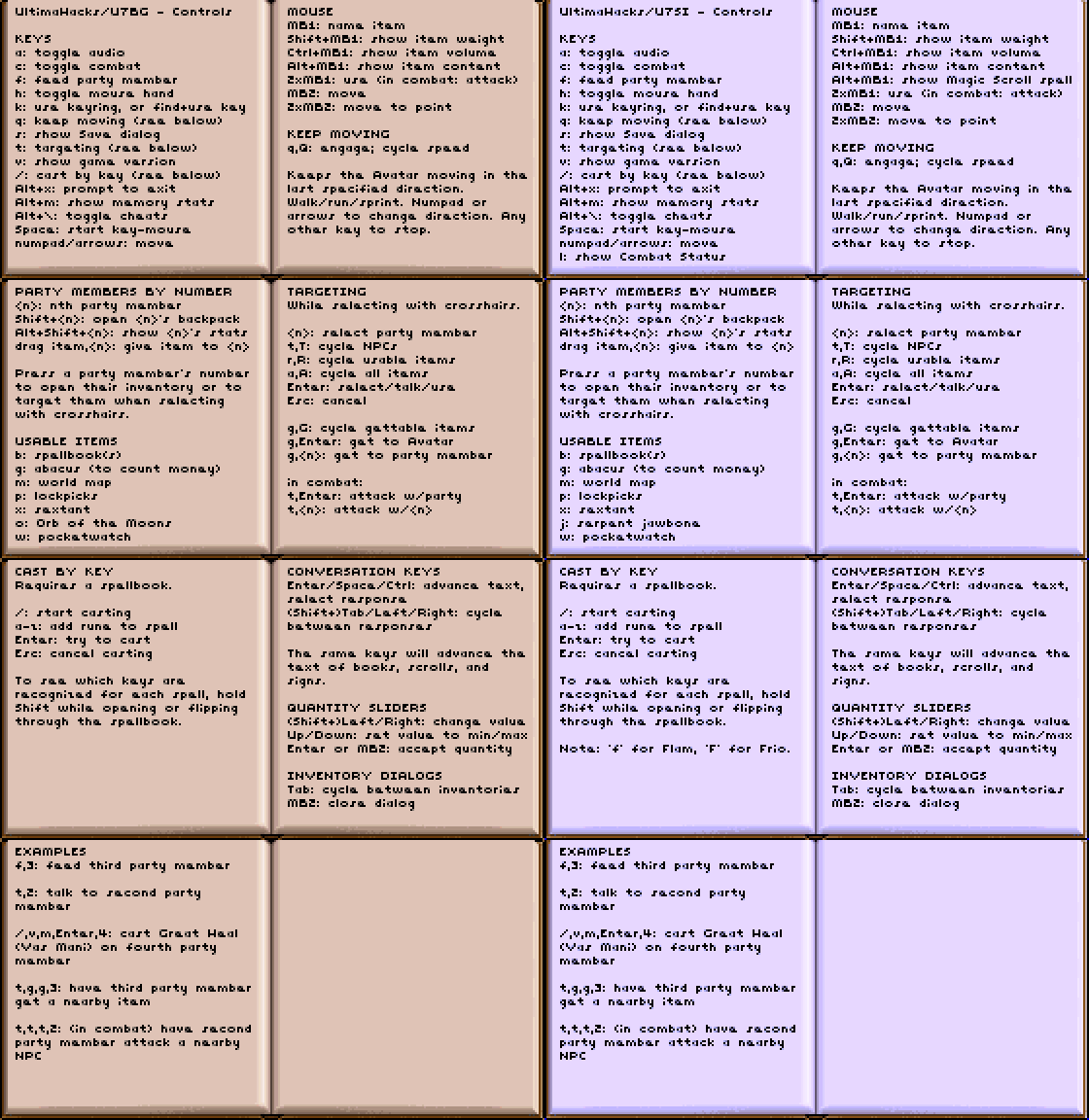
Alt+kin game, or click the image below, to see a comprensive, multi-page listing of mouse and keyboard controls.
Other changes
-
(U7SI) The Dark Path map is now labeled with the names of destinations corresponding to held serpent teeth.
-
The background is now darkened during conversation, to increase contrast and enhance the readability of text.
-
(U7SI) The game no longer crashes if the player tries to open Combat Status with more than six party members.
-
Some overwhelmingly loud or frequent background sounds (such as the flickering of fire swords) have been silenced or attenuated.
-
The cheat-menu ability to set and inspect Game Flags has been restored.
-
(U7BG) The cheat ability to press Alt+6 and choose a specific music track to play, originally available in U7SI, has been added.
-
(U7BG) Calculating the elapsed number of hours on a timer for Usecode now uses absolute day number (as in U7SI) rather than day-of-the-week; this fixes the bug where Jaana would not be able to heal again even after waiting the required 5 hours.
-
The fault address is now printed on a fatal divide-by-zero error.
Ultima Underworld: The Stygian Abyss
Ultima Underworld II: Labyrinth of Worlds
The biggest change is the addition of mouse-look (looking around by moving the mouse), which can be toggled on and off with a keypress. In support of this, the allowed range of vertical view angle has been greatly expanded, and the 3D rendering engine has been hacked to have it draw the bits of the world that become visible when the player looks sharply upward or downward.
Also, spell runes can be typed directly (with Ctrl+Alt+<letter>), without having to
navigate through the inventory and the rune bag.
Things made more convenient:
- The opening title-screen or cinematic is skipped.
- The player's heading is not adjusted when moving against a wall.
- Skill points gained in training are immediately reported in the message log (currently only in Ultima Underworld II).
A number of keys have been added or changed. The most important:
` (Backquote): toggle mouse-look
        Alt+`: invert mouse-look axes (cycles through 4 states)
         wasd: movement, typical of modern shooters
        Space: attack (using last attack type, or slash)
        Shift: jump
            q: look at object in 3D view
            e: use object in 3D view
            z: display map
            r: flip to rune-bag panel
            f: flip to character panel
Keys for spell-casting:
  Ctrl+Alt+<letter>: select a rune
 Ctrl+Alt+Backspace: clear selected runes
     Ctrl+Alt+Space: cast the selected runes
"Easy Move" actions:
      Ctrl+Up: Easy Move Walk Forward
    Ctrl+Left: Easy Move Left
   Ctrl+Right: Easy Move Right
    Ctrl+Down: Easy Move Backwards
Some miscellaneous keys:
            g: activate compass
            h: activate health and mana flasks
   Ctrl+Shift: standing long jump
        Shift: fly up
         Ctrl: fly down
            c: close container in inventory view
            v: scroll inventory down
            b: scroll inventory up
Keys for navigating the map:
            s: up one level
            w: down next level
            d: previous realm (Ultima Underworld II only)
            a: next realm (Ultima Underworld II only)
            c: go to Avatar's level
How to Apply the Patches
These patches are intended to be applied to particular versions of the games, all as distributed by GOG.com:
- Ultima VII: The Black Gate 3.4
- Ultima VII Part Two: Serpent Isle 1.02s5 Final
- Ultima Underworld vF1.94S
- Ultima Underworld II vF1.99S
Pre-assembled patches can be applied to a game's executable in seconds with the Hack Applier website:
https://johnglassmyer.github.io/UltimaHacks/patcher-site
To use the website, select the game executable file (U7.EXE, SI.EXE, UW.EXE, or UW2.EXE) from your installation of the game, select the corresponding "hack" for that game from the drop-down, and then click the "Apply" button to save a patched copy of the executable, with which you can replace the original file in your installation of the game.
Game executables, as well as saved games, should be backed up before applying patches. Always keep a copy of the original, un-patched executable on-hand.
Note that if you intend to patch a GOG.com installation of Ultima Underworld
or Ultima Underworld II that uses an ISO CD image (game.gog), then the
executable file you need to patch is contained within that CD image. In
that case, you can either
-
extract the contents of the
game.gogimage to a directory using a program such as 7-Zip, and then edit DOSBox's configuration to have it mount that directory as the CD-ROM drive in place of thegame.gogimage, or -
extract the contents of
game.gog, patch the executable, and then build a newgame.gogISO with the patched executable included
Related Skills
qqbot-channel
344.1kQQ 频道管理技能。查询频道列表、子频道、成员、发帖、公告、日程等操作。使用 qqbot_channel_api 工具代理 QQ 开放平台 HTTP 接口,自动处理 Token 鉴权。当用户需要查看频道、管理子频道、查询成员、发布帖子/公告/日程时使用。
docs-writer
99.8k`docs-writer` skill instructions As an expert technical writer and editor for the Gemini CLI project, you produce accurate, clear, and consistent documentation. When asked to write, edit, or revie
model-usage
344.1kUse CodexBar CLI local cost usage to summarize per-model usage for Codex or Claude, including the current (most recent) model or a full model breakdown. Trigger when asked for model-level usage/cost data from codexbar, or when you need a scriptable per-model summary from codexbar cost JSON.
Design
Campus Second-Hand Trading Platform \- General Design Document (v5.0 \- React Architecture \- Complete Final Version)1\. System Overall Design 1.1. Project Overview This project aims t
