
RoboCrew
🦾Make your robot autonomous with LLM agent. Set it up with the same ease as normal agents in CrewAI or Autogen
Install / Use
/learn @Grigorij-Dudnik/RoboCrewREADME
Create LLM agent for your robot. Connect movement tools, VLA policies and sensor scans just in a few lines of code.
<p align="center"> <img src="https://raw.githubusercontent.com/Grigorij-Dudnik/RoboCrew-assets/master/Demo_videos/robocrew_v3_9fps.gif" alt="RoboCrew demo" width="700"> </p> <p align="center"><em>RoboCrew agent cleaning up a table.</em></p>🚀 Quick Start
Run on your robot:
pip install robocrew
Start GUI app with:
robocrew-gui
✨ Features
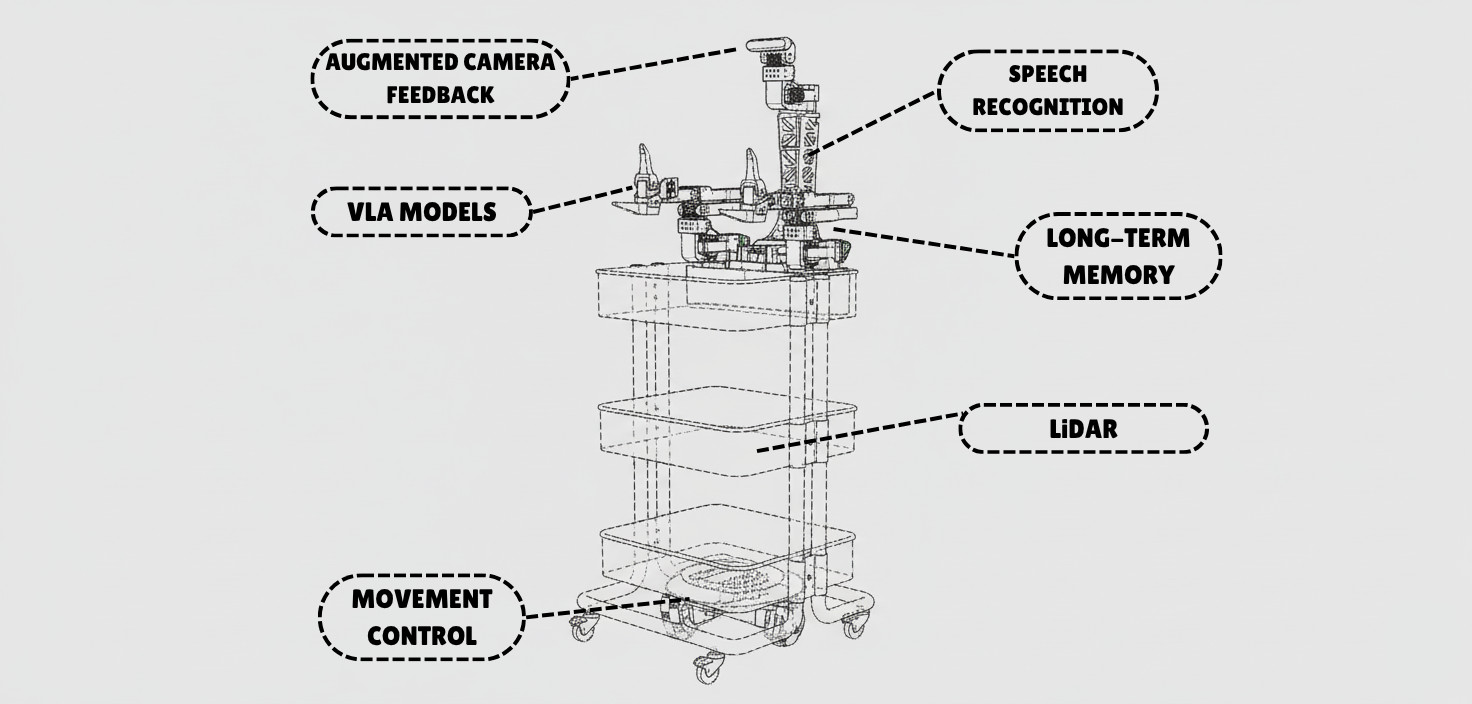
- 🚗 Movement - Pre-built wheel controls for mobile robots
- 🦾 Manipulation - VLA models as tools for arms control
- 👁️ Vision - Camera feed with image augmentation for better spatial understanding
- 🎤 Voice - Wake-word activated voice commands and TTS responses
- 🗺️ LiDAR - Top-down mapping with LiDAR sensor
- 🧠 Intelligence - Multi-agent control provides autonomy in decision making
🎨 Supported Robots
- ✅ XLeRobot - Full support for all features
- 🥝 LeKiwi - Use XLeRobot code (compatible platform)
- 🚙 Earth Rover mini plus - Full support
- 🔜 More robot platforms coming soon! Request your platform →
🎯 How It Works
<div align="center"> <img src="https://raw.githubusercontent.com/Grigorij-Dudnik/RoboCrew-assets/master/Images/robot_agent.png" alt="How It Works Diagram" width="400"> </div>The RoboCrew Intelligence Loop:
- 👂 Input - Voice commands, text tasks, or autonomous operation
- 🧠 LLM Processing - LLM analyzes the task and environment...
- 🛠️ Tool Selection - ...and chooses appropriate tools (move, turn, grab an apple, etc.)
- 🤖 Robot Actions - Wheels and arms execute commands
- 📹 Visual Feedback - Cameras capture results with augmented overlay
- 🔄 Repeat - LLM evaluates results and adjusts strategy
📱 Scripts to Use:
To gain full control over RoboCrew features, you can create your own script. Simplest example:
from robocrew.core.camera import RobotCamera
from robocrew.core.LLMAgent import LLMAgent
from robocrew.robots.XLeRobot.tools import create_move_forward, create_turn_right, create_turn_left
from robocrew.robots.XLeRobot.servo_controls import ServoControler

# 📷 Set up main camera
main_camera = RobotCamera("/dev/camera_center")  # camera usb port Eg: /dev/video0

# 🎛️ Set up servo controller
right_arm_wheel_usb = "/dev/arm_right"  # provide your right arm usb port. Eg: /dev/ttyACM1
servo_controler = ServoControler(right_arm_wheel_usb=right_arm_wheel_usb)

# 🛠️ Set up tools
move_forward = create_move_forward(servo_controler)
turn_left = create_turn_left(servo_controler)
turn_right = create_turn_right(servo_controler)

# 🤖 Initialize agent
agent = LLMAgent(
    model="google_genai:gemini-3-flash-preview",
    tools=[move_forward, turn_left, turn_right],
    main_camera=main_camera,
    servo_controler=servo_controler,
)

# 🎯 Give it a task and go!
agent.task = "Approach a human."
agent.go()
🎤 Enable Listening and Speaking
Use voice to tell robot what to do.
📖 Docs: https://grigorij-dudnik.github.io/RoboCrew-docs/guides/examples/audio/
💻 Code example: examples/2_xlerobot_listening_and_speaking.py
🦾 Add VLA Policy as a Tool
Let's make our robot manipulate objects with its arms!
📖 Docs: https://grigorij-dudnik.github.io/RoboCrew-docs/guides/examples/vla-as-tools/
💻 Code example: examples/3_xlerobot_arm_manipulation.py
🧠 Increase intelligence with multiagent communication:
One agent plans mission, another controls robot.
📖 Docs: https://grigorij-dudnik.github.io/RoboCrew-docs/guides/examples/multiagent/
💻 Code example: examples/4_xlerobot_multiagent_cooperation.py
💬 Community & Support
- 💭 Join our Discord - Get help, share projects, discuss features
- 📖 Read the Docs - Comprehensive guides and API reference
- 🐛 Report Issues - Found a bug? Let us know!
- ⭐ Star on GitHub - Show your support!
❤️ Special thanks to all contributors and early adopters!
