
Zplug
A next-generation plugin manager for zsh — manage plugins, commands, and themes from GitHub, Bitbucket, oh-my-zsh, prezto, and more with parallel installation and lazy loading.
Install / Use
/learn @zplug/ZplugREADME
Zplug
A next-generation plugin manager for zsh. zplug can manage plugins, commands, and themes from GitHub, Bitbucket, Gist, oh-my-zsh, prezto, local directories, and more — all with parallel installation, lazy loading, and branch/tag locking.
Pros.
- Can manage everything
- Zsh plugins/UNIX commands on GitHub and Bitbucket
- Gist files (gist.github.com)
- Externally managed plugins e.g., oh-my-zsh and prezto plugins/themes
- Binary artifacts on GitHub Releases
- Local plugins
- etc. (you can add your own sources!)
- Super-fast parallel installation/update
- Support for lazy-loading
- Branch/tag/commit support
- Post-update, post-load hooks
- Dependencies between packages
- Unlike antigen, no ZSH plugin file (
*.plugin.zsh) required - Interactive interface (fzf, peco, zaw, and so on)
- Cache mechanism for reducing the startup time
DEMO:
<!-- [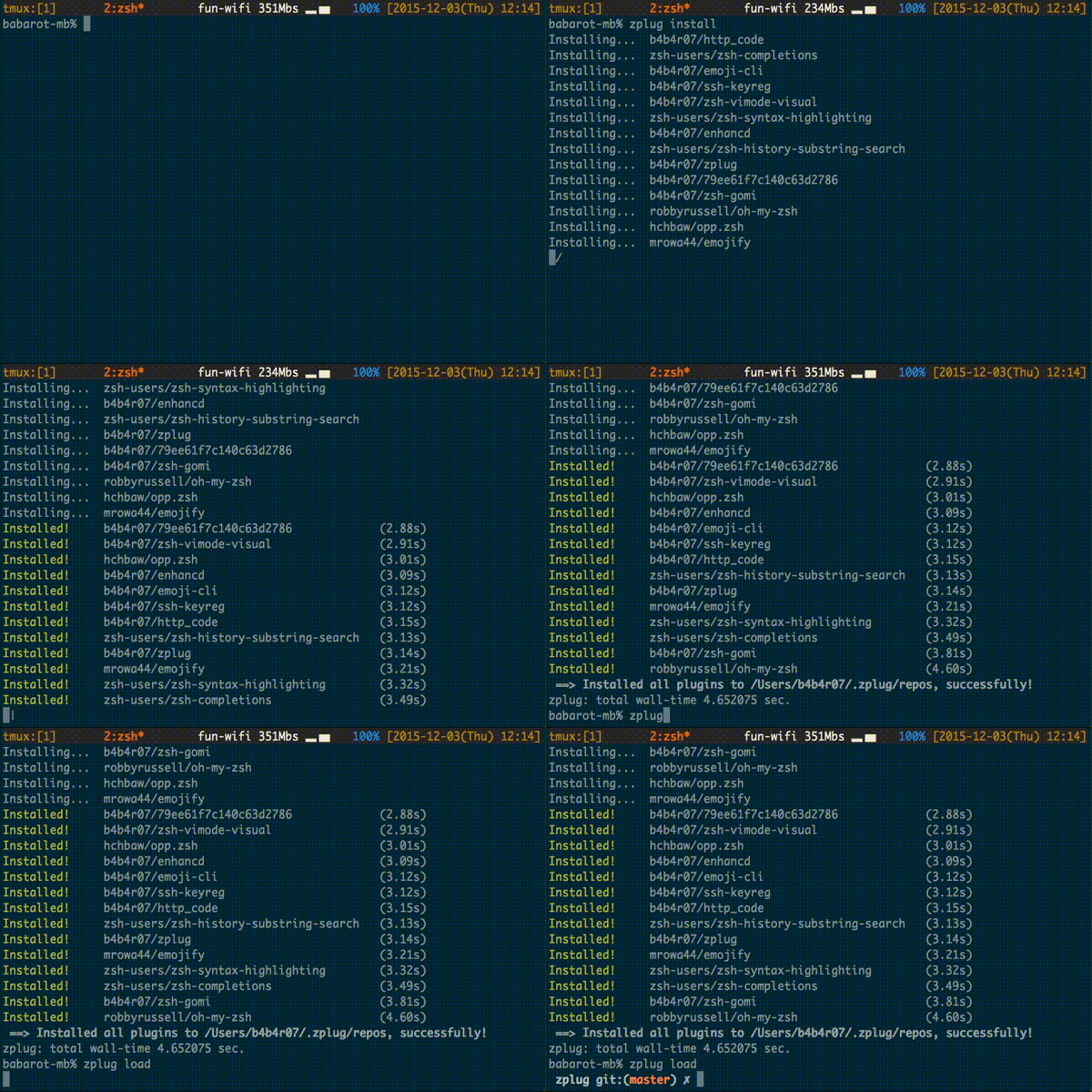][repo] -->[ ][repo]
Installation
latest | stable ---|--- [![Latest][latest-badge]][latest-link] | [![Stable][stable-badge]][stable-link]
The best way
curl -sL --proto-redir -all,https https://raw.githubusercontent.com/zplug/installer/master/installer.zsh | zsh
Curious about the installation script? Check it out at zplug/installer.
Using Homebrew (macOS)
brew install zplug
Manually
Clone from GitHub and source init.zsh:
$ export ZPLUG_HOME=/path/to/.zplug
$ git clone https://github.com/zplug/zplug $ZPLUG_HOME
Requirements
zsh: version 4.3.9 or highergit: version 1.7 or higherawk: An AWK variant that's notmawk
Usage
Add a zplug section to your .zshrc:
- List the packages with
zplugcommands zplug loadto source the plugins and add commands to your$PATH
Example
[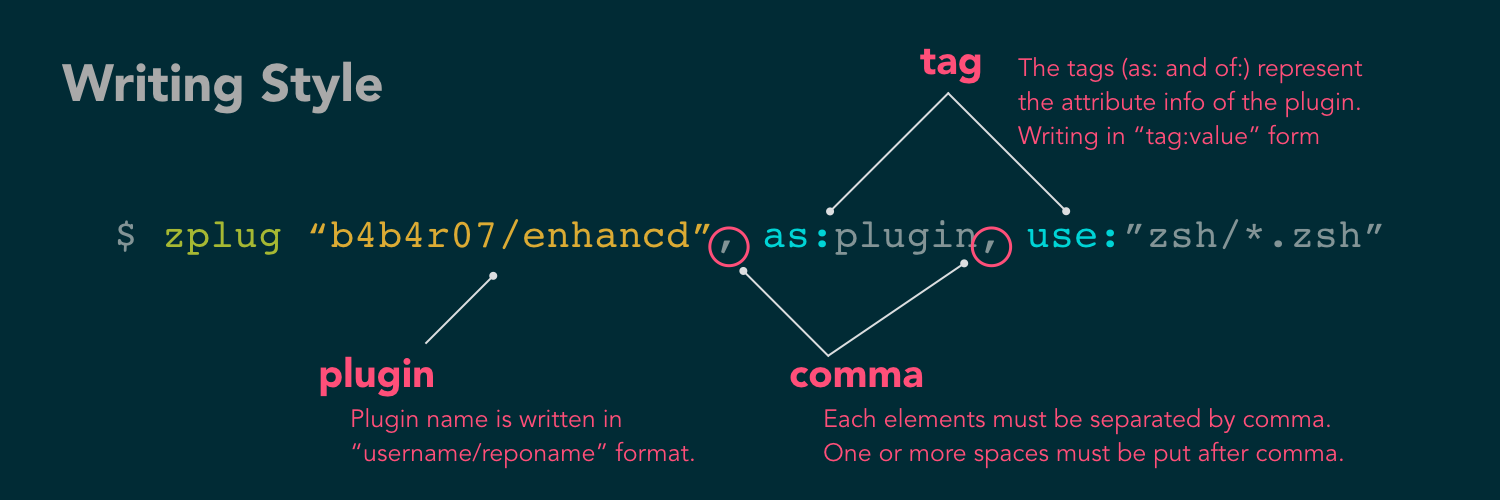 ][repo]
source ~/.zplug/init.zsh

# Make sure to use double quotes
zplug "zsh-users/zsh-history-substring-search"

# Use the package as a command
# And accept glob patterns (e.g., brace, wildcard, ...)
zplug "Jxck/dotfiles", as:command, use:"bin/{histuniq,color}"

# Can manage everything, e.g., another person's zshrc
zplug "tcnksm/docker-alias", use:zshrc

# Disable updates using the "frozen" tag
zplug "k4rthik/git-cal", as:command, frozen:1

# Grab binaries from GitHub Releases
# and rename with the "rename-to:" tag
zplug "junegunn/fzf", \
    from:gh-r, \
    as:command, \
    use:"*darwin*amd64*"

# Supports oh-my-zsh plugins and the like
zplug "plugins/git",   from:oh-my-zsh

# Also prezto
zplug "modules/prompt", from:prezto

# Load if "if" tag returns true
zplug "lib/clipboard", from:oh-my-zsh, if:"[[ $OSTYPE == *darwin* ]]"

# Run a command after a plugin is installed/updated
# Provided, it requires to set the variable like the following:
# ZPLUG_SUDO_PASSWORD="********"
zplug "jhawthorn/fzy", \
    as:command, \
    rename-to:fzy, \
    hook-build:"make && sudo make install"

# Supports checking out a specific branch/tag/commit
zplug "babarot/enhancd", at:v1
zplug "mollifier/anyframe", at:4c23cb60

# Can manage gist file just like other packages
zplug "babarot/79ee61f7c140c63d2786", \
    from:gist, \
    as:command, \
    use:get_last_pane_path.sh

# Supports Bitbucket
zplug "babarot/hello_bitbucket", \
    from:bitbucket, \
    as:command, \
    use:"*.sh"

# Rename a command with the string captured with `use` tag
zplug "babarot/httpstat", \
    as:command, \
    use:'(*).sh', \
    rename-to:'$1'

# Group dependencies
# Load "emoji-cli" if "jq" is installed in this example
zplug "stedolan/jq", \
    from:gh-r, \
    as:command, \
    rename-to:jq
zplug "babarot/emoji-cli", \
    on:"stedolan/jq"
# Note: To specify the order in which packages should be loaded, use the defer
#       tag described in the next section

# Set the priority when loading
# e.g., zsh-syntax-highlighting must be loaded
# after executing compinit command and sourcing other plugins
# (If the defer tag is given 2 or above, run after compinit command)
zplug "zsh-users/zsh-syntax-highlighting", defer:2

# Can manage local plugins
zplug "~/.zsh", from:local

# Load theme file
zplug 'dracula/zsh', as:theme

# Install plugins if there are plugins that have not been installed
if ! zplug check --verbose; then
    printf "Install? [y/N]: "
    if read -q; then
        echo; zplug install
    fi
fi

# Then, source plugins and add commands to $PATH
zplug load --verbose
Finally, use zplug install to install your plugins and reload .zshrc.
1. Options for zplug
| Option | Description |
|-----------------|-------------|
| --help | Display the help message |
| --rollback | Rollback a failed package |
| --self-manage | Self management of zplug |
| --version | Display the version of zplug |
| --log | Show the report of zplug errors |
2. Commands for zplug
| Command | Description | Options |
|-----------|-------------|---------|
| install | Install packages in parallel | (None) |
| load | Source installed plugins and add installed commands to $PATH | --verbose |
| list | List installed packages (more specifically, view the associative array $zplugs) | --select,--installed,--loaded |
| update | Update installed packages in parallel | --select,--force |
| check | Return true if all packages are installed, false otherwise | --verbose |
| status | Check if the remote repositories are up to date | --select |
| clean | Remove repositories which are no longer managed | --force,--select |
| clear | Remove the cache file | (None) |
| info | Show the information such as the source URL and tag values for the given package | (None) |
Take a closer look
# zplug check returns true if all packages are installed
# Therefore, when it returns false, run zplug install
if ! zplug check; then
    zplug install
fi

# source plugins and add commands to the PATH
zplug load

# zplug check returns true if the given repository exists
if zplug check babarot/enhancd; then
    # setting if enhancd is available
    export ENHANCD_FILTER=fzf-tmux
fi
Let zplug manage zplug
To manage zplug itself like other packages, write the following in your .zshrc.
zplug 'zplug/zplug', hook-build:'zplug --self-manage'
All that's left is to run zplug update.
3. Tags for zplug
truthy is any of true, yes, on, 1 and falsy is any of false, no, off, 0.
| Tag | Description | Value (default) | Example |
|-----|-------------|-----------------|---------|
| as | Specify whether to register the package as plugins or commands | plugin,command,theme (plugin) | as:command |
| use | Specify the pattern of the files to source (for plugin) or the relative path to add to the $PATH (for command) / With from:gh-r, zplug tries to guess which file to use from your OS and architecture. You can manually specify use:"*darwin*{amd,386}*" if that doesn't get the right file. | glob (use:"*.zsh") | use:bin,use:"*.sh", use:*darwin* |
| ignore | Similar to use tag, but specify pattern of files you want to ignore (see also #56) | glob (-) | ignore:"some_*.zsh" |
| from | Specify where to get the package from | github,bitbucket,<br>gh-r,gist,<br>oh-my-zsh,prezto,local (github) | from:gh-r |
| at | Specify branch/tag/commit to install | revision (master) | at:v1.5.6 |
| rename-to | Specify the filename you want to rename the command to (use this only with as:command) | filename (-) | rename-to:fzf |
| dir | Installed directory of the package | READ ONLY | dir:/path/to/user/repo |
| if | Specify the conditions under which to install and use the package | boolean (-) | if:"[ -d ~/.zsh ]" |
| hook-build | Commands to run after installation/update | commands (-) | hook-build:"make install" |
| hook-load | Commands to run after loading | commands (-) | hook-load:"echo 'Loaded!'" |
| frozen | Do not update unless explicitly specified | truthy,falsy (false) | frozen:1 |
| on | Load this package only if a different package is installed | package | on:user/repo |
| defer | Defers the loading of a package. If the value is 2 or above, zplug will source the plugin after compinit (see also #26) | 0..3 (0) | defer:2 |
| lazy | Whether it is an autoload function or not | truthy,falsy (false) | lazy:true |
| depth | The number of commits to include in the cloned repository. 0 means the whole history. | Any non-negative integer | depth:10 |
Changing the defaults
You can use zstyle to change the default value. The format is:
zstyle ":zplug:tag" tag_name new_default_value
For example, if you have a lot of commands and not so many plugins, (i.e. if
you find yourself specifying as:command often), you can do:
zstyle ":zplug:tag" as command
The default value for all tags can be changed in this
Related Skills
node-connect
333.3kDiagnose OpenClaw node connection and pairing failures for Android, iOS, and macOS companion apps
frontend-design
82.0kCreate distinctive, production-grade frontend interfaces with high design quality. Use this skill when the user asks to build web components, pages, or applications. Generates creative, polished code that avoids generic AI aesthetics.
openai-whisper-api
333.3kTranscribe audio via OpenAI Audio Transcriptions API (Whisper).
commit-push-pr
82.0kCommit, push, and open a PR
