
Lldbg
A lightweight native GUI for LLDB.
Install / Use
/learn @zmeadows/LldbgREADME


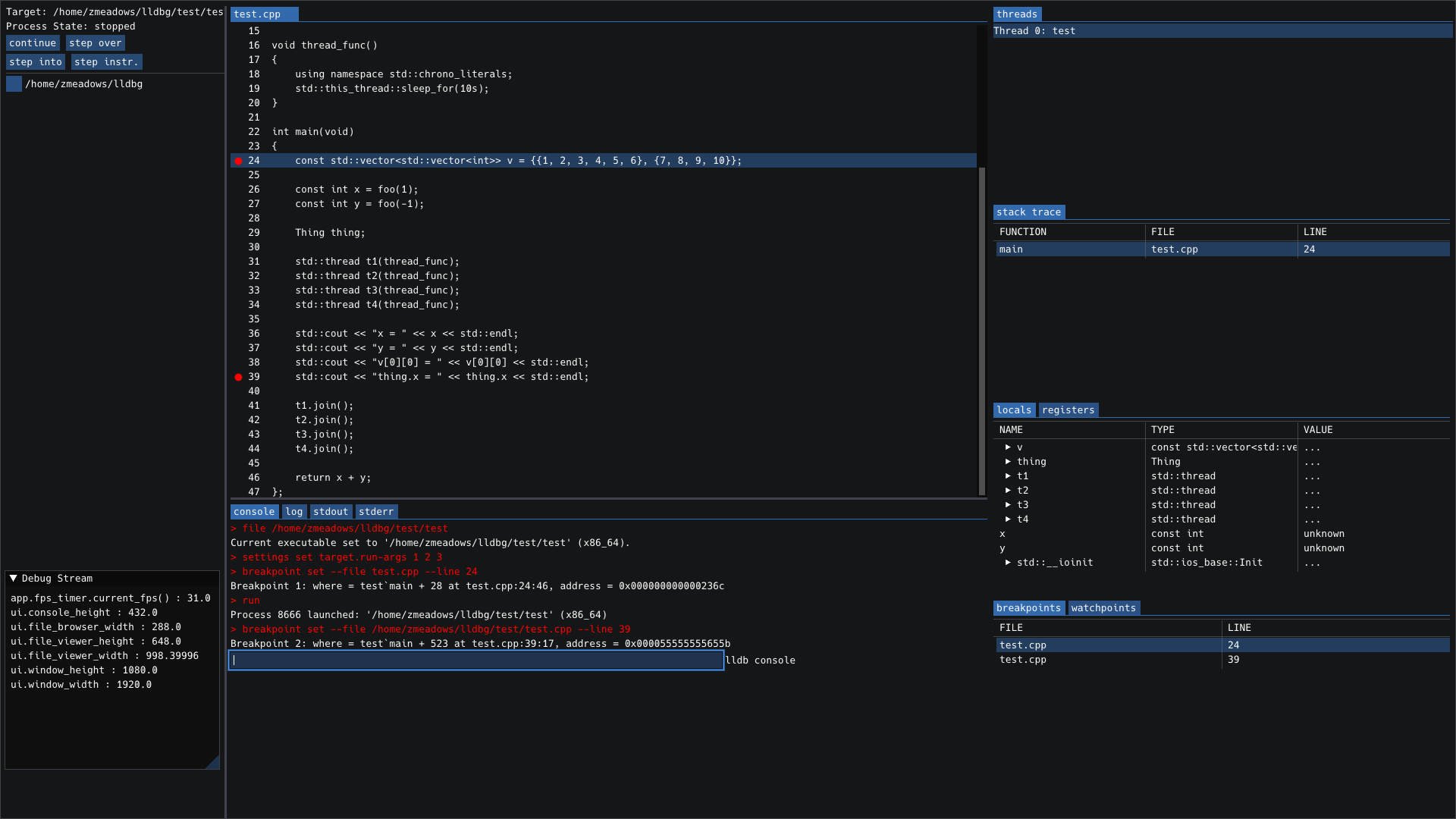
lldbg is a native GUI for lldb which is currently in alpha stage. Right now you probably shouldn't attempt to use it unless you want to contribute to the development in some way, either directly or by submitting issues. The basic idea is to provide vim/emacs users with a lightweight, easy-to-compile, easy-to-use likeness of what you would see in a full-featured IDE debugger interface.
Primary goals are:
- open/close and respond to user input instantly, 100% of the time
- function intuitively so that 'using lldbg' is not a skill you have to learn
- require no outside configuration files or complicated setup
- the build should 'just work' on almost any system
- launch with the many of the same command line options as lldb itself
Issues are welcome.
Install / Build (End Users)
Build & Run Guide — lldbgui
This repo ships CMake presets for two audiences:
- End users:
user-release— quick, optimized Release build with LTO; no dev extras. - Developers:
dev— RelWithDebInfo +compile_commands.jsonfor IDEs and tools.
The presets use the Ninja generator and place build trees under build/<preset>/.
Minimum tooling: CMake ≥ 3.20, Ninja, a C++17 compiler, and LLDB. ImGui/GLFW/fmt/cxxopts are resolved automatically (system packages preferred; vendored fallbacks are pinned in
cmake/LLDBGDeps.cmake). OpenGL is required.
TL;DR
# Clone
git clone git@github.com:zmeadows/lldbg.git lldbg && cd lldbg

# End users: fast Release build
cmake --preset user-release
cmake --build --preset user-release -j

# Developers: debug info + compile_commands.json
cmake --preset dev
cmake --build --preset dev -j

# Run (binary lives in the build tree)
./build/user-release/lldbgui    # or: ./build/dev/lldbgui
1) Platform prerequisites
macOS (Apple Silicon or Intel)
- Install Xcode Command Line Tools (for AppleClang & SDKs):
xcode-select --install - Install Homebrew packages:
To help CMake find the LLVM/LLDB config packages:brew install cmake ninja pkg-config fmt glfw cxxopts llvmexport CMAKE_PREFIX_PATH="$(brew --prefix llvm):$(brew --prefix)" export LLVM_DIR="$(brew --prefix llvm)/lib/cmake/llvm" export LLDB_DIR="$(brew --prefix llvm)/lib/cmake/lldb"On macOS, the build prefers AppleClang for ABI compatibility. If you see an error about non‑Apple Clang, either set:
or deliberately override withexport CC="$(xcrun --find clang)" CXX="$(xcrun --find clang++)"-DLLDBG_ALLOW_NON_APPLECLANG=ON.
Ubuntu/Debian
sudo apt-get update
sudo apt-get install -y \
  build-essential ninja-build cmake pkg-config \
  clang lldb liblldb-dev \
  libgl1-mesa-dev
Notes:
- If you prefer GCC, omit
clangand rely ongcc/g++.libgl1-mesa-devprovides OpenGL headers; GLFW/ImGui/fmt/cxxopts are fetched if not present.
Fedora
sudo dnf install -y \
  gcc-c++ clang ninja-build cmake pkg-config \
  lldb lldb-devel \
  mesa-libGL-devel
Arch Linux
sudo pacman -S --needed \
  base-devel ninja cmake pkgconf \
  clang lldb \
  mesa
2) End users — Release build (user-release)
This preset enables LTO and disables dev extras.
cmake --preset user-release
cmake --build --preset user-release -j
Artifacts:
- Binary:
build/user-release/lldbgui
Optional toggles (pass via -D... to the configure step):
-DLLDBG_USE_SYSTEM_DEPS=ON|OFF— prefer system packages (default ON) or force vendored.-DLLDBG_WARN_AS_ERRORS=ON|OFF— treat warnings as errors (default OFF here).
Run
Launch the UI directly:
./build/user-release/lldbgui
A few useful CLI options (subset):
-f, --file <prog>— debug this program-p, --attach-pid <pid>— attach to PID-n, --attach-name <name>— attach to process by name--workdir <dir>— set initial file browser root--loglevel <debug|verbose|info|warning|error>
Example:
./build/user-release/lldbgui --file ./a.out --loglevel info
3) Developers — Debug‑friendly build (dev)
Generates RelWithDebInfo binaries and writes compile_commands.json for IDEs/linters.
cmake --preset dev
# alternative: symlink compile_commands.json to root repo directory for editors
# cmake --preset dev -DCMAKE_EXPOSE_COMPILE_COMMANDS=ON
cmake --build --preset dev -j
Artifacts:
- Binary:
build/dev/lldbgui - Compilation DB:
build/dev/compile_commands.json
Editor & tooling hints
- clangd/VSCode/CLion: point to
build/dev/compile_commands.json. - clang-tidy / clang-format: versions pinned in repo (see
.clang-tidy,.clang-format):# Example: run clang-tidy on sources using the dev build directory clang-tidy -p build/dev --config-file=.clang-tidy $(git ls-files 'src' | grep -E '\.(c|cc|cpp|cxx|m|mm)$')
Running tests
If/when tests are added, you can use the CTest preset:
ctest --preset dev --output-on-failure
4) Common customizations
- Select a specific compiler:
# Clang CC=clang CXX=clang++ cmake --preset dev # GCC CC=gcc CXX=g++ cmake --preset dev - Clean the build:
cmake --build --preset dev --target clean # or blow away the tree: rm -rf build/dev - Change build type ad‑hoc (developers):
cmake -S . -B build/dev -G Ninja -DCMAKE_BUILD_TYPE=Debug
5) Troubleshooting
-
LLDB not found
- macOS: ensure Xcode CLTs are installed; if using Homebrew LLVM, export
CMAKE_PREFIX_PATH,LLVM_DIR,LLDB_DIRas above. - Linux: install
lldb+ headers (liblldb-dev/lldb-devel) from your distro.
- macOS: ensure Xcode CLTs are installed; if using Homebrew LLVM, export
-
OpenGL/GLFW errors
- Install OpenGL dev headers (
libgl1-mesa-devon Debian/Ubuntu;mesa-libGL-develon Fedora). - GLFW will be fetched automatically if not present, but it still requires platform GL/X11 headers on Linux.
- Install OpenGL dev headers (
-
Non‑Apple Clang on macOS
- By default the build prefers AppleClang. To force a different toolchain:
cmake -S . -B build/dev -G Ninja -DLLDBG_ALLOW_NON_APPLECLANG=ON
- By default the build prefers AppleClang. To force a different toolchain:
-
Ninja not found
- Install it via your package manager (see prerequisites) or run
brew install ninja.
- Install it via your package manager (see prerequisites) or run
6) What the presets do
user-releaseCMAKE_BUILD_TYPE=Release, LTO enabled, warnings not-as-errors.devCMAKE_BUILD_TYPE=RelWithDebInfo, exportscompile_commands.json, warnings as-errors.
(See CMakePresets.json for exact values.)
Happy hacking! If you hit build issues on a new distro, paste the full CMake output and we’ll sort it out.
Developers
see Contributing
Changelog
see Changelog
