
BannerView
No description available
Install / Use
/learn @zlwmzh/BannerViewREADME
基于RecyclerView打造的BannerView
在项目开发过程中,我们经常会收到广告轮播图的需求。之前都是用Viewpager来实现,也用到了些许第三方的的广告轮播库。这是一款基于RecyclerView实现的广告轮播 控件,使用起来十分方便。
主要实现了:
- Banner无限滚动
- 自动轮播开启关闭
- RecyclerView 每次滑动切换一项
- 可自定义轮播图样式
- 可设置滑动速度和每个轮播图停留的时间
- 可自定义数据源
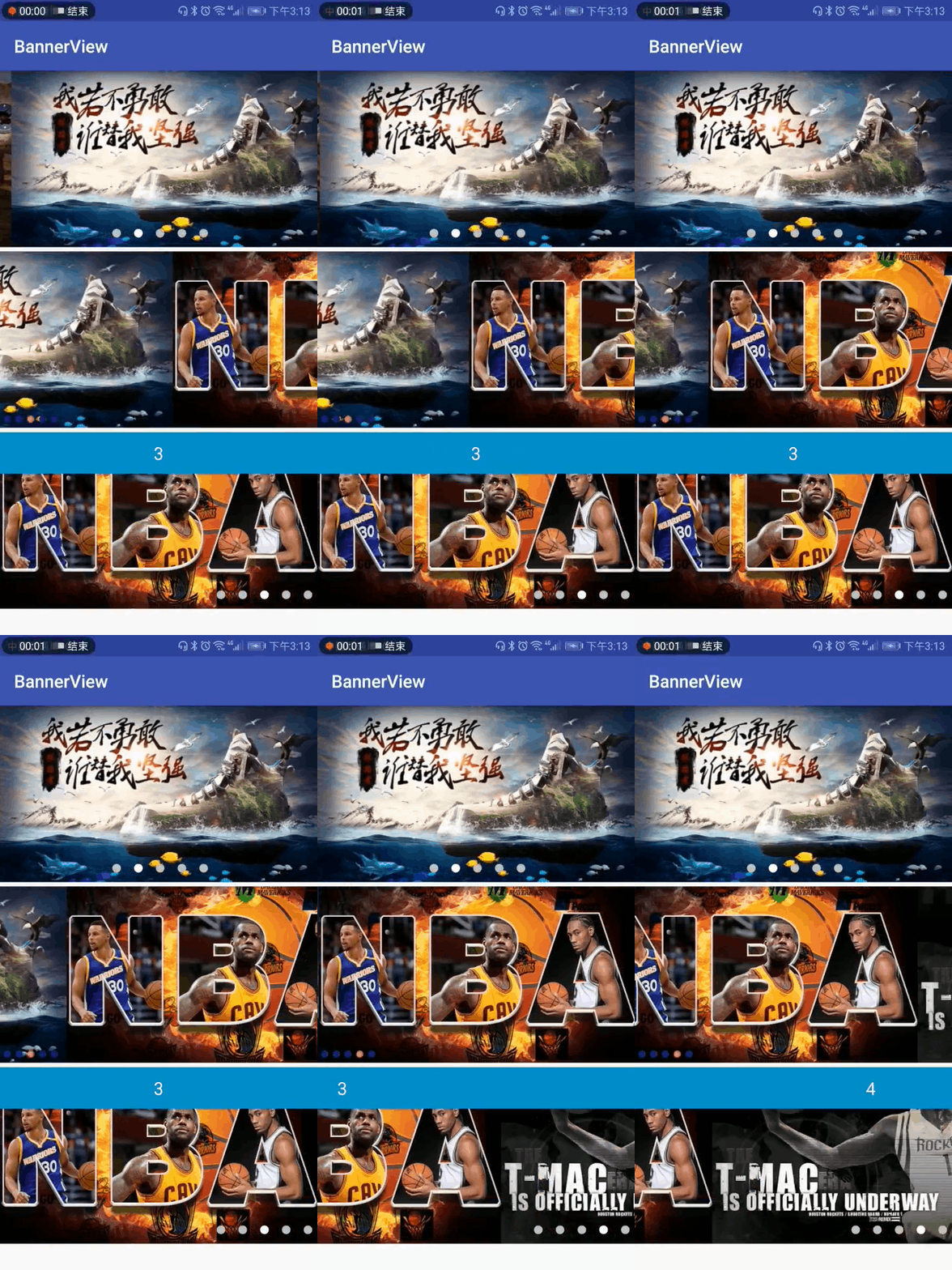
使用方式
第一步. 添加依赖:
compile 'compile 'com.mickywu:bannerview:1.0.1'
第二步. 布局中引用BannerView
在Application中初始化:
Banner.init(this);
然后布局中引用:
<com.micky.www.bannerviewmodule.BannerView
     android:layout_width="match_parent"
     android:layout_height="200dp"
     android:id="@+id/bannerview_2"
     app:indicatorheight="30px"
     app:indicatorwidth="30px"
     app:delaytime="1000"
     app:isautoplay="true"
     app:indicatorgravity="left"
     app:indicatordrawable="@drawable/select_indicator_1"
     app:speed="200"
     android:layout_marginTop="5dp"
     ></com.micky.www.bannerviewmodule.BannerView>
第三步. Activity查找BannerView控件
mBannerView = findViewById(R.id.bannerview);
第四步. 设置BannerView相关参数
      // 设置指示器位置
      mBannerView.setIndicatorGravity(BannerConfig.CENTER);
      // 设置Banner停留时间
      mBannerView.setDelayTime(1 * 1000);
      // 设置指示器样式
      mBannerView.setIndicatorDrawableId(R.drawable.selector_indicator);
      // 设置指示器间距
      mBannerView.setIndicatorMargin(10);
      // 设置单个指示器的宽高
      mBannerView.setIndicatorWH(30,30);
      // 设置是否开启自动轮播,默认开启
      mBannerView.setIsAutoPlay(true);
      // 设置滑动速度
      mBannerView.setSpeend(150f);
      // 设置数据源,当所有属性设置完成后,才可设置数据源
      mBannerView.setListData(mList);
      // 设置自定义view
      mBannerView.setBannerLayout(R.layout.item_banner_1);
      mBannerView.setCallBack(new BannerAdapterCallBack<String>() {
          @Override
          public void onCallBack(View view, String s) {
              // 默认回掉的是SimpleDraweeView,可直接设置图片路径
              SimpleDraweeView  simpleDraweeView = (SimpleDraweeView) view;
              simpleDraweeView.setImageURI(s);
              // 如果自定义了View,需要自己查找并设置数据
          }
      });
       // 开始轮播,这一步一定最后调用
      mBannerView.start();
第五步. 页面销毁时,释放BannerView
// 释放BannerView
mBannerView.releaseBanner();
相关属性说明
| 属性 |作用 | |--|--| | app:indicatorheight | 单个指示器高度 | |app:indicatorwidth|单个指示器宽度 | |app:delaytime|延迟时间| | app:isautoplay | 是否开启自动轮播 | |app:indicatorgravity| 指示器位置| |app:indicatordrawable|指示器样式| |app:speed | 轮播速度 |
主要方法(后续持续更新)
|方法名 | 作用 | |--|--| | setIndicatorWH(int widht,int height) |设置单个指示器的高度和宽度 | |setIndicatorMargin(int margin)| 指示器间距 | |setIndicatorDrawableId(int indicatorDrawableId)|设置指示器样式| |setDelayTime(int time) |设置Banner停留时间 | |setSpeend(int speed) | 设置广告滑动速度 | |setIsAutoPlay(boolean isAutoPlay)|是否开启自动轮播| | setBannerLayout(int bannerLayout) | 设置自定义布局(Banner图布局) | |setListData(List<T> list) | 设置数据源| |setCallBack(BannerAdapterCallBack<T> callBack)|设置回掉| | start() |开始轮播(所有属性设置完后,需要调用此方法) | | pauseAutoPlay() | 暂停轮播 | |continueAutoPlay()|继续轮播| | stopAutoPlay() |停止轮播 | | setIndicatorGravity(int gravity) | 设置指示器的位置(左、右、居中) | |releaseBanner()|释放BannerView(可在页面销毁时调用)|
相关代码可参考上面demo中简单代码!!!
Related Skills
node-connect
350.1kDiagnose OpenClaw node connection and pairing failures for Android, iOS, and macOS companion apps
frontend-design
109.9kCreate distinctive, production-grade frontend interfaces with high design quality. Use this skill when the user asks to build web components, pages, or applications. Generates creative, polished code that avoids generic AI aesthetics.
openai-whisper-api
350.1kTranscribe audio via OpenAI Audio Transcriptions API (Whisper).
qqbot-media
350.1kQQBot 富媒体收发能力。使用 <qqmedia> 标签,系统根据文件扩展名自动识别类型(图片/语音/视频/文件)。
