
LocationPicker
A ready for use and fully customizable location picker for your app
Install / Use
/learn @zhuorantan/LocationPickerREADME
LocationPicker
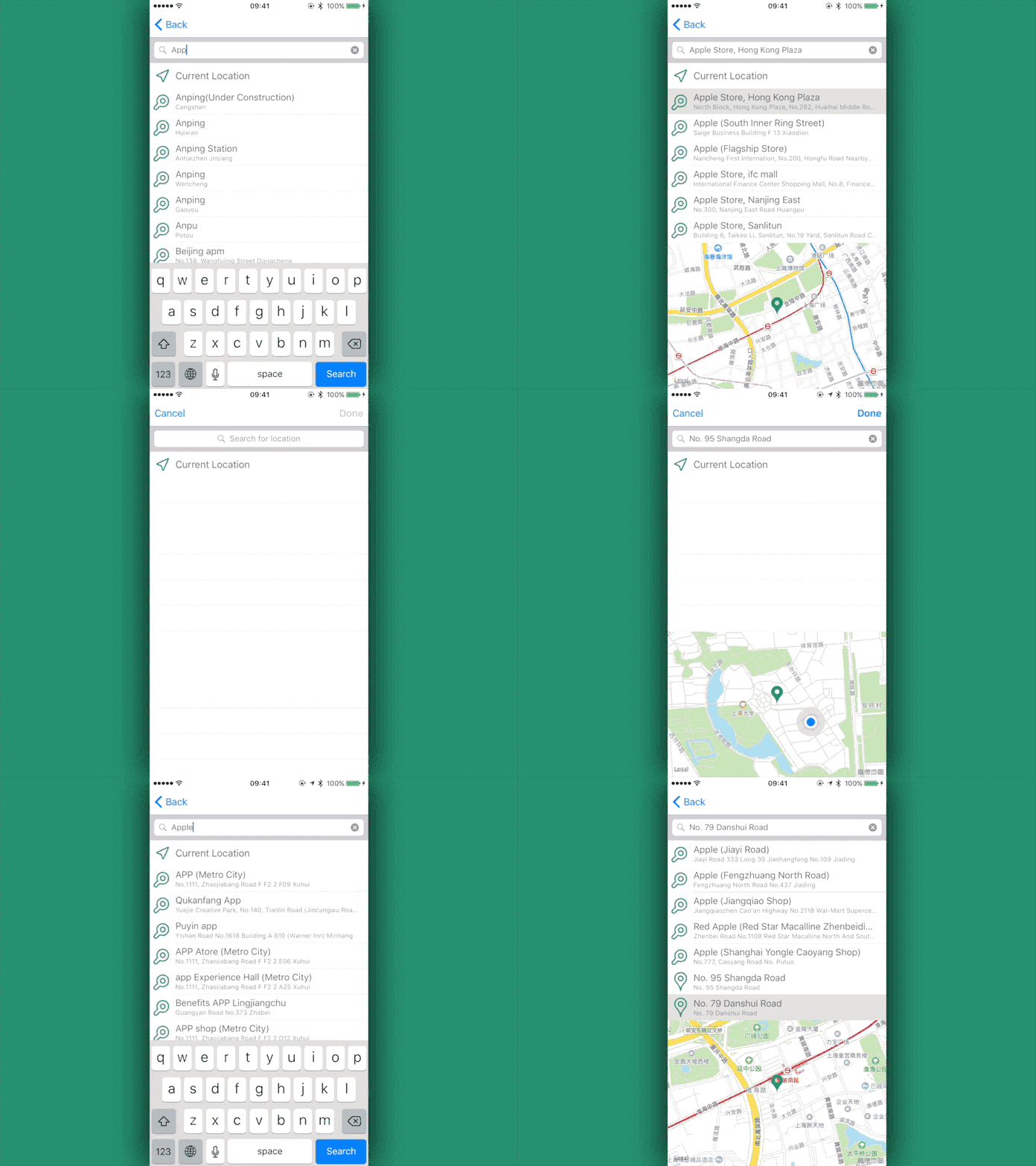
A ready for use and fully customizable location picker for your app.




- Features
- Installation
- Quick Start
- Customization
- Callback
- Location Item
- Change Log
- Contribute
- License
Features
- Easy to use - A fully functional location picker can be integrated to your app within 5 lines of codes.
LocationPickercan be subclassed in storyboard or programmatically. - Comprehensive -
LocationPickerprovides Closure, Delegate and Data Source, Override for callback to suit your need. - All kinds of locations to pick - Users can pick locations from their current location, search results or a list of locations provided by your app.
- Fully customizable -
LocationPickerprovides a great deal of customizability allowing all text to be customized along with the colors and icons. Original UI elements likeUISearchBar,UITableView,MKMapItemare also accessible if you want to do some deep customization. - Permission worry free -
LocationPickerrequests location access for you.
Installation
Cocoapods
CocoaPods is a dependency manager for Cocoa projects.
You can install it with the following command:
$ gem install cocoapods
To integrate LocationPicker into your Xcode project using CocoaPods, specify it in your Podfile:
platform :ios, '8.0'
use_frameworks!

target 'YourApp' do
    pod 'LocationPickerViewController'
end
Carthage
Carthage is a decentralized dependency manager that automates the process of adding frameworks to your Cocoa application.
You can install Carthage with Homebrew using the following command:
$ brew update
$ brew install carthage
To integrate LocationPicker into your Xcode project using Carthage, specify it in your Cartfile:
github "JeromeTan1997/LocationPicker"
Swift Package Manager
Swift Package Manager is a tool for managing the distribution of Swift code.
Swift Package Manager is currently only available with the Swift 3 development snapshots.
To integrate LocationPicker into your Xcode project using Swift Package Manager, specify it in your Packages.swift:
import PackageDescription

let package = Package(
    name: "Your Project Name",
    targets: [],
    dependencies: [
        .Package(url: "https://github.com/JeromeTan1997/LocationPicker.git", versions: "2.0.0" ..< Version.max)
    ]
)
Quick Start
Programmatically
Import LocationPicker
import LocationPicker
NOTE: If you installed via Cocoapods:
import LocationPickerViewController
Showing LocationPicker via navigation controller is very simple, just create one, add a completion closure and push it.
let locationPicker = LocationPicker()
locationPicker.pickCompletion = { (pickedLocationItem) in
    // Do something with the location the user picked.
}
navigationController!.pushViewController(locationPicker, animated: true)
To present LocationPicker, it needs to be nested inside a navigation controller so that it can be dismissed.
let locationPicker = LocationPicker()
locationPicker.pickCompletion = { (pickedLocationItem) in
    // Do something with the location the user picked.
}
locationPicker.addBarButtons()
// Call this method to add a done and a cancel button to navigation bar.

let navigationController = UINavigationController(rootViewController: customLocationPicker)
presentViewController(navigationController, animated: true, completion: nil)
Storyboard
- Drag a View Controller to your Storyboard.
- In the Identity inspector, Entry
LocationPickerboth in Class and Module field.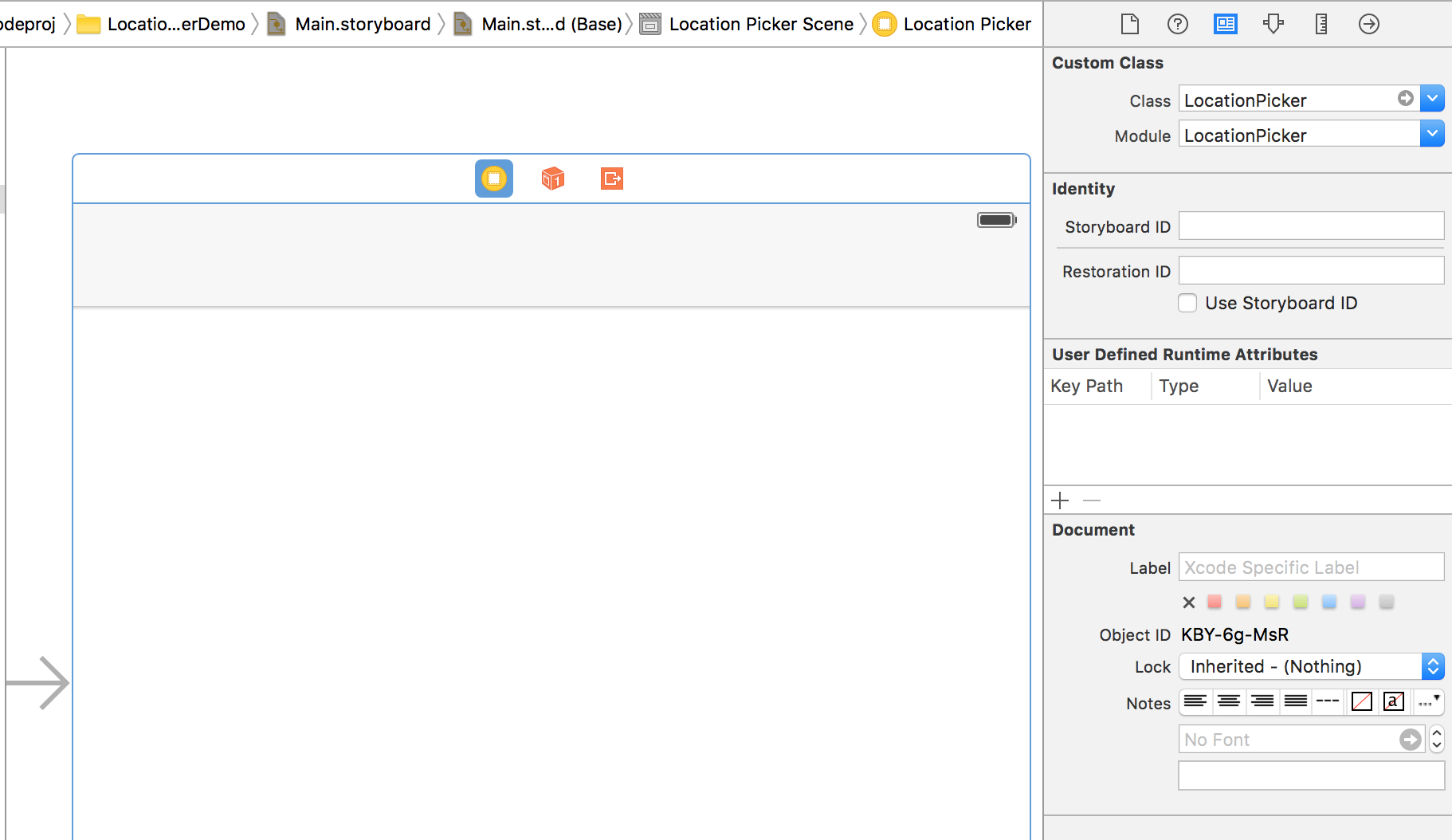 NOTE: If you installed via Cocopods, the Module field should be
 LocationPickerViewController - Create a segue and add a Identifier to it.
- Add the following codes in the source view controller.
override func prepareForSegue(segue: UIStoryboardSegue, sender: AnyObject?) {
    if segue.identifier == "Your Identifier" {
        let locationPicker = segue.destinationViewController as! LocationPicker
        locationPicker.pickCompletion = { (pickedLocationItem) in
            // Do something with the location the user picked.
        }
    }
}
That's all you need to have a fully functional location picker in your app. How easy!
Note: To use current location, don't forget to add NSLocationWhenInUseUsageDescription to your info.plist
Customization
Methods
func addBarButtons
This method provides 3 optional parameter. doneButtonItem and cancelButtonItem can be set as the customized UIBarButtonItem object. doneButtonOrientation is used to determine how to align these two buttons. If none of the parameters is provided, two system style buttons would be used, and the done button would be put on the right side.
After this method is called, these two buttons can be accessed via barButtonItems property.
func setColors
This method aims to set colors more conveniently. themColor will be set to currentLocationIconColor, searchResultLocationIconColor, alternativeLocationIconColor, pinColor. primaryTextColor and secondaryTextColor can also be set by this method.
func setLocationDeniedAlertControllerTitle
This method provides the text of locationDeniedAlertController simultaneously.
If this method is not called, the alert controller will be presented like this
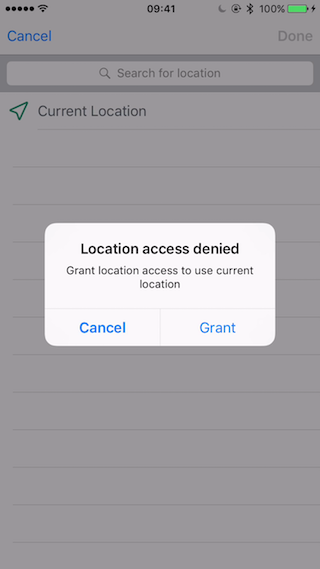
Grant button will direct user to the Settings where location access can be changed.
Boolean
| Property name | Default | Target | Remark |
| ------------- |:-------:| ------ | ------ |
| allowArbitraryLocation | false | | Allows the selection of locations that did not match or exactly match search results |
| mapViewZoomEnabled | true | mapView.zoomEnabled | Whether the map view can zoom in and out |
| mapViewShowsUserLocation | true | mapView.showsUserLocation | Whether the map view shows user's location |
| mapViewScrollEnabled | true | mapView.scrollEnabled | Whether user can scroll the map view |
| isRedirectToExactCoordinate | true | | Whether redirect to the exact coordinate after queried |
| alternativeLocationEditable | false | tableViewDataSource.tableView(tableView: UITableView, canEditRowAtIndexPath indexPath: NSIndexPath) | Whether user can delete the provided locations in table view |
| forceReverseGeocoding | false | | Whether to force reverse geocoding or not. If this property is set to true, the location will be reverse geocoded |
Note: If alternativeLocationEditable is set to true, please adopt Location Deletion callback to delete the location from database or memory.
Text
| Property name | Default | Target | Remark | | ------------- |:-------:| ------ | ------ | | currentLocationText | "Current Location" | currentLocationCell.locationNameLabel.text | The text that indicates the user's current location | | searchBarPlaceholder | "Search for location" | searchBar.placeholder | The text that ask user to search for locations | | locationDeniedAlertTitle | "Location access denied" | alertController.title | The text of the alert controller's title | | locationDeniedAlertMessage | "Grant location access to use current location" | alertController.message | The text of the alert controller's message | | locationDeniedGrantText | "Grant" | alertAction.title | The text of the alert controller's Grant button | | locationDeniedCancelText | "Cancel" | alertAction.title | The text of the alert controller's Cancel button |
Color
| Property name | Default | Target | Remark |
| ------------- |:-------:| ------ | ------ |
| tableViewBackgroundColor | UIColor.whiteColor() | tableView.backgroundColor | The background color of the table view |
| currentLocationIconColor | UIColor(hue: 0.447, saturation: 0.731, brightness: 0.569, alpha: 1) | UIImage() | The color of the icon showed in current location cell, the icon image can be changed via property currentLocationIconImage |
| searchResultLocationIconColor | UIColor(hue: 0.447, saturation: 0.731, brightness: 0.569, alpha: 1) | UIImage() | The color of the icon showed in search result location cells, the icon image can be changed via property searchResultLocationIconImage |
| alternativeLocationIconColor | UIColor(hue: 0.447,
Related Skills
node-connect
341.8kDiagnose OpenClaw node connection and pairing failures for Android, iOS, and macOS companion apps
frontend-design
84.6kCreate distinctive, production-grade frontend interfaces with high design quality. Use this skill when the user asks to build web components, pages, or applications. Generates creative, polished code that avoids generic AI aesthetics.
openai-whisper-api
341.8kTranscribe audio via OpenAI Audio Transcriptions API (Whisper).
commit-push-pr
84.6kCommit, push, and open a PR
