
EuNet
Peer to peer network solution for multiplayer games.
Install / Use
/learn @zestylife/EuNetREADME
EuNet C# (.NET, .NET Core, Unity)




Easy Unity Network (EuNet) is a network solution for multiplayer games.
Supports Server-Client, Peer to Peer communication using TCP, UDP, and RUDP protocols.
In the case of P2P (Peer to Peer), supports hole punching and tries to communicate directly as much as possible, and if it is impossible, automatically relayed through the server.
Great for developing Action MORPG, MOBA, Channel Based MMORPG, Casual Multiplayer Game (e.g. League of Legends, Among Us, Kart Rider, Diablo, etc.).
Produced based on .Net Standard 2.0, multiplatform supported(Windows, Linux, Android, iOS, etc.), and is optimized for .Net Core-based servers and Unity3D-based clients.
RPC(Remote procedure call) can be used to call remote functions and receive return values.
There is no overhead as it serializes at high speed and calls remote functions.
Work efficiency increases as there is no work to create a message every time.
Example
| EuNet-Starter | EuNet-Tanks |
| :---: | :---: |
| https://github.com/zestylife/EuNet-Starter | https://github.com/zestylife/EuNet-Tanks |
| | Google Play |
|  |
| 
Diagram
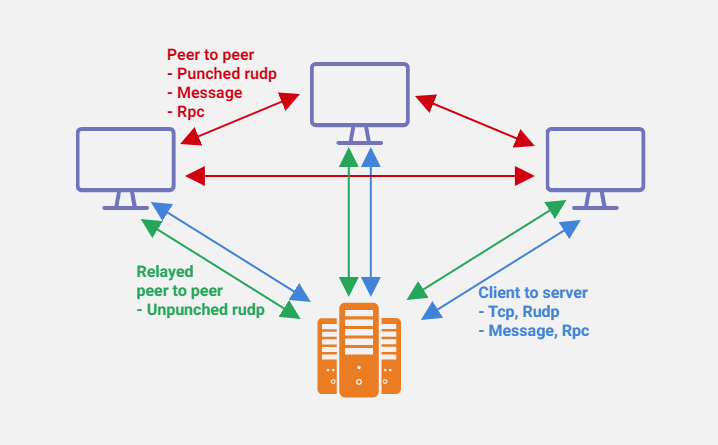
Table of Contents
- EuNet C# (.NET, .NET Core, Unity)
Features
- Fast network communication
- High speed communication using multi-thread
- Fast allocation using pooling buffer
- Supported channels
- TCP
- Unreliable UDP
- Reliable Ordered UDP
- Reliable Unordered UDP
- Reliable Sequenced UDP
- Sequenced UDP
- Supported communication
- Client to Server
- Peer to Peer
- Hole Punching
- Relay (Auto Switching)
- RPC (Remote Procedure Call)
- Fast packet serializer (Partial using MessagePack for C#)
- Custom Compiler(EuNetCodeGenerator) for fast serializing and RPC
- Automatic MTU detection
- Automatic fragmentation of large UDP packets
- Automatic merging small packets
- Unity3D support
- Supported platforms
- Windows / Mac / Linux (.Net Core)
- Android (Unity)
- iOS (Unity)
Channels
| Channels | Transmission guarantee | Not duplicate | Order guarantee | | :--------------------: | :----------------------------: | :----------------: | :----------------: | | TCP | :heavy_check_mark: | :heavy_check_mark: | :heavy_check_mark: | | Unreliable UDP | :x: | :x: | :x: | | Reliable Ordered UDP | :heavy_check_mark: | :heavy_check_mark: | :heavy_check_mark: | | Reliable Unordered UDP | :heavy_check_mark: | :heavy_check_mark: | :x: | | Reliable Sequenced UDP | :heavy_check_mark:(Last order) | :heavy_check_mark: | :heavy_check_mark: | | Sequenced UDP | :x: | :heavy_check_mark: | :heavy_check_mark: |
Installation
We need three projects
- Common project (.Net Standard 2.0)
- Server, Client common use
- Generate code using EuNetCodeGenerator
- Server project (.Net Core)
- Client project (Unity3D)
See EuNet-Starter for an example
Common project
- Create .Net Standard 2.0 based project.
- Install nuget package.
PM> Install-Package EuNet.CodeGenerator.Templates
- Rebuild project.
- If you look at the project,
CodeGen/EuNet.Rpc.CodeGen.csfile was created.
Server project (.net core)
- First install the nuget package.
PM> Install-Package EuNet
- Add common project to reference
Solution Explorer -> [User Project] -> References -> Add Reference -> [Add Common project]
- Write server code. Server Code Sample
- Write session code. Session Code Sample
Client project (Unity3D)
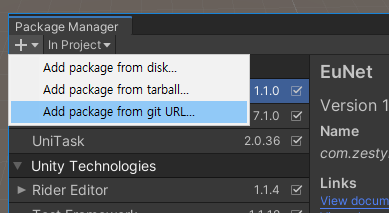
Install via git URL
After Unity 2019.3.4f1, Unity 2020.1a21, that support path query parameter of git package. You can add package from UPM (Unity Package Manager)
https://github.com/zestylife/EuNet.git?path=src/EuNet.Unity/Assets/Plugins/EuNet
If you want to add a specific release version, add #version after the url. ex) version 1.1.13
https://github.com/zestylife/EuNet.git?path=src/EuNet.Unity/Assets/Plugins/EuNet#1.1.13
Install via package file
- Install the unity-package. Download here
RPC (Remote procedure call)
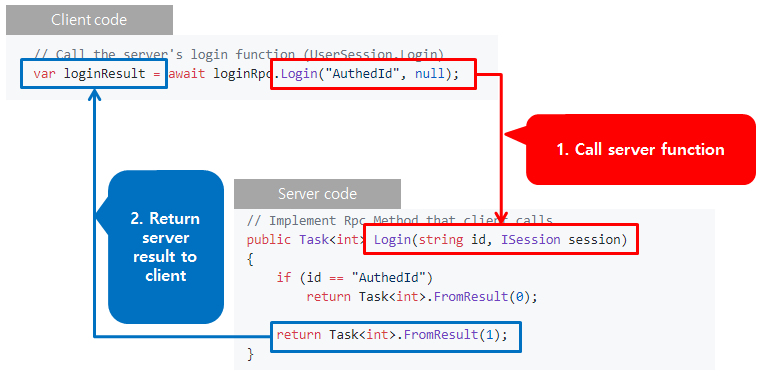
RPC(Remote procedure call) can be used to call remote functions and receive return values.
There is no overhead as it serializes at high speed and calls remote functions.
Work efficiency increases as there is no work to create a message every time.
Common project
// Declaring login rpc interface
public interface ILoginRpc : IRpc
{
    Task<int> Login(string id, ISession session);
    Task<UserInfo> GetUserInfo();
}
// Generate Rpc code using EuNetCodeGenerator and use it in server and client
Server project (.Net Core)
// User session class inherits Rpc Interface (ILoginRpc)
public partial class UserSession : ILoginRpc
{
    private UserInfo _userInfo = new UserInfo();

    // Implement Rpc Method that client calls
    public Task<int> Login(string id, ISession session)
    {
        if (id == "AuthedId")
            return Task<int>.FromResult(0);

        return Task<int>.FromResult(1);
    }

    // Implement Rpc Method that client calls
    public Task<UserInfo> GetUserInfo()
    {
        // Set user information
        _userInfo.Name = "abc";

        return Task<UserInfo>.FromResult(_userInfo);
    }
}
Client project (Unity3D)
private async UniTaskVoid ConnectAsync()
{
    var client = NetClientGlobal.Instance.Client;

    // Trying to connect. Timeout is 10 seconds.
    var result = await client.ConnectAsync(TimeSpan.FromSeconds(10));

    if(result == true)
    {
        // Create an object for calling login Rpc
        LoginRpc loginRpc = new LoginRpc(client);

        // Call the server's login function (UserSession.Login)
        var loginResult = await loginRpc.Login("AuthedId", null);

        Debug.Log($"Login Result : {loginResult}");
        if (loginResult != 0)
            return;

        // Call the server's get user information function (UserSession.GetUserInfo)
        var userInfo = await loginRpc.GetUserInfo();
        Debug.Log($"UserName : {userInfo.Name}");
        // UserName : abc
    }
    else
    {
        // Fail to connect
        Debug.LogError("Fail to connect server");
    }
}
Quick Start
Serialize
Object serialization is required to use Rpc. There are two ways to serialize objects.
Using Auto-Generated formmater
Declaring the NetDataObject Attribute makes the class serializable.
All public objects are serialized.
Declaring the [IgnoreMember] Attribute does not serialize it.
[NetDataObject]
public class DataClass
{
    // Serializable
    public int Int;

    // Serializable
    public int Property { get; set; }

    // Ignore
    public int PropertyOnlyGet { get; }

    // Ignore
    private int IntPrivate;

    // Ignore
    protected int IntProtected;

    // Ignore
    [IgnoreMember]
    public int IgnoreInt;

    // Ignore
    [IgnoreMember]
    public int IgnoreProperty { get; set; }
}
Manualy serialize
Implement serialization manually by inheriting INetSerializable.
You have to code, but it's the fastest and most flexible.
public class InterfaceSerializeClass : INetSerializable
{
    public int Value;
    public string Name;

    public void Serialize(NetDataWriter writer)
    {
        writer.Write(Value);
        writer.Write(Name);
    }

    public void Deserialize(NetDataReader reader)
    {
        Value = reader.ReadInt32();
        Name = reader.ReadString();
    }
}
Unity3D
- Special object NetView is supported,
Related Skills
node-connect
339.3kDiagnose OpenClaw node connection and pairing failures for Android, iOS, and macOS companion apps
frontend-design
83.9kCreate distinctive, production-grade frontend interfaces with high design quality. Use this skill when the user asks to build web components, pages, or applications. Generates creative, polished code that avoids generic AI aesthetics.
openai-whisper-api
339.3kTranscribe audio via OpenAI Audio Transcriptions API (Whisper).
commit-push-pr
83.9kCommit, push, and open a PR
