
TaSTT
A free self-hosted STT for VRChat
Install / Use
/learn @yum-food/TaSTTREADME
TaSTT: A deliciously free STT
Note: This project is archived and unsupported. Please consider these supported alternatives:
- TTS Voice Wizard - free, uses WhisperCPP and optional cloud backends
- VRCTextboxStt - free, uses the same self-hosted backend as this tool
- RabidCrab's STT - non-free, uses cloud transcription
TaSTT (pronounced "tasty") is a free speech-to-text tool for VRChat. It uses a GPU-based transcription algorithm to turn your voice into text, then sends it into VRChat via OSC.
To get started, download the latest .zip from the releases page.
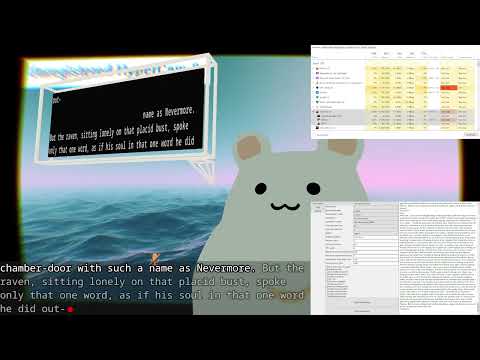
Contents:
Made with love by yum_food.
Usage and setup
Download the latest .zip from the releases page.
Please join the discord to share feedback and get technical help.
To build your own package from source, see GUI/README.md.
Basic controls:
- Short click to toggle transcription.
- Medium click to hide the text box.
- Hold to update text box without unlocking from worldspace.
- Medium click + hold to type using STT.
- Scale up/down in the radial menu.
Design philosophy
- All language services are performed on the client. No network hops in the critical path.
- Priorities (descending order): reliability, latency, accuracy, performance, aesthetics.
- No telemetry of any kind in the app. github and discord are the only means I have to estimate usage and triage bugs.
- Permissive licensing. Users should be legally entitled to hack, extend, relicense, and profit from this codebase.
Features
- Works with the built-in chatbox (usable with public avatars!)
- Customizable board resolution, up to ridiculous sizes.
- Lighweight design:
- Works with VRC native chatbox - works with any avatar without modification
- Custom textbox requires as few as 65 parameter bits
- Transcription doesn't destroy your frames in game since VRChat is heavily CPU bound. Performance impact when not speaking is negligible.
- Performant: uses CTranslate2 inference engine with GPU support and flash-attention
- Browser source. Use with OBS!
- Multi-language support.
- Whisper natively supports transcription in 100 languages.
- A local translation algorithm (Meta's NLLB) enables translating into 200 other languages with good-ish accuracy (BLEU scores typically around 20-35) and low latency.
- Customizable:
- Control button may be set to left/right a/b/joystick.
- Text filters: lowercase, uppercase, uwu, remove trailing period, profanity censoring.
- Many optional quality-of-life features:
- Audio feedback: hear distinct beeps when transcription starts and stops.
- May also enable in-game noise indicator, to grab others' attention.
- Custom chatbox features:
- Free modular avatar prefab available here.
- Resizable with a blendtree in your radial menu.
- Locks to world space either when summoned (default) or when done speaking.
- Unicode variant (supporting e.g. Chinese and Japanese) is available through the app's Unity panel.
- Privacy-respecting: transcription is done on your GPU, not in the cloud.
- Hackable.
- From-scratch implementation.
- Free as in beer.
- Free as in freedom.
- MIT license.
Bad parts
I think that any ethical software project should disclose what sucks about it. Here's what sucks about this project:
- The app UI looks like trash. Only you will see it, so I don't think this really matters. (Electron rewrite when?)
- The app is HUGE. This mostly stems from the bundled NVIDIA CUDNN .dll's
(~1.0GB) and portable git (~500 MB).
- NVIDIA's DLLs should be statically linked into ctranslate2. That probably means doing our own build of ctranslate2... yuck.
- Portable git can probably be stripped down. It includes a full mingw environment responsible for the vast majority of the size, which we almost certainly don't need.
- The app doesn't start automatically with steamvr (TODO do this)
- The app starts in a weird state where it's transcribing and doesn't really back off correctly. Press the controller keybind once to stop transcription then again to put it into a normal state.
- The backend Unity code is pretty gory. (This is largely irrelevant to end users, since end users mostly use the VRC-native chatbox or the modular avatar prefab.) I have a burning disdain for C# so I wrote a scuffed "animator as code" library (libunity.py) in Python. This includes a lot of crazy shit like a multiprocess YAML parser and a ton of macro-like string manipulation/concatenation. We should just use the upstream C# animator as code library.
- The app doesn't include any version numbers, so debugging version-specific issues can be tough (TODO fix this)
Requirements
System requirements:
- ~2GB disk space
- NVIDIA GPU with at least 2GB of spare VRAM.
- You can run it in CPU mode, but it's really slow and lags you a lot more, so I wouldn't recommend it.
- I've tested on a 1080 Ti and a 3090 and saw comparable latency.
- SteamVR.
Avatar resources used by custom chatbox:
- Tris: 12
- Material slots: 1
- Texture memory: 340 KB (English), 130 MB (international)
- Parameter bits: 65-217 (configurable; more bits == faster paging)
- Menu slots: 1
Motivation
Many VRChat players choose not to use their mics, but as a practical matter, occasionally have to communicate. I want this to be as simple, efficient, and reliable as possible.
There are existing tools which help here, but they are all imperfect for one reason or another:
- RabidCrab's STT costs money and relies on cloud-based transcription. Because of the reliance on cloud-based transcription services, it's typically slower and less reliable than local transcription. However, the accuracy and speed of cloud AI models has improved radically since late 2022, so this is probably the best option if money and privacy don't matter to you.
- The in-game text box is not visible in streamer mode, and limits you to one update every ~2 seconds, making it a poor choice for latency-sensitive communication.
- KillFrenzy's AvatarText only supports text-to-text. It's an excellent product with high-quality source code, but it lacks integration with a client-side STT engine.
- I5UCC's VRCTextboxSTT makes KillFrenzy's AvatarText and Whisper kiss. It's the closest spiritual cousin to this repository. The author has made incredible sustained progress on the problem. Definitely take a look!
- VRCWizard's TTS-Voice-Wizard also uses Whisper, but they rely on the C# interface to Const-Me's CUDA-enabled Whisper implementation. This implementation does not support beam search decoding and waits for pauses to segment your voice. Thus it's less accurate and higher latency than this project's transcription engine. It supports more features (like cloud-based TTS), so you might want to check it out.
Why should you pick this project over the alternatives? This project is mature, low-latency (typically 500-1000 ms end-to-end in game under load), reliable, and accurate. There is no network hop to worry about and no subscription to manage. Just download and go.
Design overview
These are the important bits:
TaSTT_template.shader. A simple unlit shader template. Contains the business logic for the shader that shows text in game.generate_shader.py. Adds parameters and an accessor function to the shader template.libunity.py. Contains the logic required to generate and manipulate Unity YAML files. Works well enough on YAMLs up to ~40k documents, 1M lines.libtastt.py. Contains the logic to generate TaSTT-specific Unity files, namely the animations and the animator.osc_ctrl.py. Sends OSC messages to VRChat, which it dutifully passes along to the generated FX layer.transcribe_v2.py. Uses OpenAI's whisper neural network to transcribe audio and sends it to the board using osc_ctrl.
Parameters & board indexing
I divide the board into several regions and use a single int parameter,
TaSTT_Select, to select the active region. For each byte of data
in the active region, I use a float parameter to blend between two
animations: one with value 0, and one with value 255.
To support wide character sets, I support 2 bytes per character. This can be configured down to 1 byte per character to save parameter bits.
FX controller design
The FX controller (AKA animator) is pretty simple. There is one layer for each sync parameter (i.e. each character byte). The layer has to work out which region it's in, then write a byte to the correct shader parameter.

From top down, we first check if updating the board is enabled. If no, we stay in the first state. Then we check which region we're in. Finally, we drive a shader parameter to one of 256 possible values using a blendtree.

The blendtree trick lets us represent wide character sets efficiently. The number of animations required increa
