
Artemis
Ruby GraphQL client on Rails that actually makes you more productive
Install / Use
/learn @yuki24/ArtemisREADME
Artemis 

Artemis is a GraphQL client that is designed to fit well on Rails.
- Convention over Configuration: You'll never have to make trivial decisions or spend time on boring setup. Start making a GraphQL request in literally 30s.
- Performant by default: You can't do wrong when it comes to performance. All GraphQL files are pre-loaded only once in production and it'll never affect runtime performance. Comes with options that enable persistent connections and even HTTP/2, the next-gen high-performance protocol.
- First-class support for testing: Testing and stubbing GraphQL requests couldn't be simpler. No need to add external dependencies to test well.
<img width="24" height="24" src="https://avatars1.githubusercontent.com/u/541332?s=48&v=4"> Battle-tested at Artsy
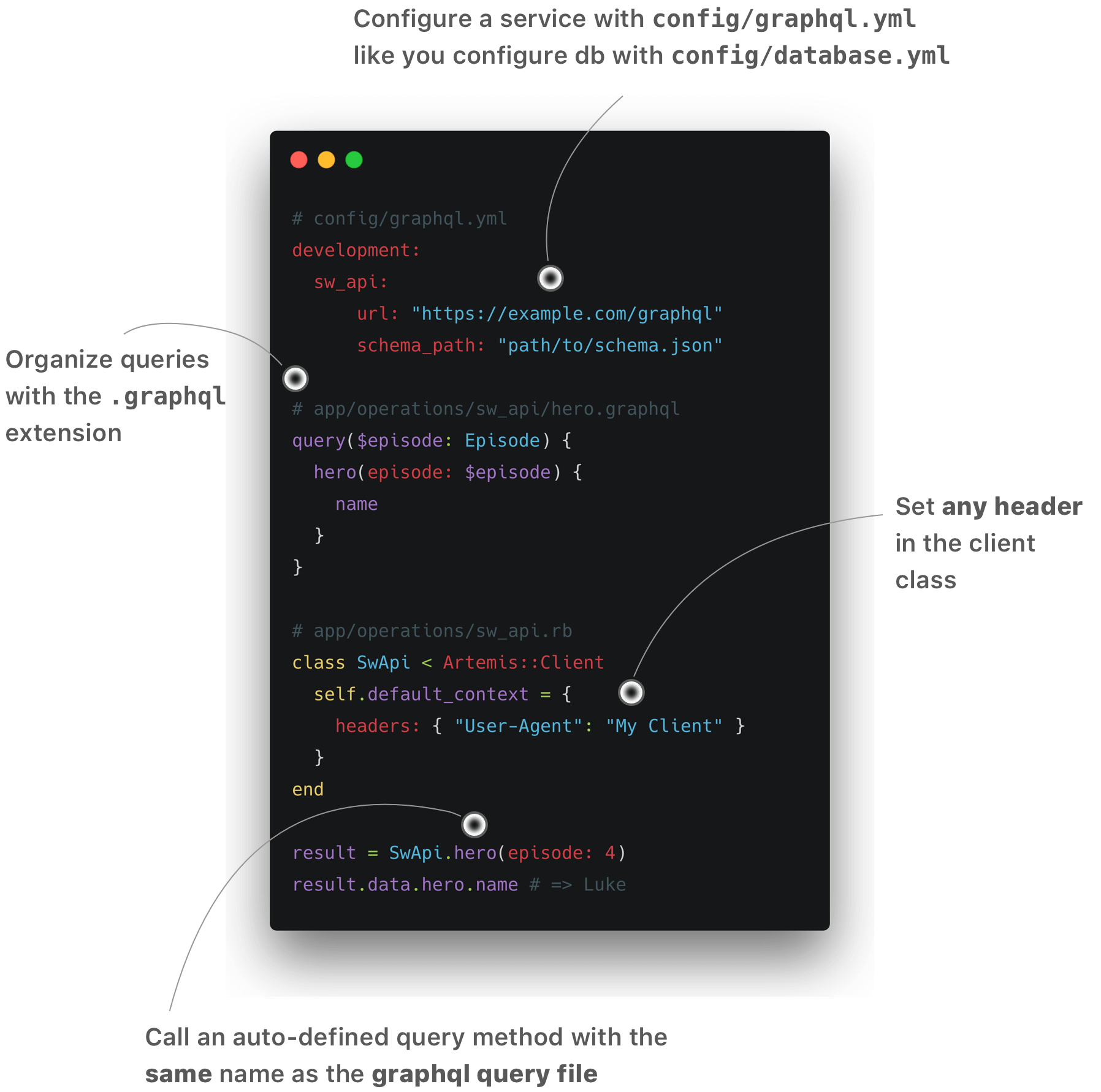
Getting started
Add this line to your application's Gemfile:
gem 'artemis'
Once you run bundle install on your Rails app, run the install command:
$ rails g artemis:install artsy https://metaphysics-production.artsy.net/

# or if you need to specify the `--authorization` header:
$ rails g artemis:install github https://api.github.com/graphql --authorization 'token ...'
Generating your first query
Artemis comes with a query generator. For exmaple, you could use the query generator to generate a query stub for artist:
$ rails g artemis:query artist
Then this will generate:
# app/operations/artist.graphql
query($id: String!) {
  artist(id: $id) {
    # Add fields here...
  }
}
Then you could call the class method that has the matching name artist:
Artsy.artist(id: "pablo-picasso")
# => makes a GraphQL query that's in app/operations/artist.graphql
You can also specify a file name:
$ rails g artemis:query artist artist_details_on_artwork
# => generates app/operations/artist_details_on_artwork.graphql
Then you can make a query in artist_details_on_artwork.graphql with:
Artsy.artist_details_on_artwork(id: "pablo-picasso")
The convention
Artemis assumes that the files related to GraphQL are organized in a certain way. For example, a service that talks to Artsy's GraphQL API could have the following structure:
├──app/operations
│   ├── artsy
│   │   ├── _artist_fragment.graphql
│   │   ├── artwork.graphql
│   │   ├── artist.graphql
│   │   └── artists.graphql
│   └── artsy.rb
├──config/graphql.yml
├──test/fixtures/graphql
│   └── artsy
│       ├── artwork.yml
│       ├── artist.yml
│       └── artists.yml
└──vendor/graphql/schema/artsy.json
Fragments
Fragments are defined in defined in a standard way in a file named _artwork_fragment.graphql with the standard convention:
fragment on Artwork {
  id,
  name,
  artist_id
  # other artwork fields here
}
The way of calling an Artemis fragment on other queries or models is with a Rails convention. Let us suppose we have the Artist model and its corresponding artwork. The way of nesting or calling the artwork on the artist model would look like this:
fragment on Artist {
  id,
  name,
  artworks {
    ...Artsy::ArtworkFragment
  }
}
Where Artsy is the name of the folder/module.
Callbacks
You can use the before_execute callback to intercept outgoing requests and the after_execute callback to observe the
response. A common operation that's done in the before_execute hook is assigning a token to the header:
class Artsy < Artemis::Client
  before_execute do |document, operation_name, variables, context|
    context[:headers] = {
      Authorization: "token ..."
    }
  end
end
Here the :headers key is a special context type. The hash object assigned to the context[:headers] will be sent as
the HTTP headers of the request.
Another common thing when receiving a response is to check if there's any error in the response and throw and error accordingly:
class Artsy < Artemis::Client
  after_execute do |data, errors, extensions|
    raise "GraphQL error: #{errors.to_json}" if errors.present?
  end
end
Multi domain support
Services like Shopify provide
a different endpoint per customer (e.g.
https://{shop}.myshopify.com). In order to switch the endpoint on a per-request basis, you will have to use the
:multi_domain adapter. This is a wrapper adapter that relies on an actual HTTP adapter such as :net_http and
:curb so that e.g. it can maintain multiple connections for each endpoint if necessary. This could be configured
as shown below:
default: &default
  # Specify the :multi_domain adapter:
  adapter: :multi_domain

  # Other configurations such as `timeout` and `pool_size` are passed down to the underlying adapter:
  timeout: 10
  pool_size: 25

  # Additional adapter-specific configurations could be configured as `adapter_options`:
  adapter_options:
    # Here you can configure the actual adapter to use. By default, it is set to :net_http. Available adapters are
    # :net_http, :net_http_persistent, :curb, and :test. You can not nest the use of the `:multi_domain` adapter.
    adapter: :net_http

development:
  shopify:
    <<: *default

...
Upon making a request you will also have to specify the url option:
# Makes a request to https://myawesomeshop.myshopify.com:
Shopify.with_context(url: "https://myawesomeshop.myshopify.com").product(id: "...")
Configuration
You can configure the GraphQL client using the following options. Those configurations are found in the
config/graphql.yml.
| Name | Required? | Default | Description |
| ------------- | --------- | ------------| ----------- |
| adapter | No | :net_http | The underlying client library that actually makes an HTTP request. See Adapters for available options.
| pool_size | No | 25 | The number of keep-alive connections. The :net_http adapter will ignore this option.
| schema_path | No | See above | The path to the GrapQL schema. Setting an empty value to this will force the client to download the schema upon the first request.
| timeout | No | 10 | HTTP timeout set for the adapter in seconds. This will be set to both read_timeout and write_timeout and there is no way to configure them with a different value as of writing (PRs welcome!)
| url | Yes | N/A | The URL for the GraphQL endpoint.
Adapters
There are four adapter options available. Choose the adapter that best fits on your use case.
| Adapter | Protocol | Keep-alive | Performance | Dependencies |
| ---------------------- | ------------------------ | ----------- | ----------- | ------------ |
| :curb | HTTP/1.1, HTTP/2 | Yes | Fastest | [curb 0.9.6+][curb]<br>[libcurl 7.64.0+][curl]<br>[nghttp2 1.0.0+][nghttp]
| :net_http (default) | HTTP/1.1 only | No | Slow | None
| :net_http_persistent | HTTP/1.1 only | Yes | Fast | [net-http-persistent 3.0.0+][nhp]
| :multi_domain | See multi domain support
| :test | See Testing
Third-party adapters
This is a comminuty-maintained adapter. Want to add yours? Send us a pull request!
| Adapter | Description |
| ---------------------- | ------------|
| :net_http_hmac | provides a new Adapter for the Artemis GraphQL ruby client to support HMAC Authentication using ApiAuth. |
Writing your own adapter
When the built-in adapters do not satisfy your needs, you may want to implement your own adapter. You could do so by following the steps below. Let's implement the :net_http_hmac adapter as an example.
-
Define
NetHttpHmacAdapterunder theArtemis::Adaptersnamespace and implement the#executemethod:# lib/artemis/adapters/net_http_hmac_adapter.rb module Artemis::Adapters class NetHttpHmacAdapter def execute(document:, operation_name: nil, variables: {}, context: {}) # Makes an HTTP request for GraphQL query. end end end -
Load the adapter in
config/initializers/artemis.rb(or any place that gets loaded before Rails runs initializers):require 'artemis/adapters/net_http_hmac_adapter' -
Specify the adapter name in
config/graphql.yml:default: &default adapter: :net_http_hmac
Rake tasks
Artemis also adds a useful rake graphql:schema:update rake task that downloads the GraphQL schema using the
Introspection query.
graphql:schema:update
Downloads and saves the GraphQL schema.
| Option Name | Description |
| ------------------ | ------------|
| SERVICE | Service name the schema is downloaded from.|
| AUTHORIZATION | HTTP Authorization header value used to download the schema with.|
Examples
$ rake graphql:schema:update
# => downloads schema from the service. fails if there are multiple services in config/graphql.yml.

$ rake graphql:schema:update SERVICE=github AUTHORIZATION="token ..."
# => downloads schema from the `github` service using the HTTP header "AU
Related Skills
node-connect
345.4kDiagnose OpenClaw node connection and pairing failures for Android, iOS, and macOS companion apps
frontend-design
104.6kCreate distinctive, production-grade frontend interfaces with high design quality. Use this skill when the user asks to build web components, pages, or applications. Generates creative, polished code that avoids generic AI aesthetics.
openai-whisper-api
345.4kTranscribe audio via OpenAI Audio Transcriptions API (Whisper).
qqbot-media
345.4kQQBot 富媒体收发能力。使用 <qqmedia> 标签,系统根据文件扩展名自动识别类型(图片/语音/视频/文件)。
