
MyLinearLayout
MyLayout is a powerful iOS UI framework implemented by Objective-C. It integrates the functions with Android Layout,iOS AutoLayout,SizeClass, HTML CSS float and flexbox and bootstrap. So you can use LinearLayout,RelativeLayout,FrameLayout,TableLayout,FlowLayout,FloatLayout,PathLayout,GridLayout,LayoutSizeClass to build your App 自动布局 UIView UITableView UICollectionView RTL
Install / Use
/learn @youngsoft/MyLinearLayoutREADME









MyLayout
MyLayout is a simple and easy objective-c framework for iOS view layout. MyLayout provides some simple functions to build a variety of complex interface. It integrates the functions including: Autolayout and SizeClass of iOS, five layout classes of Android, float and flex-box and bootstrap of HTML/CSS. The MyLayout's Swift version are named: TangramKit
 Chinese (Simplified): 中文说明
Usage
- There is a container view S which width is 100 and height is wrap to all subviews height. there are four subviews A,B,C,D arranged from top to bottom.
- Subview A's left margin is 20% width of S, right margin is 30% width of S, height is equal to width of A.
- Subview B's left margin is 40, width is filled in to residual width of S,height is 40.
- Subview C's width is filled in to S, height is 40.
- Subview D's right margin is 20, width is 50% width of S, height is 40
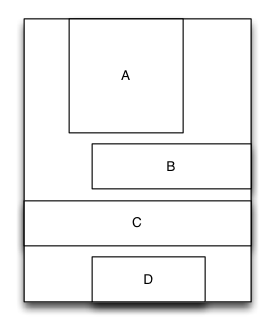
    MyLinearLayout *S = [MyLinearLayout linearLayoutWithOrientation:MyOrientation_Vert];
    S.subviewSpacing = 10;
    S.widthSize.equalTo(@100);

    UIView *A = UIView.new;
    A.leftPos.equalTo(@0.2);
    A.rightPos.equalTo(@0.3);
    A.heightSize.equalTo(A.widthSize);
    [S addSubview:A];

    UIView *B = UIView.new;
    B.leftPos.equalTo(@40);
    B.widthSize.equalTo(@60);
    B.heightSize.equalTo(@40);
    [S addSubview:B];

    UIView *C = UIView.new;
    C.leftPos.equalTo(@0);
    C.rightPos.equalTo(@0);
    C.heightSize.equalTo(@40);
    [S addSubview:C];

    UIView *D = UIView.new;
    D.rightPos.equalTo(@20);
    D.widthSize.equalTo(S.widthSize).multiply(0.5);
    D.heightSize.equalTo(@40);
    [S addSubview:D];
Performance comparison
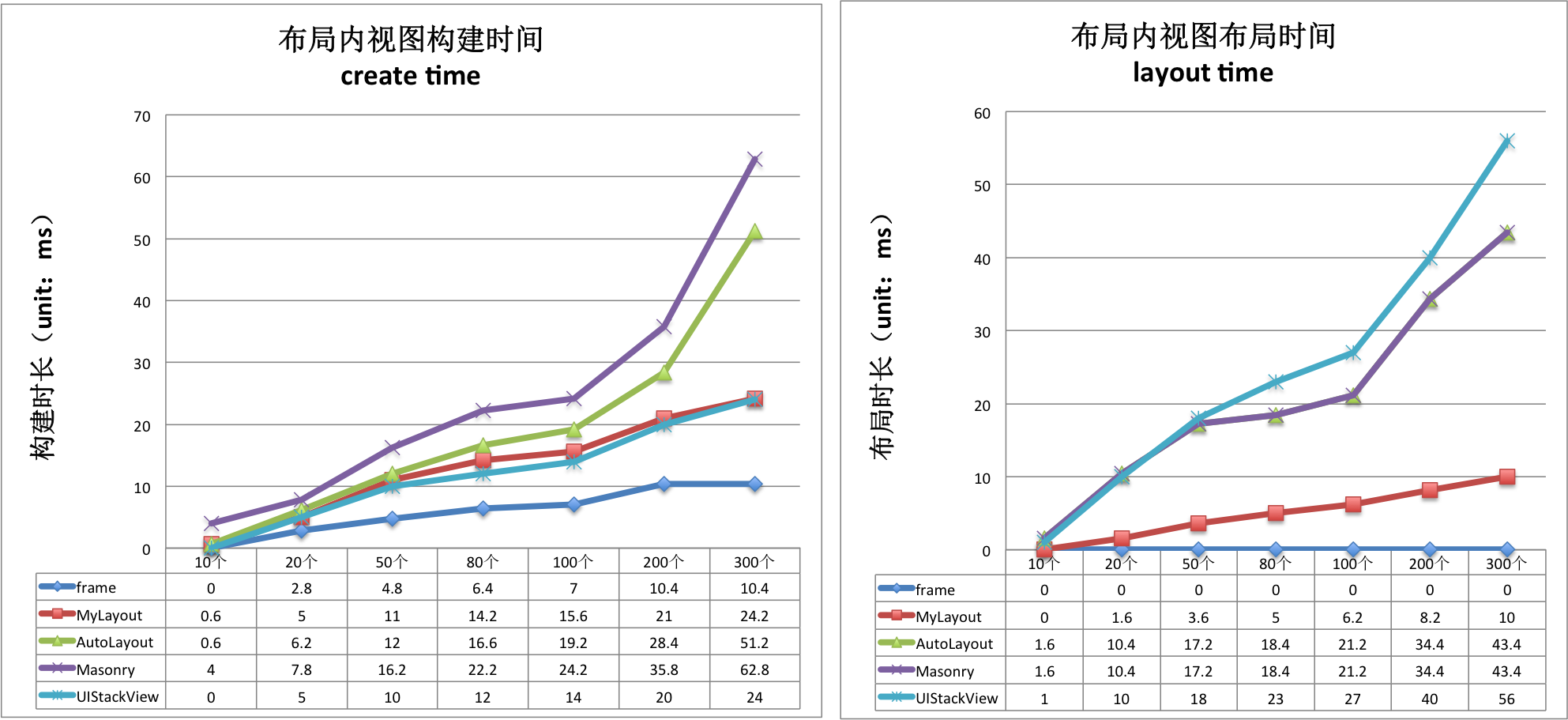
create time(ms)/per subview|Frame|MyLayout|AutoLayout|Masonry|UIStackView -----|-------|---------|------|------|--------- MyLinearLayout|0.08|0.164|0.219|0.304|0.131 MyFrameLayout|0.05|0.149|0.209|0.273|0.131 MyRelativeLayout|0.079|0.182|0.116|0.359|0.131 MyFlowLayout|0.08|0.107|0.198|0.258|0.131 MyFloatLayout|0.044|0.148|0.203|0.250|0.131
layout time(ms)/per subview |Frame|MyLayout|AutoLayout|Masonry|UIStackView
-----|-------|---------|------|------|---------
MyLinearLayout|0|0.049|0.269|0.269|0.272
MyFrameLayout|0|0.042|0.243|0.243|0.272
MyRelativeLayout|0|0.068|0.274|0.274|0.272
MyFlowLayout|0|0.036|0.279|0.279|0.272
MyFloatLayout|0|0.055|0.208|0.208|0.272
Architecture
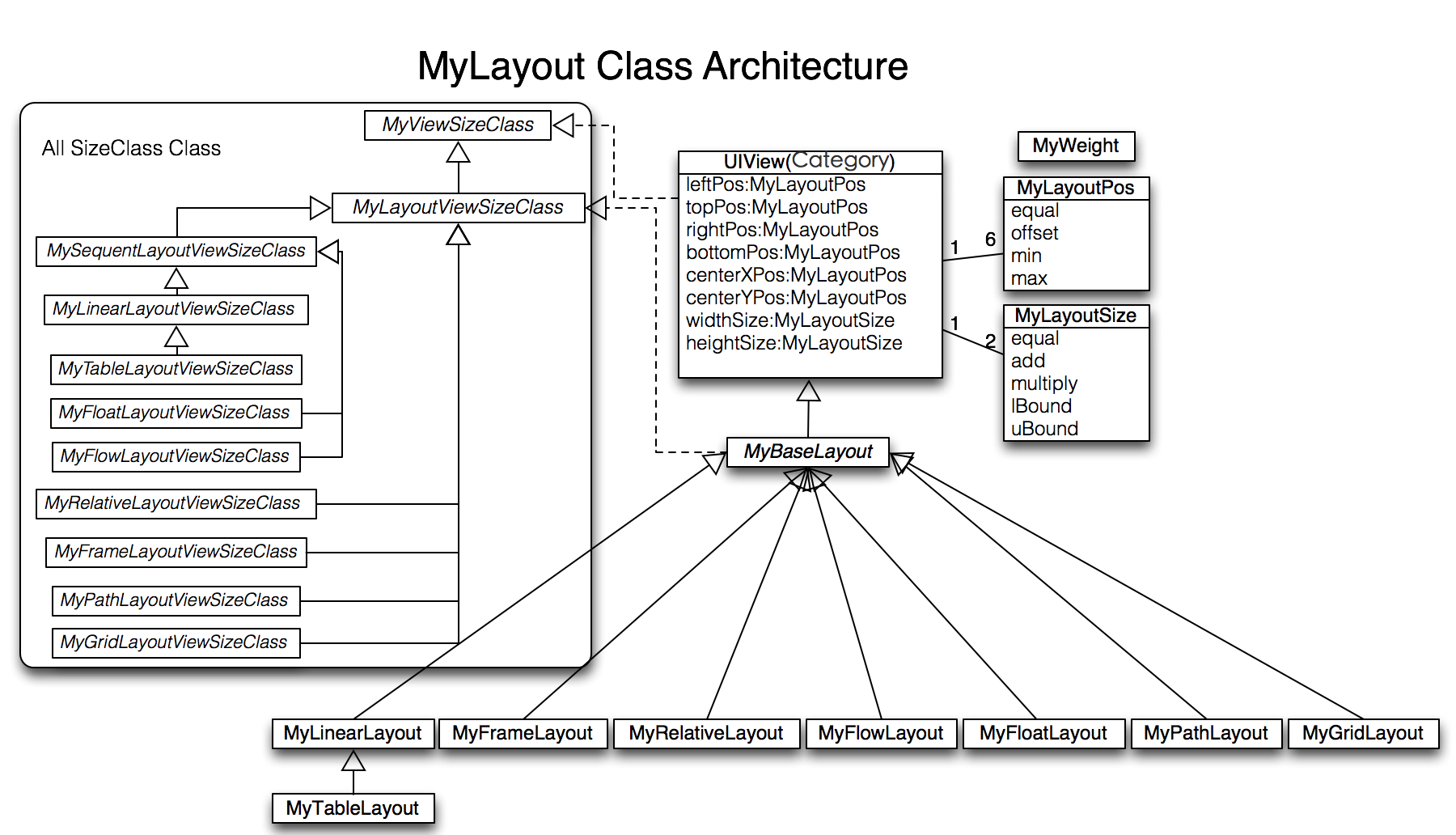
MyLayoutPos
MyLayoutPos is represent to the position of a view. UIView provides six extension variables:leftPos, topPos, bottomPos, rightPos, centerXPos, centerYPos to set view's margin or space distance between self and others. You can use equalTo method to set NSNumber or MyLayoutPos or NSArray<MyLayoutPos*> value. there are six simple variables:myLeft,myTop,myBottom,myRight,myCenterX,myCenterY use to set NSNumber value. eg. A.leftPos.equalTo(@10); <==> A.myLeft = 10;
MyLayoutSize
MyLayoutSize is represent to the size of a view. UIView provides two extension variables:widthSize,heightSize to set view's width and height dimension. You can use equalTo method to set NSNumber or MyLayoutSize or NSArray<MyLayoutSize*> value. there are two simple variables: myWidth, myHeight use to set NSNumber value. eg. A.widthSize.equalTo(@10); <==> A.myWidth = 10;
MyLinearLayout
Is equivalent to: UIStackView of iOS and LinearLayout of Android.
Linear layout is a single line layout view that the subviews are arranged in sequence according to the added order(from top to bottom or from left to right). So the subviews' origin&size constraints are established by the added order. Subviews arranged in top-to-bottom order is called vertical linear layout view, and the subviews arranged in left-to-right order is called horizontal linear layout.
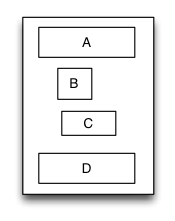
Sample code:
-(void)loadView {
    [super loadView];

    MyLinearLayout *S = [MyLinearLayout linearLayoutWithOrientation:MyOrientation_Vert];
    S.myWidth = 120;
    S.subviewSpacing = 10;

    UIView *A = [UIView new];
    A.myHorzMargin = 5;
    A.myHeight = 40;
    [S addSubview:A];

    UIView *B = [UIView new];
    B.myLeft = 20;
    B.mySize = CGSizeMake(40,40);
    [S addSubview:B];

    UIView *C = [UIView new];
    C.myRight = 40;
    C.mySize = CGSizeMake(50,40);
    [S addSubview:C];

    UIView *D = [UIView new];
    D.myHorzMargin = 10;
    D.myHeight = 40;
    [S addSubview:D];

    [self.view addSubview:S];
    S.backgroundColor = [UIColor redColor];
    A.backgroundColor = [UIColor greenColor];
    B.backgroundColor = [UIColor blueColor];
    C.backgroundColor = [UIColor orangeColor];
    D.backgroundColor = [UIColor cyanColor];
 }
MyRelativeLayout
Is equivalent to: AutoLayout of iOS and RelativeLayout of Android.
Relative layout is a layout view that the subviews layout and position through mutual constraints.The subviews in the relative layout are not depended to the adding order but layout and position by setting the subviews' constraints.
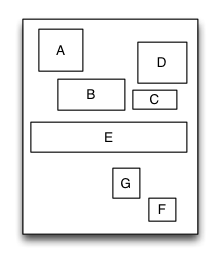
Sample code:
-(void)loadView {
    [super loadView];

    MyRelativeLayout *S = [MyRelativeLayout new];
    S.widthSize.equalTo(@170);
    S.heightSize.equalTo(@280);

    UIView *A = [UIView new];
    A.leftPos.equalTo(@20);
    A.topPos.equalTo(@20);
    A.widthSize.equalTo(@40);
    A.heightSize.equalTo(A.widthSize);
    [S addSubview:A];

    UIView *B = [UIView new];
    B.leftPos.equalTo(A.centerXPos);
    B.topPos.equalTo(A.bottomPos).offset(10);
    B.widthSize.equalTo(@60);
    B.heightSize.equalTo(A.heightSize);
    [S addSubview:B];

    UIView *C = [UIView new];
    C.leftPos.equalTo(B.rightPos).offset(10);
    C.bottomPos.equalTo(B.bottomPos);
    C.widthSize.equalTo(@40);
    C.heightSize.equalTo(B.heightSize).multiply(0.5);
    [S addSubview:C];

    UIView *D = [UIView new];
    D.bottomPos.equalTo(C.topPos).offset(10);
    D.rightPos.equalTo(@15);
    D.heightSize.equalTo(A.heightSize);
    D.widthSize.equalTo(D.heightSize);
    [S addSubview:D];

    UIView *E = [UIView new];
    E.centerYPos.equalTo(@0);
    E.centerXPos.equalTo(@0);
    E.heightSize.equalTo(@40);
    E.widthSize.equalTo(S.widthSize).add(-20);
    [S addSubview:E];
    //.. F, G

    [self.view addSubview:S];
    S.backgroundColor = [UIColor redColor];
    A.backgroundColor = [UIColor greenColor];
    B.backgroundColor = [UIColor blueColor];
    C.backgroundColor = [UIColor orangeColor];
    D.backgroundColor = [UIColor cyanColor];
    E.backgroundColor = [UIColor magentaColor];
}
MyFrameLayout
Is equivalent to: FrameLayout of Android.
Frame layout is a layout view that the subviews can be overlapped and gravity in a special location of the superview.The subviews' layout position&size is not depended to the adding order and establish dependency constraint with the superview. Frame layout devided the vertical orientation to top,vertical center and bottom, while horizontal orientation is devided to left,horizontal center and right. Any of the subviews is just gravity in either vertical orientation or horizontal orientation.
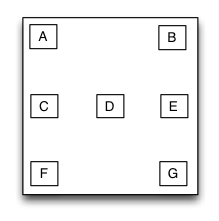
Sample code:
 -(void)loadView {
    [super loadView];

    MyFrameLayout *S = [MyFrameLayout new];
    S.mySize = CGSizeMake(320,500);

    UIView *A = [UIView new];
    A.mySize = CGSizeMake(40,40);
    [S addSubview:A];

    UIView *B = [UIView new];
    B.mySize = CGSizeMake(40,40);
    B.myRight = 0;
    [S addSubview:B];

    UIView *C = [UIView new];
    C.mySize = CGSizeMake(40,40);
    C.myCenterY = 0;
    [S addSubview:C];

    UIView *D = [UIView new];
    D.mySize = CGSizeMake(40,40);
    D.myCenter = CGPointZero;
    [S addSubview:D];

    //..E,F,G

    [self.view addSubview:S];
    S.backgroundColor = [UIColor redColor];
    A.backgroundColor = [UIColor greenColor];
    B.backgroundColor = [UIColor blueColor];
    C.backgroundColor = [UIColor orangeColor];
    D.backgroundColor = [UIColor cyanColor];
  }
MyTableLayout
Is equivalent to: TableLayout of Android and table of HTML.
Table layout is a layout view that the subviews are multi-row&col arranged like a table. First you must create a rowview and add it to the table layout, then add the s
Related Skills
node-connect
330.3kDiagnose OpenClaw node connection and pairing failures for Android, iOS, and macOS companion apps
frontend-design
81.3kCreate distinctive, production-grade frontend interfaces with high design quality. Use this skill when the user asks to build web components, pages, or applications. Generates creative, polished code that avoids generic AI aesthetics.
openai-whisper-api
330.3kTranscribe audio via OpenAI Audio Transcriptions API (Whisper).
commit-push-pr
81.3kCommit, push, and open a PR
