
Selmer
A fast, Django inspired template system in Clojure.
Install / Use
/learn @yogthos/SelmerREADME
Selmer


A fast, Django inspired template system in pure Clojure.
<!-- TOC was generated by Markdown Writer for Atom: https://atom.io/packages/markdown-writer --> <!-- TOC depthTo:2 -->- Installation
- Marginalia documentation
- Usage
- Error Handling
- Variables and Tags
- Filters
- Tags
- Template Inheritance
- Missing values
- Internationalization
- License
Installation
Leiningen

tools.deps
{selmer/selmer {:mvn/version "<version>"}}
Marginalia documentation
Usage
Jump to Filters
Built-in Filters
abbreviate add addslashes block.super capitalize center count count-is currency-format date default default-if-empty double-format email empty? not-empty first take drop drop-last get get-digit hash join json last length length-is linebreaks linebreaks-br linenumbers lower name phone pluralize range rand-nth remove remove-tags safe sort sort-by sort-by-reversed sort-reversed subs sum str title upper urlescape multiply divide round between? replace
Jump to Tags
Built-in Tags
block comment cycle debug if ifequal ifunequal include extends firstof for now safe script style verbatim with
Jump to Template Inheritance
Templates
Selmer templates consist of plain text that contains embedded expression and filter tags. While Selmer is primarily meant for HTML generation, it can be used for templating any text.
Selmer compiles the template files and replaces any tags with the corresponding functions for handling dynamic content. The compiled template can then be rendered given a context map.
For example, if we wanted to render a string containing a name variable we could write the following:
(use 'selmer.parser)

(render "Hello {{name}}!" {:name "Yogthos"})
=>"Hello Yogthos!"
alternatively, it's possible to use string interpolation macro to inject symbols found in the environment directly into the template:
(let [a 1
      b "hello"]
  (<< "{{b|upper}}, {{a}} + {{a}} = 2"))

;;=> "HELLO, 1 + 1 = 2"
To render a file we can call render-file instead:
(use 'selmer.parser)

(render-file "home.html" {:name "Yogthos"})
To list the declared variables in the template:
(known-variables "{{name}}")
=>#{:name}
**Important**
When rendering files Selmer will cache the compiled template. A recompile will be triggered if the last modified timestamp of the file changes. Note that changes in files referenced by the template will not trigger a recompile. This means that if your template extends or includes other templates you must touch the file that's being rendered for changes to take effect.
Alternatively you can turn caching on and off using (selmer.parser/cache-on!) and
(selmer.parser/cache-off!) respectively.
Resource Path
By default the templates are located relative to the ClassLoader URL. If you'd like to set a custom location for the
templates, you can use selmer.parser/set-resource-path! to do that:
(selmer.parser/set-resource-path! "/var/html/templates/")
It's also possible to set the root template path in a location relative to the resource path of the application:
(set-resource-path! (clojure.java.io/resource "META-INF/foo/templates"))
This allows the templates to be refrerenced using include and extends tags without having to specify the full path.
To reset the resource path back to the default simply pass it a nil:
(selmer.parser/set-resource-path! nil)
The application will then look for templates at this location. This can be useful if you're deploying the application as a jar and would like to be able to modify the HTML without having to redeploy it.
Custom Markers
By default, Selmer uses {% and %} to indicate the start and the end of an expression, while using {{ and }} for variables.
This might conflict with clientside frameworks such as AngularJS. In this case you can specify custom tags by passing
a map containing any of the following keys to the parser:
:tag-open
:tag-close
:filter-open
:filter-close
:tag-second
(render "[% for ele in foo %]{{[{ele}]}}[%endfor%]"
        {:foo [1 2 3]}
        {:tag-open \[
         :tag-close \]})
=>"{{1}}{{2}}{{3}}"
Namespaced Keys
Note that if you're using namespaced keys, such as :foo.bar/baz, then you will need to escape the . as follows:
(parser/render "{{foo..bar/baz}}" {:foo.bar/baz "hello"})
Error Handling
Selmer will attempt to validate your templates by default, if you wish to disable validation for any reason it can be done by
calling (selmer.validator/validate-off!).
Whenever an error is detected by the validator an instance of clojure.lang.ExceptionInfo will be thrown.
The exception will contain the following keys:
:type-:selmer-validation-error:error- the error message:error-template- the error page template:template- template file that contains the error:validation-errors- a vector of validation errors
Each error in the :validation-errors vector is a map containing the details specific to the error:
:line- the line on which the error occurred:tag- the tag that contains the error
The template under the :error-template key can be used to render a friendly error page.
Selmer provides a middleware wrapper for this purpose:
(ns myapp.handler
  (:require [selmer.middleware :refer [wrap-error-page]]
            [environ.core :refer [env]]))

...

#(if (env :dev) (wrap-error-page %) %)
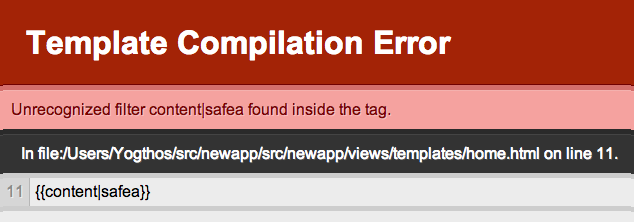
The middleware will render a page like the one below whenever any parsing errors are encountered.
Variables and Tags
Variables are used to inject dynamic content into the text of the template. The values for the variables are looked up in the context map as can be seen in the example above. When a value is missing then an empty string is rendered in its place.
By default variables are defined using the double curly braces: {{myvar}}.
A variables can also be nested data structures, eg:
(render "{{person.name}}" {:person {:name "John Doe"}})
(render "{{foo.bar.0.baz}}" {:foo {:bar [{:baz "hi"}]}})
It works with string keys too. For optimal performance, prefer maps with keyword keys. Occasional string keys are ok, but heavily nested context maps with all string key lookups are slower to render.
(render "{{foo.bar.baz}}" {:foo {:bar {"baz" "hi"}}})
Tags are used to add various functionality to the template such as looping and conditions.
For example, if we wanted to create a list from a collection of items we could use the for tag
as follows:
<ul>
{% for item in items %}
    <li>{{item}}</li>
{% endfor %}
</ul>
Filters
In many cases you may wish to postprocess the value of a variable. For example, you might want to convert
it to upper case, pluralize it, or parse it as a date. This can be done by specifying a filter following the
name of the variable. The filters are separated using the | character.
For example, if we wanted to convert the variable to upper case we could write {{user-name|upper}}. When
rendered with {:user-name "Yogthos"} it would produce YOGTHOS as its output.
Some filters can take parameters. {{domain|hash:"md5"}} rendered with {:domain "example.org"} would produce
1bdf72e04d6b50c82a48c7e4dd38cc69. If a parameter begins with @ it will be looked up in the context map and,
if found, will be replaced with its value before
being passed to the filter function. For example, @foo.bar will treated as (get-in context-map [:foo :bar] "@foo.bar").
Finally, you can easily register custom filters in addition to those already provided. A filter is simply a function that accepts a value and returns its replacement:
(use 'selmer.filters)

(add-filter! :embiginate clojure.string/upper-case)
(render "{{shout|embiginate}}" {:shout "hello"})
=>"HELLO"

(add-filter! :empty? empty?)
(render "{{files|empty?}}" {:files []})
=>"true"
by default the content of the filter will be escaped, if you'd like to make a safe filter then wrap it's body
in a vector with a :safe keyword:
(add-filter! :foo  (fn [x] [:safe (.toUpperCase x)]))

(render "{{x|foo}}" {:x "<div>I'm safe</div>"})
=>"<DIV>I'M SAFE</DIV>"
It is possible to disable escaping (if, for exam
