
Ymuse
GTK client for Music Player Daemon (MPD) written in Go
Install / Use
/learn @yktoo/YmuseREADME




 Ymuse
Ymuse
Ymuse is an easy, functional, and snappy GTK front-end (client) for Music Player Daemon written in Go. It supports both light and dark desktop theme.
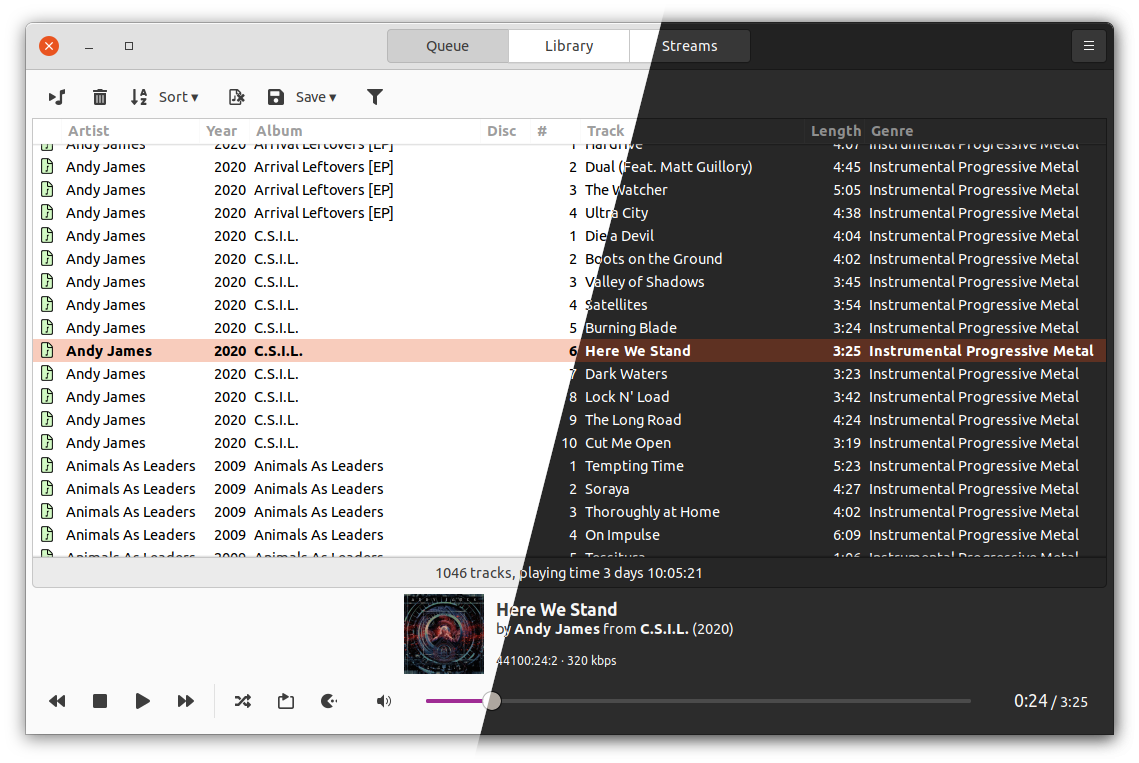
It supports library browsing and search, playlists, streams etc.


Watch Ymuse feature tour video:
Installing
- If your distribution supports snap packages:
sudo snap install ymuse - Ubuntu (as of 23.04) or Debian Testing:
sudo apt install ymuse - A flatpak is available in the Flathub repository.
- Otherwise, you can use a binary package from the Releases section.
Building from source
Requirements
- Go 1.22+
- GTK 3.24+
Getting started
- Install Go
- Make sure you have the following build dependencies installed:
build-essentiallibc6libgtk-3-devlibgdk-pixbuf2.0-devlibglib2.0-devgettext
- Clone the source and compile:
git clone https://github.com/yktoo/ymuse.git
cd ymuse
go generate
go build
- Copy over the icons and localisations:
sudo cp -r resources/icons/* /usr/share/icons/
sudo cp -r resources/i18n/generated/* /usr/share/locale/
sudo update-icon-caches /usr/share/icons/hicolor/*
This will create the application executable ymuse in the project root directory, which you can run straight away.
Packaging
DEB and RPM
Requires goreleaser installed.
goreleaser release --clean --skip=publish [--snapshot]
Flatpak
- Install
flatpakandflatpack-builder flatpak remote-add flathub https://flathub.org/repo/flathub.flatpakrepoflatpak-builder dist /path/to/com.yktoo.ymuse.yml --force-clean --install-deps-from=flathub --repo=/path/to/repository- Optional: make a
.flatpakbundle:flatpak build-bundle /path/to/repository ymuse.flatpak com.yktoo.ymuse
Snap
Install and run snapcraft (it will also ask to install Multipass, which you'll have to confirm):
snap install snapcraft
snapcraft clean # Optional, when rebuilding the snap
snapcraft
License
See COPYING.
Credits
- Icon artwork: Jeppe Zapp
- gotk3
- gompd by Fazlul Shahriar
- go-logging by Örjan Fors
- goreleaser by Carlos Alexandro Becker et al.
TODO
- Automated UI testing.
- Drag’n’drop of multiple tracks in the play queue.
- More settings.
- Multiple MPD connections support.
