
Zack.AnyDBConfigProvider
ConfigurationProvider for loading configuration from any database, including but not limited to SQLServer, MySQL, Oracle, etc.
Install / Use
/learn @yangzhongke/Zack.AnyDBConfigProviderREADME
Zack.AnyDBConfigProvider
ConfigurationProvider for loading configuration from any database in .NET(.NET Core and .NET Framework), including but not limited to SQLServer, MySQL,PostgreSQL, Oracle, etc.
Nuget Package
Zack.AnyDBConfigProvider
Step One:
Create a table for retrieving configuration data from database. The table name is 't_configs', which can be changed to other name with further configuration. The table must have there columns: Id(int, autoincrement), Name(text/varchar/nvarchar), Value(text/varchar/nvarchar).
Multi rows of the same 'Name' value is allowed, and the row with the maximum id value takes effect , which makes version controlling possible. The value of column 'Name' conform with “the flattening of hierarchical data”, for example:
Api:Jwt:Audience
Age
Api:Names:0
Api:Names:1
The 'Value' column is for storing value of the corresponding value associated with that 'Name'. The 'Value' can be plain value, string value of json array, and string value of json object. for example:
["a","d"]
{"Secret": "afd3","Issuer": "youzack","Ids":[3,5,8]}
ffff
3
AttentionBecause the non-double-quoted string is not valid json format, for example, {'Secret': 'afd3'} or{Secret: 'afd3'}, so they are not supported by this library, so please use double-quoted string :{"Secret": "afd3"}
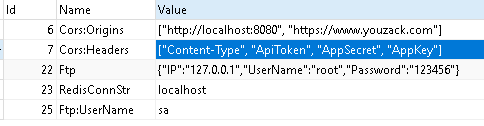
This is the data that will be used in the following demonstrations:
Step Two:
Please create an ASP.NET project. The demo project here is created by Visual Studio 2019 in .NET Core 3.1. However, Zack.AnyDBConfigProvider is not limited to this version. Install the package via NuGet:
Install-Package Zack.AnyDBConfigProvider
Step Three:
While the other configurations in the project can be stored in the database, the connection strings for the database itself still need to be configured separately. It can be configured either in a local configuration file, or through environment variables. Let’s take using a local JSON file for example.
Edit appsettings.json, and add the following codes:
  "ConnectionStrings": {
    "conn1": "Server=127.0.0.1;database=youzack;uid=root;pwd=123456"
  },
Then, insert the following code before webBuilder.UseStartup<Startup>(), which is located in CreateHostBuilder of Program.cs:
webBuilder.ConfigureAppConfiguration((hostCtx, configBuilder)=>{
	var configRoot = configBuilder.Build();
	string connStr = configRoot.GetConnectionString("conn1");
	configBuilder.AddDbConfiguration(() => new MySqlConnection(connStr),reloadOnChange:true,reloadInterval:TimeSpan.FromSeconds(2));
});
In .Net 6, you can use the following code:
var webBuilder = builder.Host;
webBuilder.ConfigureAppConfiguration((hostCtx, configBuilder) => {
    var configRoot = builder.Configuration;
    string connStr = configRoot.GetConnectionString("conn1");
    configBuilder.AddDbConfiguration(() => new MySqlConnection(connStr), reloadOnChange: true, reloadInterval: TimeSpan.FromSeconds(2));
});
The third line of the above code reads the connection string for the database from the local configuration, and the fourth line uses AddDbConfiguration()to add support for Zack.AnyDBConfigProvider. I'm using the MySQL database, so I creates a connection to the MySQL database using “new MySqlConnection(connStr)”. You can change it to any other database management system you want.
The reloadOnChange parameter indicates whether the configuration changes in the database are automatically reloaded. The default value is false. If reloadOnChange is set to true, then every reloadInterval, the program will scan through the database configuration table, if the database configuration data changes, it will reload the configuration data. The AddDbConfiguration() method also supports a tableName parameter as the name of the self-defined configuration table, the default name is T_Configs.
Different versions of the development tools generate different project templates, so the initial code might be different, so the above code may not be put in your project intact, please customize the configuration code according to your own project.
Step Four:
Then we can use the standard approach of .NET to read configurations. For example, if we want to read the data in the above example, we would configure it as follows.
First, please create a FTP class (with properties of IP, Username, Password), and a Cors class (with two string array properties: Origins and Headers). Then, add the following code into ConfigureServices() of Startup.cs.
services.Configure<Ftp>(Configuration.GetSection("Ftp"));
services.Configure<Cors>(Configuration.GetSection("Cors"));
And, use the following code to read configurations:
public class HomeController : Controller
{
	private readonly ILogger<HomeController> _logger;
	private readonly IConfiguration config;
	private readonly IOptionsSnapshot<Ftp> ftpOpt;
	private readonly IOptionsSnapshot<Cors> corsOpt;

	public HomeController(ILogger<HomeController> logger, IConfiguration config, IOptionsSnapshot<Ftp> ftpOpt, IOptionsSnapshot<Cors> corsOpt)
	{
		_logger = logger;
		this.config = config;
		this.ftpOpt = ftpOpt;
		this.corsOpt = corsOpt;
	}

	public IActionResult Index()
	{
		string redisCS = config.GetSection("RedisConnStr").Get<string>();
		ViewBag.s = redisCS;
		ViewBag.ftp = ftpOpt.Value;
		ViewBag.cors = corsOpt.Value;
		return View();
	}
}
Related Skills
feishu-drive
338.0k|
things-mac
338.0kManage Things 3 via the `things` CLI on macOS (add/update projects+todos via URL scheme; read/search/list from the local Things database)
clawhub
338.0kUse the ClawHub CLI to search, install, update, and publish agent skills from clawhub.com
yu-ai-agent
1.9k编程导航 2025 年 AI 开发实战新项目,基于 Spring Boot 3 + Java 21 + Spring AI 构建 AI 恋爱大师应用和 ReAct 模式自主规划智能体YuManus,覆盖 AI 大模型接入、Spring AI 核心特性、Prompt 工程和优化、RAG 检索增强、向量数据库、Tool Calling 工具调用、MCP 模型上下文协议、AI Agent 开发(Manas Java 实现)、Cursor AI 工具等核心知识。用一套教程将程序员必知必会的 AI 技术一网打尽,帮你成为 AI 时代企业的香饽饽,给你的简历和求职大幅增加竞争力。
