
Dbin
📦 Poor man's package manager. +4164 statically linked binaries in the default repos [automated build repos: Go[+34k], Rust[+7k]] (amd64/arm64/riscv)! The easy to use, easy to get, suckless software distribution system.
Install / Use
/learn @xplshn/DbinREADME
dbin: The easy to use, easy to get, suckless software distribution system




dbin is a simple and extensible software distribution system, it is like a package manager, but without the hassle of dependencies nor the bloat, every binary provided is statically linked or otherwise self-contained, dbin itself doesn't even require a database to track installs, all operations are atomic and stateless. Dbin is particularly well-suited for embedded systems, we support both amd64, aarch64 and riscv64.
dbin can also work on systems other than Linux, but given that we don't have repositories offering binaries for other systems, we just don't release dbin for other systems. But, creating a repo and compiling dbin are trivial matters, feel free to start your own dbin repository :)
Why?
"I tend to think the drawbacks of dynamic linking outweigh the advantages for many (most?) applications." – John Carmack. If you are looking for more in-depth arguments, see: dynlib - drewdevault.com, cat-v.ORG - Dynamic Linking
I've seen lots of package manager projects without "packages". What is different about this one?
There are currently 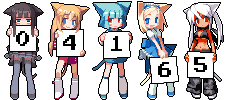 binaries in our repos. They are all statically linked.
Features 
$ dbin --help

 Copyright (c) 2024-2025: xplshn and contributors
 For more details refer to https://github.com/xplshn/dbin

  Synopsis
    dbin [-v|-h] [|list|install|remove|update|run|info|search|] <-args->
  Description:
    The easy to use, easy to get, software distribution system
  Options:
    -h, --help        Show this help message
    -v, --version     Show the version number
    --verbose         Run in extra verbose mode
    --silent          Run in silent mode, only errors will be shown
    --extra-silent    Run in extra silent mode, suppressing all output
  Commands:
    list              List all available binaries
    install, add      Install binaries
    remove, del       Remove binaries
    update            Update binaries binaries installed by dbin
    run               Run a specified binary from cache
    info              Show information about a specific binary OR display installed binaries if called without arguments
    search            Search for a binaries by supplying one or more search terms
  Variables:
    DBIN_INSTALL_DIR   If present, it must contain a valid directory path
    DBIN_CACHE_DIR     If present, it must contain a valid directory path
    DBIN_NOTRUNCATION  If present, and set to ONE (1), string truncation will be disabled
    DBIN_REOWN         If present, and set to ONE (1), it makes dbin update programs that may not have been installed by dbin
    DBIN_NOCONFIG      If present, and set to ONE (1), it makes dbin use its builtin config, it won't create or read an existing one
    DBIN_REPO_URLs     If present, it must contain one or more repository's index file urls separated by ;
  NOTE: Check out `config --show` to see all parameters and their env vars
Examples
    dbin search editor
    dbin install micro.upx
    dbin install lux kakoune aretext shfmt
    dbin --silent install bed && echo "[bed] was installed to $INSTALL_DIR/bed"
    dbin del bed
    dbin del orbiton tgpt lux
    dbin info
    dbin info | grep a-utils | xargs dbin add # install the entire a-utils suite
    dbin info jq
    dbin list --detailed
    dbin tldr gum
    dbin --verbose run curl -qsfSL "https://raw.githubusercontent.com/xplshn/dbin/master/stubdl" | sh -
    dbin --silent run --transparent micro ~/.profile
    dbin run chromium.dwfs.AppBundle "https://www.paypal.com/donate/?hosted_button_id=77G7ZFXVZ44EE" # Donate?
Features
- Ability to install specific versions of binaries (by specifying the Snapshot you want to install of it)
- Ability to use user-curated repositories, as the format for the repository indexes is quite simple
Note that a repo index for
dbincan be in either of these formats:- JSON: For ease of use
- CBOR: To optimize the time it takes to load the repo
- YAML: Because this library is already used for the config, so, why not? The repo indexes can be compressed as .gz or .zst, this is specially useful for large catalogs of programs
- Hooks.
dbincan run a set of commands or a script, whenever a binary of file with a certain extension is being installed. The user can also specify uninstall hooks dbincan work without a config, and it can also run from RAM- No breaking changes. Old releases of
dbindo not break, until after at least 3 releases of newer versions. dbinwill survive even if the upstream repo disappears.dbinhas a repository index that is held in its own repo. And given that the upstream binaries are held & built in GHCR, all build logs and binaries will continue to be usable/downloadable even ifpkgforgedisappears or experiences downtime- The binaries in
dbinare specifically filtered forportability(meaning, they work on older kernel versions, they work onMuslandGlibcand even weird yet wonderful systems like AliceLinux, OasisLinux or FreeBSD (with linuxlator, so that you don't have to set up an Ubuntu chroot to install a Linux web browser and be able to watch DRM content, etc)
What are these optional flags?
Flags that correspond to the run functionality
In the case of --transparent, it runs the program from $PATH and if it isn't available in the user's $PATH it will pull the binary from dbin's repos and run it from cache.
Update arguments:
Update can receive an optional list of specific binaries to update OR no arguments at all. When update receives no arguments it updates everything that is both found in the repos and in your $DBIN_INSTALL_DIR (unless $DBIN_REOWN=1, dbin will not update binaries it didn't install. It won't modify symlinks either).
Arguments of info
When info is called with no arguments, it displays all binaries which were installed by dbin. When it is called with a binary's name as argument, info will display as much information of it as is available.
Example:
$ dbin info micro
Name: micro#github.com.zyedidia.micro
Pkg ID: github.com.zyedidia.micro
Pretty Name: micro
Description: Modern and intuitive terminal-based text editor
Version: HEAD-7d16dcd-250311T073524
Download URL: oci://ghcr.io/pkgforge/bincache/micro/official/micro:HEAD-7d16dcd-250311T073524-x86_64-linux
Size: 14 MB
B3SUM: b6f32b2b8ff4b5abad126c4d0d466549f91c12eedafbc9826d0673b91d10eea9
SHA256: 3a9278b2be59a8c1fd87647f65d0cfcb9c707e823713045e93af183610ef8102
Build Date: 2025-03-12T03:02:06Z
Build Script: https://github.com/pkgforge/soarpkgs/blob/main/binaries/micro/static.official.source.yaml
Build Log: https://api.ghcr.pkgforge.dev/pkgforge/bincache/micro/official/micro?tag=HEAD-7d16dcd-250311T073524-x86_64-linux&download=micro.log
Rank: 1102
Snapshots: HEAD-9b3f7ff-250119T130748-x86_64-linux [2.0.14]
Arguments of list
list can receive the optional argument --detailed/-d. It will display all binaries + their description
Arguments of search
search can only receive various search terms, if the name of a binary or a description of a binary contains the term, it is shown as a search result.
search can optionally receive a --limit argument, which changes the limit on how many search results can be displayed (default is 90) (you can also put this in your config)
Getting Started
To begin using dbin, simply run one of these commands on your Linux/FreeBSD+Linuxlator system. No additional setup is required. You may also build the project using go build or go install
Use without installing
wget -qO- "https://raw.githubusercontent.com/xplshn/dbin/master/stubdl" | sh -s -- --help
Install to ~/.local/bin
wget -qO- "https://raw.githubusercontent.com/xplshn/dbin/master/stubdl" | sh -s -- --install "$HOME/.local/bin/dbin"
Examples of usage cases of dbin
Inside of a SH script
Whenever you want to pull a specific GNU coreutil, busybox, toybox, etc, insert a bash snippet, use a *fetch tool, etc, you can use dbin for the job! There's also a --transparent flag for run, which will use the users' installed version of the program you want to run, and if it is not found in the $PATH dbin wil
