
Lunet.Extensions.Logging.SpectreConsole
A highly configurable Spectre console logger for Microsoft.Extensions.Logging.
Install / Use
/learn @xoofx/Lunet.Extensions.Logging.SpectreConsoleREADME
Lunet.Extensions.Logging.SpectreConsole


[!WARNING]
This repository is now archived. I’ve moved to XenoAtom.Logging.
A highly configurable Spectre.Console logger for Microsoft.Extensions.Logging.
Features
- Highly configurable
- Simple dependency to
Microsoft.Extensions.Logging/9.0.4+andSpectre.Console/0.50+ - Add log markup methods (e.g
LogInformationMarkup,LogWarningMarkup...) that can take additionalSpectre.Consolerenderable objects.- Compatible with other loggers. Ansi colors will be removed from output.
- Compatible with
netstandard2.0+
Usage
On a logger factory configuration, you can simply configure Spectre console via the extension method configure.AddSpectreConsole()
Example 1
using Lunet.Extensions.Logging.SpectreConsole;
using Microsoft.Extensions.Logging;

// Example1: default layout (Similar to SimpleConsole)
using (var factory = LoggerFactory.Create(configure => configure.AddSpectreConsole()))
{
    var logger = factory.CreateLogger("SampleCategory");
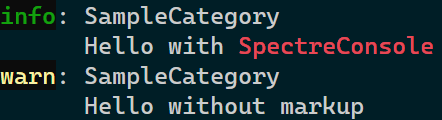
    logger.LogInformationMarkup("Hello with [red]SpectreConsole[/]");
    logger.LogWarning("Hello without markup");
}
It will generate the following log:
Example 2
using Lunet.Extensions.Logging.SpectreConsole;
using Microsoft.Extensions.Logging;

// Example2: Don't add a new line, include timestamp
using (var factory = LoggerFactory.Create(configure =>
           {
               configure.AddSpectreConsole(new SpectreConsoleLoggerOptions()
               {
                   IncludeNewLineBeforeMessage = false,
                   IncludeTimestamp = true,
               });
           }
       ))
{
    var logger = factory.CreateLogger("SampleCategory");
    logger.LogInformationMarkup(new EventId(1), "Hello from [red]SpectreConsole[/]");
    logger.LogWarning(new EventId(2), "Hello without markup");
}
It will generate the following log:

Example 3
using Lunet.Extensions.Logging.SpectreConsole;
using Microsoft.Extensions.Logging;
using Spectre.Console;

// Example3: Don't add a new line, include timestamp, log a table
using (var factory = LoggerFactory.Create(configure =>
           {
               configure.AddSpectreConsole(new SpectreConsoleLoggerOptions()
               {
                   IncludeNewLineBeforeMessage = false,
                   IncludeTimestamp = true,
               });
           }
       ))
{

    var table = new Table();
    table.AddColumn("Name");
    table.AddColumn("Spectre?");
    table.AddRow("Microsoft.Extensions.Logging.Console", "⛔");
    table.AddRow("Lunet.Extensions.Logging.SpectreConsole", "✅");

    var logger = factory.CreateLogger("SampleCategory");
    logger.LogInformationMarkup(new EventId(1), "Hello from [red]SpectreConsole[/] with a table:", table);
    logger.LogWarning(new EventId(2), "Hello without markup");
}
It will generate the following log:

Configuration
You can configure the way a log line will be displayed via SpectreConsoleLoggerOptions:
| Property | Type | Description |
|-----------------------------------|------------------------|-------------|
| LogLevel | LogLevel | The minimum log level to log. Default is Information
| ConfigureConsole | Action<IAnsiConsole> | A callback to allow to configure the console once created from ConsoleSettn
| ConsoleSettings | AnsiConsoleSettings | The settings of the console.
| IncludeTimestamp | bool | A boolean indicating if the log should include a timestamp. Default is false.
| TimestampFormat | string | The formatting string for the timestamp. Default is yyyy/MM/dd HH:mm:ss.fff.
| EventIdFormat | string | The formatting string for the EventId. Default is ####.
| CultureInfo | CultureInfo | The culture used for formatting. Default is invariant.
| IncludeLogLevel | bool | A boolean indicating if the log should include the log level. Default is true.
| IncludeCategory | bool | A boolean indicating if the log should include the log category. Default is true.
| IncludeEventId | bool | A boolean indicating if the log should include the log event id. Default is true.
| IncludeNewLineBeforeMessage | bool | A boolean indicating if the log should include a new line right before the message. Default is true<.
| IndentAfterNewLine | bool | A boolean indicating if the log should indent on new lines. Default is true.
| UseFixedIndent | bool | A boolean indicating if the log should use a fix indent on new lines instead of the automatic indent. Default is false<.
| FixedIndent | int | The fixed indent level if UseFixedIndent is true.
| LogException | bool | A boolean indicating whether to log exceptions to the output. Default is false.
| SingleLine | bool | A boolean indicating if the log message should be emitted on a single line. Default is false. Note that if IncludeNewLineBeforeMessage, a new line will still be emitted before the log message.
| GetLogTimeStamp | delegate | The callback to get the log timestamp. Default is Datetime.Now.
| Formatter | delegate | The formatter used to format the datetime, log level, event id and category.
| TimestampFormatter | delegate | The formatter for the timestamp of a log.
| LogLevelFormatter | delegate | The formatter for the log level.
| EventIdFormatter | delegate | The formatter for the log event id.
| CategoryFormatter | delegate | The formatter for the log category.
In addition, log filtering rules can be added to appsettings.json using the category "SpectreConsole"
License
This software is released under the BSD-Clause 2 license.
Author
Alexandre Mutel aka xoofx.
