
Pathprober
Probe and discover HTTP pathname using brute-force methodology and filtered by specific word or 2 words at once
Install / Use
/learn @xchopath/PathproberREADME
pathprober
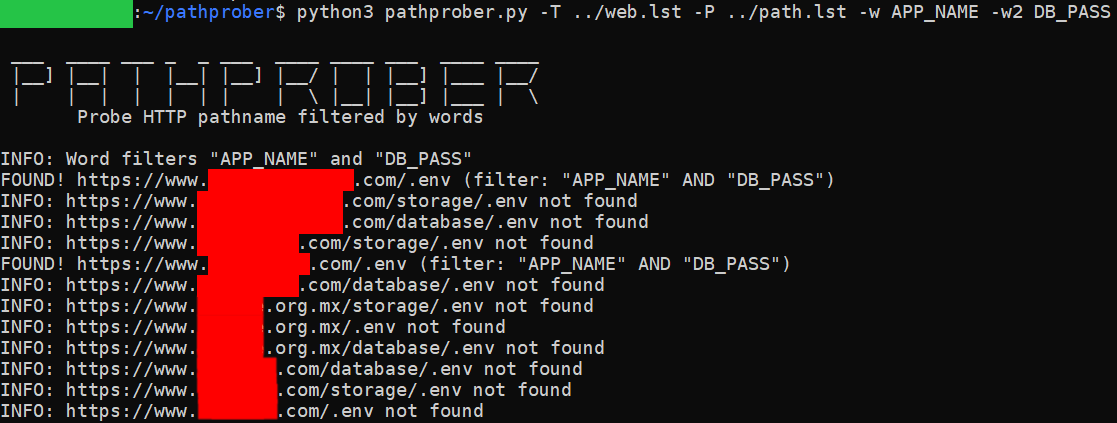
Probe and discover HTTP pathname using brute-force methodology and filtered by specific word or 2 words at once.


Purpose
Brute-forcing website directories or HTTP pathname and validate using HTTP response code is not relevant anymore. This tool will help you to perform a penetration test, because it could validate the directories using specific-word or 2 words at once and the results will more accurate.
It will help you to find:
- Web administrator/login panel
- Credential in some paths
- Third-party token
- Etc
Installation
git clone https://github.com/xchopath/pathprober
cd pathprober/
Requirements
pip3 install -r requirements.txt
Support
- Multiple URL targets (in a file separated by newline) or single URL target
- Multiple paths (in a file separated by newline) or single path
- 1 word or 2 words (filter)
- Save valid results to another file
- Multi-threading
Sample usage
Multiple target, multiple path, and multiple words:
python3 pathprober.py -T target.txt -P path.txt -w "APP_NAME" -w2 "DB_PASSWORD"
Single target, multiple path, and single word:
python3 pathprober.py -t https://redacted.com/ -P path.txt -w "APP_NAME"
Multiple target, single path, multiple words, and save output to file:
python3 pathprober.py -T target.txt -p /.env -w "APP_NAME" -w2 "TWILIO" -o output.txt
Need more help?
bash:~/pathprober$ python3 pathprober.py --help

 ___  ____ ___ _  _ ___  ____ ____ ___  ____ ____
 |__] |__|  |  |__| |__] |__/ |  | |__] |___ |__/
 |    |  |  |  |  | |    |  \ |__| |__] |___ |  \
       Probe HTTP pathname filtered by words

usage: pathprober.py [-h] [-t https://example.com] [-p pathname] [-T target.txt] [-P path.txt] [-w Word] [-w2 Word] [-o output.txt]

PathProber - Probe and discover HTTP pathname using brute-force methodology and filtered by specific word or 2 words at once

optional arguments:
  -h, --help            show this help message and exit
  -t https://example.com
                        Single website target
  -p pathname           Single pathname
  -T target.txt         Multiple target separated by newline
  -P path.txt           Multiple pathname separated by newline
  -w Word               A word that you want to find in a path
  -w2 Word              A second word that you want to find in a path
  -o output.txt         Save the results to file
Contributors
- @xchopath (from @zerobyte-id)
Related Skills
claude-opus-4-5-migration
99.2kMigrate prompts and code from Claude Sonnet 4.0, Sonnet 4.5, or Opus 4.1 to Opus 4.5
model-usage
344.4kUse CodexBar CLI local cost usage to summarize per-model usage for Codex or Claude, including the current (most recent) model or a full model breakdown. Trigger when asked for model-level usage/cost data from codexbar, or when you need a scriptable per-model summary from codexbar cost JSON.
TrendRadar
50.5k⭐AI-driven public opinion & trend monitor with multi-platform aggregation, RSS, and smart alerts.🎯 告别信息过载,你的 AI 舆情监控助手与热点筛选工具!聚合多平台热点 + RSS 订阅,支持关键词精准筛选。AI 智能筛选新闻 + AI 翻译 + AI 分析简报直推手机,也支持接入 MCP 架构,赋能 AI 自然语言对话分析、情感洞察与趋势预测等。支持 Docker ,数据本地/云端自持。集成微信/飞书/钉钉/Telegram/邮件/ntfy/bark/slack 等渠道智能推送。
mcp-for-beginners
15.7kThis open-source curriculum introduces the fundamentals of Model Context Protocol (MCP) through real-world, cross-language examples in .NET, Java, TypeScript, JavaScript, Rust and Python. Designed for developers, it focuses on practical techniques for building modular, scalable, and secure AI workflows from session setup to service orchestration.
