
DragListView
Drag and drop to reorder items in a list, grid or board for Android. Based on RecyclerView. Also supports swiping items in a list.
Install / Use
/learn @woxblom/DragListViewREADME
This library is no longer maintained, feel free to fork and continue the development if you want. Thanks!
DragListView
DragListView can be used when you want to be able to re-order items in a list, grid or a board. It also supports horizontal swiping of items in a list.
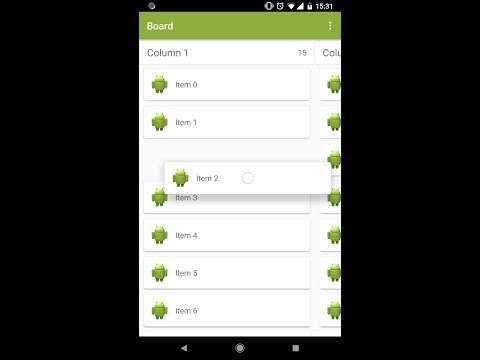
YouTube demo video<br>
Features
- Re-order items in a list, grid or board by dragging and dropping with nice animations.
- Add custom animations when the drag is starting and ending.
- Get a callback when a drag is started and ended with the position.
- Disable and enable drag and drop
- Swipe list items
Download lib with gradle
repositories {
    mavenCentral()
}

dependencies {
    compile 'com.github.woxthebox:draglistview:1.7.3'
}
Add this to proguard rules, otherwise animations won't work correctly
-keep class com.woxthebox.draglistview.** { *; }
Usage
List and Grid layouts are used as example in the sample project.
For list and grid view use the DragListView.
    mDragListView = (DragListView) view.findViewById(R.id.drag_list_view);
    mDragListView.setDragListListener(new DragListView.DragListListener() {
        @Override
        public void onItemDragStarted(int position) {
            Toast.makeText(getActivity(), "Start - position: " + position, Toast.LENGTH_SHORT).show();
        }

        @Override
        public void onItemDragEnded(int fromPosition, int toPosition) {
            if (fromPosition != toPosition) {
                Toast.makeText(getActivity(), "End - position: " + toPosition, Toast.LENGTH_SHORT).show();
            }
        }
    });

    mDragListView.setLayoutManager(new LinearLayoutManager(getActivity()));
    ItemAdapter listAdapter = new ItemAdapter(mItemArray, R.layout.list_item, R.id.image, false);
    mDragListView.setAdapter(listAdapter);
    mDragListView.setCanDragHorizontally(false);
If you want to prevent to drag or drop items at certain positions the use these methods.
    // Prevents to drop an item in the top or bottom
    mDragListView.setCanNotDragAboveTopItem(true);
    mDragListView.setCanNotDragBelowBottomItem(true);

    // Set a callback so you can decide exactly which positions that is allowed to drag from and drop to
    mDragListView.setDragListCallback(new DragListView.DragListCallbackAdapter() {
        @Override
        public boolean canDragItemAtPosition(int dragPosition) {
            // Can not drag item at position 5
            return dragPosition != 5;
        }

        @Override
        public boolean canDropItemAtPosition(int dropPosition) {
            // Can not drop item at position 2
            return dropPosition != 2;
        }
    });
A custom drag item can be provided to change the visual appearance of the dragging item.
    mDragListView.setCustomDragItem(new MyDragItem(getActivity(), R.layout.list_item));

    private static class MyDragItem extends DragItem {
        public MyDragItem(Context context, int layoutId) {
            super(context, layoutId);
        }

        @Override
        public void onBindDragView(View clickedView, View dragView) {
            CharSequence text = ((TextView) clickedView.findViewById(R.id.text)).getText();
            ((TextView) dragView.findViewById(R.id.text)).setText(text);
            dragView.setBackgroundColor(dragView.getResources().getColor(R.color.list_item_background));
        }
    }
If you don't want items to automatically reorder when dragging you can disable that with the following code. This will do so you can swap two items instead of reorder one item as you are dragging. You should add a drop target drawable when using this feature to make it clear which item you will swap with when dropping. You can add either a background or foreground drop target drawable, or both.
    mDragListView.setDisableReorderWhenDragging(true);
    mDragListView.setDropTargetDrawables(myBackgroundDrawable, myForeGroundDrawable);
To enable swiping of list items then just set a swipe listener on the DragListView.
    mDragListView.setSwipeListener(new ListSwipeHelper.OnSwipeListenerAdapter() {
        @Override
        public void onItemSwipeStarted(ListSwipeItem item) {
            mRefreshLayout.setEnabled(false);
        }

        @Override
        public void onItemSwipeEnded(ListSwipeItem item, ListSwipeItem.SwipeDirection swipedDirection) {
            mRefreshLayout.setEnabled(true);

            // Swipe to delete on left
            if (swipedDirection == ListSwipeItem.SwipeDirection.LEFT) {
                Pair<Long, String> adapterItem = (Pair<Long, String>) item.getTag();
                int pos = mDragListView.getAdapter().getPositionForItem(adapterItem);
                mDragListView.getAdapter().removeItem(pos);
            }
        }
    });
It is also possible to configure how the swiping should work on individual items by changing supported SwipeDirection and the SwipeInStyle.
    public enum SwipeDirection {
        LEFT, RIGHT, LEFT_AND_RIGHT, NONE
    }

    public enum SwipeInStyle {
        APPEAR, SLIDE
    }

    swipeItem.setSwipeInStyle(SwipeInStyle.SLIDE)
    swipeItem.setSupportedSwipeDirection(SwipeDirection.LEFT)
The swipe item is setup from xml like this. Check out the sample app to see the details. The important thing here is to set the swipeViewId, leftViewId and rightViewId.
  <com.woxthebox.draglistview.swipe.ListSwipeItem
      xmlns:android="http://schemas.android.com/apk/res/android"
      xmlns:app="http://schemas.android.com/apk/res-auto"
      android:layout_width="match_parent"
      android:layout_height="wrap_content"
      app:leftViewId="@+id/item_left"
      app:rightViewId="@+id/item_right"
      app:swipeViewId="@+id/item_layout">
      ...
      ...
  </com.woxthebox.draglistview.swipe.ListSwipeItem>
For a board, which is a number of horizontal columns with lists, then use BoardView. For an example with custom animations check the sample code. A custom header view can also be used when adding a column. This can be any view and will be attached to the top of the column. There are many different features that you can toggle on the BoardView as seen below. You read about them in the java doc of each method.
    mBoardView = (BoardView) view.findViewById(R.id.board_view);
    mBoardView.setSnapToColumnsWhenScrolling(true);
    mBoardView.setSnapToColumnWhenDragging(true);
    mBoardView.setSnapDragItemToTouch(true);
    mBoardView.setSnapToColumnInLandscape(false);
    mBoardView.setColumnSnapPosition(BoardView.ColumnSnapPosition.CENTER);
    mBoardView.setBoardListener(new BoardView.BoardListener() {
        @Override
        public void onItemDragStarted(int column, int row) {
            Toast.makeText(getActivity(), "Start - column: " + column + " row: " + row, Toast.LENGTH_SHORT).show();
        }

        @Override
        public void onItemDragEnded(int fromColumn, int fromRow, int toColumn, int toRow) {
            if (fromColumn != toColumn || fromRow != toRow) {
                Toast.makeText(getActivity(), "End - column: " + toColumn + " row: " + toRow, Toast.LENGTH_SHORT).show();
            }
        }

        @Override
        public void onItemChangedPosition(int oldColumn, int oldRow, int newColumn, int newRow) {
            Toast.makeText(mBoardView.getContext(), "Position changed - column: " + newColumn + " row: " + newRow, Toast.LENGTH_SHORT).show();
        }

        @Override
        public void onItemChangedColumn(int oldColumn, int newColumn) {
            TextView itemCount1 = (TextView) mBoardView.getHeaderView(oldColumn).findViewById(R.id.item_count);
            itemCount1.setText("" + mBoardView.getAdapter(oldColumn).getItemCount());
            TextView itemCount2 = (TextView) mBoardView.getHeaderView(newColumn).findViewById(R.id.item_count);
            itemCount2.setText("" + mBoardView.getAdapter(newColumn).getItemCount());
        }

        @Override
        public void onFocusedColumnChanged(int oldColumn, int newColumn) {
            Toast.makeText(getContext(), "Focused column changed from " + oldColumn + " to " + newColumn, Toast.LENGTH_SHORT).show();
        }

        @Override
        public void onColumnDragStarted(int position) {
            Toast.makeText(getContext(), "Column drag started from " + position, Toast.LENGTH_SHORT).show();
        }

        @Override
        public void onColumnDragChangedPosition(int oldPosition, int newPosition) {
            Toast.makeText(getContext(), "Column changed from " + oldPosition + " to " + newPosition, Toast.LENGTH_SHORT).show();
        }

        @Override
        public void onColumnDragEnded(int position) {
            Toast.makeText(getContext(), "Column drag ended at " + position, Toast.LENGTH_SHORT).show();
        }
    });
    mBoardView.setBoardCallback(new BoardView.BoardCallback() {
        @Override
        public boolean canDragItemAtPosition(int column, int dragPosition) {
            // Add logic here to prevent an item to be dragged
            return true;
        }

        @Override
        public boolean canDropItemAtPosition(int oldColumn, int oldRow, int newColumn, int newRow) {
            // Add logic here to prevent an item to be dropped
            return true;
        }
    });
    ...
    mBo
Related Skills
openhue
347.0kControl Philips Hue lights and scenes via the OpenHue CLI.
sag
347.0kElevenLabs text-to-speech with mac-style say UX.
weather
347.0kGet current weather and forecasts via wttr.in or Open-Meteo
tweakcc
1.6kCustomize Claude Code's system prompts, create custom toolsets, input pattern highlighters, themes/thinking verbs/spinners, customize input box & user message styling, support AGENTS.md, unlock private/unreleased features, and much more. Supports both native/npm installs on all platforms.
