Qsqlite
Quick SQLite Cmd/Script Tools
Install / Use
/learn @wolf71/QsqliteREADME
Quick SQLite Cmd/Script Tools
Introduction to Qsqlite
- A command line tool to interactively manipulate sqlite or mysql databases for fast data processing, analysis, statistics, and graphical presentation;
- General sqlite operations (just like the sqlite cmd tools); can be easily manipulated using sql statements.
- Support sqlite and sqlite memory database (:memory:), support mysql database, copy whole mysql database to sqlite, copy tables between different sqlite databases.
- Load csv/tsv or json data, or export select results to csv/tsv file.
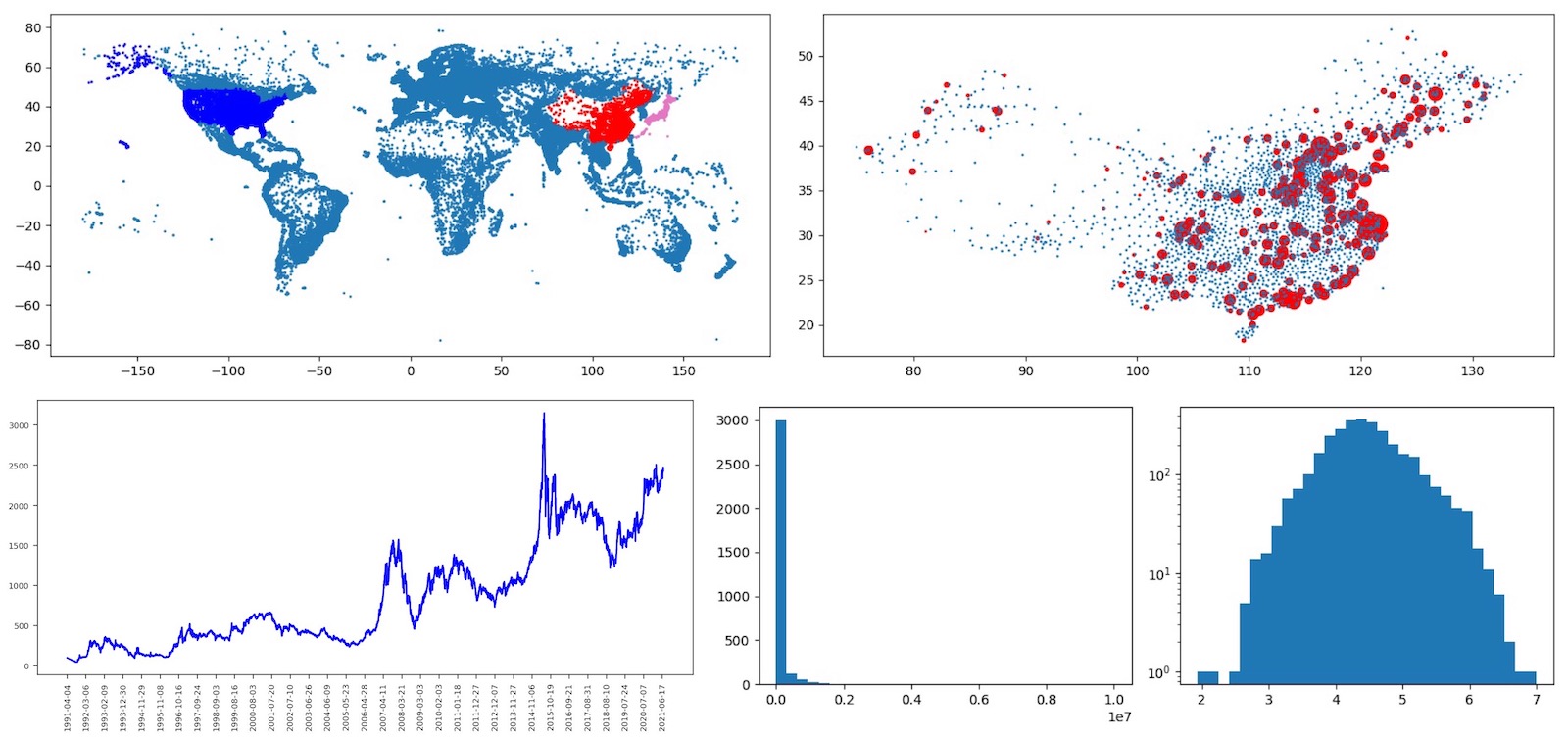
- Draw graphs with the data obtained by select statement, such as: scatter, line, histogram (distribution), violin graph (based on data distribution).
- Provide a series of extended sqlite functions, supporting regular operations, text-based sum operations, Chinese ID recognition, and other extended functions.
- A script interpreter that can write script files to batch and automate a series of operations to achieve data processing, analysis, and report output;
- Provides sql statement-based scripting capabilities, allowing you to automate batch operations and output the results to an html file.
- Support extended loop/lend with nested support for loop statements, which is convenient for some operations that can't be handled by sql statements.
- Support for formatting the output syntax of select results, to facilitate the generation of formatted reports.
- The graphs are saved inline in the output html file, so that only a single html file can be sent to show all the graphs in their entirety.
- A Web Server and Job Server that can provide web or scheduled task processing backend services based on a database;
- The web server can be scripted to enable data query and data insertion operations to facilitate the interaction of data statistics and analysis results in a browser-based.
- Job server can be defined by scripts to achieve regular data cleaning, data aggregation, analysis, report generation, and output as local files or send emails to share the results.
- A python libray Can be imported using: from Qsqlite import Qexec , for use in python or jupyter/ipython ipynb notebooks using Qexec(cmds) calls, cmds can be a string with newlines,including a series of commands or a command.
- Summary: With sqlite's powerful sql syntax and high performance, Qsqlite hopes to enable you to efficiently use the power of sqlite and sql syntax to quickly organize, analyze, aggregation, and show result; and collaborate with Excel by exporting/importing csv/tsv files when needed to achieve greater efficiency.
Quickly start
- install
- pip3 install Qsqlite , and then open cmd/Term enter: Qsqlite
- Copy Qsqlite.py to local directory, and then open cmd/Term python Qsqlite.py (please using python3)
- Now you can enter sql cmd or ? get help or copy below code to try it.
  # open memory database
  open :memory:
  # create demo table
  create table demo(ID text, Name text, Age integer)
  # using loop/lend insert data to table
  loop [ [i, i**2] for i in range(1,100) ]
  insert into demo values ('_^1_', 'User_^1_', _^2_)
  lend
  # select data
  info
  select count(*) from demo
  select * from demo limit 10 >[- ID: _@1_, Name: _@2_, Age: _@3_]
  # draw data
  draw l select age from demo; draw ll select id,age from demo
- Try running the demo script file in the demo directory, using the python3 Qsqlite.py script filename to run.
- qloop.txt loop/lend function demo
- qdraw.txt html output and drawing demo (requires two csv files in the demo directory)
- qweb.txt Web server demo
- qjob.txt Job task server demo
- qnotebook.ipynb iPython notebook demo
Qsqlite function
1. Basic database operation functions
- 1.1 Open a SQLite database
- open dbname opens a sqllite database file.
- open :memory: open sqlite memory database file; can use memory database for temporary data processing, transit.
- db show current open database name.
- If the provided file name does not exist, a new database file will be created.
- 1.2 MySQL Database Support
- create a MySQL database connection with mysql dbname server user password
- For example: mysql test 127.0.0.1 root pwd (To set the MySQL port number, use: mysql test 127.0.0.1:3308 root pwd)
- You can set multiple MySQL databases with mysql command and then switch them with open;
- Enter mysql will display currently mysql server list; if none setup, a reminder will show;
- Use open #dbname# to open/switch the MySQL database;
- some MySQL commands
- show databases Lists all databases on the database server
- show tables Lists all tables in the current database
- show keys from tb Lists the indexes contained in a table
- 1.3 Common Commands
- ? Show help info, or ? str search help str.
- clear Clear Screen. (on windows using cls).
- { } Code block support. Allows you to separate code into lines for easy reading and understanding.
     # support sql code block
     {
       select v.a, c.b, info from v, c
         where v.id = c.id and
           c.y > 1000
     }
- info Shows the table information of the currently open database
- info 1 Show index information for the currently open database
- info 2 Show the currently connected MySQL tables (including the number of records and the space occupied by the tables)
- info 3 Show the table structure of the currently connected MySQL with comment information
- dinfo on/off Turn on/off the display of database query debugging information
- ls Lists files in the current directory, supports ls *.db wildcard, easy to filter files
- l List the 12 most recently used operation commands
- la Lists all history commands
- l0 execute the last operation instruction, you can also use the corresponding serial number to execute the previous operation instructions, for example: l3, l22
- l> file Save history to file.
- l< file Load history from file.
- 1.4 Database copy operation
- copy db tableDest select * from tabSource
- is used to copy table data between multiple databases, for example, to copy the contents of the tabSource table in the current database to the tableDest table in the other database.
- Example: Copy the contents of tableA in database A.db to NewA in database B.db
- open A.db
- info 1 , list the database table structure with info, and copy the tableA table structure creation statement
- open B.db , open B database, use the creation statement you just copied to create the NewA table in B database
- open A.db , switch back to database A
- use the [ copy B NewA select * from tableA ] command to copy the tableA table contents of database A to database B NewA table (because of the use of select statement, so you can use where conditions or other ways to filter, organize, and process the data flexibly)
- you can use [ open :memory: ] to open memory database for data transfer and processing; you can also use MySQL database for operation
- dump #mysqldb# sqlitedb
- Copy all tables from mysqldb database to a sqlite database; this command automatically scans the mysql database table structure, creates the table in the sqlite database, and completes the data copy.
- You can use dump #mysqldb# :memory: to copy data to a memory sqlite database
- copy db tableDest select * from tabSource
- 1.5 Query output formatting operations
- >[ ]
- The default select query results are listed automatically without special handling, unless you want to format the output, which can be adjusted with >[ ] after the statement
- For example select * from table >[- ID: @1, Name: @2(@3), Age: @4]
- Here @1 is the first column returned by the select statement, @2 is the second column, and so on; if you want to display the order number (starting from 1 and increasing automatically), you can use @0, for example: select * from table limit 10 >[ @0 ID: @1, Name: @2]
- >[ ]
- 1.6 Execute Script
- exec file Execute file script, etc: exec qTest.txt will execute qTest.txt script.
2 import and export data
- 2.1 Load csv/tsv file using: loadcsv file.csv tab01
- Load the file.csv file, create the table tab01 automatically according to the csv column, and insert the data.
- tab01 ( "r1" text, "r2" text, "r3" text )
- If the csv file contains table header information (the first line of the csv file), the parameter 1 can be added at the end for correct identification.
- using: loadcsv filecsv tab01 1
- Set the table information based on the csv table header information, for example
- tab01 ( "ID" text, "Name" text, "Tele" text )
- loadcsv also support tsv format file (\t split type), just using: loadcsv test.tsv tb1 1
- loadcsv also support bioinformatics .maf/.vcf/.sam/.gtf/.gff/.gpd/.gct file, just using: loadcsv test.maf tb1 or loadcsv test.vcf tb1
- loadcsv support gzip / zip file, Judging by file extension; etc: test.tsv.gz / test.gtf.gz / test.csv.zip
- Load the file.csv file, create the table tab01 automatically according to the csv column, and insert the data.
- 2.2 Exporting csv/tsv
- Use >csv csv/tsv file name 0/1 (The parameter 0/1 indicates whether to export the table header information. 0-no export, 1-export)
- if file name has xxx.tsv will export tsv format, otherwise csv format.
- if file name has xxx.tsv.gz or xxx.csv.gz , will be exported in the corresponding format and gzip compressed.
- Example: select * from table1 where n=300 >csv user1.csv 1 , export the contents of a table to user1.csv file by select and export the table header information (the first line of the exported csv file is the database table header information)
- Example: select ID, name, sum(val) as val from tab1 group by ID limit 100 >csv test1.csv 0
- 2.3 Load Simply json data, Example
Related Skills
feishu-drive
345.4k|
things-mac
345.4kManage Things 3 via the `things` CLI on macOS (add/update projects+todos via URL scheme; read/search/list from the local Things database)
clawhub
345.4kUse the ClawHub CLI to search, install, update, and publish agent skills from clawhub.com
codebase-memory-mcp
1.1kHigh-performance code intelligence MCP server. Indexes codebases into a persistent knowledge graph — average repo in milliseconds. 66 languages, sub-ms queries, 99% fewer tokens. Single static binary, zero dependencies.