
RedGuard
RedGuard is a C2 front flow control tool,Can avoid Blue Teams,AVs,EDRs check.
Install / Use
/learn @wikiZ/RedGuardREADME




English | 中文文档

0x00 Introduction
What is RedGuard
RedGuard, a derivative tool based on command and control (C2) front flow control technology, has a lighter design, efficient traffic interaction, and reliable compatibility with development in the go programming language.As cyber attacks are constantly evolving , the red and blue team exercises become progressively more complex, RedGuard is designed to provide a better C2 channel hiding solution for the red team, that provides the flow control for the C2 channel, blocks the "malicious" analysis traffic, and better completes the entire attack task.
RedGuard is a C2 front flow control tool that can avoid Blue Team, AVS, EDR, Cyberspace Search Engine detects.
When is RedGuard Used?
- In the offensive and defensive exercise, the investigators attempting to do cyber attribution analyze C2 traffic connected to the attackers with the situational awareness platform
- Prevent malware sample analysis by identifying cloud sandboxes based on JA3 fingerprint libraries
- Block malicious requests to perform replay attacks and achieve obfuscation online
- Restrict access requests by whitelisting in the case of the IP of the connecting server is specified
- Prevent the scanning and identification of C2 facilities by cyberspace mapping technology, and redirect or intercept the traffic of scanning probes
- Supports front flow control for multiple C2 servers, and can realize domain fronting, load balancing connection to achieve hidden effect
- Able to perform regional host connection restriction according to the attribution of IP address by requesting IP reverse lookup API interface
- Resolve strong features of staged checksum8 rule path parsing without changing the source code.
- Analyze blue team traceability behavior through interception logs of target requests, which can be used to track peer connection events/issues
- With the ability to customize the time period for legal interaction of samples to realize the function of only conducting traffic interaction during the working time period
- Malleable C2 Profile parser capable of validating inbound HTTP/S requests strictly against malleable profile and dropping outgoing packets in case of violation (supports Malleable Profiles 4.0+)
- Built-in blacklist of IPV4 addresses for a large number of devices, honeypots, and cloud sandboxes associated with cybersecurity vendors to automatically intercept redirection request traffic
- SSL certificate information and redirect URLs that can interact with samples through custom tools to avoid the fixed signature of tool traffic
- ..........
0x01 Install
You can directly download and use the compiled version, or you can download the go package remotely for independent compilation and execution.
git clone https://github.com/wikiZ/RedGuard.git
cd RedGuard
# You can also use upx to compress the compiled file size
go build -ldflags "-s -w" -trimpath
# Give the tool executable permission and perform initialization operations
chmod +x ./RedGuard&&./RedGuard
0x02 Configuration Description
initialization
As shown in the figure below, Set executable permissions and initialize RedGuard. The first run will generate a configuration file in the current user home directory to achieve flexible function configuration. Configuration file name: .RedGuard_CobaltStrike.ini.
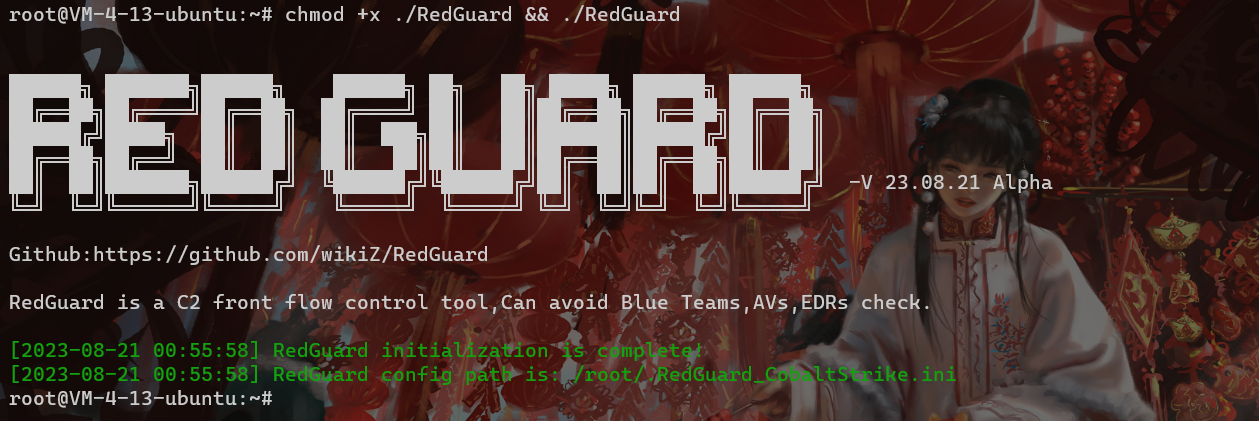
Configuration file content:

The configuration options of cert are mainly for the configuration information of SSL certificate encrypted HTTPS communication between the sample and the C2 front infrastructure. The proxy is mainly used to configure the control options in the reverse proxy traffic. The specific use will be explained in detail below.
The SSL certificate encrypted HTTPS communication will be generated in the cert-rsa/ directory under the directory where RedGuard is executed. You can start and stop the basic functions of the tool by modifying the configuration file (the serial number of the certificate is generated according to the timestamp , don't worry about being associated with this feature).If you want to use your own certificate,Just rename them to ca.crt and ca.key.
openssl x509 -in ca.crt -noout -text

Random TLS JARM fingerprints are updated each time RedGuard is started to prevent this from being used to authenticate C2 infrastructure.

In the case of using your own certificate, modify the HasCert parameter in the configuration file to true to prevent normal communication problems caused by the incompatibility of the CipherSuites encryption suite with the custom certificate caused by JARM obfuscation randomization.
# Whether to use the certificate you have applied for true/false
HasCert      = false
Forged TLS certificates
When deploying a Domain fronting to hide C2 traffic, the accelerated domain name does not have HTTPS certificate information by default. This is obviously problematic, so you need to pay attention to configuring the certificate when configuring the domain name. This is also the default basis for determining whether the sample is domain front-end traffic.

[^Tencent Cloud]: Content Delivery Network Certificate Configuration
I believe that everyone will have some questions after reading this, How to obtain the configured certificate? If you use your own application for the certificate, it will not meet the anonymity effect we expect. Here you can use the cloned certificate for configuration. Taking Tencent Cloud as an example, it was found in the test that it would not verify the validity of the custom uploaded certificate. We can use the same certificate as the actual site of the accelerated domain name to forge it. Although the forged certificate cannot communicate when replacing the default certificate of CS under normal circumstances, it will not verify the validity when deployed on the cloud service provider CDN full-site acceleration and RedGuard, and C2 interactive traffic can communicate normally.
The following is the existing project address on Github
https://github.com/virusdefender/copy-cert
Although the certificate on the front-end traffic side of the sample domain has been resolved, from the perspective of large-scale network mapping, our C2 server is still exposed to the outside world and may still be detected and associated with the real C2 server. At this time, RedGuard can be used to modify the fronting default certificate of C2 to achieve anonymity.

[^intelligence information]: TLS Certificates
The above is the effect of the forged certificate of the C2 server. It can be seen that it is credible and not expired in the intelligence of the Threatbook community. The main way to obtain the digital certificate is to extract and update it in real time during sample analysis in the cloud sandbox, but it is obviously not effectively verified. The status value only verifies the expiration time. The certificate trust verification should only be based on whether normal communication can be achieved.
It should be noted that Threatbook intelligence does not mark the SNI and HOST addresses of sample requests with certificate intelligence. This is actually to prevent false positives. I think this is correct. As an important basis for assisting researchers in analysis, threat intelligence is better to be incomplete than to point to the wrong direction, which will cause misjudgment in subsequent analysis. If configuring certificates for full-site acceleration is to forge certificates for communication traffic, then configuring the pre-response certificate of RedGuard C2 is to forge the behavioral characteristics of the real C2 server deployed on the public network to achieve anti-mapping effects, which is very necessary.
Extract the certificate serial number: 55e6acaed1f8a430f9a938c5, and perform HEX encoding to obtain the TLS certificate fingerprint: 26585094245224241434632730821
| IP | Port | Protocol | Service | Country | City | Title | Time | | :------------: | :--: | :------: | :----------: | :-----: | :----: | :-------------------: | :--------: | | 103.211.xx.90 | 443 | https | Apache httpd | China | Suzhou | 百度图片-发现多彩世界 | 2023-08-28 | | 223.113.xx.207 | 443 | https | JSP3 | China | Xuzhou | 403 Forbidden | 2023-08-28 | | 223.112.xx.48 | 443 | https | JSP3 | China | Xuzhou | 403 Forbidden | 2023-08-28 | | 223.113.xx.40 | 443 | https | JSP3 | China | Xuzhou | 403 Forbidden | 2023-08-28 | | 223.113.xx.31 | 443 | https | JSP3 | China |
Related Skills
node-connect
337.3kDiagnose OpenClaw node connection and pairing failures for Android, iOS, and macOS companion apps
frontend-design
83.2kCreate distinctive, production-grade frontend interfaces with high design quality. Use this skill when the user asks to build web components, pages, or applications. Generates creative, polished code that avoids generic AI aesthetics.
openai-whisper-api
337.3kTranscribe audio via OpenAI Audio Transcriptions API (Whisper).
commit-push-pr
83.2kCommit, push, and open a PR
