
BoosterDriver
A step-by-step walkthrough of how to write a Client and a Driver to communicate with each other and boost the priority of a thread.
Install / Use
/learn @whokilleddb/BoosterDriverREADME
Booster
A Proof-of-Code and code walkthrough to demonstrate how to facilitate communication between userland applications and Windows kernel driver. This is a follow-up to my last Windows Kernel development repository where I document my journey into Windows Kernel land - while giving extensive code walkthroughs.
In this repository, we write a Client and a Driver which work together to boost a thread's Base Priority.
Usage
To send a signal to the Driver to increase the base priority of a thread, use the following command:
BoosterClient.exe <Thread ID> <Target Priority>
Walkthrough
This part of the guide walks you through the Driver and Client code to explain the underlying concepts. First, we take a look into the driver itself which explores concepts like Handling Dispatch routines, Major Functions, etc, while the Client covers topics like how to use CreateFile() and WriteFile() to communicate with a driver.
Also, we briefly touch upon IRQs but more upon that in future articles.
References
This article is directly influenced by @zodicon's Windows Internal training and I recommend everyone to check it out.
The Driver
We will be breaking down this section by the different functions which constitute our driver, namely:
DriverEntry()- This serves as an entry point when the driver is loaded by the systemBoosterCreateClose()- This function handles Create/Close dispatch routines issued by the ClientBoosterWrite()- This function handles the Write dispatch routineBoosterUnload()- This function is called when the system unloads our driver
DriverEntry
Looking at the DriverEntry() function, it has the following code:
NTSTATUS DriverEntry(PDRIVER_OBJECT DriverObject, PUNICODE_STRING _RegistryPath) {
  // Set major functions to indicate supported functions
  DriverObject->DriverUnload = BoosterUnload;
  DriverObject->MajorFunction[IRP_MJ_WRITE] = BoosterWrite;
  DriverObject->MajorFunction[IRP_MJ_CREATE] = DriverObject->MajorFunction[IRP_MJ_CLOSE] = BoosterCreateClose;

  // Create a device object for the client to talk to
  PDEVICE_OBJECT device_obj = NULL;
  UNICODE_STRING device_name = RTL_CONSTANT_STRING(L"\\Device\\Booster");
  NTSTATUS status = IoCreateDevice(DriverObject, 0, &device_name, FILE_DEVICE_UNKNOWN, 0, FALSE, &device_obj);
  if (!NT_STATUS(status))	return status;
  device_obj->Flags |= DO_BUFFERED_IO;

  // Create symbolic link
  UNICODE_STRING symlink_name = RTL_CONSTANT_STRING(L"\\??\\Booster");
  status = IoCreateSymbolicLink(&symlink_name, &device_name);
  if (!NT_SUCCESS(status)) {
    IoDeleteDevice(device_obj);
    return status;
  }

  return status;
}
There are three major parts to the function - Setting the major functions to indicate the functions our driver supports, creating a device object for the client to interact with, and finally creating a symbolic link for the client to call CreateFile() on.
The first part of the code sets the necessary function pointers:
- First, set the
DriverUnloadmember of theDriverObjectwhich points to the unload routine. - Then we set the
MajorFunctionmembers. TheMajorFunctionarray contains a list of function pointers that serve as entry points for the Driver's dispatch routines. These indicate the functionalities supported by the driver. In our case, we support three routines:IRP_MJ_CREATE: A routine to deal with requests sent by the client when it tries to open a handle to the Device objectIRP_MJ_CLOSE: A routine to deal with requests sent by the client when it tries to close the handle to the Device objectIRP_MJ_WRITE: A routine to deal with requests sent by the client when it tries to transfer data to the driver using operations likeWriteFile()orNtWriteFile()
For the sake of simplicity, we will point the major functions indicated by IRP_MJ_CREATE and IRP_MJ_WRITE to the same dispatch routine. But, why do we need to specify these functions in the first place? Microsoft Documentation specifies that we need to specify these functions to handle the Create/Close Dispatch routines so that the clients can have a handle for it, and, in turn, uses functions like WriteFile() which need a handle to be passed in as one of the parameters.
Next up, we create a Device for the Client to interact with. We use the RTL_CONSTANT_STRING macro to initialize a UNICODE_STRING with the full path name of the device. We create a device called Booster in the \Device object directory, which is where devices are usually created.
Following that, we use the IoCreateDevice() to go ahead and actually create the device. The parameters passed to this function are as follows:
| Parameter | Value | Description |
| --|--|---|
|PDRIVER_OBJECT DriverObject | DriverObject | Pointer to the driver object for the caller. In our case, we get the pointer as a parameter for the DriverEntry() function.|
|ULONG DeviceExtensionSize | 0 | Specifies the driver-determined number of bytes to be allocated for the device extension of the device object. This allows us to attach extra information to the devices, in case we need to. In our case, we dont have any such special requirements.|
|PUNICODE_STRING DeviceName | &device_name |Pointer to the null-terminated device name Unicode string.|
|DEVICE_TYPE DeviceType|FILE_DEVICE_UNKNOWN| Indicates the type of device - since we do not confront to the usual predefined driver types, we specify FILE_DEVICE_UNKNOWN.|
|ULONG DeviceCharacteristics| 0| Specifies additional information about the driver's device - since we have no special permissions, we set it to 0. |
|BOOLEAN Exclusive |FALSE| Specifies if the device object represents an exclusive device. Most drivers set this value to FALSE. |
|PDEVICE_OBJECT *DeviceObject |&device_obj| Pointer to a variable that receives a pointer to the newly created DEVICE_OBJECT structure. |
If the function runs successfully - we should have a valid Device object. This address to this device can also be found at the first index of the linked list pointed by the DeviceObject field of DriverObject.
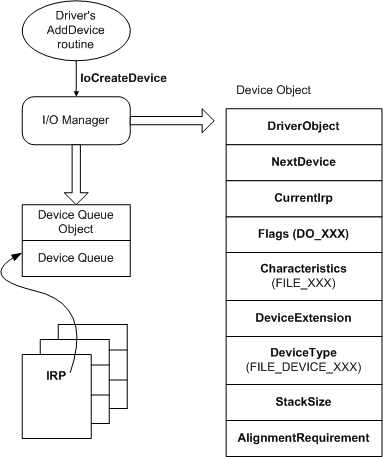
Next up, we also create a symbolic link for the device so that the client can easily access it. We use the IoCreateSymbolicLink() function to create a symbolic link to our device called \??\Booster where \?? is a "fake" prefix that refers to per-user Dos devices.
However, if the IoCreateSymbolicLink() fails, we need to delete the previously created device object as if the DriverEntry``()`` function returns something other than STATUS_SUCCESS`, the unload routine is never called - so we don't have any opportunities to clean up after ourselves. If we do not delete the device object - we will leak the device object.
Finally, we return the valid NTSTATUS from the function signifying that the DriverEntry routine was complete.
BoosterCreateClose
This function is responsible for handling Create/Close dispatch routines - and has the following code:
NTSTATUS BoosterCreateClose(PDEVICE_OBJECT _DriverObject, PIRP Irp) {
  ...
  ...

  Irp->IoStatus.Status = STATUS_SUCCESS;
  Irp->IoStatus.Information = 0;
  IoCompleteRequest(Irp, 0);
  return STATUS_SUCCESS;
}
The function takes in two parameters - the pointer to the DriverObject, and a pointer to an IRP structure that represents an I/O request packet. For our driver, we won't need anything fancy - so we would just let the operation complete successfully. To do it, we need to do a couple of things:
- First, we set the final status of the request as
STATUS_SUCCESSby assigning that value to theStatuscomponent of theIO_STATUS_BLOCK. TheIO_STATUS_BLOCKstructure stores status and information before callingIoCompleteRequest()[more on that in a moment]. - Next up, we set the
Informationfield ofIoStatusto indicate that we do not pass any additional information to the Client. For example, for Write/Read, this field can define the number of bytes that were written/read and return that information to the caller. Since for Create/Close we don't have any such requirements, we set it to 0. - Finally, we complete the request with
IoCompleteRequest()indicating that we have completed the I/O request and returned the IRP to the I/O manager. We pass two parameters to the function - theIrpstructure pointer as well as the value for the priority boost for the original thread that requested the operation. Since we complete the IRP synchronously, we set it to 0. - Finally, we return the same status as the one we put in
Irp->IoStatus.Status. However, we cannot just something likereturn Irp->IoStatus.Statusbecause after theIoCompleteRequest()function is called - the value stored in the address might change.
With this, we complete the function allowing us to open and close handles to the driver. Onto the next 🚀
BoosterWrite
The code we have written so far can more or less be considered a boiler template - something w
