
Tabi
An accessible Zola theme with search, multi-language support, optional JavaScript, a perfect Lighthouse score, and comprehensive documentation. Crafted for personal websites and blogs.
Install / Use
/learn @welpo/TabiREADME
🌱 tabi
An accessible Zola theme with search, multi-language support, optional JavaScript, a perfect Lighthouse score, and comprehensive documentation. Crafted for personal websites and blogs.
[!TIP] Want to start blogging right away? Use the tabi-start template to get a complete site up and running in minutes.
See a live preview (and the theme's documentation) here.
Explore the Sites Using tabi section to see real-world applications.
tabi (旅, /<span title="/t/: 't' in 'sty'">t</span><span title="/ɐ/: a sound between 'a' in 'sofa' and 'u' in 'nut'">ɐ</span><span title="/ˈ/: primary stress mark, indicating that the following syllable is pronounced with greater emphasis">ˈ</span><span title="/b/: 'b' in 'cab'">b</span><span title="/i/: 'i' in 'fleece'">i</span>/): Journey.

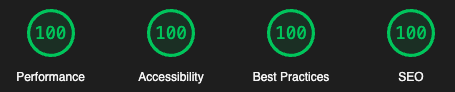
tabi has a perfect score on Google's Lighthouse audit:
Features
- [X] Set any language as default. Set your base site to Chinese, Spanish, French, Hindi… or any other supported language. The theme's interface will be translated accordingly.
- [X] Integration with remote repositories on GitHub, GitLab, Gitea & Codeberg for commit history and showing the site source.
- [X] Series support for creating sequential content like tutorials, courses, and multi-part stories.
- [X] Dark and light themes. Defaults to the OS setting, with a switcher in the navigation bar.
- [X] Thorough documentation. See Mastering tabi Settings: A Comprehensive Guide.
- [X] Perfect Lighthouse score (Performance, Accessibility, Best Practices and SEO).
- [X] Comprehensive multi-language support. Add as many languages as you wish.
- [X] Support for comments using giscus, utterances, Hyvor Talk, or Isso.
- [X] Indieweb ready with microformats, hcard and webmentions support.
- [X] Code syntax highlighting with colours based on Catppuccin Frappé.
- [X] Mermaid support to create diagrams and charts with text.
- [X] Local search with an accessible, multi-lingual interface.
- [X] Custom Twitter card and automatic Open Graph tags.
- [X] Anonymous like buttons powered by iine.
- [X] KaTeX support for mathematical notation.
- [X] Stylized and human readable Atom feed.
- [X] Stylized and human readable sitemap.
- [X] Mail encoding for spam protection.
- [X] All JavaScript can be fully disabled.
- [X] Customizable Table of Contents.
- [X] Customizable secure headers.
- [X] Copy button for code blocks.
- [X] Quick navigation buttons.
- [X] Custom copyright notice.
- [X] Custom canonical URLs.
- [X] Custom shortcodes.
- [X] Customizable skins.
- [X] Social media cards.
- [X] Responsive design.
- [X] Projects page.
- [X] Archive page.
- [X] Pinned posts.
- [X] Social links.
- [X] Tags.
Installation
[!NOTE] The fastest way to create a new site is to use the tabi-start template. This gives you a complete blog setup with all the essential configuration ready to go.
Manual installation
To add tabi to you existing Zola site:
- Initialize a Git repository in your project directory (if you haven't already):
git init
- Add the theme as a git submodule:
git submodule add https://github.com/welpo/tabi.git themes/tabi
Or clone the theme into your themes directory:
git clone https://github.com/welpo/tabi.git themes/tabi
Required configuration
- Enable the theme in your
config.toml:
theme = "tabi"
- Set a
titlein yourconfig.toml:
title = "Your Site Title"
- Configure code block highlighting in your
config.toml:
[markdown.highlighting]
theme = "catppuccin-frappe"
style = "class"
-
Create a
content/_index.mdfile. This file controls how your home page looks and behaves. Choose one of the following options:Option A: Serve posts from
/:+++ title = "Home" paginate_by = 5 # Show 5 posts per page. +++- This will display posts in
content/with pagination.
Option B: Serve posts from a different path (e.g.,
blog/):+++ title = "Home" # Note we're not setting `paginate_by` here. [extra] section_path = "blog/_index.md" # Where to find your posts. max_posts = 5 # Show 5 posts on the home page. +++- This will display the latest 5 posts from the
blog/section. - Do not set
paginate_byif you choose this option. - Use the full path to the section's
_index.mdfile. Usingsection_path = "blog/"will not work.
- This will display posts in
[!WARNING] Do not set both
paginate_byandsection_pathincontent/_index.md.These settings are mutually exclusive and using both may result in no posts being displayed.
- If you want an introduction section (see screenshot above), add these lines to
content/_index.md:
[extra]
header = {title = "Hello! I'm tabi~", img = "img/main.webp", img_alt = "Your Name" }
The content outside the front matter will be rendered between the header title and the posts listing. In the screenshot above, it's the text that reads "tabi is a fast, lightweight, and modern Zola theme…".
- If you want a multilingual site, you will need to set up each language. In
config.toml, set the title and taxonomies for each language, like:
[languages.es]
title = "~/tabi"
taxonomies = [{name = "tags", feed = true}]
You will need an _index.{language_code}.md per language for each section (e.g. /blog or /projects) that you want
Related Skills
openhue
344.1kControl Philips Hue lights and scenes via the OpenHue CLI.
sag
344.1kElevenLabs text-to-speech with mac-style say UX.
weather
344.1kGet current weather and forecasts via wttr.in or Open-Meteo
tweakcc
1.5kCustomize Claude Code's system prompts, create custom toolsets, input pattern highlighters, themes/thinking verbs/spinners, customize input box & user message styling, support AGENTS.md, unlock private/unreleased features, and much more. Supports both native/npm installs on all platforms.
