
Volute
Raspberry Pi + Nodejs = Speech Robot
Install / Use
/learn @webfansplz/VoluteREADME
volute 是什么?
volute(蜗壳)是一个使用 Raspberry Pi+Node.js 制作的语音助手.
什么是树莓派?


树莓派(英语:Raspberry Pi)是基于 Linux 的单片机电脑,由英国树莓派基金会开发,目的是以低价硬件及自由软件促进学校的基本计算机科学教育。
树莓派每一代均使用博通(Broadcom)出产的 ARM 架构处理器,如今生产的机型内存在 2GB 和 8GB 之间,主要使用 SD 卡或者 TF 卡作为存储媒体,配备 USB 接口、HDMI 的视频输出(支持声音输出)和 RCA 端子输出,内置 Ethernet/WLAN/Bluetooth 网络链接的方式(依据型号决定),并且可使用多种操作系统。产品线型号分为 A 型、B 型、Zero 型和 ComputeModule 计算卡。
简单的说,这是一台可以放到口袋里的电脑!!
什么是 Node.js?

Node.js 是一个能执行 Javascript 的环境,一个事件驱动 I/O 的 Javascript 环境,基于 Google 的 V8 引擎.
什么是人机对话系统 ?

人机对话(Human-Machine Conversation)是指让机器理解和运用自然语言实现人机通信的技术。
对话系统大致可分为 5 个基本模块:语音识别(ASR)、自然语音理解(NLU)、对话管理(DM)、自然语言生成(NLG)、语音合成(TTS)。
- 语音识别(ASR):完成语音到文本的转换,将用户说话的声音转化为语音。
- 自然语言理解(NLU):完成对文本的语义解析,提取关键信息,进行意图识别与实体识别。
- 对话管理(DM):负责对话状态维护、数据库查询、上下文管理等。
- 自然语言生成(NLG):生成相应的自然语言文本。
- 语音合成(TTS):将生成的文本转换为语音。
材料准备
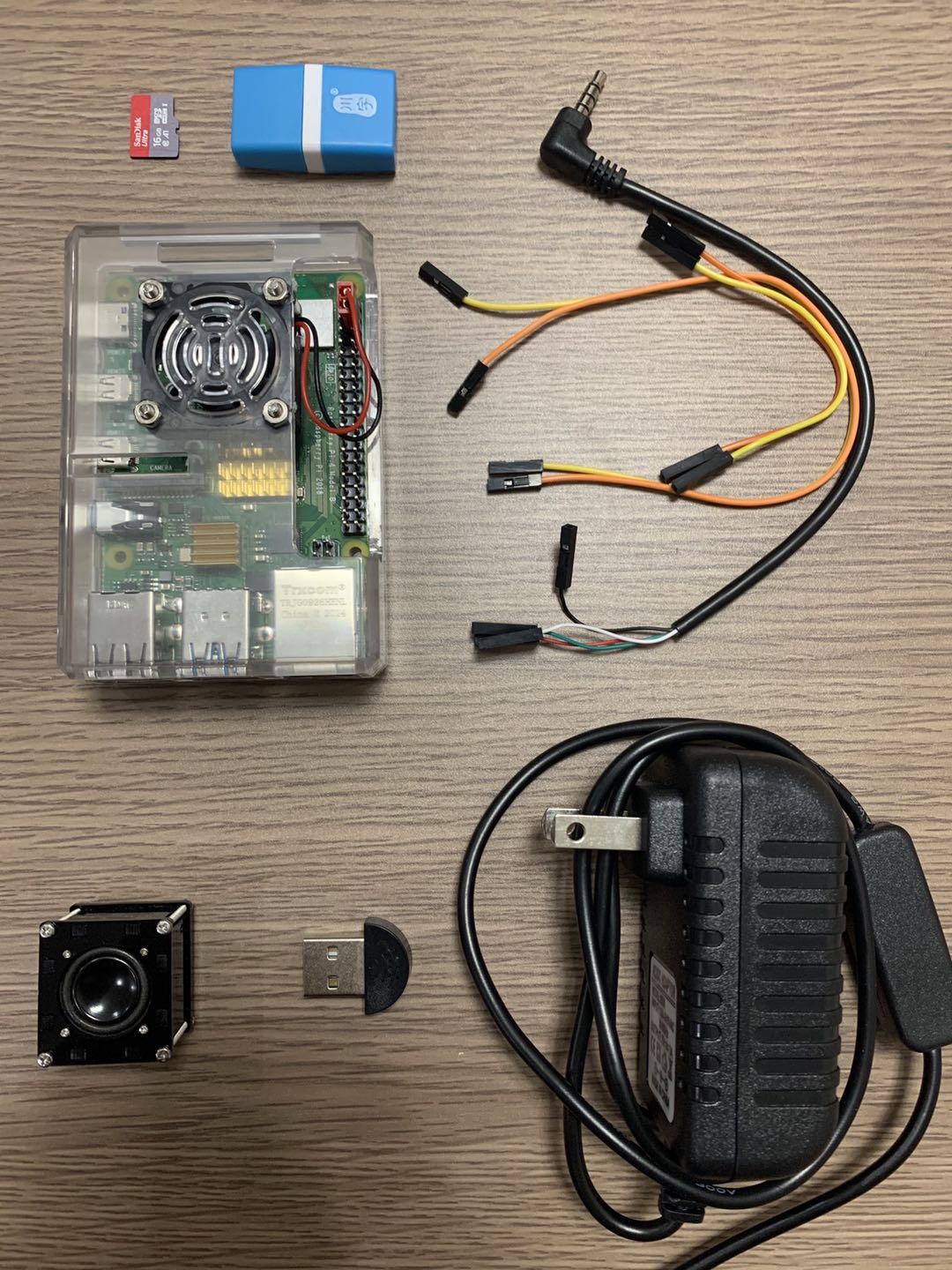
- 树莓派 4B 主板
- 树莓派 5V3A TYPE C 接口
- 微型 USB 麦克风
- 迷你音箱
- 16G TF 卡
- 川宇读卡器
- 杜邦线,外壳,散热片...
树莓派系统安装及基础配置
新的树莓派不像你买的 Macbook Pro 一样开机就能用 🐶,想要顺利体验树莓派,还得一步一步来~
烧录操作系统
树莓派没有硬盘结构,仅有一个 micro SD 卡插槽用于存储,因此要把操作系统装到 micro SD 卡中。
树莓派支持许多操作系统,这里选择的是官方推荐的 Raspbian,这是一款基于 Debian Linux 的树莓派专用系统,适用于树莓派所有的型号。
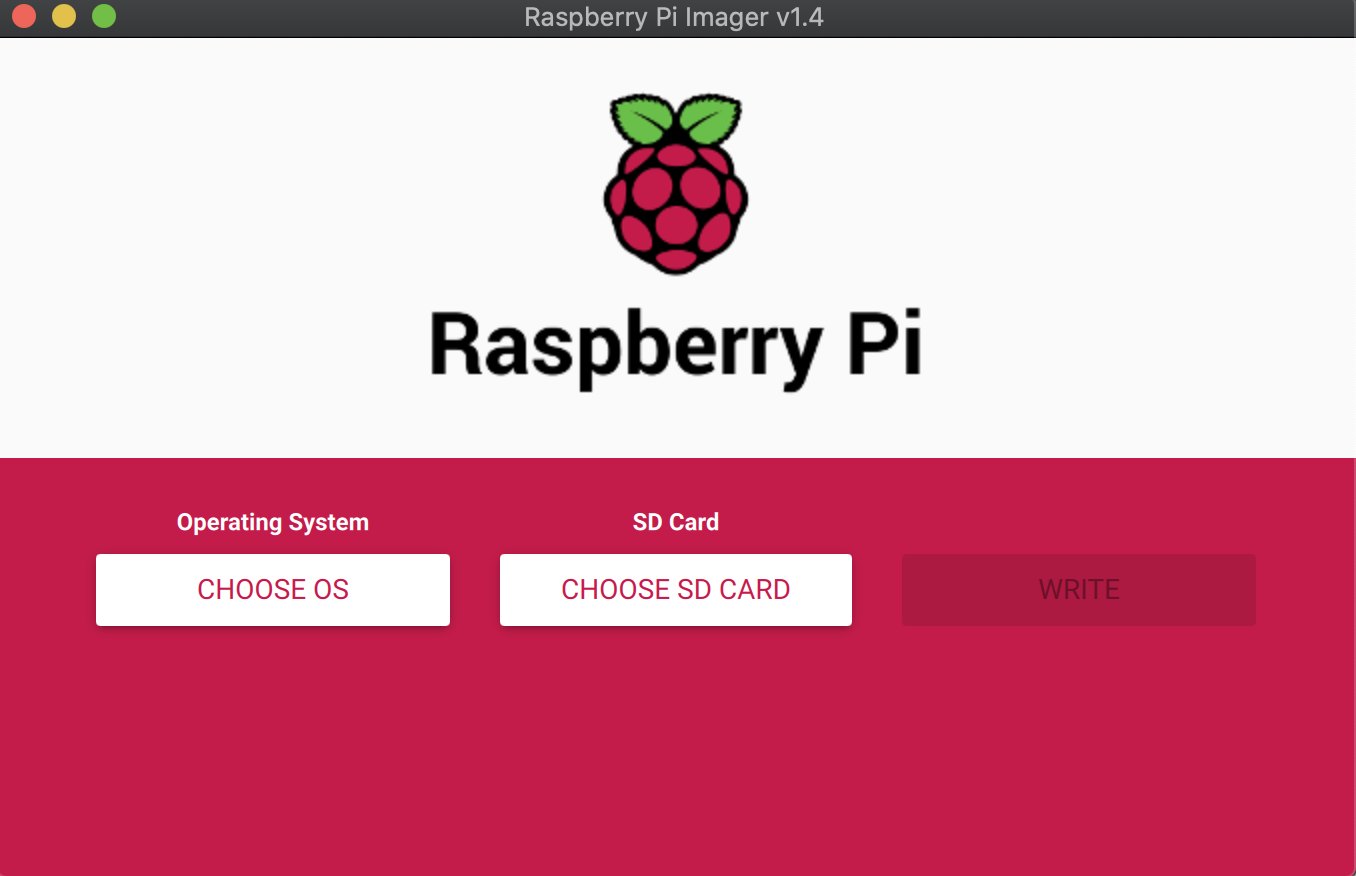
安装系统我用的是 Raspberry Pi Imager 工具为树莓派烧录系统镜像。
基础配置
要对树莓派进行配置,首先要启动系统(我们安装的是系统镜像,可免安装直接进入),然后将树莓派连接显示器即可看到系统桌面,我这里使用的是另一种方法:
- 使用 IP Scanner 工具 扫描出 Raspberry Pi 的 IP
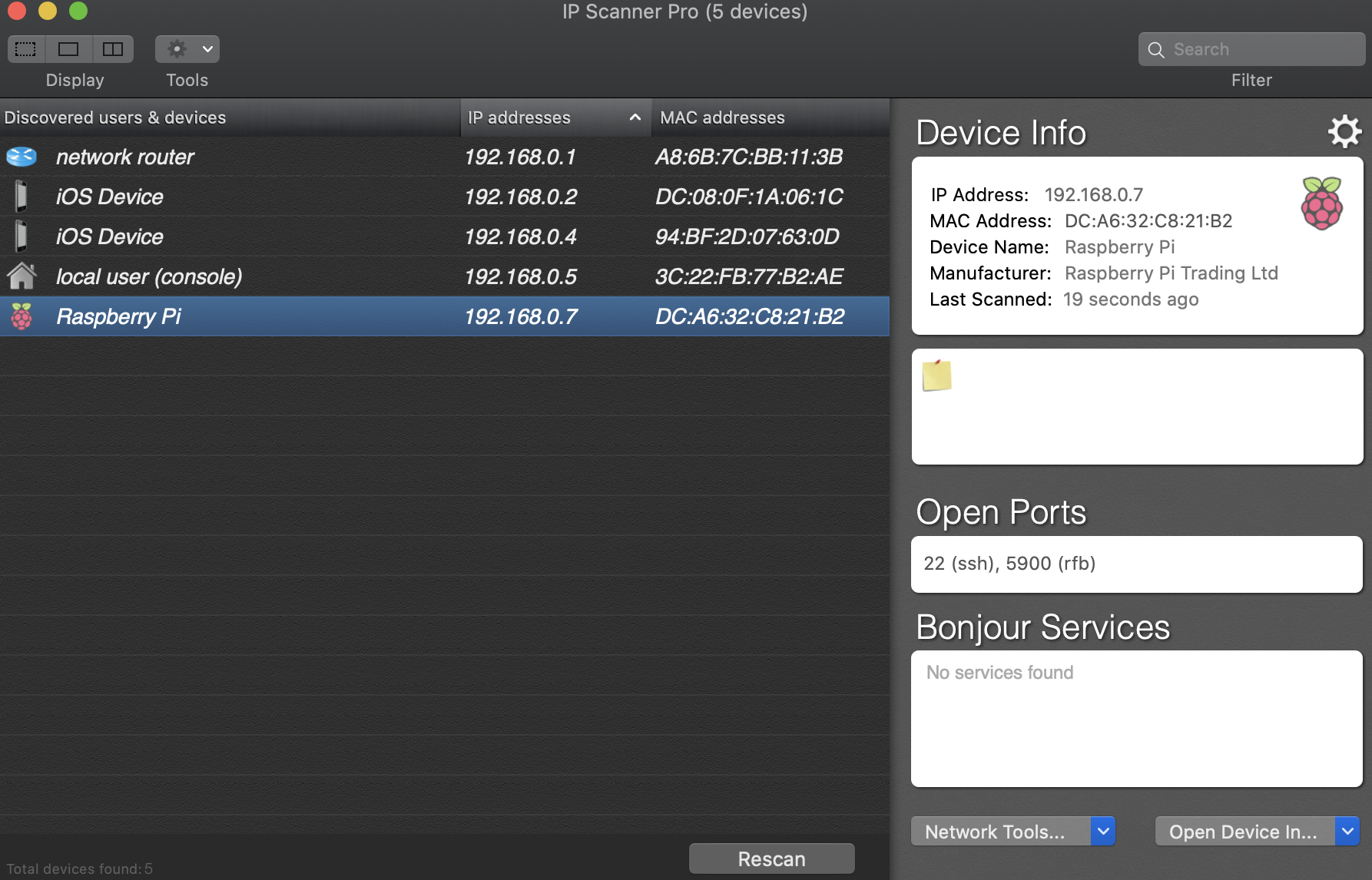
- 扫描出 IP 后使用 VNC Viewer 工具 连接进系统

- 也可以直接 ssh 连接,然后通过 raspi-config 命令进行配置
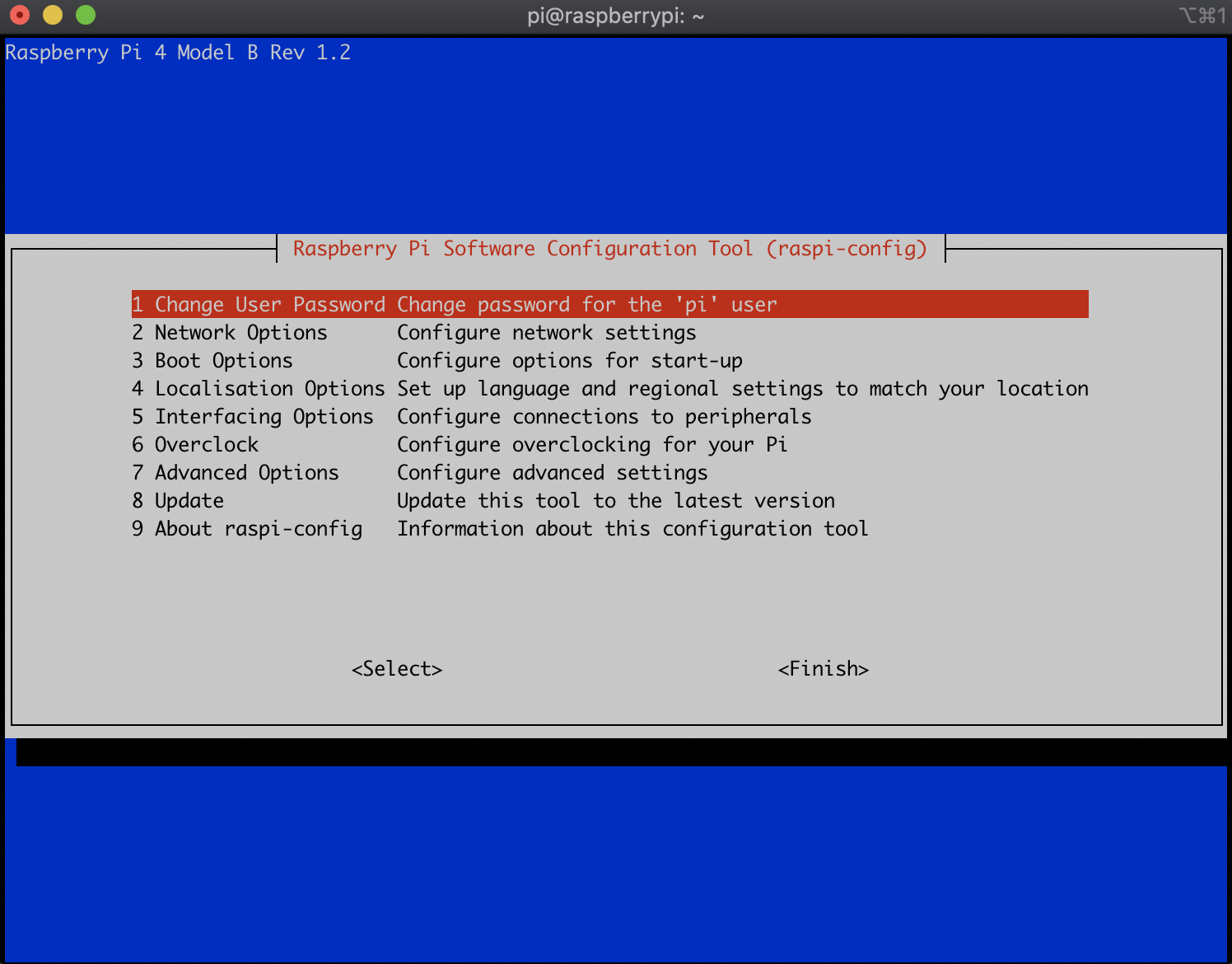
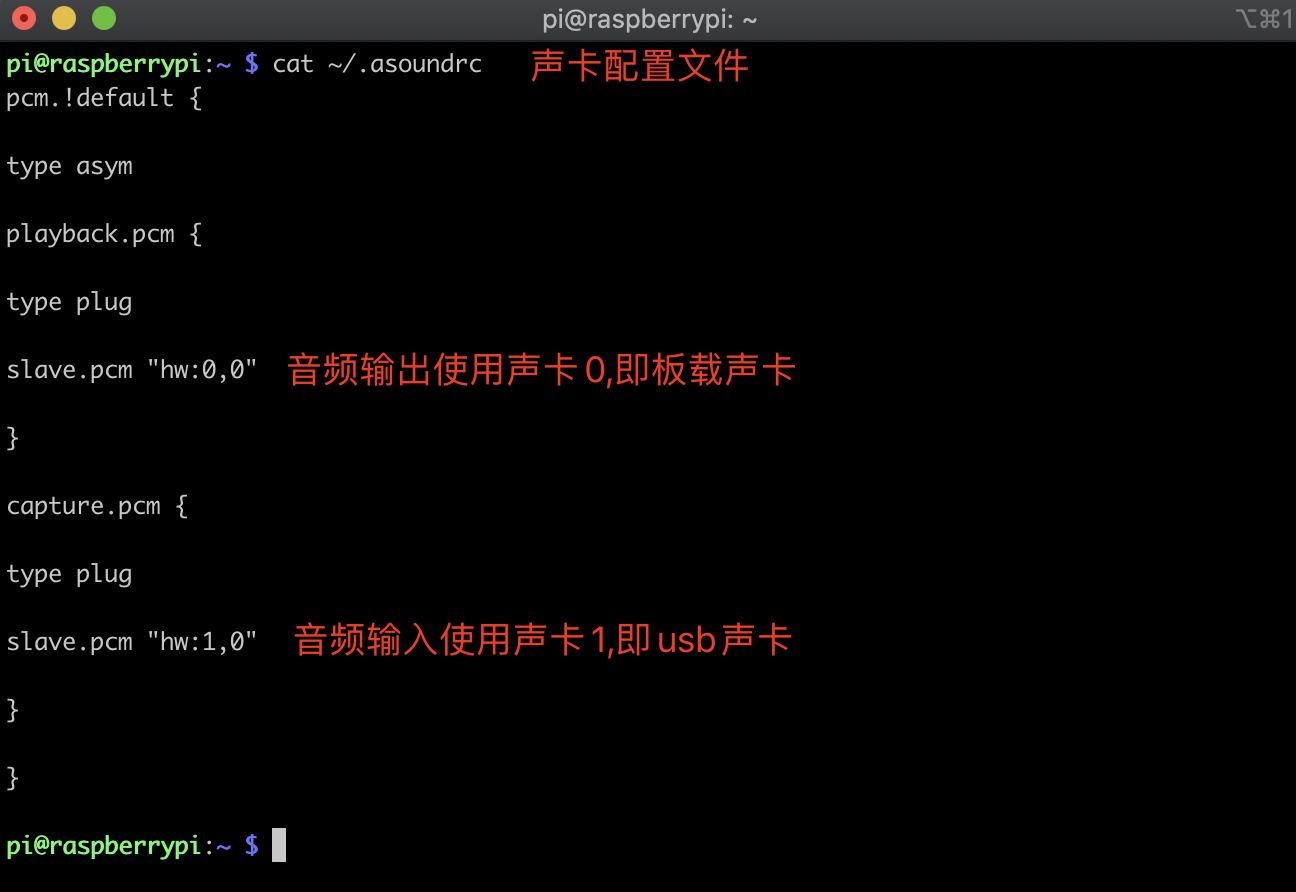
- 配置网络/分辨率/语言/输入输出音频等参数
volute 实现思路
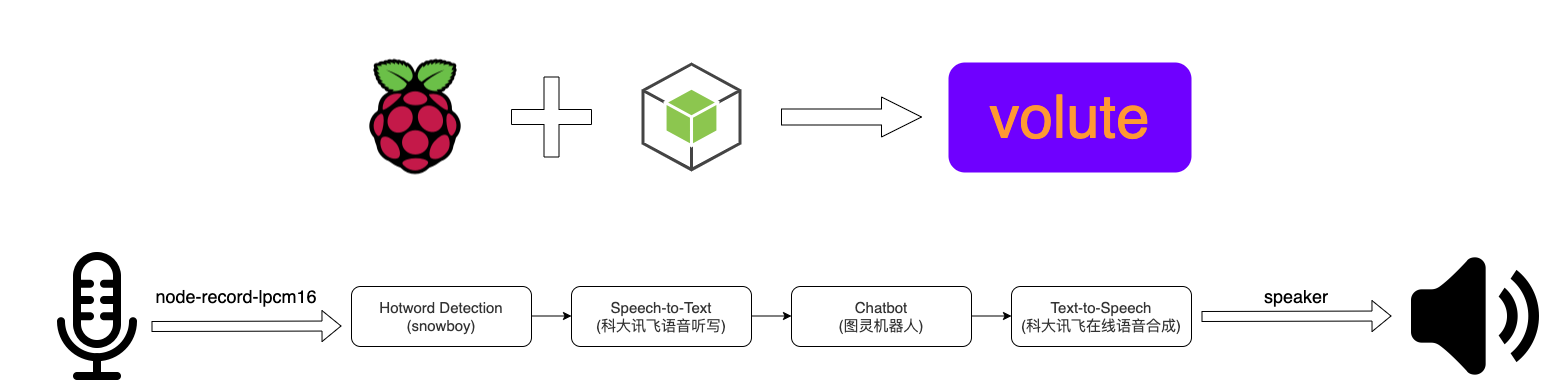
任务调度服务
const fs = require("fs");
const path = require("path");
const Speaker = require("speaker");
const { record } = require("node-record-lpcm16");
const XunFeiIAT = require("./services/xunfeiiat.service");
const XunFeiTTS = require("./services/xunfeitts.service");
const initSnowboy = require("./services/snowboy.service");
const TulingBotService = require("./services/tulingbot.service");
// 任务调度服务
const taskScheduling = {
  // 麦克风
  mic: null,
  speaker: null,
  detector: null,
  // 音频输入流
  inputStream: null,
  // 音頻輸出流
  outputStream: null,
  init() {
    // 初始化snowboy
    this.detector = initSnowboy({
      record: this.recordSound.bind(this),
      stopRecord: this.stopRecord.bind(this),
    });
    // 管道流,将麦克风接收到的流传递给snowboy
    this.mic.pipe(this.detector);
  },
  start() {
    // 监听麦克风输入流
    this.mic = record({
      sampleRate: 16000, // 采样率
      threshold: 0.5,
      verbose: true,
      recordProgram: "arecord",
    }).stream();
    this.init();
  },
  // 记录音频输入
  recordSound() {
    // 每次记录前,先停止上次未播放完成的输出流
    this.stopSpeak();
    console.log("start record");
    // 创建可写流
    this.inputStream = fs.createWriteStream(
      path.resolve(__dirname, "./assets/input.wav"),
      {
        encoding: "binary",
      }
    );
    // 管道流,将麦克风接受到的输入流 传递给 创建的可写流
    this.mic.pipe(this.inputStream);
  },
  // 停止音频输入
  stopRecord() {
    if (this.inputStream) {
      console.log("stop record");
      // 解绑this.mac绑定的管道流
      this.mic.unpipe(this.inputStream);
      this.mic.unpipe(this.detector);
      process.nextTick(() => {
        // 销毁输入流
        this.inputStream.destroy();
        this.inputStream = null;
        // 重新初始化
        this.init();
        // 调用语音听写服务
        this.speech2Text();
      });
    }
  },
  // speech to text
  speech2Text() {
    // 实例化 语音听写服务
    const iatService = new XunFeiIAT({
      onReply: (msg) => {
        console.log("msg", msg);
        // 回调,调用聊天功能
        this.onChat(msg);
      },
    });
    iatService.init();
  },
  // 聊天->图灵机器人
  onChat(text) {
    // 实例化聊天机器人
    TulingBotService.start(text).then((res) => {
      console.log(res);
      // 接收到聊天消息,调用语音合成服务
      this.text2Speech(res);
    });
  },
  // text to speech
  text2Speech(text) {
    // 实例化 语音合成服务
    const ttsService = new XunFeiTTS({
      text,
      onDone: () => {
        console.log("onDone");
        this.onSpeak();
      },
    });
    ttsService.init();
  },
  // 播放,音频输出
  onSpeak() {
    // 实例化speaker,用于播放语音
    this.speaker = new Speaker({
      channels: 1,
      bitDepth: 16,
      sampleRate: 16000,
    });
    // 创建可读流
    this.outputStream = fs.createReadStream(
      path.resolve(__dirname, "./assets/output.pcm")
    );
    // this is just to activate the speaker, 2s delay
    this.speaker.write(Buffer.alloc(32000, 10));
    // 管道流,将输出流传递给speaker进行播放
    this.outputStream.pipe(this.speaker);
    this.outputStream.on("end", () => {
      this.outputStream = null;
      this.speaker = null;
    });
  },
  // 停止播放
  stopSpeak() {
    this.outputStream && this.outputStream.unpipe(this.speaker);
  },
};
taskScheduling.start();
热词唤醒 Snowboy
语音助手需要像市面上的设备一样,需要唤醒。 如果没有唤醒步骤,一直做监听的话,对存储资源和网络连接的需求是非常大的。
Snowboy 是一款高度可定制的唤醒词检测引擎(Hotwords Detection Library),可以用于实时嵌入式系统,通过训练热词之后,可以离线运行,并且 功耗很低。当前,它可以运行在 Raspberry Pi、(Ubuntu)Linux 和 Mac OS X 系统上。

const path = require("path");
const snowboy = require("snowboy");
const models = new snowboy.Models();

// 添加训练模型
models.add({
  file: path.resolve(__dirname, "../configs/volute.pmdl"),
  sensitivity: "0.5",
  hotwords: "volute",
});

// 初始化 Detector 对象
const detector = new snowboy.Detector({
  resource: path.resolve(__dirname, "../configs/common.res"),
  models: models,
  audioGain: 1.0,
  applyFrontend: false,
});

/**
 * 初始化 initSnowboy
 * 实现思路:
 * 1. 监听到热词,进行唤醒,开始录音
 * 2. 录音期间,有声音时,重置silenceCount参数
 * 3. 录音期间,未接受到声音时,对silenceCount进行累加,当累加值大于3时,停止录音
 */
function initSnowboy({ record, stopRecord }) {
  const MAX_SILENCE_COUNT = 3;
  let silenceCount = 0,
    speaking = false;
  /**
   * silence事件回调,没声音时触发
   */
  const onSilence = () => {
    console.log("silence");
    if (speaking && ++silenceCount > MAX_SILENCE_COUNT) {
      speaking = false;
      stopRecord && stopRecord();
      detector.off("silence", onSilence);
      detector.off("sound", onSound);
      detector.off("hotword", onHotword);
    }
  };
  /**
   * sound事件回调,有声音时触发
   */
  const onSound = () => {
    console.log("sound");
    if (speaking) {
      silenceCount = 0;
    }
  };
  /**
   * hotword事件回调,监听到热词时触发
   */
  const onHotword = (index, hotword, buffer) => {
    if (!speaking) {
      silenceCount = 0;
      speaking = true;
      record && record();
    }
  };
  detector.on("silence", onSilence);
  detector.on("sound", onSound);
  detector.on("hotword", onHotword);
  return detector;
}

module.exports = initSnowboy;
语音听写 科大讯飞 API
语音转文字使用的是讯飞开放平台的语音听写服务.它可以将短音频(≤60 秒)精准识别成文字,除中文普通话和英文外,支持 25 种方言和 12 个语种,实时返回结果,达到边说边返回的效果。
require("dotenv").config();
const fs = require("fs");
const WebSocket = require("ws");
const { resolve } = require("path");
const { createAuthParams } = require("../utils/auth");

class XunFeiIAT {
  constructor({ onReply }) {
    super();
    // websocket 连接
    this.ws = null;
    // 返回结果,解析后的消息文字
    this.message = "";
    this.onReply = onReply;
    // 需要进行转换的输入流 语音文件
    this.inputFile = resolve(__dirname, "../assets/input.wav");
    // 接口 入参
    this.params = {
      host: "iat-api.xfyun.cn",
      path: "/v2/iat",
      apiKey: process.env.XUNFEI_API_KEY,
      secret: process.env.XUNFEI_SECRET,
    };
  }
  // 生成websocket连接
  generateWsUrl() {
    const { host, path } = this.params;
    // 接口鉴权,参数加密
    const params = createAuthParams(this.params);
    return `ws://${host}${path}?${params}`;
  }
  // 初始化
  init() {
    const reqUrl = this.generateWsUrl();
    this.ws = new WebSocket(reqUrl);
    this.initWsEvent();
  }
  // 初始化websocket事件
  initWsEvent() {
    this.ws.on("open", this.onOpen.bind(this));
    this.ws.on("error", this.onError);
    this.ws.on("close", this.onClose);
    this.ws.on("message", this.onMessage.bind(this));
  }
  /**
   *  websocket open事件,触发表示已成功建立连接
   */
  onOpen() {
    console.log("open");
    this.onPush(this.inputFile);
  }
  onPush(file) {
    this.pushAudioFile(file);
  }
  // websocket 消息接收 回调
  onMessage(data) {
    const payload = JSON.parse(data);
    if (payload.data && payload.data.result) {
      // 拼接消息结果
      this.message += payload.data.result.ws.reduce(
        (acc, item) => acc + item.cw.map((cw) => cw.w),
        ""
      );
      // status 2表示结束
      if (payload.data.status === 2) {
        this.onReply(this.message);
      }
    }
  }
  // websocket 关闭事件
  onClose() {
    console.log("close");
  }
  // websocket 错误事件
  onError(error) {
    console.log(error);
  }
  /**
   * 解析语音文件,将语音以二进制流的形式传送给后端
   */
  pushAudioFile(audioFile) {
    this.message = "";
    // 发送需要的载体参数
    const audioPayload = (statusCode, audioBase64) => ({
      common:
        statusCode === 0
          ? {
              app_id: "5f6cab72",
            }
          : undefined,
      business:
        statusCode === 0
          ? {
              language: "zh_cn",
              domain: "iat",
              ptt: 0,
            }
          : undefined,
      data: {
        status: statusCode,
        format: "audio/L16;rate=16000",
        encoding: "raw",
        audio: audioBase64,
      },
    });
    const chunkSize = 9000;
    // 创建buffer,用于存储二进制数据
    const buffer = Buffer.alloc(chunkSize);
    // 打开语音文件
    fs.open(audioFile, "r", (err, fd) => {
      if (err) {
        throw err;
      }

      let i = 0;
      // 以二进制流的形式递归发送
      function readNextChunk() {
        fs.read(fd, buffer, 0, chunkSize, null, (errr, nread) => {
          if (errr) {
            throw errr;
          }
          // nread表示文件流已读完,发送传输结束标识(status=2)
