
Clockpicker
A clock-style timepicker for Bootstrap (or jQuery). Sorry but no longer maintained.
Install / Use
/learn @weareoutman/ClockpickerREADME
ClockPicker 


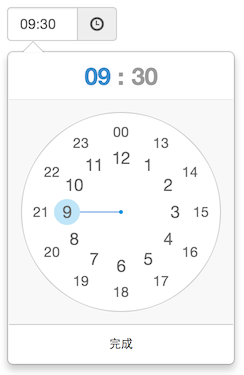
A clock-style timepicker for Bootstrap (or jQuery). Documentation and examples.

Browser support
All major browsers are supported, including IE 9+. It should look and behave well enough in IE 8.
Device support
Both desktop and mobile device are supported. It also works great in touch screen device.
Dependencies
ClockPicker was designed for Bootstrap in the beginning. So Bootstrap (and jQuery) is the only dependency(s).
Since it only used .popover and some of .btn styles of Bootstrap, I picked these styles to build a jQuery plugin.
Feel free to use jquery-* files instead of bootstrap-* , for non-bootstrap project.
Usage
<!-- Bootstrap stylesheet -->
<link rel="stylesheet" type="text/css" href="assets/css/bootstrap.min.css">

<!-- ClockPicker Stylesheet -->
<link rel="stylesheet" type="text/css" href="dist/bootstrap-clockpicker.min.css">

<!-- Input group, just add class 'clockpicker', and optional data-* -->
<div class="input-group clockpicker" data-placement="right" data-align="top" data-autoclose="true">
	<input type="text" class="form-control" value="09:32">
	<span class="input-group-addon">
		<span class="glyphicon glyphicon-time"></span>
	</span>
</div>

<!-- Or just a input -->
<input id="demo-input" />

<!-- jQuery and Bootstrap scripts -->
<script type="text/javascript" src="assets/js/jquery.min.js"></script>
<script type="text/javascript" src="assets/js/bootstrap.min.js"></script>

<!-- ClockPicker script -->
<script type="text/javascript" src="dist/bootstrap-clockpicker.min.js"></script>

<script type="text/javascript">
$('.clockpicker').clockpicker()
	.find('input').change(function(){
		// TODO: time changed
		console.log(this.value);
	});
$('#demo-input').clockpicker({
	autoclose: true
});

if (something) {
	// Manual operations (after clockpicker is initialized).
	$('#demo-input').clockpicker('show') // Or hide, remove ...
			.clockpicker('toggleView', 'minutes');
}
</script>
Options
| Name | Default | Description | | ---- | ------- | ----------- | | default | '' | default time, 'now' or '13:14' e.g. | | placement | 'bottom' | popover placement | | align | 'left' | popover arrow align | | donetext | '完成' | done button text | | autoclose | false | auto close when minute is selected | | twelvehour | false | enables twelve hour mode with AM & PM buttons | | vibrate | true | vibrate the device when dragging clock hand | | fromnow | 0 | set default time to * milliseconds from now (using with default = 'now') | | init | | callback function triggered after the colorpicker has been initiated | | beforeShow | | callback function triggered before popup is shown | | afterShow | | callback function triggered after popup is shown | | beforeHide | | callback function triggered before popup is hidden Note:will be triggered between a beforeDone and afterDone | | afterHide | | callback function triggered after popup is hidden Note:will be triggered between a beforeDone and afterDone | | beforeHourSelect | | callback function triggered before user makes an hour selection | | afterHourSelect | | callback function triggered after user makes an hour selection | | beforeDone | | callback function triggered before time is written to input | | afterDone | | callback function triggered after time is written to input |
Operations
| operation | Arguments | Description | | --------- | --------- | ----------- | | show | | show the clockpicker | | hide | | hide the clockpicker | | remove | | remove the clockpicker (and event listeners) | | toggleView | 'hours' or 'minutes' | toggle to hours or minutes view |
What's included
clockpicker/
├── dist/
│   ├── bootstrap-clockpicker.css      # full code for bootstrap
│   ├── bootstrap-clockpicker.js
│   ├── bootstrap-clockpicker.min.css  # compiled and minified files for bootstrap
│   ├── bootstrap-clockpicker.min.js
│   ├── jquery-clockpicker.css         # full code for jquery
│   ├── jquery-clockpicker.js
│   ├── jquery-clockpicker.min.css     # compiled and minified files for jquery
│   └── jquery-clockpicker.min.js
└── src/                               # source code
    ├── clockpicker.css
    ├── clockpicker.js
    └── standalone.css                 # some styles picked from bootstrap
Development
git clone https://github.com/weareoutman/clockpicker.git
cd clockpicker
npm install -g gulp
npm install
gulp
# gulp test
Todo
- [ ] Auto placement and align.
- [ ] Events.
- [ ] Customize format.
- [ ] Seconds View ?
Change log
0.0.7
- Enables twelve hour mode with AM & PM buttons.
0.0.6
- Default time can be setted to
now. - Registered as a bower package.
0.0.5
- Functional operations.
License
MIT
Related Skills
node-connect
346.8kDiagnose OpenClaw node connection and pairing failures for Android, iOS, and macOS companion apps
frontend-design
107.6kCreate distinctive, production-grade frontend interfaces with high design quality. Use this skill when the user asks to build web components, pages, or applications. Generates creative, polished code that avoids generic AI aesthetics.
openai-whisper-api
346.8kTranscribe audio via OpenAI Audio Transcriptions API (Whisper).
qqbot-media
346.8kQQBot 富媒体收发能力。使用 <qqmedia> 标签,系统根据文件扩展名自动识别类型(图片/语音/视频/文件)。
