
Wavedrom
:ocean: Digital timing diagram rendering engine
Install / Use
/learn @wavedrom/WavedromREADME

 <span class="badge-paypal"><a href="https://www.paypal.com/cgi-bin/webscr?cmd=_donations&business=J6WR5E7TJGSY2&lc=US&item_name=WaveDrom&item_number=github¤cy_code=USD&bn=PP%2dDonationsBF%3abtn_donate_SM%2egif%3aNonHosted" title="Donate to this project using Paypal"><img src="https://img.shields.io/badge/paypal-donate-yellow.svg" alt="PayPal donate button" /></a></span>

Introduction
WaveDrom is a Free and Open Source online digital timing diagram (waveform) rendering engine that uses javascript, HTML5 and SVG to convert a WaveJSON input text description into SVG vector graphics.
WaveJSON is an application of the JSON format. The purpose of WaveJSON is to provide a compact exchange format for digital timing diagrams utilized by digital HW / IC engineers.
The engine is using WaveDromSkin skin mechanism to render a complete picture.
Server
svg.wavedrom.com

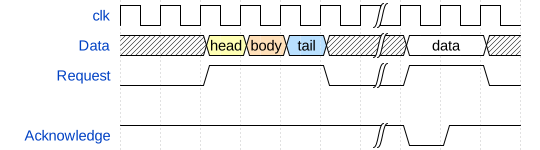

<img src="https://svg.wavedrom.com/{WAVEDROM SOURCE}/>
<img src="https://svg.wavedrom.com/{signal:[{name:'clk',wave:'p......'},{name:'bus',wave:'x.34.5x',data:'head body tail'},{name:'wire',wave:'0.1..0.'}]}"/>
CLI
WaveDrom can be used from the command line to generate SVG files from JSON5 source.
Run with npx
npx wavedrom --input source.json5 > output.svg
Global Installation
npm install -g wavedrom
wavedrom --input source.json5 --indent 2 > output.svg
Options
-i,--input <path>: (Required) Path to the WaveJSON source file.-t,--indent <number>: Text indent in the output SVG.-h,--help: Show help message.
Export to PNG
To export a waveform to PNG, you can use the @resvg/resvg-js-cli tool:
npx wavedrom -i source.json5 | npx @resvg/resvg-js-cli - output.png
Web usage
WaveDrom timing diagrams can be embedded into the web pages, blogs, and wikis to be rendered by the most of modern browsers.
HTML pages
There are three steps to insert WaveDrom diagrams directly into your page:
- Put the following line into your HTML page
<header>or<body>:
From a CDN (jsDelivr):
<script src="https://cdn.jsdelivr.net/npm/wavedrom@3/wavedrom.min.js" type="text/javascript"></script>
or (unpkg):
<script src="https://unpkg.com/wavedrom@3/wavedrom.min.js" type="text/javascript"></script>
- Set the
onloadevent for the HTML body.
<body onload="WaveDrom.ProcessAll()">
- Insert WaveJSON source inside HTML
<body>wrapped with the<script>tag:
<script type="WaveDrom">
{ signal : [
  { name: "clk",  wave: "p......" },
  { name: "bus",  wave: "x.34.5x",   data: "head body tail" },
  { name: "wire", wave: "0.1..0." },
]}
</script>
The script will find all <script type="WaveDrom"> instances and insert a timing diagram at that point.
impress.js
(http://wavedrom.com/impress.html)
Blogs & Wikis
ObservableHQ examples: (https://observablehq.com/collection/@drom/wavedrom)
Blogger integration: (http://wavedrom.blogspot.com/2011/08/wavedrom-digital-timing-diagram-in-your.html)
MediaWiki integration: (https://github.com/Martoni/mediawiki_wavedrom)
Editor
WaveDromEditor is an online real-time editor of digital timing diagrams based on the WaveDrom engine and WaveJSON format.
Standalone WaveDromEditor
Windows
- Download latest
wavedrom-editor-v2.4.2-win-{ia32|x64}.ziprelease from here: releases - Unzip it into a working directory.
- Run the editor:
wavedrom-editor.exe
Linux
- Download the latest
wavedrom-editor-v2.4.2-linux-{ia32|x64}.tar.gzrelease from here: releases - unzip-untar the package:
tar -xvzf wavedrom-editor-v2.3.2-linux-x64.tar.gz - Run the editor:
./WaveDromEditor/linux64/wavedrom-editor
OS X
- Download the latest
wavedrom-editor-v2.4.2-osx-x64.ziprelease from here: releases - Unzip
- Run
Community
Please use the WaveDrom user group for discussions, questions, ideas, or whatever.
Contributing
License
See LICENSE.
Related Skills
node-connect
347.2kDiagnose OpenClaw node connection and pairing failures for Android, iOS, and macOS companion apps
frontend-design
108.0kCreate distinctive, production-grade frontend interfaces with high design quality. Use this skill when the user asks to build web components, pages, or applications. Generates creative, polished code that avoids generic AI aesthetics.
openai-whisper-api
347.2kTranscribe audio via OpenAI Audio Transcriptions API (Whisper).
qqbot-media
347.2kQQBot 富媒体收发能力。使用 <qqmedia> 标签,系统根据文件扩展名自动识别类型(图片/语音/视频/文件)。
