
Qsurface
✅ Python package for simulation and visualization of quantum error-correction on surface codes. The package provides the ability to inspect the error-correcting code during the decoding process, and tools to benchmark the decoder.
Install / Use
/learn @watermarkhu/QsurfaceREADME
Qsurface







Qsurface is a simulation package for the surface code, and is designed to modularize 3 aspects of a surface code simulation.
- The surface code
- The error model
- The used decoder
New types of surface codes, error modules and decoders can be added to Qsurface by using the included templates for each of the three core module categories.
The current included decoders are:
- The Mininum-Weight Perfect Matching (
mwpm) decoder. - Delfosse's and Nickerson's Union-Find (
unionfind) decoder, which has almost-linear worst-case time complexity. - Our modification to the Union-Find decoder; the Union-Find Node-Suspension (
ufns) decoder, which improves the threshold of the Union-Find decoder to near MWPM performance, while retaining quasi-linear worst-case time complexity.
The compatibility of these decoders with the included surface codes are listed below.
| Decoders | toric code | planar code |
|-----------|--------------|---------------|
|mwpm |✅ |✅ |
|unionfind|✅ |✅ |
|ufns |✅ |✅ |
Installation
All required packages can be installed through:
pip install qsurface
Requirements
MWPM decoder
The MWPM decoder utilizes networkx for finding the minimal weights in a fully connected graph. This implementation is however rather slow compared to Kolmogorov's Blossom V algorithm. Blossom V has its own license and is thus not included with Qsurface. We do provided a single function to download and compile Blossom V, and to setup the integration with Qsurface automatically.
>>> from qsurface.decoders import mwpm
>>> mwpm.get_blossomv()
Usage
To simulate the toric code and simulate with bitflip error for 10 iterations and decode with the MWPM decoder:
>>> from qsurface.main import initialize, run
>>> code, decoder = initialize((6,6), "toric", "mwpm", enabled_errors=["pauli"])
>>> run(code, decoder, iterations=10, error_rates = {"p_bitflip": 0.1})
{'no_error': 8}
Benchmarking of decoders can be enabled by attaching a benchmarker object to the decoder. See the docs for the syntax and information to setup benchmarking.
>>> from qsurface.main import initialize, run
>>> benchmarker = BenchmarkDecoder({"decode":"duration"})
>>> run(code, decoder, iterations=10, error_rates = {"p_bitflip": 0.1}, benchmark=benchmarker)
{'no_error': 8,
'benchmark': {'success_rate': [10, 10],
'seed': 12447.413636559,
'durations': {'decode': {'mean': 0.00244155000000319,
'std': 0.002170364089572033}}}}
Plotting
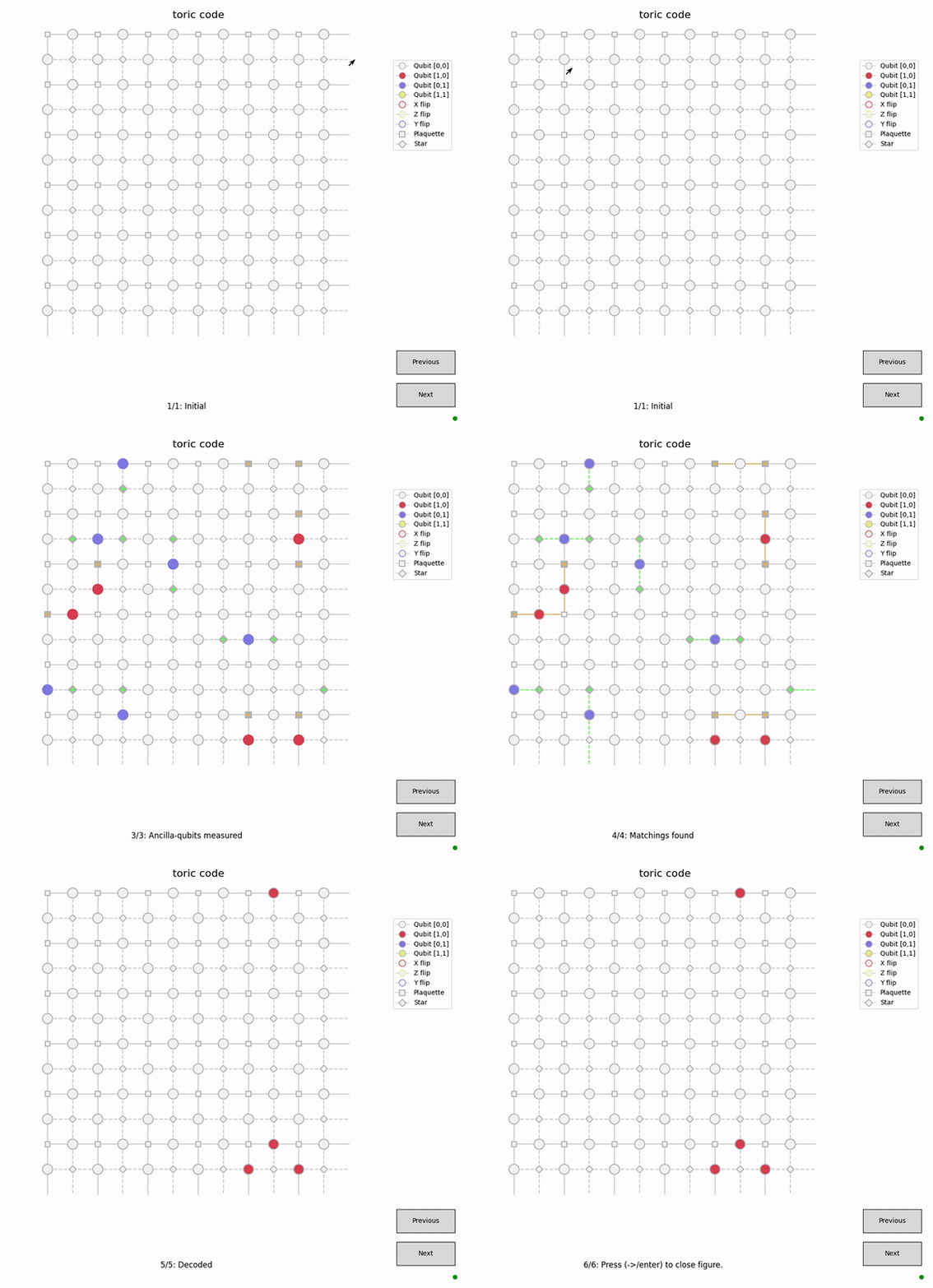
The figures in Qsurface allows for step-by-step visualization of the surface code simulation (and if supported the decoding process). Each figure logs its history such that the user can move backwards in time to view past states of the surface (and decoder). Press h when the figure is open for more information.
>>> from qsurface.main import initialize, run
>>> code, decoder = initialize((6,6), "toric", "mwpm", enabled_errors=["pauli"], plotting=True, initial_states=(0,0))
>>> run(code, decoder, error_rates = {"p_bitflip": 0.1, "p_phaseflip": 0.1}, decode_initial=False)
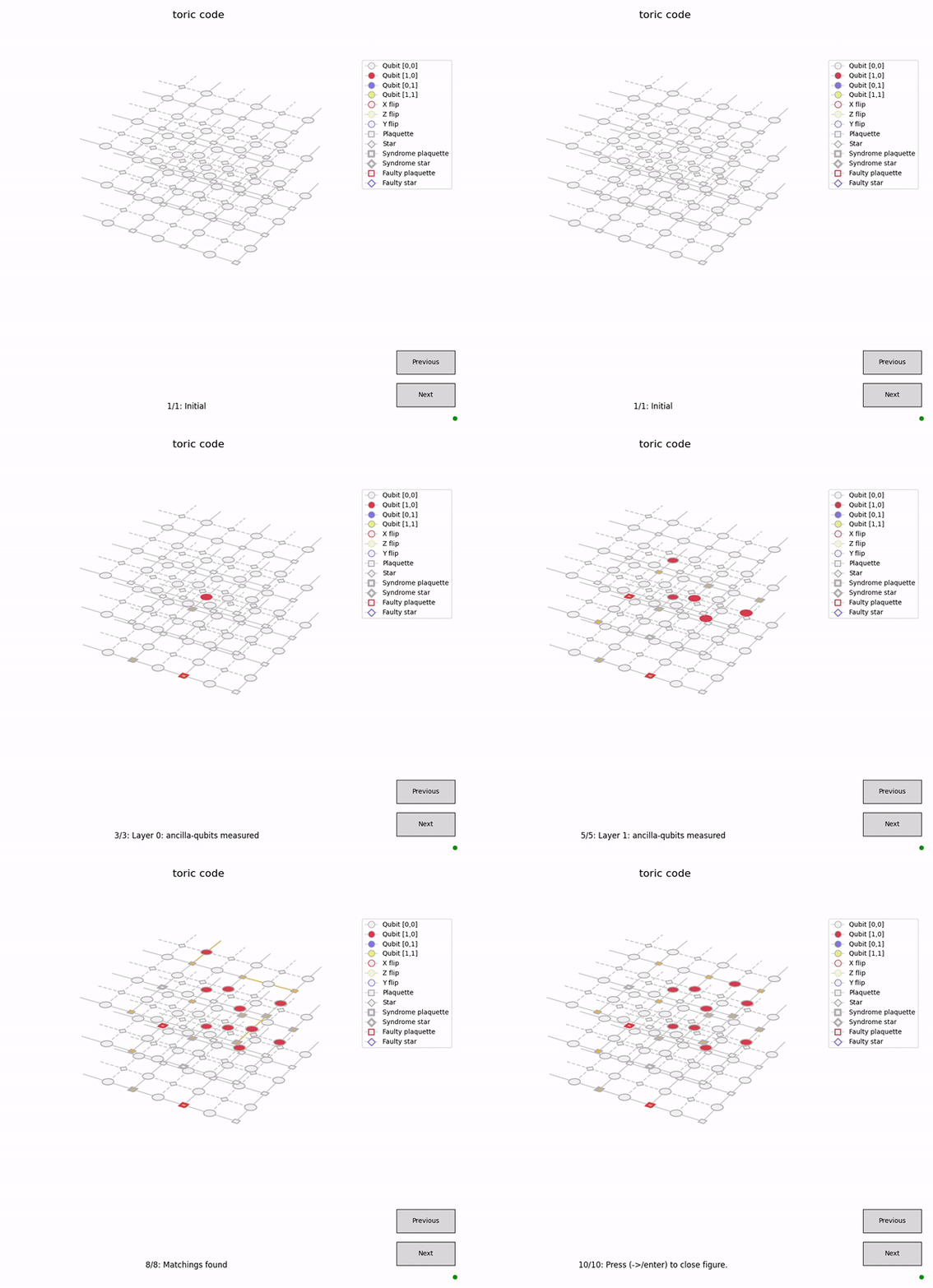
Plotting will be performed on a 3D axis if faulty measurements are enabled.
>>> code, decoder = initialize((3,3), "toric", "mwpm", enabled_errors=["pauli"], faulty_measurements=True, plotting=True, initial_states=(0,0))
>>> run(code, decoder, error_rates = {"p_bitflip": 0.05, "p_bitflip_plaq": 0.05}, decode_initial=False)
In IPython, inline images are created for each iteration of the plot, which can be tested in the example notebook.
Command line interface
Simulations can also be initiated from the command line
$ python -m qsurface -e pauli -D mwpm -C toric simulation --p_bitflip 0.1 -n 10
{'no_error': 8}
For more information on command line interface:
$ python -m qsurface -h
usage: qsurface
...
This project is proudly funded by the Unitary Fund.
Related Skills
claude-opus-4-5-migration
83.9kMigrate prompts and code from Claude Sonnet 4.0, Sonnet 4.5, or Opus 4.1 to Opus 4.5
model-usage
339.5kUse CodexBar CLI local cost usage to summarize per-model usage for Codex or Claude, including the current (most recent) model or a full model breakdown. Trigger when asked for model-level usage/cost data from codexbar, or when you need a scriptable per-model summary from codexbar cost JSON.
mcp-for-beginners
15.7kThis open-source curriculum introduces the fundamentals of Model Context Protocol (MCP) through real-world, cross-language examples in .NET, Java, TypeScript, JavaScript, Rust and Python. Designed for developers, it focuses on practical techniques for building modular, scalable, and secure AI workflows from session setup to service orchestration.
TrendRadar
49.9k⭐AI-driven public opinion & trend monitor with multi-platform aggregation, RSS, and smart alerts.🎯 告别信息过载,你的 AI 舆情监控助手与热点筛选工具!聚合多平台热点 + RSS 订阅,支持关键词精准筛选。AI 智能筛选新闻 + AI 翻译 + AI 分析简报直推手机,也支持接入 MCP 架构,赋能 AI 自然语言对话分析、情感洞察与趋势预测等。支持 Docker ,数据本地/云端自持。集成微信/飞书/钉钉/Telegram/邮件/ntfy/bark/slack 等渠道智能推送。
