
agent-review-panel
Claude Code skill: Multi-agent adversarial review panel — 4-6 AI reviewers debate your code/plans, then a supreme judge delivers the verdict. 9 auto-detected signal groups, built-in domain checklists, anti-groupthink mechanisms.
Install / Use
npx skills add wan-huiyan/agent-review-panelInstalls into whichever agent you are using.
SKILL.md
Installable skill definition
Quality Score
Category
AI & Machine LearningSupported Platforms
Skill content
View source on GitHub



Agent Review Panel
4–6 AI reviewers independently evaluate your code, plan, or docs, debate each other's findings, then a judge resolves disagreements. A Claude Code plugin that orchestrates structured multi-stance review. Each run costs roughly $3–$20 in Opus tokens and takes 6–15 minutes — built for high-stakes reviews, not routine code review.
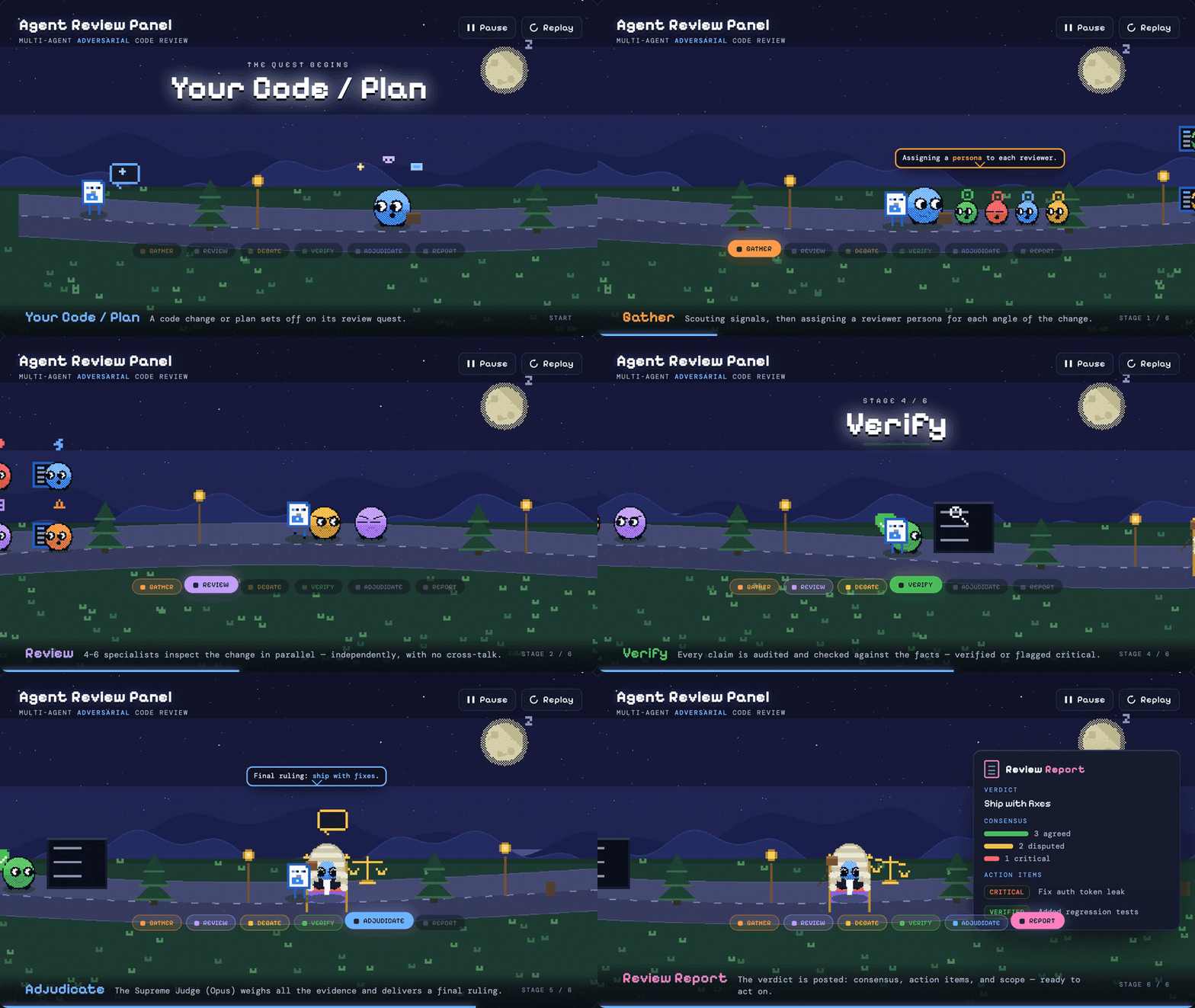
Runs only on Claude Code surfaces (CLI, IDE extension, Desktop "Code" tab) and the Claude Agent SDK. Does not work on claude.ai web chat or the raw Anthropic API — see Surfaces & Requirements.
Quick Start
claude plugin marketplace add wan-huiyan/agent-review-panel
claude plugin install roundtable@agent-review-panel
Restart your Claude Code session — skills load at session start.
<details> <summary>Already inside a Claude Code session? Use the slash-command form</summary>/plugin marketplace add wan-huiyan/agent-review-panel
/plugin install roundtable@agent-review-panel
Same effect. Shell form (claude plugin …) from the terminal; REPL form (/plugin …) from inside Claude Code.
Verify it loaded. In a fresh Claude Code session, type /roundtable:agent-review-panel with no arguments. The skill should introduce itself and ask what to review. If you get unknown command, see Troubleshooting. Migrating from an older install handle? See MIGRATION.md.
⚡ Recommended — add VoltAgent specialists. Reviews get noticeably sharper when VoltAgent specialist agents are installed: the panel auto-upgrades each reviewer to a real domain specialist (e.g. Security Auditor → voltagent-qa-sec:security-auditor) instead of a generic persona. Not installed? It falls back gracefully — nothing breaks.
claude plugin marketplace add VoltAgent/awesome-claude-code-subagents
claude plugin install voltagent-qa-sec@voltagent-subagents   # backs the core code-review personas
Add voltagent-lang, voltagent-data-ai, voltagent-infra, … as you need them (10 families, 130+ agents; the /plugin … REPL form works too — takes effect next session). Why it's worth it → Sharper reviews with VoltAgent. (VoltAgent installs through Claude Code's plugin system.)
Use:
> Review this implementation plan from multiple perspectives: docs/my_plan.md

> /roundtable:agent-review-panel
Natural-language invocation also works ("red team this", "stress-test this design", "get a panel review of …").
What you get — three files written to your current working directory:
review_panel_report.md— executive summary, consensus, judge-resolved disagreements, action itemsreview_panel_process.md— verbatim "director's cut" of every reviewer's outputreview_panel_report.html— interactive dashboard with expandable issue cards, charts, and a panel gallery
See Sample output below for what a real report looks like.
When to use it — and when not
Use a panel for: high-stakes plans you'd want a second/third/fourth opinion on; security-sensitive code; architecture decisions that are expensive to reverse; docs that have to be right; "I'm too close to this — stress-test it."
Don't use a panel for (use a single review or /review instead): a quick look before pushing; type-error fixes; routine code review; addressing existing PR comments; "what does this code do?"; deployments; writing tests or docs from scratch.
The key signal is multiple independent perspectives — if one opinion would do, you're paying 4–6× more for nothing.
Why a panel, not a single reviewer?
Ask one reviewer "review this" and you get one perspective. It won't argue with itself, catch its own blind spots, or volunteer "I'm not sure about this."
The panel forces the same model to take multiple passes from assigned, divergent stances — Correctness Hawk, Security Auditor, Devil's Advocate, etc. — before they see each other's output. Then they debate, then a separate judge step resolves disputes against verified evidence. You get a deliberation, not a list:
Feasibility Analyst: "The
data_available_throughhardcoding is minor — it's documented."Risk Assessor: "Disagree. If stale, the lookforward extends past actual data — model trains on incomplete outcomes — silent false-negative bias."
Feasibility Analyst (Round 2): "Valid point. I upgrade this to IMPORTANT."
Honest caveat: all reviewers are Claude instances running the same base model. This is structured self-critique, not independent verification — unanimous agreement may reflect shared model bias rather than ground truth. The architecture includes anti-groupthink safeguards (blind final scoring, sycophancy detection, correlated-bias warnings) but cannot eliminate the structural limitation. The value is the forced multi-stance discipline plus verification against actual source, not the appearance of disagreement.
Sample output
The panel was run against this very README on 2026-05-14. The interactive HTML dashboard:
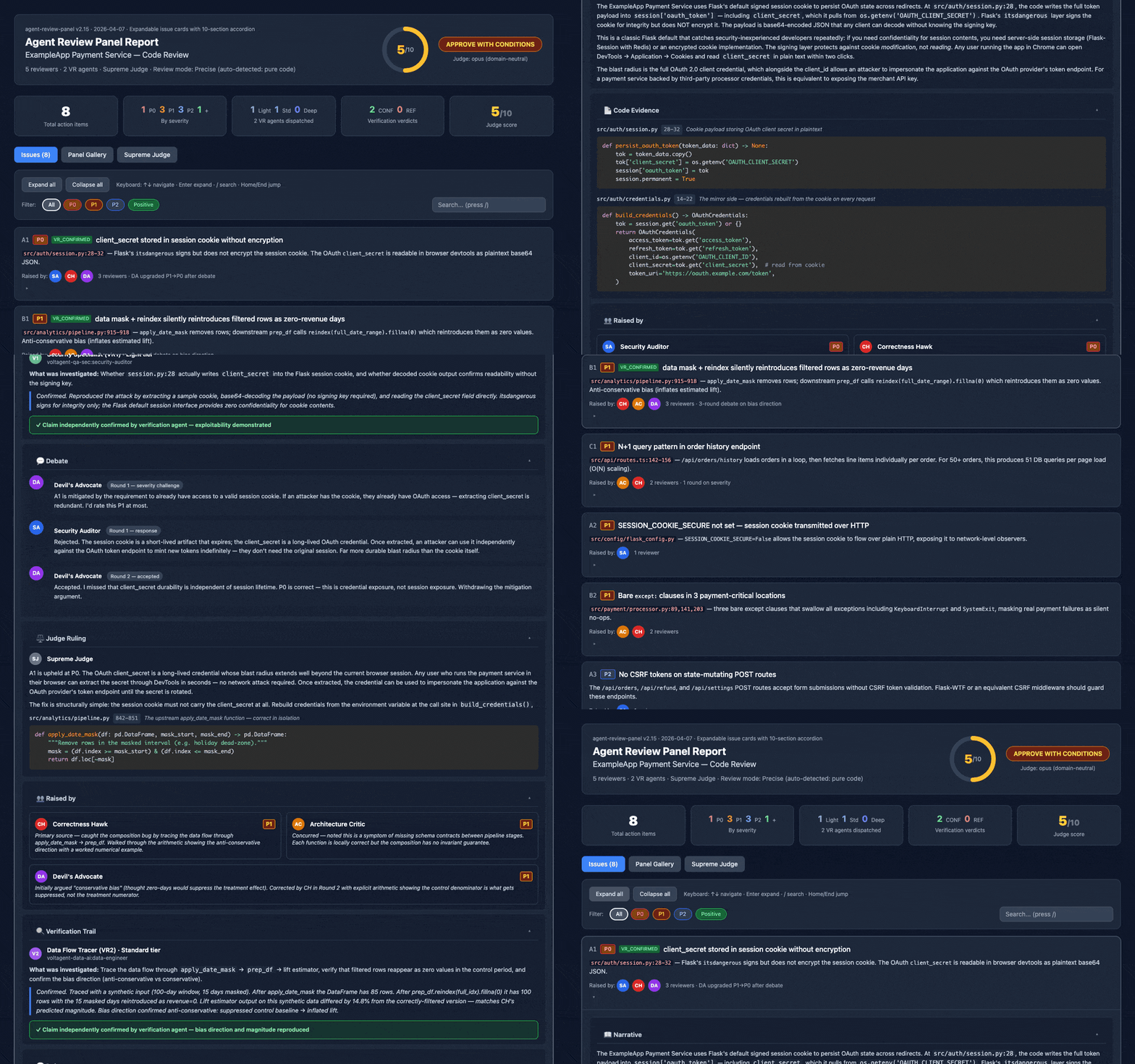
Expandable 10-section issue cards (narrative, code evidence with Prism.js syntax highlighting, debate transcripts, judge rulings, fix recommendations, cross-references), deep-linkable, keyboard-navigable, print-friendly. The GIF above links to the actual generated report for this README.
Excerpt from the matching review_panel_report.md:
# Review Panel Report — README.md

**Verdict:** REVISE — substantial edit needed | **Confidence:** Medium-High
**Score:** 5/10 | **Mode:** Exhaustive (pure documentation)

## Executive Summary

The README is factually careful where it counts — install commands, marketplace
handles, slash commands, the test-count claim, and spot-checked anchors all verify
cleanly against the repo. But three problems pull the score to 5/10: the
version/release story is incoherent and actively misleads every current
user, the document is roughly a third too long, and it never shows what a
review actually produces.

## Consensus Points (judge-confirmed)

- Version/release story is broken — all four reviewers, independently.
  package.json declares 3.3.0; the only git tags are up to v3.1.0. The
  "Updating" section tells users to verify against "the latest GitHub
  release" — which resolves to v3.1.0, so every correctly-installed
  v3.3.0 user concludes their install is wrong.  [VERIFIED][CONSENSUS]

## Action Items

| # | Severity | Action                                                       |
|---|----------|--------------------------------------------------------------|
| 1 | P1 [VERIFIED][CONSENSUS] | Fix the version/release story.            |
| 3 | P1 [CONSENSUS]           | Cut ~⅓ length; split audiences.           |
| 4 | P1 [VERIFIED]            | Add a text sample of a real report.       |
You're reading the rewrite that lands those findings. The full artifacts live at:
docs/reviews/2026-05-14-readme/review_panel_report.md— the full markdown report (13 action items)docs/reviews/2026-05-14-readme/review_panel_report.html— the interactive HTML dashboarddocs/reviews/2026-05-14-readme/review_panel_process.md— verbatim process log with all four reviewers' raw output
Sharper reviews with VoltAgent specialists
By default every reviewer is a generic Claude agent wearing a persona prompt ("act as a Security Auditor"). That works — but if you install VoltAgent's specialist agents, the panel upgrades each persona to a matching domain specialist whose expertise is built into its own system prompt: a real Security Auditor, Database Optimizer, or SRE instead of a generalist asked to role-play one.
- Automatic, zero-config. During setup (Phase 1) the panel scans for installed
voltagent-*agents and routes personas to them. No specialist installed for a given role? That reviewer falls back to a generic persona — nothing to configure, nothing breaks. - 130+ specialists across 10 families —
qa-sec(code review, security, performance, chaos),lang(20+ language experts),data-ai,infra,core-dev, and more. Content signals auto-add the right one: SQL → a database optimizer, Terraform → an IaC engineer, React → a frontend specialist. v3.4 added 30 such signal→specialist mappings, roughly doubling coverage. - Install what you review.
voltagent-qa-secbacks the core code-review personas; addvoltagent-lang/voltagent-data-ai/voltagent-infrafor language-, ML-, or infra-heavy work. Commands are in Quick Start.
VoltAgent specialists install through Claude Code's plugin system — the same Claude Code surfaces the panel itself runs on (CLI / IDE / Desktop "Code" tab / Agent SDK). Codex isn't a supported surface for the panel: it needs Claude Code's
Agenttool to spawn reviewers in parallel — see Surfaces & Requirements.
Surfaces & Requirements
This plugin needs the Claude Code Agent tool for parallel subagent spawning, local-filesystem access for output files, and a plugin loader.
Works ✅
- CLI —
claudein your terminal - VS Code extension — Claude Code extension
- JetBrains IDE extension — IntelliJ, PyCharm, WebStorm, GoLand, Rider, etc.
- Claude Desktop app → Code tab — the dedicated "Code" tab inside the Desktop app (docs)
- Claude Agent SDK — load via
options.plugins: [{ type: "local", path: "./agent-review-panel" }](docs)
Does not work ❌
- claude.ai web chat and Claude Desktop regular chat tabs — no
/pluginmarketplace; Agent Skills there can't spawn parallel subagents or write the output files - Anthropic Messages API called directly (without the Agent SDK) — no plugin loader, no subagent orchestration, no filesystem. Use the Agent SDK entry above.
Prerequisites in one place:
- Claude Code v1.0+ on a supported surface, or the Claude Agent SDK
- A Claude Pro / Max subscription or API access (Opus is the reviewer model)
- Node ≥18 (only needed if running
npm testor developing locally) - Recommended: [VoltAgent specialist agents](https://githu
Truncated for display — read the full file on GitHub.
Related Skills
caveman
107.2k🪨 why use many token when few token do trick. Viral skill + proxy for coding agents that cuts 65% of tokens by talking like a caveman.
claude-mem
94.4kPersistent Context Across Sessions for Every Agent – Captures everything your agent does during sessions, compresses it with AI, and injects relevant context back into future sessions. Works with Claude Code, OpenClaw, Codex, Gemini, Hermes, Copilot, OpenCode + More
Understand-Anything
83.6kGraphs that teach > graphs that impress. Turn any code into an interactive knowledge graph you can explore, search, and ask questions about. Works with Claude Code, Codex, Cursor, Copilot, Gemini CLI, and more.
headroom
73.4kCompress tool outputs, logs, files, and RAG chunks before they reach the LLM. 20% fewer tokens for coding agents, 60-95% fewer tokens for JSON, same answers. Library, proxy, MCP server.
