H2loadrunner
h2loadrunner is an HTTP and HTTP2 performance testing tool
Install / Use
/learn @wallyatgithub/H2loadrunnerREADME


Read this in other languages: 简体中文.
h2loadrunner is an HTTP and HTTP2 benchmarking / load testing / performance testing tool
h2loadrunner is a benchmarking tool supporting both HTTP 1.x and HTTP2.
h2loadrunner was initially created from h2load utility of the nghttp2 project.
Post that, a lot of powerful new features have been added, and the framework is also re-designed, to make it a powerful, performant, cross platform load test tool.
Now, unlike h2load, h2loadrunner is based on Boost ASIO instead of Libev, for best performance while with best portibility.
The legacy Libev support is still present in h2loadrunner, yet depricated, and might be removed in near future, as Libev is not functioning well on Windows.
Talking about the powerful new features of h2loadrunner, here are the powerful new features supported by h2loadrunner, while not present in h2load:
-
Variable support in URI and message body.
-
Stream timeout handling.
-
Transaction support with specific resource header tracking.
Other types of resource tracking are to be added in the future, like, XPath for XML message body, Json pointer for Json message body, etc.
-
Natively support Set-Cookie and Cookie headers, yet provides the flexibility of clearing Cookie before the execution of one request.
Cookies handling complies to https://tools.ietf.org/html/rfc6265
-
Lua script support. With lua script, user can customize every header and the payload of the request to be sent.
-
JSON based configuration; user can build complex test scenarios with a simple GUI editor.
-
Dynamic report of the test, dynamic change of the RPS. h2loadrunner prints the test statistics every second; it also supports dynamic change of RPS.
-
Async dynamic connection establishment.
-
Support delay between requests of the same scenario, with the delay interval configurable.
-
Support configurable status code to determine if a response is successful in statistics report
-
mTLS support
-
Parallel connections to multiple hosts in a load share pool
-
Connection failover and failback.
-
Native support of Linux and Windows platforms, with very high performance on both platform, thanks to Boost ASIO, for best leveraging the power of Linux epoll and Windows IOCP respectively.
How to have a quick try
Download the pre-built Maock executable for Windows or linux respectively from https://github.com/wallyatgithub/maock/releases
Unzip/Untar, then run it:
./maock ./maock.json # for linux
or
maock.exe maock.json # for windows 10
Now Maock is up and running on port 8081 with the sample rules.
Download the pre-built H2loadrunner executable for Windows or linux respectively from https://github.com/wallyatgithub/h2loadrunner/releases
Unzip/Untar, then run it:
./h2loadrunner --config-file=./h2load.json # for linux
or
h2loadrunner.exe --config-file=h2load.json # for windows 10
Now H2loadrunner is up and sending test traffic through 2 connections to Maock, each connection has request per second = 100.
Check the output of Maock and H2loadrunner for the ongoing traffic statistics.
How to build on Windows
cmake 3.20 or later, Visual Studio 2022, and windows 10 SDK need to be installed first
vcpkg is also needed. Please follow https://vcpkg.io/en/getting-started.html to install and set up vcpkg
These dependency packages need to be installed to vcpkg:
boost:x64-windows
getopt:x64-windows
openssl:x64-windows
luajit:x64-windows
nghttp2:x64-windows
rapidjson:x64-windows
Next, download h2loadrunner source with http or git, for example, h2loadrunner is downloaded to c:\tmp
Then,
Open "x64 Native Tools Command Prompt" from start menu

C:\tmp>cd h2loadrunner

C:\tmp\h2loadrunner>mkdir build

C:\tmp\h2loadrunner>cd build

C:\tmp\h2loadrunner\build>cmake ../ -DCMAKE_TOOLCHAIN_FILE=_REPLACE_THIS_WITH_YOUR_VCPKG_PATH_\scripts\buildsystems\vcpkg.cmake -DCMAKE_BUILD_TYPE=Release

Make sure to replace _REPLACE_THIS_WITH_YOUR_VCPKG_PATH_ with your actual vcpkg path.

Opitonally, add -DVCPKG_TARGET_TRIPLET=x64-windows-static for x64 static link (dependency packages of x64-windows-static triplet should be installed to vcpkg)

C:\tmp\h2loadrunner\build>cmake --build ./ --config=Release
h2loadrunner.exe will then be generated
How to build on Linux
These packages are required to build h2loadrunner, take Ubuntu for example:
libnghttp2-dev
openssl
libssl-dev
libev-dev
libluajit-5.1-dev
rapidjson-dev
libboost-all-dev
c-ares (included in third-party/c-ares, as the c-ares devel package of linux distro is too old)
Use cmake to build
$git clone https://github.com/wallyatgithub/h2loadrunner.git

$cd h2loadrunner

$cd third-party/c-ares

$cmake ./

$cmake --build ./

$cd ../../

$mkdir build

$cd build

$cmake ..

$cmake --build ./

h2loadrunner would be generated
How to build h2loadrunner docker image
https://raw.githubusercontent.com/wallyatgithub/h2loadrunner/main/Dockerfile_Alpine_Static is the Dockerfile to build a Alpine based image with static-linked h2loadrunner installed in /usr/bin
https://raw.githubusercontent.com/wallyatgithub/h2loadrunner/main/Dockerfile_Ubuntu is the Dockerfile to build a latest Ubuntu based image with h2loadrunner installed in /usr/bin
For example, to build latest Ubuntu based image with h2loadrunner:
# mkdir h2loadrunner

# cd h2loadrunner

# wget https://raw.githubusercontent.com/wallyatgithub/h2loadrunner/main/Dockerfile_Ubuntu

# docker build ./ -f Dockerfile_Ubuntu -t h2loadrunner:ubuntu

Then use 'docker run -it h2loadrunner:ubuntu bash' to enter the container, h2loadrunner is located in /usr/bin
Usage
h2loadrunner uses JSON based configuration.
With this feature, h2loadrunner can support flexible scenario combinations.
h2loadrunner Json schema: https://github.com/wallyatgithub/h2loadrunner/blob/main/config_schema.json
It has a section called "scenarios", which is an arrary of "scenario".
Each scenario is associated with a name, a weight, and a list of requests.
The name of the scenario is used in statistics output;
The weight determines the ratio of the traffic from this scenario to all traffic. For example:
If there are 2 scenarios, the first scenario has weight = 400, and 4 requests; the other scenario has weight = 100, and 8 requests.

Then h2loadrunner will schedule the 2 scenario to make sure:

80% of the requests (400/(400+100)) in the traffic mix, are the 4 requests of the first scenario;

20% of the requests (100/(400+100)) in the traffic mix, are the 8 requests of the second scenario.
Different scenarios will run in parallel.
Same scenario of different users (see user-id-variable-in-path-and-data field, each instance of the variable in range represents a user), will also run in parallel.
Each scenario has a list of requests; requests of the same scenario for the same user will be executed sequentially.
For example, h2loadrunner can start 1000 parallel "scenario" on 100 connections (with concurrent streams), each "scenario" has a list of requests representing a user's activities in sequence.
The 1000 "scenario" are executed in parallel, while within each "scenario", the requests are executed sequentially.
Each request has several basic fields, like path, method, payload, and additonalHeaders, and also a field called "luaScript" (see below).
path, method, payload, and additonalHeaders, as the names suggest, are the path header, method header, message body, and other additional headers (such as user-agent) to build the request.
In which the path field is a compound structure, which aims to provide some quick and handy options for quick definition of some typical test scenario.
For example, the user can specify in the path field to copy the path from the request prior to this one (sameWithLastOne), or to extract the path value from some specific header of the response responding to the request prior to this one (extractFromLastResponseHeader). Of course, direct input of the path is also supported.
To generate configuration file from the Json schema above, it is recommended to use a GUI based Json editor.
There are a couple of online Json editors available, for example:
https://json-editor.github.io/json-editor/

https://pmk65.github.io/jedemov2/dist/demo.html
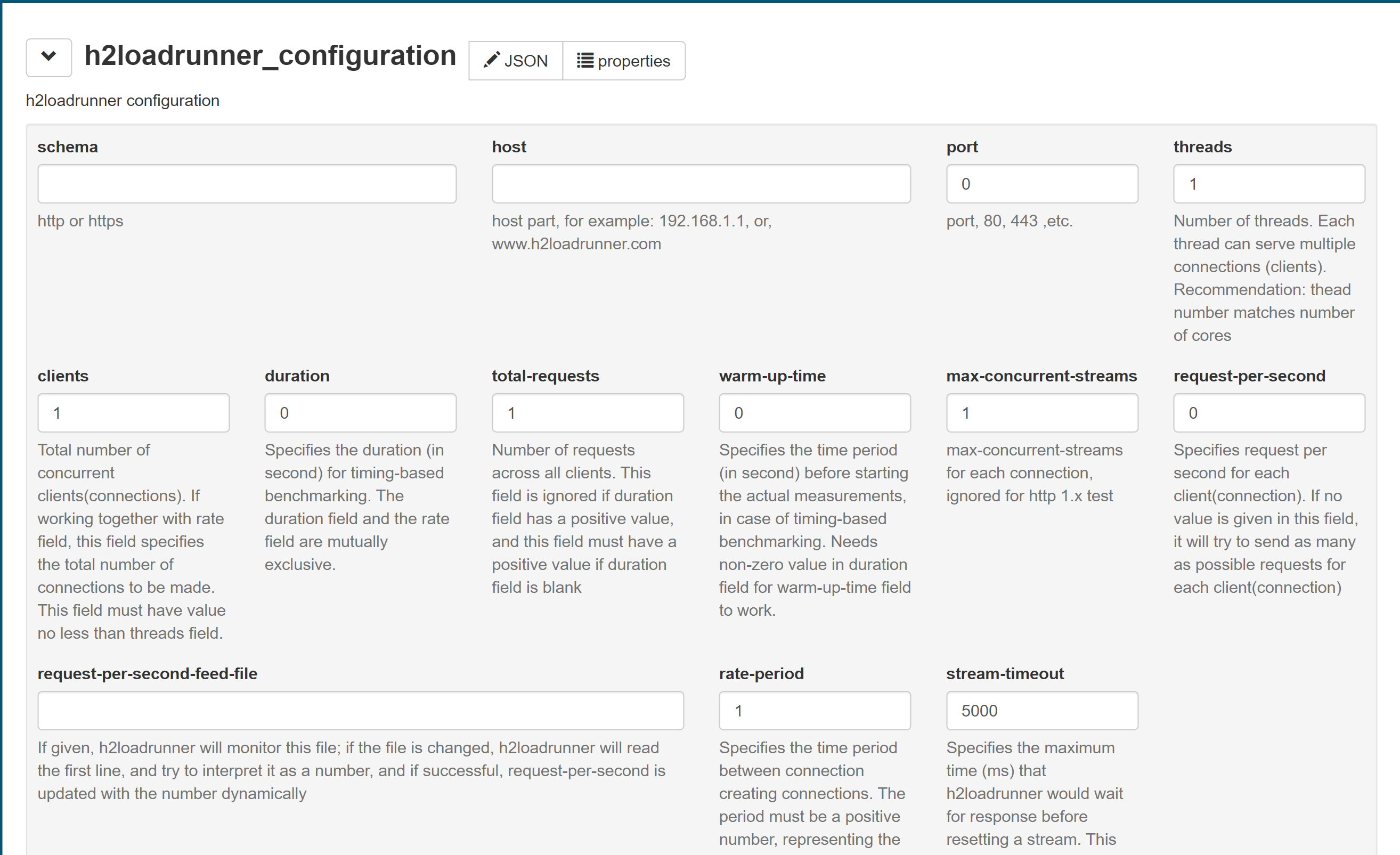
Take https://pmk65.github.io/jedemov2/dist/demo.html for example:
Paste raw content of https://raw.githubusercontent.com/wallyatgithub/h2loadrunner/main/config_schema.json to edit box of "Schema" tab of the above link
Then click "Generate Form" button, a form named h2loadrunner_configuration is available in top left "Form" tab
Check the help text associated with each field, to know what to fill/choose for each field.
Leave the field with the default value if you are not sure what to fill/choose.
After finishing editing the form, click "Output" tab, to get the JSON data from the edit box.
Copy the content of the edit box and save it to a file <JSON FILE>, then use h2loadrunner --config-file=<JSON FILE> to start the load run
Example screenshot using Json editor at https://pmk65.github.io/jedemov2/dist/demo.html: