
Vria
A Web-based Framework for Creating Immersive Analytics Experiences
Install / Use
/learn @vriajs/VriaREADME
<img align="right" width="200" height="82" src="https://pbutcher.uk/files/vria/img/vria-github-logo.png">
VRIA


A Web-Based Framework for Creating Immersive Analytics Experiences
Try it in your browser: https://vriajs.github.io/vria
Contents
- What is VRIA?
- Basic usage
- VRIA
aframe-reactComponent and API - VRIA Builder
- VRIA Boilerplate
- Team
- Publications
- License
What is VRIA?
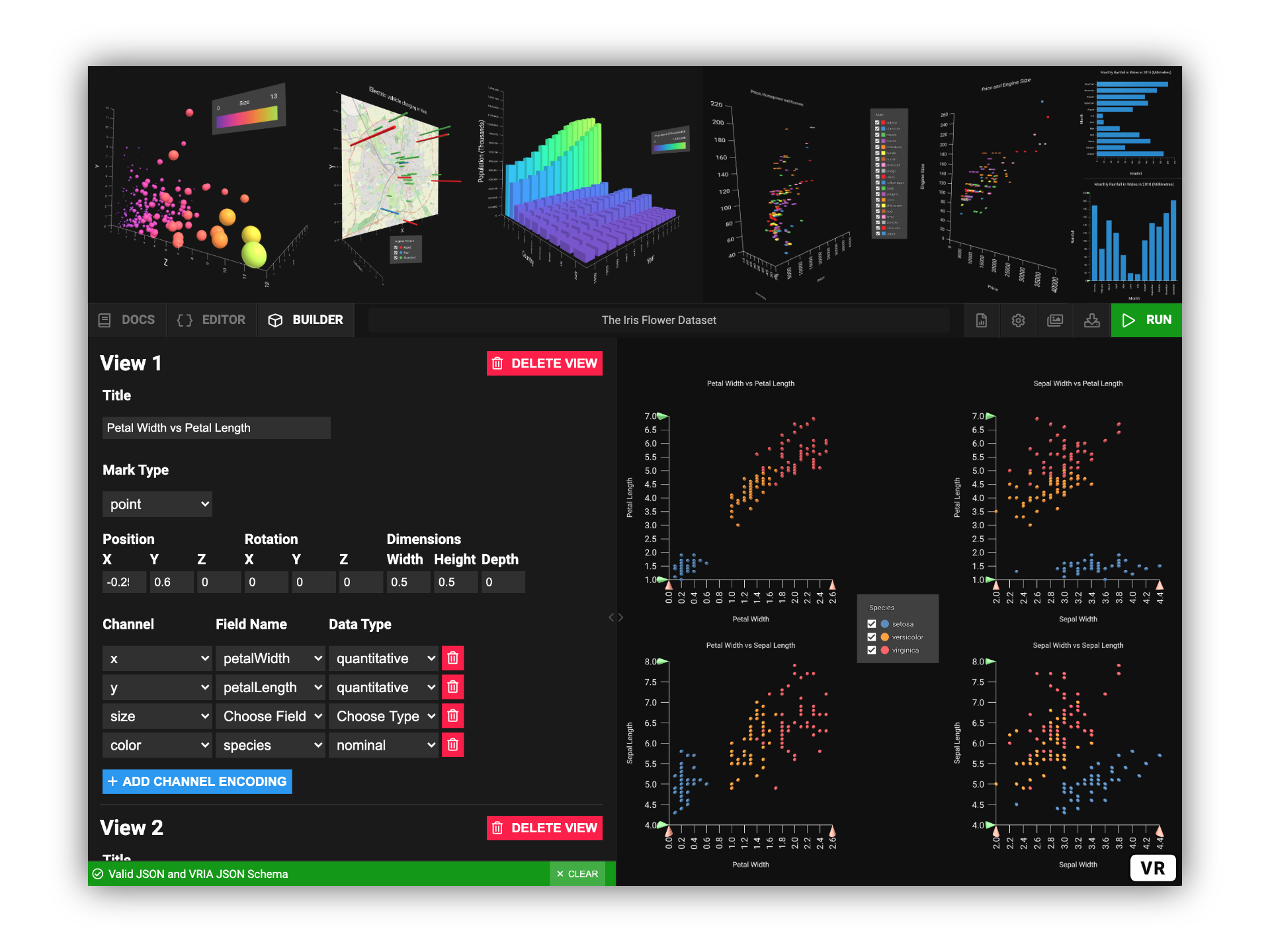
VRIA is a Web-based framework for creating Immersive Analytics experiences in virtual and augmented reality. Built with React, A-Frame, and D3, VRIA lets you rapidly create interactive, immersive data visualizations with a declarative grammar described in JSON. Powered by WebXR, the scenes you create with VRIA can be accessed immediately on a growing number of supported devices and browsers. Extra functionality can be added to immersive scenes with VRIA's API.
VRIA Grammar
VRIA visualizations are defined with a declarative grammar described in JSON. VRIA's grammar is similar to those of Vega-Lite and DxR.
Please refer to the VRIA Grammar Definition and/or the VRIA JSON Schema.
What's in the package?
VRIA's NodeJS module is separated into three parts:
- The VRIA
aframe-reactcomponent and API. [docs] - The VRIA Builder: An end-to-end tool for learning and rapidly prototyping immersive Web-based visualizations. [docs]
- A boilerplate environment to create your first standalone VRIA application. [docs]
Basic Usage
To get started with VRIA, you can experiment with the hosted version of the VRIA Builder online: https://vriajs.github.io/vria
To add VRIA to a new or existing project you will need:
- NodeJS (>= v10.0).
- You will also need to install
reactandreact-domif you haven't already. The easiest way to get started with a new React project is via create-react-app (recommended). - Finally, you will need to include the A-Frame library script in the
<head>of yourindex.htmlfile:
<script src="https://aframe.io/releases/1.0.4/aframe.min.js"></script>
Installing VRIA
You can add VRIA to a new or existing application by installing it with Yarn or NPM:
yarn add vria
or
npm install vria
You can then include VRIA in your project:
import VRIA from 'vria';
Run the development server
If you are using create-react-app you can run either yarn start or npm start to start the development server.
Your app will now be running at localhost:3000.
You can then include VRIA in your project, something like this:
// index.js

import React from 'react';
import ReactDOM from 'react-dom';
import { Scene } from 'aframe-react';
import VRIA from 'vria';

const config = {
  title: 'My first VRIA app',
  data: {
    values: [
      { a: 'A', b: 1 },
      { a: 'B', b: 2 }
    ]
  },
  mark: 'bar',
  encoding: {
    x: { field: 'a', type: 'nominal' },
    y: { field: 'b', type: 'quantitative' }
  }
};

const App = () => (
  <Scene>
    <VRIA config={config} />
  </Scene>
);

ReactDOM.render(<App />, document.getElementById('root'));
Create a production build
You can build your app for production to the build/ directory by running either yarn build or npm run build.
VRIA aframe-react Component and API
The VRIA aframe-react component is an A-Frame entity, wrapped up in a React component. It can be passed A-Frame props (e.g. position and rotation etc.), as well as props to access VRIA API features.
You can include other A-Frame components and assets inside the <Scene> element. Entities can be added with aframe-react's <Entity> component:
<Scene>
  <a-assets timeout='70000'>
    <img src='myimage.jpg' id='myimage' />
  </a-assets>
  <Entity
    primitive='a-image'
    width='1.5'
    height='1.5'
    src='#myimage'
    rotation='-90 -90 0'
    position='0 0 0'
  />
  <VRIA config={config} />
  <Entity environment={{ preset: 'default' }} />
</Scene>
In the above example the config prop is used to load a VRIA vis-config as JSON. The config prop is the only required prop, and all visualization functionality can be acheived with it. See VRIA Grammar.
VRIA exposes a set of props that can be used to integrate a scene with other libraries and user-defined features. For example, additional filters can be added to other features of a multi-variate dataset with user-defined interaction components (e.g. buttons, sliders etc.).
Props API Reference
- config
- onConfigParsed
- additionalFilters
- onFilter
- setFilters
- onSelection
- setSelection
- customMarks
- options
config
required [object]
The config prop contains a VRIA vis-config as JSON and must be supplied when the VRIA component is rendered. See VRIA Grammar for details on how to structure a VRIA vis-config.
onConfigParsed
optional [function]
The onConfigParsed prop should be passed a function which will be called whenever VRIA compiles a vis-config update. This function will be passed an object containing the following:
| Property | Type | Description |
| ---------------- | ----------------------------------------------------------------------------------------------- | ----------------------------------------- |
| compiledConfig | object | The compiled VRIA vis-config |
| dataset | object array | The parsed dataset |
| domainMap | Map() | The state of visualization domain filters |
| scales | object array | Scale functions from each VRIA view |
Example usage:
<VRIA
  config={config}
  onConfigParsed={({ compiledConfig, dataset, domainMap, scales }) => {
    // Do something once the vis-config is compiled
  }}
/>
additionalFilters
optional [object array]
The additionalFilters prop is used to list field names and domains of the dataset that the user would like to filter from the visualization. From this it is possible to create a custom filter component for each of these additional fields. Fields must not already be included in any of the encoding channels in the vis-config. Custom filters can have the following properties:
| Key | Required | Default | Possible Values | Description |
| -------- | -------- | ---------------------------------------------------------------------------------------------------------------- | ---------------------------------------------------------------- | ------------------------------------------------------------------------------- |
| field | Yes | - | string: field name | A field of the dataset |
| type | Yes | - | string: quantitative | nominal | ordinal | temporal | Field data type |
| zero | No
Related Skills
feishu-drive
345.4k|
things-mac
345.4kManage Things 3 via the `things` CLI on macOS (add/update projects+todos via URL scheme; read/search/list from the local Things database)
clawhub
345.4kUse the ClawHub CLI to search, install, update, and publish agent skills from clawhub.com
codebase-memory-mcp
1.1kHigh-performance code intelligence MCP server. Indexes codebases into a persistent knowledge graph — average repo in milliseconds. 66 languages, sub-ms queries, 99% fewer tokens. Single static binary, zero dependencies.
