
Nginx Module Sts
Nginx stream server traffic status module
Install / Use
npx skills add vozlt/nginx-module-stsInstalls into whichever agent you are using.
README
Nginx stream server traffic status module

Nginx stream server traffic status module
Table of Contents
- Version
- Dependencies
- Screenshots
- Installation
- Synopsis
- Description
- Control
- JSON
- Variables
- Limit
- Use cases
- Customizing
- Directives
- stream_server_traffic_status
- stream_server_traffic_status_zone
- stream_server_traffic_status_display
- stream_server_traffic_status_display_format
- stream_server_traffic_status_display_jsonp
- stream_server_traffic_status_average_method
- server_traffic_status
- server_traffic_status_zone
- server_traffic_status_filter
- server_traffic_status_filter_by_set_key
- server_traffic_status_filter_check_duplicate
- server_traffic_status_limit
- server_traffic_status_limit_traffic
- server_traffic_status_limit_traffic_by_set_key
- server_traffic_status_limit_check_duplicate
- server_traffic_status_average_method
- server_traffic_status_histogram_buckets
- See Also
- TODO
- Donation
- Author
Version
This document describes nginx-module-sts v0.1.1 released on 04 Jul 2018.
Dependencies
Compatibility
- Nginx
- 1.11.5 <= (last tested: 1.15.0)
Earlier versions does not work.
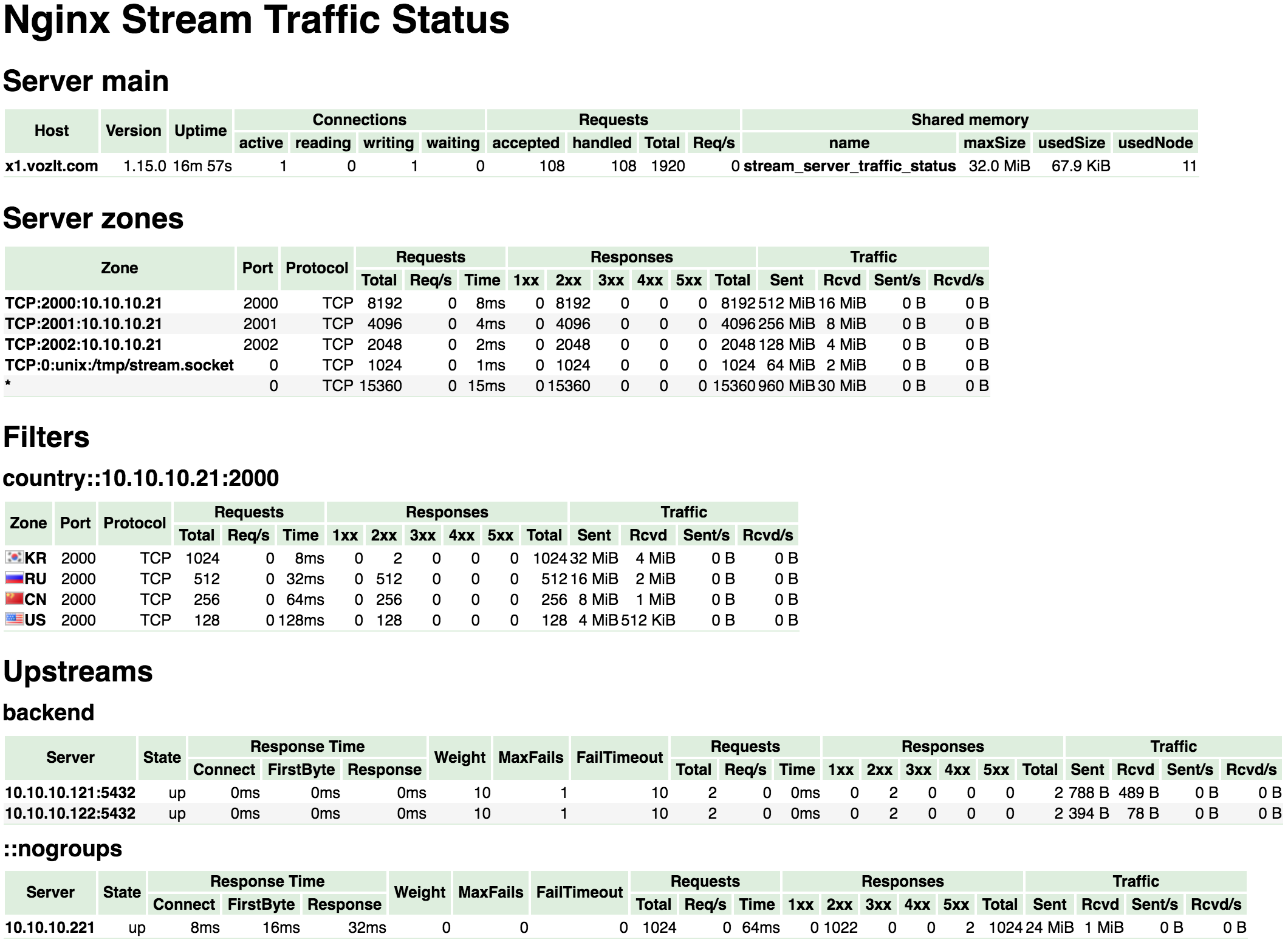
Screenshots
Installation
- Clone the git repository.
shell> git clone git://github.com/vozlt/nginx-module-sts.git
shell> git clone git://github.com/vozlt/nginx-module-stream-sts.git
- Add the module to the build configuration by adding
--with-stream
--add-module=/path/to/nginx-module-sts
--add-module=/path/to/nginx-module-stream-sts
-
Build the nginx binary.
-
Install the nginx binary.
Synopsis
http {
    stream_server_traffic_status_zone;

    ...

    server {

        ...

        location /status {
            stream_server_traffic_status_display;
            stream_server_traffic_status_display_format html;
        }
    }
}

stream {
    server_traffic_status_zone;

    ...

    server {
        ...
    }
}
Description
This is an Nginx module that provides access to stream server traffic status information. This is a porting version of the nginx-module-vts to the NGINX "stream" subsystem so as to support the same features in nginx-module-vts. It contains the current status such as servers, upstreams, user-defined filter.
First of all, It is required both the directive server_traffic_status_zone in stream block and stream_server_traffic_status_zone in http block, and then if the directive stream_server_traffic_status_display is set, can be access to as follows:
- /status/format/json
- If you request
/status/format/json, will respond with a JSON document containing the current activity data for using in live dashboards and third-party monitoring tools.
- If you request
- /status/format/html
- If you request
/status/format/html, will respond with the built-in live dashboard in HTML that requests internally to/status/format/json.
- If you request
- /status/format/jsonp
- If you request
/status/format/jsonp, will respond with a JSONP callback function containing the current activity data for using in live dashboards and third-party monitoring tools.
- If you request
- /status/format/prometheus
- If you request
/status/format/prometheus, will respond with a prometheus document containing the current activity data.
- If you request
- /status/control
- If you request
/status/control, will respond with a JSON document after it reset or delete zones through a query string. See the Control.
- If you request
JSON document contains as follows:
{
    "hostName": ...,
    "nginxVersion": ...,
    "loadMsec": ...,
    "nowMsec": ...,
    "connections": {
        "active":...,
        "reading":...,
        "writing":...,
        "waiting":...,
        "accepted":...,
        "handled":...,
        "requests":...
    },
    "sharedZones": {
        "name":...,
        "maxSize":...,
        "usedSize":...,
        "usedNode":...
    },
    "streamServerZones": {
        "...":{
            "port":...,
            "protocol":...,
            "connectCounter":...,
            "inBytes":...,
            "outBytes":...,
            "responses":{
                "1xx":...,
                "2xx":...,
                "3xx":...,
                "4xx":...,
                "5xx":...,
            },
            "sessionMsecCounter":...,
            "sessionMsec":...,
            "sessionMsecs":{
                "times":[...],
                "msecs":[...]
            },
            "sessionBuckets":{
                "msecs":[...],
                "counters":[...]
            }
        }
        ...
    },
    "streamFilterZones": {
        "...":{
            "...":{

                "port":...,
                "protocol":...,
                "connectCounter":...,
                "inBytes":...,
                "outBytes":...,
                "responses":{
                    "1xx":...,
                    "2xx":...,
                    "3xx":...,
                    "4xx":...,
                    "5xx":...,
                },
                "sessionMsecCounter":...,
                "sessionMsec":...,
                "sessionMsecs":{
                    "times":[...],
                    "msecs":[...]
                },
                "sessionBuckets":{
                    "msecs":[...],
                    "counters":[...]
                }
            },
            ...
        },
        ...
    },
    "streamUpstreamZones": {
        "...":[
            {
                "server":...,
                "connectCounter":...,
                "inBytes":...,
                "outBytes":...,
                "responses":{
                    "1xx":...,
                    "2xx":...,
                    "3xx":...,
                    "4xx":...,
                    "5xx":...
                },
                "sessionMsecCounter":...,
                "sessionMsec":...,
                "sessionMsecs":{
                    "times":[...],
                    "msecs":[...]
                },
                "sessionBuckets":{
                    "msecs":[...]
                    "counters":[...]
                },
                "uSessionMsecCounter":...,
                "uSessionMsec":...,
                "uSessionMsecs":{
                    "times":[...],
                    "msecs":[...]
                },
                "uSessionBuckets":{
                    "msecs":[...]
                    "counters":[...]
                },
                "uConnectMsecCounter":...,
                "uConnectMsec":...,
                "uConnectMsecs":{
                    "times":[...],
                    "msecs":[...]
                },
                "uConnectBuckets":{
                    "msecs":[...]
                    "counters":[...]
                },
                "uFirstByteMsecCounter":...,
                "uFirstByteMsec":...,
                "uFirstByteMsecs":{
                    "times":[...],
                    "msecs":[...]
                },
                "uFirstByteBuckets":{
                    "msecs":[...]
Related Skills
dbx
13.7k20 MB lightweight cross-platform database client for 70+ databases, including MySQL, PostgreSQL, SQLite, Redis, MongoDB, DuckDB, SQL Server, and Dameng. Built-in AI, MCP Server, CLI, desktop and Docker.
product
Cloud-agnostic Kubernetes infrastructure with Terraform & Helm for homelabs, edge, and production clusters.
ghidra-mcp
3.2kGhidra MCP Server — 200+ MCP tools for AI-powered reverse engineering. GUI plugin + headless server, lazy tool loading, convention enforcement, batch operations, Ghidra Server integration, and Docker deployment.
radar
2.8kThe missing open-source Kubernetes UI with a built-in MCP server for AI agents. See what's broken, why, and what changed. Issues, Topology, event timeline, Helm, GitOps, live service traffic, and cluster audits - all in one Go binary.
