
Leprechaun
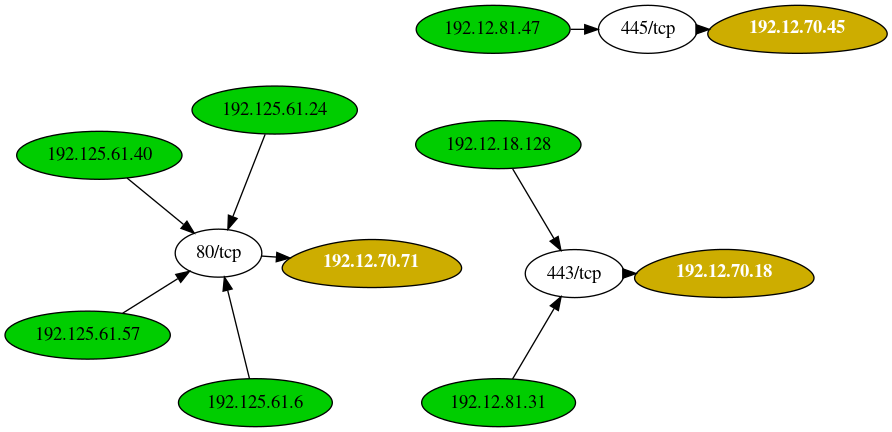
This tool is used to map out the network data flow to help penetration testers identify potentially valuable targets.
Install / Use
/learn @vonahisec/LeprechaunREADME
Leprechaun
                                       .-----.
                                      /   V   \
                                      |__...__|
                                      |_....._|
                                    .-'  ___  '-.
                                    \_.-`. .`-._/
              __ .--. _              (|\ (_) /|)
           .-;.-"-.-;`_;-,            ( \_=_/ )
         .(_( `)-;___),-;_),          _(_   _)_
        (.( `\.-._)-.(   ). )       /` ||'-'|| `\
      ,(_`'--;.__\  _).;--'`_)  _  /_/ (_>o<_) \_\
     // )`--..__ ``` _( o )'(';,)\_//| || : || |\\
     \;'        `````  `\\   '.\\--' |`"""""""`|//
     /                   ':.___//     \___,___/\_(
    |                      '---'|      |__|__|
    ;        Leprechaun         ;      ;""|"";
     \                         /       [] | []
      '.     #vonahisec      .'      .'  / \  '.
        '-,.__         __.,-'        `--'   `--'
         (___/`````````\___)
The purpose of this tool is to help penetration testers identify potentially valuable targets on the internal network environment. By aggregating netstat routes from multiple hosts, you can easily figure out what's going on within.
Getting Started
These instructions will get you a copy of the project up and running on your local machine for development and testing purposes. See deployment for notes on how to deploy the project on a live system.
Prerequisites
You'll need a few Ruby gems to get started - if you don't have them already, that is.
gem install 'securerandom'
gem install 'terminal-table'
gem install 'getopt'
Lastly, make sure you have Graphviz installed. You can install that with the following command:
apt install graphviz -y
Tool help menu
If you run the script without any arguments, you'll see the following help menu:
[root:vonahisec-kali:~/scripts/leprechaun]# ./leprechaun.rb

 -------------------------------------------------------------
 Leprechaun v1.0 - Alton Johnson (@altonjx)
 -------------------------------------------------------------

  Usage: ./leprechaun.rb -f /path/to/netstat_results.txt -p <port>

  -f  File containing the output of netstat results
  -p  Port you're interested in. e.g., 80. Specify "all", "common", or separate ports with commas
  -e  The type of destination IP addresses you want to see connections to (e.g. external/internal/all)

  Example: ./leprechaun.rb -f netstat_output.txt -p 80
  Example: ./leprechaun.rb -f netstat_output.txt -p all
  Example: ./leprechaun.rb -f netstat_output.txt -p common
  Example: ./leprechaun.rb -f netstat_output.txt -p 80,443 -t external
Example outputs
+--------------+-----------------------------+----------------------------------+
| Server       | Number of connected clients | Highest traffic destination port |
+--------------+-----------------------------+----------------------------------+
| 192.12.70.71 | 4                           | 80/tcp (4 clients)               |
| 192.12.70.18 | 2                           | 443/tcp (2 clients)              |
| 192.12.70.45 | 1                           | 445/tcp (1 clients)              |
+--------------+-----------------------------+----------------------------------+
Additional References
Blog post: https://blog.vonahi.io/post-exploitation-with-leprechaun/
LinkedIn Article: https://www.linkedin.com/pulse/finding-gaps-your-network-segmentation-using-johnson-oscp-osce/
Authors
License
This project is licensed under the MIT License - see the LICENSE.md file for details
Acknowledgments & Credits
- Josh Stone - Influenced by Routehunter
Related Skills
node-connect
351.8kDiagnose OpenClaw node connection and pairing failures for Android, iOS, and macOS companion apps
frontend-design
110.9kCreate distinctive, production-grade frontend interfaces with high design quality. Use this skill when the user asks to build web components, pages, or applications. Generates creative, polished code that avoids generic AI aesthetics.
openai-whisper-api
351.8kTranscribe audio via OpenAI Audio Transcriptions API (Whisper).
qqbot-media
351.8kQQBot 富媒体收发能力。使用 <qqmedia> 标签,系统根据文件扩展名自动识别类型(图片/语音/视频/文件)。
