
Arrayy
🗃 Array manipulation library for PHP, called Arrayy!
Install / Use
/learn @voku/ArrayyREADME





🗃 Arrayy
A PHP array manipulation library. Compatible with PHP 7+ & PHP 8+
\Arrayy\Type\StringCollection::create(['Array', 'Array'])->unique()->append('y')->implode() // Arrayy
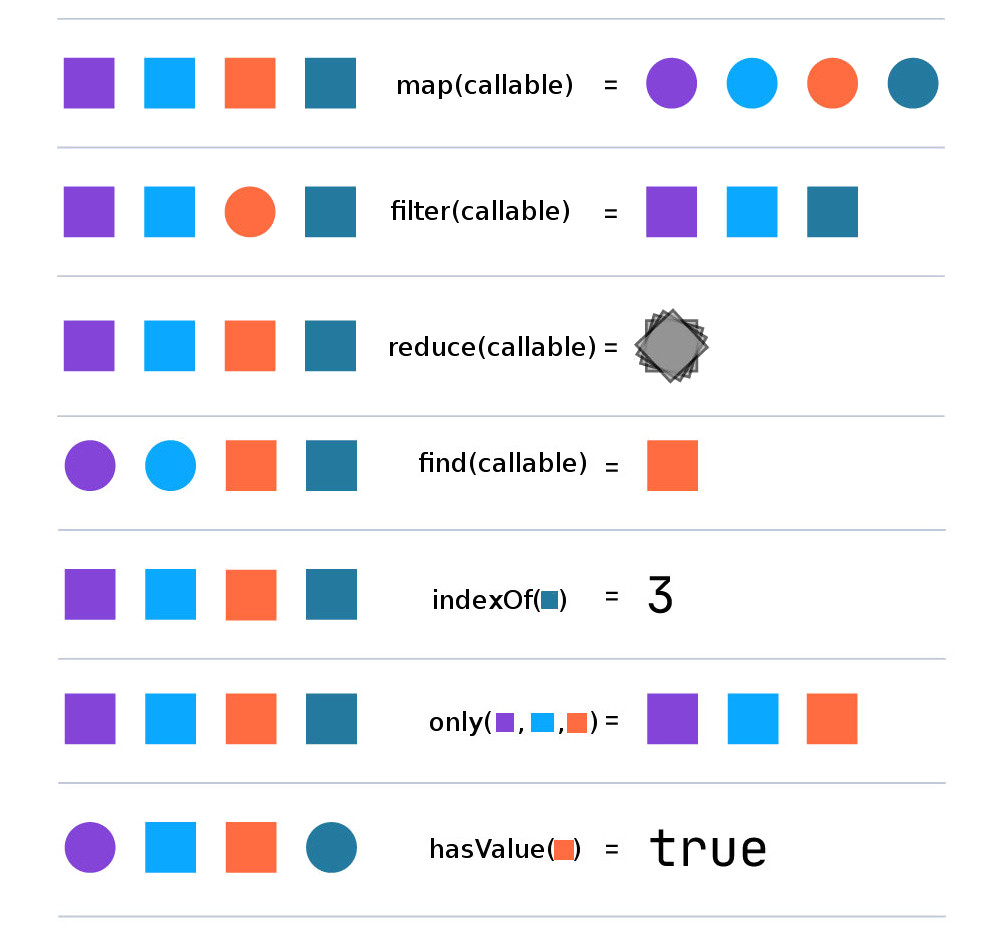
- Installation
- Multidimensional ArrayAccess
- PhpDoc @property checking
- OO and Chaining
- Collections
- Class methods
- Instance methods
- Tests
- License
Installation via "composer require"
composer require voku/arrayy
Multidimensional ArrayAccess
You can access / change the array via Object, Array or with "Arrayy"-syntax.
Access via "Arrayy"-syntax: (dot-notation)
$arrayy = new A(['Lars' => ['lastname' => 'Moelleken']]);

$arrayy->get('Lars'); // ['lastname' => 'Moelleken']
$arrayy->get('Lars.lastname'); // 'Moelleken'
Access via "array"-syntax:
$arrayy = new A(['Lars' => ['lastname' => 'Moelleken']]);

$arrayy['Lars'];             // ['lastname' => 'Moelleken']
$arrayy['Lars']['lastname']; // 'Moelleken'
Access via "object"-syntax:
$arrayy = new A(['Lars' => ['lastname' => 'Moelleken']]);

$arrayy->Lars; // Arrayy['lastname' => 'Moelleken']
$arrayy->Lars->lastname; // 'Moelleken'
Set values via "Arrayy"-syntax: (dot-notation)
$arrayy = new A(['Lars' => ['lastname' => 'Mueller']]);

$arrayy->set('Lars.lastname', 'Moelleken');
$arrayy->get('Lars.lastname'); // 'Moelleken'
Set values via "array"-syntax:
$arrayy = new A(['Lars' => ['lastname' => 'Moelleken']]);

$arrayy['Lars'] = array('lastname' => 'Müller');
$arrayy['Lars']['lastname']; // 'Müller'
Set values via "object"-syntax:
$arrayy = new A(['Lars' => ['lastname' => 'Moelleken']]);

$arrayy->Lars = array('lastname' => 'Müller');
$arrayy->Lars->lastname; // 'Müller'
PhpDoc @property checking
The library offers a type checking for @property phpdoc-class-comments, as seen below:
/**
 * @property int        $id
 * @property int|string $firstName
 * @property string     $lastName
 * @property null|City  $city
 *
 * @extends  \Arrayy\Arrayy<array-key,mixed>
 */
class User extends \Arrayy\Arrayy
{
  protected $checkPropertyTypes = true;

  protected $checkPropertiesMismatchInConstructor = true;
}

/**
 * @property string|null $plz
 * @property string      $name
 * @property string[]    $infos
 *
 * @extends  \Arrayy\Arrayy<array-key,mixed>
 */
class City extends \Arrayy\Arrayy
{
    protected $checkPropertyTypes = true;

    protected $checkPropertiesMismatchInConstructor = true;
}

$cityMeta = City::meta();
$city = new City(
    [
        $cityMeta->plz   => null,
        $cityMeta->name  => 'Düsseldorf',
        $cityMeta->infos => ['lall'],
    ]
);

$userMeta = User::meta();
$user = new User(
    [
        $userMeta->id        => 1,
        $userMeta->firstName => 'Lars',
        $userMeta->lastName  => 'Moelleken',
        $userMeta->city      => $city,
    ]
);

var_dump($user['lastName']); // 'Moelleken'
var_dump($user[$userMeta->lastName]); // 'Moelleken'
var_dump($user->lastName); // Moelleken

var_dump($user['city.name']); // 'Düsseldorf'
var_dump($user[$userMeta->city][$cityMeta->name]); // 'Düsseldorf'
var_dump($user->city->name); // Düsseldorf
- "checkPropertyTypes": activate the type checking for all defined @property in the class-phpdoc
- "checkPropertiesMismatchInConstructor": activate the property mismatch check, so you can only add an array with all needed properties (or an empty array) into the constructor
OO and Chaining
The library also offers OO method chaining, as seen below:
simple example:
echo a(['fòô', 'bàř', 'bàř'])->unique()->reverse()->implode(','); // 'bàř,fòô'
complex example:
/**
 * @property int    $id
 * @property string $firstName
 * @property string $lastName
 *
 * @extends  \Arrayy\Arrayy<array-key,mixed>
 */
class User extends \Arrayy\Arrayy
{
  protected $checkPropertyTypes = true;

  protected $checkPropertiesMismatchInConstructor = true;
}

/**
 * @template TKey of array-key
 * @extends  AbstractCollection<TKey,User>
 */
class UserCollection extends \Arrayy\Collection\AbstractCollection
{
    /**
     * The type (FQCN) associated with this collection.
     *
     * @return string
     */
    public function getType()
    {
        return User::class;
    }
}


$m = User::meta();

$data = static function () use ($m) {
    yield new User([$m->id => 40, $m->firstName => 'Foo', $m->lastName => 'Moelleken']);
    yield new User([$m->id => 30, $m->firstName => 'Sven', $m->lastName => 'Moelleken']);
    yield new User([$m->id => 20, $m->firstName => 'Lars', $m->lastName => 'Moelleken']);
    yield new User([$m->id => 10, $m->firstName => 'Lea', $m->lastName => 'Moelleken']);
};

$users = UserCollection::createFromGeneratorFunction($data);
$names = $users
    ->filter(static function (User $user): bool {
        return $user->id <= 30;
    })
    ->customSortValuesImmutable(static function (User $a, User $b): int {
        return $a->firstName <=> $b->firstName;
    })
    ->map(static function (User $user): string {
        return $user->firstName;
    })
    ->implode(';');

static::assertSame('Lars;Lea;Sven', $names);
Implemented Interfaces
Arrayy\Arrayy implements the IteratorAggregate interface, meaning that
foreach can be used with an instance of the class:
$arrayy = a(['fòôbàř', 'foo']);
foreach ($arrayy as $value) {
    echo $value;
}
// 'fòôbàř'
// 'foo'
It implements the Countable interface, enabling the use of count() to
retrieve the number of elements in the array:
$arrayy = a(['fòô', 'foo']);
count($arrayy);  // 2
PHP 5.6 Creation
As of PHP 5.6, use function is
available for importing functions. Arrayy exposes a namespaced function,
Arrayy\create, which emits the same behaviour as Arrayy\Arrayy::create().
If running PHP 5.6, or another runtime that supports the use function syntax,
you can take advantage of an even simpler API as seen below:
use function Arrayy\create as a;

// Instead of: A::create(['fòô', 'bàř'])->reverse()->implode();
a(['fòô', 'bàř'])->reverse()->implode(','); // 'bàř,fòô'
Collections
If you need to group objects together, it's not a good idea
to use a simple array or Arrayy object. For these cases you can use the AbstractCollection
class.
It will throw a InvalidArgumentException if you try to add a non valid object into the collection.
e.g.: "YOURCollection.php" (see example /tests/CollectionTest.php on github)
use Arrayy\Collection\AbstractCollection;

/**
 * @extends  AbstractCollection<array-key,YOURInterface>
 */
class YOURCollection extends AbstractCollection
{
    /**
     * The type (FQCN) associated with this collection.
     *
     * @return string
     */
    public function getType(): string
    {
