
Catime
A tiny (995KB) but mighty timer in pure C. Supports clock, countdown, stopwatch, Pomodoro, and fully customizable tray animations (GIFs, CPU/Mem%)💘Don't be shy, join here: https://discord.com/invite/W3tW2gtp6g
Install / Use
/learn @vladelaina/CatimeREADME
v1.4.0 is out! 🎉 Download Now - Only 995KB!
</div>
<div align="center">
<a href="https://cati.me" target="_blank">
<img src="Images/catime_resize.png" alt="Catime" width="249">
</a>
<h1>
<a href="https://cati.me" target="_blank" style="text-decoration: none; color: inherit;">Cati.me</a>
</h1>
</div>
<!-- Project Description + Rocket Icon -->
<p align="center">
An ultra-lightweight Windows countdown and Pomodoro tool written in <b>pure C</b> with a clean transparent interface,<br/>
rich customization, powerful shortcuts, and almost no resource usage.
</p>
<p align="center">
<img src="https://count.getloli.com/@catime?name=catime&theme=booru-qualityhentais&padding=7&offset=0&align=top&scale=1&pixelated=1&darkmode=auto" width="400">
</p>
<p align="center">
<a href="https://hellogithub.com/repository/00a7a32b7bc647e1a62747530bc16115" target="_blank" style="text-decoration: none;">
<img src="https://api.hellogithub.com/v1/widgets/recommend.svg?rid=00a7a32b7bc647e1a62747530bc16115&claim_uid=JBczix10rXqNblQ" alt="Featured|HelloGitHub" style="width: 250px; height: 54px;" width="250" height="54" />
</a>
<a href="https://trendshift.io/repositories/15506" target="_blank" style="text-decoration: none;">
<img src="https://trendshift.io/api/badge/repositories/15506" alt="Catime | Trendshift" style="width: 250px; height: 55px;" width="250" height="55" />
</a>
<a href="https://www.producthunt.com/posts/catime?utm_source=badge-featured&utm_medium=badge&utm_souce=badge-catime" target="_blank" style="text-decoration: none;">
<img src="https://api.producthunt.com/widgets/embed-image/v1/featured.svg?post_id=942133&theme=light" alt="Catime - a very useful timer | Product Hunt" style="width: 250px; height: 54px;" width="250" height="54" />
</a>
</p>
<!-- Demo Video -->
<div align="center" style="margin-bottom: 30px;">
<video src="https://github.com/user-attachments/assets/a59a85af-c522-4081-9a84-e0d3a71be236
" autoplay loop style="border-radius: 8px; max-width: 800px;"></video>
</div>
<!-- Community Links -->
<div align="center" style="margin-bottom: 30px;">
👏 Join us on
<a href="https://discord.com/invite/W3tW2gtp6g" target="_blank" style="text-decoration: none; font-weight: bold; color: #5865F2;">Discord</a>
and
<a href="https://qun.qq.com/universal-share/share?ac=1&authKey=jLajcI6fmsK8MYh9Sx8s0IArOuR5k7mnn8upVJK%2BgJkeXrEop9EBsAD8tP%2BLhPDs&busi_data=eyJncm91cENvZGUiOiIxMDI3MzI3OTEyIiwidG9rZW4iOiI0UlNlc1RzV0QyUlZKNzBMK3RWczRZOUt0K0xIRHRvVVZSQnR3OFo3bUxBMFAzcG9jUjRZa2dwUGZEaCs0ZEhuIiwidWluIjoiMjM3NzY0MDY5OSJ9&data=6Ce8O75Fxrd5GoBAByGHSoQNA3cK7t4WyUWyoI9FB3LK0mmPbgtK3PlGKQrt4vQvQsrlV4QkdQ7lQKt8TDkEg&svctype=4&tempid=h5_group_info" target="_blank" style="text-decoration: none; font-weight: bold; color: #12B7F5;">QQ Group(1079222265)</a>to say hi and ask questions.
</div>
🎨 Powerful Tray Animations
Your tray icon can now come alive! Catime brings powerful custom animation features:
- Custom Animations: Use GIF, WebP, and static images like PNG & JPG as your tray icon.
- System Status: Supports real-time display of CPU %, Memory %, Battery %, and Caps Lock status.
[!TIP] Looking for more fun animations? Check out our companion project, MemeTray!
💫Plugins
<img width="1105" height="481" alt="image" src="https://github.com/user-attachments/assets/734037a7-997c-48dd-b93f-513d1696ac54" /> <img width="1920" height="899" alt="image" src="https://github.com/user-attachments/assets/1ca3e4a4-c6b0-4c42-ac40-152330cec07a" />Plugins write to output.txt, Catime displays it — that simple.
[!TIP] Looking for more useful Plugins? Check out our companion project, Catime-Plugins!
❤️🔥Staying tuned with us
Star us and witness how this pure C-crafted minimalist time tool continues to evolve - don't miss any exciting updates!
<a href="https://github.com/vladelaina/Catime" target="_blank">
<img src="https://github.com/user-attachments/assets/50cfc9d4-3d3f-4370-b233-89d76f78977e" />
Sponsors
<div align="center"> <a href="https://www.dkdun.cn/aff/SCEYKYCH"> <img width="732" height="246" alt="dk" src="https://github.com/user-attachments/assets/6d06ac2a-ae1d-4b3f-b828-65b653f6e189" /> </a><br><br>
<table align="center"> <tr> <td style="vertical-align: middle; padding-right: 10px;"> <img alt="SignPath" src="https://signpath.org/assets/favicon-50x50.png" /> </td> <td style="vertical-align: middle;"> Free code signing on Windows provided by <a href="https://signpath.io">SignPath.io</a>, certificate by <a href="https://signpath.org/">SignPath Foundation</a> </td> </tr> </table> </div>📥 Download
-
GitHub Releases
Download the latest release from GitHub Releases.
-
Winget
winget install --id VladElaina.Catime
📑User Guide
- Left-click tray icon: Set time
- Right-click tray icon: Set menu
- Edit mode: Drag to adjust position, scroll wheel to resize, 🖱️ right-click to exit edit mode
Configuration file saved at
%LOCALAPPDATA%\Catime\config.ini
⚡Font Optimization
Reduce custom font file size by 90%+ with the official Font Simplification Tool.
Since Catime only displays numbers and symbols (
0-9,:,.), most font characters are unnecessary.Recommendation: Keep your original font files as backups. Future software updates may require additional characters beyond the current set.
🛠️ Development
Prerequisites: MinGW and CMake are required to build Catime.
Getting Started
git clone https://github.com/vladelaina/Catime.git
cd Catime

# INSTALL DEPENDENCIES
# Ubuntu/Debian
sudo apt update && sudo apt install -y mingw-w64 cmake

# Arch Linux
sudo pacman -Syu --noconfirm mingw-w64 cmake

# Windows - See setup instructions below
📦 Required Tools
| Tool | Description | Recommended Version Format | Download Link |
| ---------- | ---------------------- | ------------------------------------------------------------- | --------------------------------------------------------------------------------- |
| MinGW | GCC Compiler | x86_64-<version>-release-win32-seh-ucrt-rtv<num>-rev<num>.7z | MinGW Build |
| CMake | Build Tool | cmake-<version>-windows-x86_64.msi | CMake |
🔧 Installation Steps
1. Install MinGW
- Download
x86_64-<version>-release-win32-seh-ucrt-rtv<num>-rev<num>.7zfrom MinGW Build - Extract to
C:\mingw64 - Add
C:\mingw64\binto your PATH environment variable:- Open:
Control Panel → System → Advanced System Settings → Environment Variables - Find
Pathin System variables, click "Edit" - Add:
C:\mingw64\bin
- Open:
2. Install CMake
- Download and run
cmake-<version>-windows-x86_64.msifrom CMake - During installation, select "Add CMake to the system PATH"
3. Verify Installation
gcc --version
cmake --version
Building
chmod +x build.sh && ./build.sh   # Linux
build.bat                         # Windows
🎁 Support
<div align="center" style="margin: 20px 0;"> <a href="https://vladelaina.github.io/Catime/support.html"> <img src="https://img.shields.io/badge/Support_Catime-EA4AAA?style=for-the-badge&logo=githubsponsors&logoColor=white" alt="Support Catime" width="2500" height="1250"> </a> </div> <a href="https://vladelaina.github.io/Catime/support.html"> <img src="https://github.com/user-attachments/assets/49035b18-e803-4ee8-9ea5-2e3f32f099de" width="1889" height="872" alt="image" /> </a>Project Status
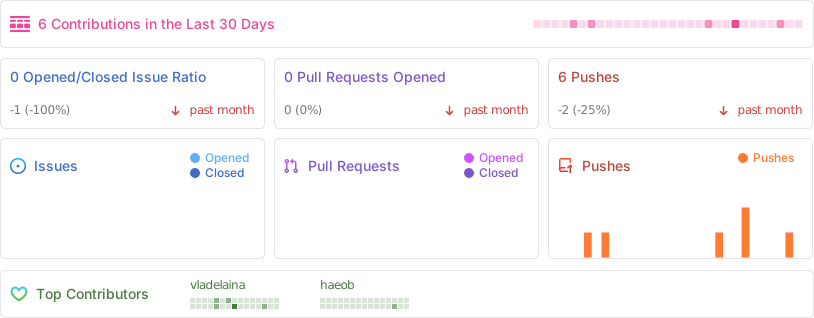
🌟Star History
<a href="https://www.star-history.com/#vladelaina/Catime&Date"> <picture> <source media="(prefers-color-scheme: dark)" srcset="https://api.star-history.com/svg?repos=vladelaina/Catime&type=Date&theme=dark" /> <source media="(prefers-color-scheme: light)" srcset="https://api.star-history.com/svg?repos=vladelaina/Catime&type=Date" /> <img alt="Star History Chart" src="https://api.star-history.com/svg?repos=vladelaina/Catime&type=Date" /> </picture> </a>✨Acknowledgements
With special appreciation to 猫屋敷梨梨Official for the beautiful icon design.
<table> <tbody> <tr> <td align="center" valign="top" width="14.28%"> <a href="https://github.com/MadMaxChow"><img src="https://vladelaina.github.io/Catime/assets/Contributors/MAX%C2%B0%E5%AD%9F%E5%85%86.webp" width="100px;" alt="MAX°孟兆"/><br /><sub><Special thanks to the following contributors(chronological order):
Related Skills
openhue
339.1kControl Philips Hue lights and scenes via the OpenHue CLI.
sag
339.1kElevenLabs text-to-speech with mac-style say UX.
weather
339.1kGet current weather and forecasts via wttr.in or Open-Meteo
tweakcc
1.5kCustomize Claude Code's system prompts, create custom toolsets, input pattern highlighters, themes/thinking verbs/spinners, customize input box & user message styling, support AGENTS.md, unlock private/unreleased features, and much more. Supports both native/npm installs on all platforms.
