
Shift
Light-weight & concurrent EventKit wrapper
Install / Use
/learn @vinhnx/ShiftREADME



Shift is a light-weight concurrency wrapper for EventKit:
- Concurrency ready with
async/await. (tag:0.7.0) - Tranditional,
Resultcompletion handler if preferred (tag:0.6.0) - Thread-safe.
- SwiftUI supported.
Shift is currently being used by Clendar app.
Requirement
- iOS 15.0 for async/await, tag
0.7.0 - iOS 14.0 and below for Result-based, tag <
0.6.0 - Swift version 5.5
- Xcode 13.1
Install
This component is built using Swift Package Manager, it is pretty straight forward to use:
- In Xcode (11+), open your project and navigate to File > Swift Packages > Add Package Dependency...
- Paste the repository URL (https://github.com/vinhnx/Shift) and click Next.
- For Rules, select Version, in here, you can choose either:
- Async/await => tag
0.7.0 - Result-based completion handler => tag
0.6.0
- Click Finish to resolve package into your Xcode project.
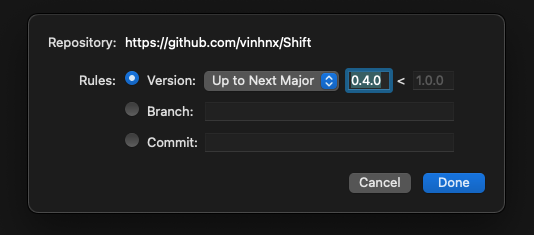
Tag Version:
Concurrency support is now ready, in tag 0.7.0
In order to use old Result-based completion hanlders, please use tag 0.6.0.
Getting Started
First thing first:
- Add Calendar usage description to your app's Info.plist to request for user's Calendars access.
<key>NSCalendarsUsageDescription</key>
<string>"$(PRODUCT_NAME) needs your permission to create events"</string>
- (Optional) configure own calendar name to request access to, preferrable in
AppDelegate'sdidFinishLaunchingWithOptions(Swift) orApp'sinit()(SwiftUI):
Swift AppDelegate:
import UIKit

@UIApplicationMain
class AppDelegate: UIResponder, UIApplicationDelegate {
    func application(_ application: UIApplication, didFinishLaunchingWithOptions launchOptions: [UIApplication.LaunchOptionsKey: Any]?) -> Bool {
        // Override point for customization after application launch.
        Shift.configureWithAppName("MyApp")
        return true
    }
}
in SwiftUI App, first import Shift, then configure your app's name to differntiate the name of your app's calendar in system's EventKit.
import SwiftUI
import Shift

@main
struct MyApp: App {
    init() {
        Shift.configureWithAppName("MyApp")
    }

    var body: some Scene {
        WindowGroup {
            ContentView()
        }
    }
}
A quick NOTE about concurrency
Since async functions can only be called on concurrency context, if you call async function inside synchornouse context, Xcode will throws an error:
So, there are two ways to awaiting for concurrency result, base on context:
- Inside
asyncfunction
func doSomethingAsync() async {
    // ... other works
    let events = try? await Shift.shared.fetchEvents(for: Date())
    // ... other works
}
- Inside
Taskclosure:
func regularFunction() {
    // ... other works

    Task {
        let events = try? await Shift.shared.fetchEvents(for: Date())
        // then...
    }

    // ... other works
}
Either is fine, base on caller's context.
You can read more about Task here https://developer.apple.com/documentation/swift/task.
In SwiftUI views, you can call async functions inside View' .task modifier:
import EventKit
import SwiftUI
import Shift

struct ContentView: View {
    @StateObject var eventKitWrapper = Shift.shared
    @State private var selectedEvent: EKEvent?

    var body: some View {
        LazyVStack(alignment: .leading, spacing: 10) {
            ForEach(eventKitWrapper.events, id: \.self) { event in
                Text(event: event)
            }
        }
        .padding()
        .task { // wrap async call inside .task modifier
            try? await eventKitWrapper.fetchEventsForToday()
        }
    }
}
You can read more about SwiftUI's
.taskmodifier here https://developer.apple.com/documentation/swiftui/view/task(priority:_:).
Usage Example
Fetch list of events for a particular date:
async/await (NEW)
inside regular async function:
func fetchEvents() async {
    do {
        let events = try await Shift.shared.fetchEvents(for: Date()) // await for events fetching
    } catch {
        print(error) // handle error
    }
}
or standalone:
Task {
    let events = try? await Shift.shared.fetchEvents(for: Date()) // await for events fetching
}
Result-based completion handlers (old pattern, but still doable if you preferred this to async/await)
Shift.shared.fetchEvents(for: Date()) { result in
    switch result {
    case let .success(events): print(events) // got events
    case let .failure(error): print(error) // handle error
    }
}
Shift.shared.fetchEventsRangeUntilEndOfDay(from: Date()) { result in
    switch result {
    case let .success(events): print(events) // got events
    case let .failure(error): print(error) // handle error
    }
}
Create Event:
async/await
inside regular async function:
func myAsyncFunction() async {
    try? await Shift.shared.createEvent("Be happy!", startDate: startTime, endDate: endTime)
}
or standalone:
Task {
    try? await Shift.shared.createEvent("Be happy!", startDate: startTime, endDate: endTime)
}
Result
Shift.shared.createEvent("Be happy!", startDate: startTime, endDate: endTime) { result in
    switch result {
    case let .success(event): print(event) // created event
    case let .failure(error): print(error) // handle error
    }
}
Delete event:
async/await
inside regular async function:
func myAsyncFunction() async {
    try? await Shift.shared.deleteEvent(identifier: eventID)
}
or standalone:
Task {
    try? await Shift.shared.deleteEvent(identifier: eventID)
}
Result
Shift.shared.deleteEvent(identifier: eventID) { result in
    switch result {
    case let .success: print("done!") // deleted event
    case let .failure(error): print(error) // handle error
    }
}
SwiftUI Example
Shift is conformed ObservableObject with an @Published events property, so it's straight-forward to use in SwiftUI binding mechanism.
Result-based example:
import EventKit
import SwiftUI
import Shift

struct ContentView: View {
    @StateObject var eventKitWrapper = Shift.shared
    @State private var selectedEvent: EKEvent?

    var body: some View {
        LazyVStack(alignment: .leading, spacing: 10) {
            ForEach(eventKitWrapper.events, id: \.self) { event in
                Text(event: event)
            }
        }
        .padding()
        .onAppear {
            eventKitWrapper.fetchEventsForToday()
        }
    }
}
async/await example:
import EventKit
import SwiftUI
import Shift

struct ContentView: View {
    @StateObject var eventKitWrapper = Shift.shared
    @State private var selectedEvent: EKEvent?

    var body: some View {
        LazyVStack(alignment: .leading, spacing: 10) {
            ForEach(eventKitWrapper.events, id: \.self) { event in
                Text(event: event)
            }
        }
        .padding()
        .task {
            try? await eventKitWrapper.fetchEventsForToday()
        }
    }
}
Apps currently using Shift
- Clendar - Clendar - universal calendar app. Written in SwiftUI. Available on App Store. MIT License.
Help, feedback or suggestions?
Feel free to open an issue or contact me on Twitter for discussions, news & announcements & other projects. 🚀
I hope you like it! :)
Related Skills
node-connect
354.3kDiagnose OpenClaw node connection and pairing failures for Android, iOS, and macOS companion apps
frontend-design
112.3kCreate distinctive, production-grade frontend interfaces with high design quality. Use this skill when the user asks to build web components, pages, or applications. Generates creative, polished code that avoids generic AI aesthetics.
openai-whisper-api
354.3kTranscribe audio via OpenAI Audio Transcriptions API (Whisper).
qqbot-media
354.3kQQBot 富媒体收发能力。使用 <qqmedia> 标签,系统根据文件扩展名自动识别类型(图片/语音/视频/文件)。
