
Klipse
Klipse is a JavaScript plugin for embedding interactive code snippets in tech blogs.
Install / Use
/learn @viebel/KlipseREADME
Klipse
Klipse is a JavaScript plugin for embedding interactive code snippets in tech blogs. See examples at https://blog.klipse.tech/
Technically, Klipse is a small piece of JavaScript code that evaluates code snippets in the browser and it is pluggable on any web page.
If you like this stuff, please consider a (small donation) on Patreon.
Plugin
The klipse plugin is a JavaScript tag (see details below) that transforms static code snippets of an html page into live and interactive snippets:
- Live: The code is executed in your browser
- Interactive: You can modify the code and it is evaluated as you type
The code evaluation is done in the browser: no server is involved at all!
Live demo
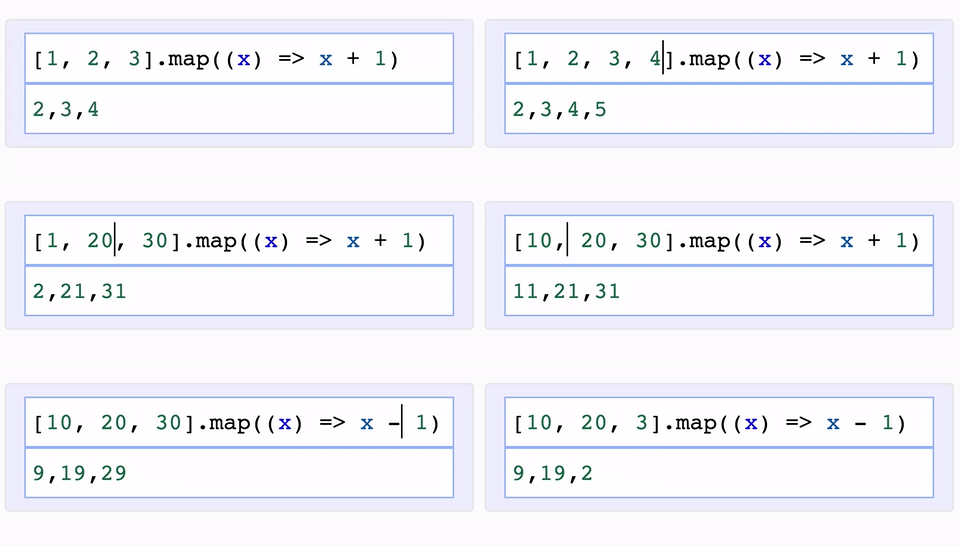
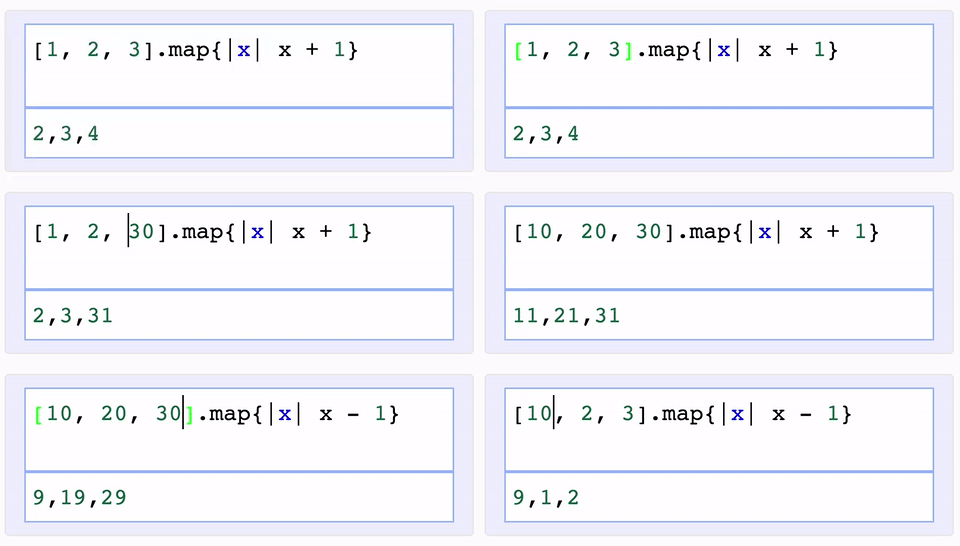
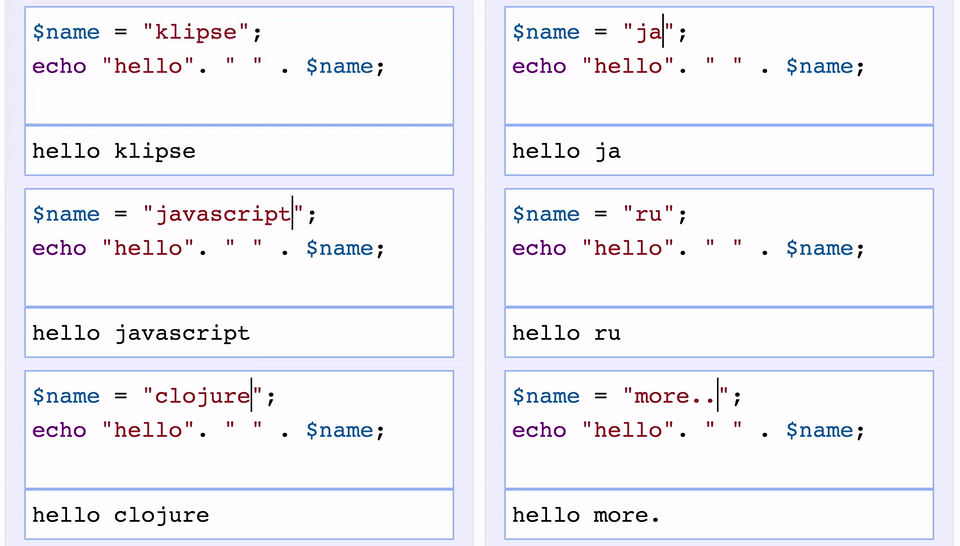
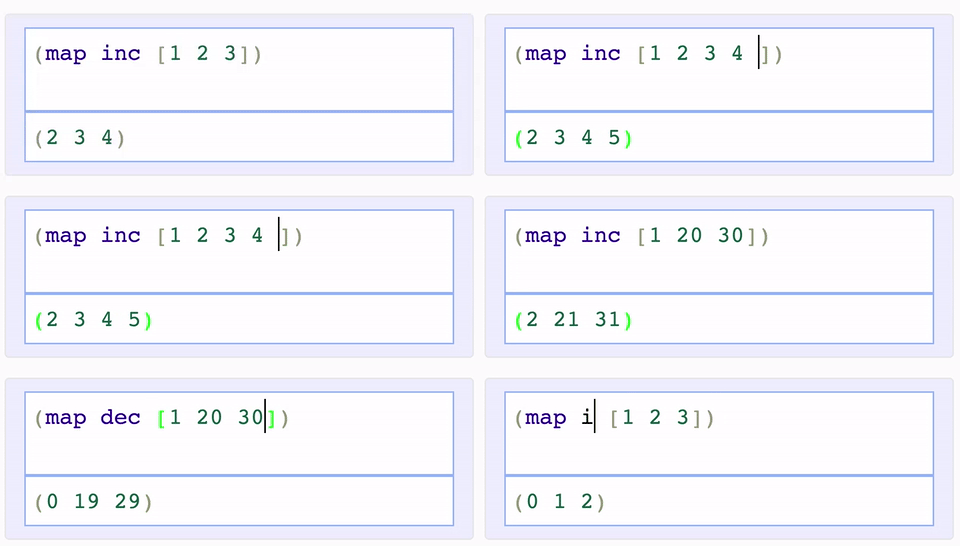
With the klipse plugin, the code is evaluated as you type...
Here is a live demo of the embedding of klipse in a web page.
|JavaScript | Ruby |
|-------------------------|-------------------------|
| |
|  |
|
|PHP | Clojure |
|-------------------------|-------------------------|
| |
|  |
|
Supported languages
- JavaScript: evaluation is done with the JavaScript function
evaland pretty printing of the result is done with pretty-format - Clojure[Script]: evaluation is done with Self-Hosted Clojurescript
- Ruby: evaluation is done with Opal
- C++: evaluation is done with JSCPP
- Python: evaluation is done with Skulpt
- Python3: evaluation is done with Pyodide
- Scheme: evaluation is done with BiwasScheme
- Prolog: evaluation is done with Tau Prolog
- Common Lisp: evaluation is done with JSCL
- PHP: evaluation is done with Uniter
- SQL: evaluation is done with sql.js. See SQL example
- Lua: evaluation is done with wasm_lua
- Go: evaluation is done with Yaegi
- BrainFuck
- JSX
- EcmaScript2017
- Google Charts: See Interactive Business Report with Google Charts.
The code editing inside the interactive snippets is powered by CodeMirror.
How does it work?
- JavaScript: A new way of blogging about JavaScript
- Ruby: A new way of blogging about ruby
- Clojure[Script]: How to klipsify a clojure[script] blog post
Integration
In order to integrate the klipse plugin on a blog, library documentation or any other web page, you have to follow 3 simple steps.
-
Make sure you have
<!DOCTYPE html>at the top of your html file and<meta charset="utf-8">right after your<head>(It is required in order to display properly the CodeMirror elements used by Klipse.) -
Add css and custom configuration somewhere in the page (it could be in the
<head>or in the<body>) before the<script>element of step #3. The selector keys are per language (see below for a list of supported languages) and the value are the CSS selector of the elements that you want to klipsify.
<link rel="stylesheet" type="text/css" href="https://storage.googleapis.com/app.klipse.tech/css/codemirror.css">

<script>
    window.klipse_settings = {
        selector_eval_js: '.language-klipse-eval-js', // css selector for the html elements you want to klipsify
    };
</script>
- Add the
JavaScripttag at the end of the body tag :
For Clojure:
<script src="https://storage.googleapis.com/app.klipse.tech/plugin/js/klipse_plugin.js"></script>
</body>
For other languages:
    <script src="https://storage.googleapis.com/app.klipse.tech/plugin_prod/js/klipse_plugin.min.js"></script>
</body>
Here is an interactive guide of the klipse snippets.
If you want to host Klipse JavaScript tag from your own server, see Host Klipse Locally.
If you want to use an older version of Klipse, see Use Older Versions.
JavaScript
Here is the full interactive guide of the klipse JavaScript snippets.
<link rel="stylesheet" type="text/css" href="https://storage.googleapis.com/app.klipse.tech/css/codemirror.css">

<script>
    window.klipse_settings = {
        selector_eval_js: '.language-klipse-eval-js', // css selector for the html elements you want to klipsify
    };
</script>
<script src="https://storage.googleapis.com/app.klipse.tech/plugin_prod/js/klipse_plugin.min.js"></script>
Here is a jsfiddle with Klipse plugin for JavaScript. And here are detailed explanations about a JavaScript live code editor in a blog post.
Clojure and ClojureScript in a web page
Pay attention: for Clojure interactive snippets, you must use the non-minified version of klipse as for the moment, self-host cljs doesn't support advanced compilation!
Here is the full interactive guide of the klipse clojure snippets.
You can manipulate the DOM inside KLIPSE: here is a tutorial.
<link rel="stylesheet" type="text/css" href="https://storage.googleapis.com/app.klipse.tech/css/codemirror.css">

<script>
    window.klipse_settings = {
        selector: '.language-klipse'// css selector for the html elements you want to klipsify
    };
</script>
<script src="https://storage.googleapis.com/app.klipse.tech/plugin/js/klipse_plugin.js"></script>
ClojureScript project
If you want to integrate Klipse inside a Clojurescript project, it is recommended to consume Klipse as a Clojurescript library like any other Clojurescript lib, just like this  .
.
Inside your code you have to require two namespaces and call a function:
(ns my.project
  (:require [klipse.run.plugin.plugin] ;; this namespace initializes Klipse. We require it for its side effects
            [klipse.plugin :as klipse-plugin]))

(klipse-plugin/init #js {:selector ".language-klipse"
                         :selector_reagent ".language-reagent"})
Here is an example of a tiny reagent demo project that integrates Klipse as a Clojurescript library.
Python
<link rel="stylesheet" type="text/css" href="https://storage.googleapis.com/app.klipse.tech/css/codemirror.css">

<script>
    window.klipse_settings = {
        selector_eval_python_client: '.language-klipse-python', // css selector for the html elements you want to klipsify
    };
</script>
<script src="https://storage.googleapis.com/app.klipse.tech/plugin_prod/js/klipse_plugin.min.js"></script>
Python3 (numpy, pandas)
<link rel="stylesheet" type="text/css" href="https://storage.googleapis.com/app.klipse.tech/css/codemirror.css">

<script>
    window.klipse_settings = {
        selector_pyodide: '.language-klipse-pyodide', // css selector for the html elements you want to klipsify
    };
</script>
<script src="https://storage.googleapis.com/app.klipse.tech/plugin_prod/js/klipse_plugin.min.js"></script>
Ruby
<link rel="stylesheet" type="text/css" href="https://storage.googleapis.com/app.klipse.tech/css/codemirror.css">

<script>
    window.klipse_settings = {
        selector_eval_ruby: '.language-klipse-eval-ruby', // css selector for the html elements you want to klipsify
    };
</script>
<script src="https://storage.googleapis.com/app.klipse.tech/plugin_prod/js/klipse_plugin.min.js"></script>
Lua
<link rel="stylesheet" type="text/css" href="https://storage.googleapis.com/app.klipse.tech/css/codemirror.css">
<link rel="stylesheet" type="text/css" href="https://storage.googleapis.com/app.klipse.tech/css/lua.css">

<script>
    window.klipse_settings = {
        selector_lua: '.language-klipse-lua', // css selector for the html elements you want to klipsify
    };
</script>
<script src="https://storage.googleapis.com/app.klipse.tech/plugin_prod/js/klipse_plugin.min.js"></script>
Go
<link rel="stylesheet" type="text/css" href="https://storage.googleapis.com/app.klipse.tech/css/codemirror.css">

<script>
    window.klipse_settings = {
        selector_golang: '.language-klipse-go, // css selector for the html elements you want to klipsify
    };
</script>
<script src="https://storage.googleapis.com/app.klipse.tech/plugin_prod/js/klipse_plugin.min.js"></script>
Scheme
<link rel="stylesheet" type="text/css" href="https://storage.googleapis.com/app.klipse.tech/css/codemirror.css">

<script>
    window.klipse_settings = {
        selector_eval_scheme: '.language-klipse-eval-scheme', // css selector for the html elements you want to k
