
Sshto
Small bash script to manage your ssh connections. It builds menu (via dialog) from your ~/.ssh/config. It can not only connect but also to run commands, copy files, tunnel ports.
Install / Use
/learn @vaniacer/SshtoREADME
sshto
<a href="https://t.me/sshtobash"><img src="https://telegram.org/img/website_icon.svg" width="21"></a>

 <sup>Feel free to support the project!)</sup></br>
Small bash script that builds a menu (via dialog) from your ~/.ssh/config.</br>
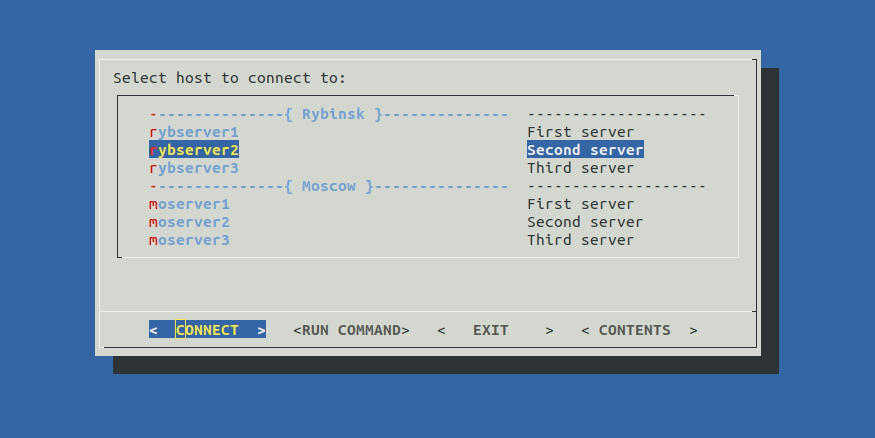 </br>
Allows you to connect to your servers or run commands from menu. Available commands:</br>
</br>
Allows you to connect to your servers or run commands from menu. Available commands:</br>
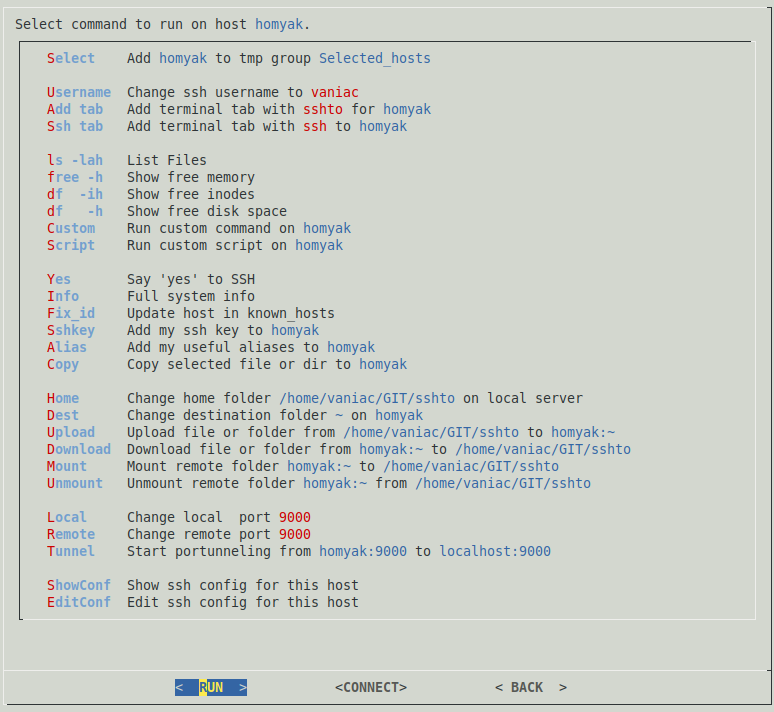 </br>
Your commands can be easily added to this list. Just edit this part of the script:
</br>
Your commands can be easily added to this list. Just edit this part of the script:
First collumn - command, second - description.</br>
Simple commands like ls -la could be added as is.</br>
A list of commands or a complicated logic should be added via function.</br>
Empty values('') could be used as a delimiter.</br>
You can quick jump to the selected server via <i>CONNECT</i> button.</br>
To close <i>ssh</i> session press <kbd>CTRL</kbd>+<kbd>D</kbd> or run exit command, it'll bring you back to <i>sshto</i> commands section.</br>
</br>
Optional hosts description could be added like this:</br>
Optional start menu delimiters '---{ Group Name }---' could be added like this:</br>
<pre> #Host DUMMY #Group Name# </pre>If you are unhappy with this 'DUMMY' group name template, or you actually have a host named 'dummy',
you can change this template by ajusting this variable group_id=dummy. </br>
All these additions won't break your ssh configs coz they are considered as comments.
~/.ssh/config example:
<pre> #Host DUMMY #Rybinsk# Host rybserver1 #First server HostName localhost Host rybserver2 #Second server HostName localhost Host rybserver3 #Third server HostName localhost #Host DUMMY #Moscow# Host moserver1 #First server HostName localhost Host moserver2 #Second server HostName localhost Host moserver3 #Third server HostName localhost </pre>Script greps data from multiple config files via pattername config* in ~/.ssh dir.</br>
So you can split config to multiple files and use them with <i>Include</i> directive, example:
All preset variables and functions could be tweaked via ~/.sshtorc config file:
You can customize dialog itself a bit by creating and editing its config file:
<pre> dialog --create-rc ~/.dialogrc nano ~/.dialogrc </pre>If you don't have dialog and don't want(or can't) to install it, there is a dialog-less version of sshto
in my new project bashui here is how it looks:


Try it bashui-sshto!
How to install
Clone\download this project, go to it's folder and run:
<pre>sudo cp sshto /usr/bin/ #and to unistall sudo rm /usr/bin/sshto </pre><a href="https://asciinema.org/a/PQMuRvfmxlHUc4oZMN76LY2V4">See how it works at asciinema</a></br>
<a href="http://www.youtube.com/watch?feature=player_embedded&v=FhnsVH8t96Q " target="_blank"><img src="http://img.youtube.com/vi/FhnsVH8t96Q/0.jpg" alt="ssh config guide" width="240" height="180" border="10"/></a></br> Tom Lawrens video guide about ssh config and sshto
<a href="https://t.me/sshtobash"><img src="https://telegram.org/img/website_icon.svg" width="21"></a>
<sup>Feel free to support the project!)</sup></br>
Related Skills
node-connect
339.1kDiagnose OpenClaw node connection and pairing failures for Android, iOS, and macOS companion apps
frontend-design
83.8kCreate distinctive, production-grade frontend interfaces with high design quality. Use this skill when the user asks to build web components, pages, or applications. Generates creative, polished code that avoids generic AI aesthetics.
openai-whisper-api
339.1kTranscribe audio via OpenAI Audio Transcriptions API (Whisper).
commit-push-pr
83.8kCommit, push, and open a PR
