
Raider
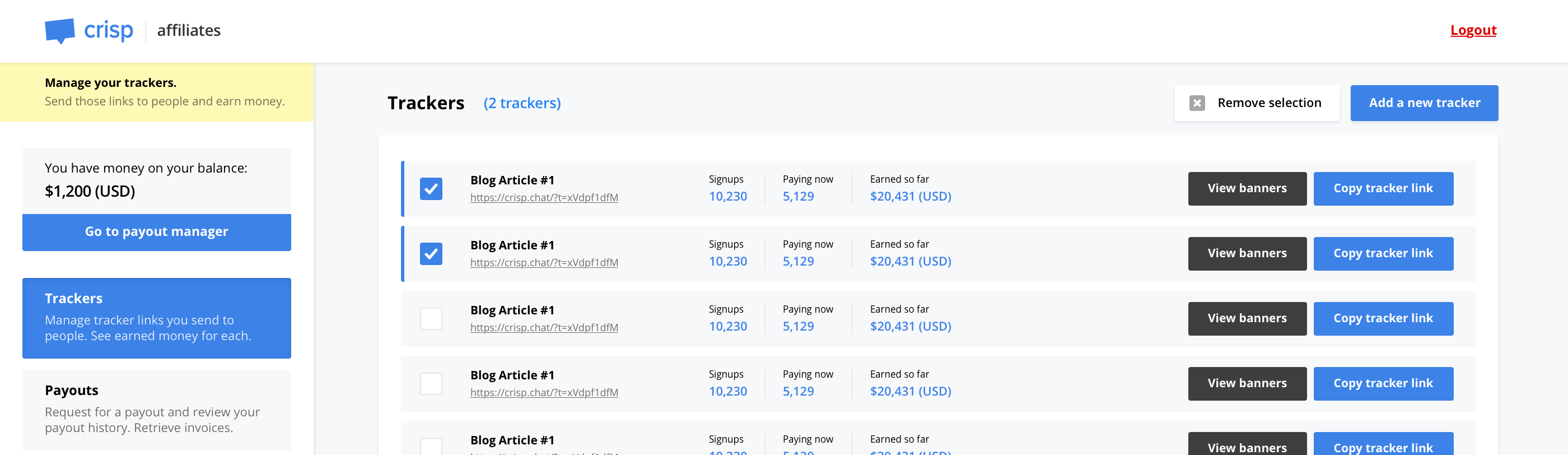
🐎 Affiliates dashboard. Used by affiliates to generate tracking codes and review their balance.
Install / Use
/learn @valeriansaliou/RaiderREADME
Raider




Affiliates dashboard. Used by affiliates to generate tracking codes and review their balance.
Raider is easy to integrate in your existing system. You can also customize the dashboard look & feel with templates and styles. It can be used as a self-service affiliates system, for your affiliate users to manage their account, create tracking URLs, review their balance and request for payouts.
Tested at Rust version: rustc 1.51.0-nightly (c8915eebe 2021-01-07)
🇭🇺 Crafted in Budapest, Hungary.
Who uses it?
<table> <tr> <td align="center"><a href="https://crisp.chat/"><img src="https://valeriansaliou.github.io/raider/images/crisp-icon.png" width="64" /></a></td> </tr> <tr> <td align="center">Crisp</td> </tr> </table>👋 You use Raider and you want to be listed there? Contact me.
Features
- Self-service affiliates dashboard
- Users can generate affiliates tracking codes
- Users can see their affiliates statistics (eg. how much money they made)
- Users can request for payouts (you then receive a notification email)
- Your backend reports referred customer payments to Raider
How does it work?
Raider provides a self-service affiliates dashboard on which users can sign up, login, and manage their account (eg. create tracking codes, request for payouts, etc.). Your backend can report referred customer payments to Raider, so that the affiliates can cash out their commission and request for a payout at any point.
Raider provides two services:
- Self-service dashboard: Used by your affiliates users
- Payment reporting API: Called by your backend once a payment is made (ie. to credit due commission money to an affiliate)
How to use it?
Installation
Install from releases:
The best way to install Raider is to pull the latest release from the Raider releases page.
Make sure to pick the correct server architecture (eg. Intel 32 bits).
Install from packages:
Raider provides pre-built packages for Debian-based systems (Debian, Ubuntu, etc.).
Important: Raider only provides 64 bits packages targeting Debian 12 for now (codename: bookworm). You might still be able to use them on other Debian versions, as well as Ubuntu (although they rely on a specific glibc version that might not be available on older or newer systems).
First, add the Raider APT repository (eg. for Debian bookworm):
echo "deb [signed-by=/usr/share/keyrings/valeriansaliou_raider.gpg] https://packagecloud.io/valeriansaliou/raider/debian/ bookworm main" > /etc/apt/sources.list.d/valeriansaliou_raider.list
curl -fsSL https://packagecloud.io/valeriansaliou/raider/gpgkey | gpg --dearmor -o /usr/share/keyrings/valeriansaliou_raider.gpg
apt-get update
Then, install the Raider package:
apt-get install raider
Then, edit the pre-filled Raider configuration file:
nano /etc/raider/raider.cfg
Finally, restart Raider:
service raider restart
Install from Cargo:
If you prefer managing raider via Rust's Cargo, install it directly via cargo install:
cargo install raider-server
Ensure that your $PATH is properly configured to source the Crates binaries, and then run Raider using the raider command.
Install from source:
The last option is to pull the source code from Git and compile Raider via cargo:
cargo build --release
You can find the built binaries in the ./target/release directory.
Install the libssl-dev (ie. OpenSSL headers) and libmysqlclient-dev (ie. MySQL client headers) before you compile Raider. SSL dependencies are required for email notifications, and MySQL dependencies are required to connect to your database.
Install from Docker Hub:
You might find it convenient to run Raider via Docker. You can find the pre-built Raider image on Docker Hub as valeriansaliou/raider.
First, pull the valeriansaliou/raider image:
docker pull valeriansaliou/raider:v1.2.3
Then, seed it a configuration file and run it (replace /path/to/your/raider/config.cfg with the path to your configuration file):
docker run -p 8080:8080 -v /path/to/your/raider/config.cfg:/etc/raider.cfg valeriansaliou/raider:v1.2.3
In the configuration file, ensure that:
server.inetis set to0.0.0.0:8080(this lets Raider be reached from outside the container)assets.pathis set to./res/assets/(this refers to an internal path in the container, as the assets are contained there)
Raider will be reachable from http://localhost:8080.
Database
Raider requires a MySQL to be running on your host (it is unfortunately not compatible with PostgreSQL and others, at the moment).
The Raider SQL schema should be imported in the Raider database you created, which you can find at raider.sql.
Configuration
Use the sample config.cfg configuration file and adjust it to your own environment.
⚠️ Important: Make sure to change the default server.secret_key, server.track_token and server.management_token configuration values with secret keys you generated. Also, generate a random arbitrary length string for database.password_salt. Failing to change any of those values will make your Raider instance insecure. You can easily create these tokens by running openssl rand -base64 32.
Available configuration options are commented below, with allowed values:
[server]
log_level(type: string, allowed:debug,info,warn,error, default:error) — Verbosity of logging, set it toerrorin productioninet(type: string, allowed: IPv4 / IPv6 + port, default:[::1]:8080) — Host and TCP port the Raider service should listen onworkers(type: integer, allowed: any number, default:4) — Number of workers for the Raider service to run ontrack_token(type: string, allowed: secret token, default: no default) — Track API secret token (ie. secret password)management_token(type: string, allowed: secret token, default: no default) — Management API secret token (ie. secret password)secret_key(type: string, allowed: 192-bit base64 encoded secret key, default: no default) — Secret key for cookie encryption (see Rocket docs for details)
[database]
url(type: string, allowed: MySQL URL, no default) — URL of the MySQL database to connect topool_size(type: integer, allowed: any number, default:4) — Number of connections to maintain to MySQLidle_timeout(type: integer, allowed: seconds, default:300) — Idle timeout in seconds to MySQLconnection_timeout(type: integer, allowed: seconds, default:10) — Connection timeout in seconds to MySQLpassword_salt(type: string, allowed: any string, no default) — Password salt (preferably strong and long; do not change this after accounts got created as it will make them unusable)account_create_allow(type: boolean, allowed:true,false, default:true) — Whether to allow accounts to be created or not
[exchange]
[exchange.fixer]
endpoint(type: string, allowed: any string, default:https://api.apilayer.com/fixer) — Fixer API endpoint (on APILayer)api_key(type: string, allowed: any string, no default) — APILayer API key (for Fixer)
[email]
from(type: string, allowed: email address, no default) — Email address from which to send emailssmtp_host(type: string, allowed: hostname, IPv4, IPv6, default:localhost) — SMTP host to connect tosmtp_port(type: integer, allowed: TCP port, default:587) — SMTP TCP port to connect tosmtp_username(type: string, allowed: any string, no default) — SMTP username to use for authentication (if any)smtp_password(type: string, allowed: any string, no default) — SMTP password to use for authentication (if any)smtp_encrypt(type: boolean, allowed:true,false, default:true) — Whether to encrypt SMTP connection withSTARTTLSor not
[assets]
path(type: string, allowed: UNIX path, default:./res/assets/) — Path to Raider assets directory
[branding]
page_title(type: string, allowed: any string, default:Affiliates) — Affiliates system titlepage_url(type: string, allowed: URL, no default) — Affiliates system URLhelp_url(type: string, allowed: URL, no default) — Help URL to be used in dashboard (ie. knowledge base where users can search for help)support_url(type: string, allowed: URL, no default) — Support URL to be used in dashboard (ie. where users can contact you if something is wrong)icon_color(type: string, allowed: hexadecimal color code, no default) — Icon color (ie. your icon background color)icon_url(type: string, allowed: URL, no default) — Icon URL, the ic
