
ZenSharp
ZenSharp for ReSharper is mnemonics on steroids!
Install / Use
/learn @ulex/ZenSharpREADME
ReSharper ZenSharp plugin
A shortcuts language for defining ReSharper live template items. You can specify your own live template scheme using flexible language.
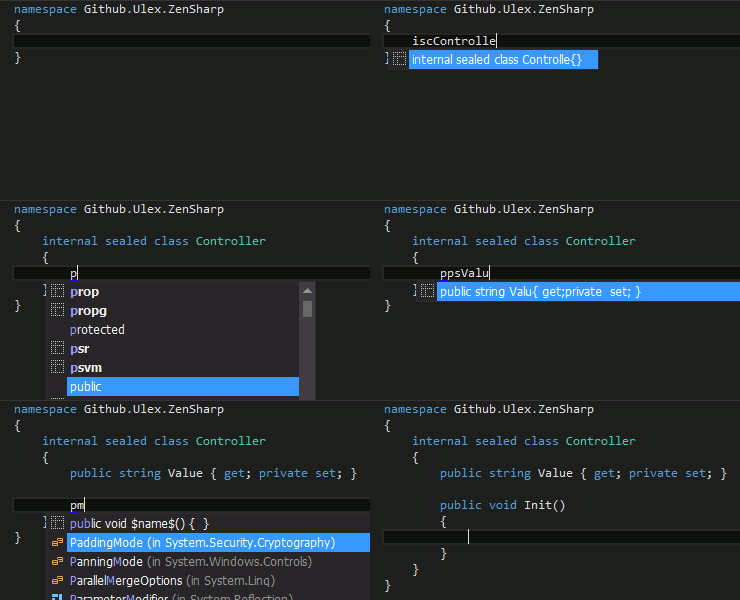
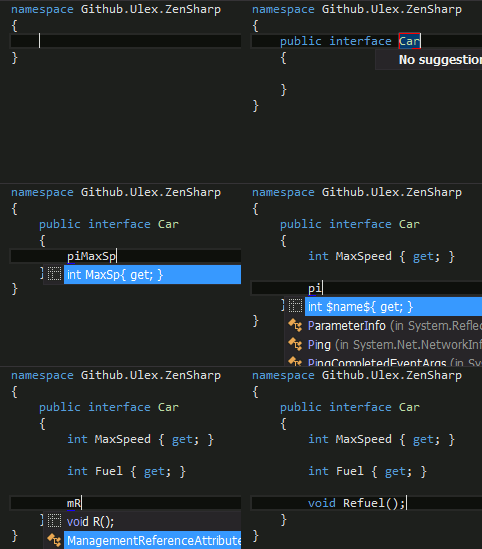
How do I get it?
You can install directly into ReSharper via the Extension Manager in the ReSharper menu.
Predefined templates
ZenSharp shipped with a lot of standard templates.
$END$ means cursor position after expand template by pressing Tab.
Examples in scope, where method definition is allowed:
<!-- btw: «how to memo» really non readable markdown, sorry :) -->| shortcut | expand to | how to memo |
|----------|--------------------------------------------------------|-----------------------------------------------------------------------------|
| pps | public string $name$ { get; private set; } $END$ | public property string |
| ppsAge | public string Age {get; private set;} $END$ | public property string Name |
| pps+ | public string $name$ { get; set; } $END$ | public property string more access! |
| ppsA+p | public string A {get; protected set;} $END$ | public property string more access!protected |
| _rs | private readonly string $name$; $END$ | [_ is private] readonly string |
| pvm | public virtual void $name$($END$) { } | public virtual method |
| pM~s | public static IEnumerable<string> $name$($END$) { } | public [static Method] returning [~ is IEnumerable] of string |
| pamb | public abstract bool $name$($END$) { } | public abstract method bool |
| pmiaTest | public int[] Test() { $END$ } | public method returning int array Name |
Examples where type declaration is allowed:
| shortcut | expand to | how to memo |
|----------|------------------------------------------|---------------------------------|
| pi | public interface $name$ { $END$ } | public interface |
| psc | public sealed class $name$ { $END$ } | public sealed class |
| pc:t | public class $name$ : $type$ { $END$ } | public class :type |
| ie | internal enum $name$ { $END$ } | internal enum |
Hint: you can always write variable name after shortcut. For example, you can type ppsPropertyName and
by pressing tab it magically expand to public string PropertyName {get; set; }.
Access
| shortcut | expand to | |----------|-----------| | p | public | | _ | private | | i | internal | | P | protected |
Types
| shortcut | expand to | note |
|----------|-----------|-------------------------------------------------|
| t | $type$ | ask user for custom type after expand |
| sa | string[] | any prim type end with a — array of this type |
| b? | bool? | any prim type end with ? — Nullable type |
Primitive types
| shortcut | expand to | |----------|-----------| | s | string | | by | byte | | b | bool | | dt | DateTime | | d | double | | i | int | | ui | uint | | g | Guid | | dc | decimal | | b? | bool? |
Generic types
| shortcut | expand to | |----------|-----------------| | l | IList<T1> | | ~ | IEnumerable<T1> | | sl | SortedList<T1> | | di | Dictionary<T1> |
NUnit attributes
Some useful examples to help wring NUnit tests: repo today)
| shortcut | expand to |
|------------------------|-------------------------------------------------------------|
| supmSetup | [SetUp] public void Setup() { $END$ } |
| tfsupmFixtureSetup | [TestFixtureSetUp] public void FixtureSetup() { $END$ } |
| tftdFixtureDown | [TestFixtureTearDown] public void FixtureDown() { $END$ } |
| tdpmTearDown | [TearDown] public void Test() { $END$ } |
| tcpmTest | [TestCase] public void Test() { $END$ } |
| tpmTest | [Test] public void Test() { $END$ } |
Rules
Simplest rule for expand text cw into System.Console.WriteLine($END$)(this
rule is ordinary ReSharper live template) will looks like start ::= "cw"="System.Console.WriteLine($END$)"
More complex rule, a sort of predefined live template for define class in scope,
where class declaration is allowed. In ordinary live templates, if you want to
specify class access before executing live template, you must define
independent live templates one for "public class"=pc, another for "internal class"=ic
But class can be also be sealed. Or static. And same access modifier can be
applied to interface and enum.
In ZenSharp config you can simple define rules like formal grammar. For class declaration this definition will looks like:
space  ::= " "
cursor ::= "$END$"
identifier ::= <name default="$name$" macros = "complete()">

access ::= (internal=i | public=p | private=_ | protected=P) space
class  ::= access ["sealed "=s] ("class"=c | "static class"=C) space body
body   ::= identifier "{" cursor "}"

scope "InCSharpTypeAndNamespace"
{
  start = class | interface
}
More complex example available in predefined templates file.
How to compile
ZenSharp written in C# and Nemerle programming language. You can install it from Nemerle website http://nemerle.org/Downloads . ZenSharp depend on nuget packages ReSharper.SDK and nunit.framwork. Use nuget package restore for them.
After this, ZenSharp can be built either msbuild or Visual Studio.
External links
https://blog.jetbrains.com/dotnet/2015/12/22/end-of-year-round-up-of-resharper-10-extensions/ https://garyng.github.io/gtil-gitbook/ReSharper/resharper-plugin-zensharp.html
<!-- HOW TO UPGRADE: 1. Update ZenSharp.Integration/ZenSharp.Integration.csproj ReSharperSDK and Lifetime to latest version (from visual studio) 2. Update release notes in ZenSharp.nuspec 3. Update version spec in buildNuPack.ps1 4. Check compilation in Visual Studio 5. Build package by running build.bat 6. Install and check plugin from bin/Releases 7. Push to plugins.jetbrains.com via marketplace 8. Commit and push this repo vim:tw=140:spell: -->