
Bluefin
The next generation Linux workstation, designed for reliability, performance, and sustainability.
Install / Use
/learn @ublue-os/BluefinREADME
Bluefin
Deinonychus antirrhopus




Bluefin is a cloud-native desktop operating system that reimagines the Linux desktop experience for modern computing environments.
For end users, it provides a system as reliable as a Chromebook with near-zero maintenance. For developers, it offers a kickass cloud-native developer workflow with integrated container tools, declarative system management, and seamless CI/CD integration. Check Introduction to Bluefin for a feature walkthrough.
Mission
Bluefin's mission is to provide a robust, cloud-native desktop operating system that bridges the gap between consumer usability and enterprise-grade infrastructure practices. We aim to deliver:
- Reliability: Atomic updates ensuring system stability
- Developer Experience: Integrated cloud-native tooling and workflows, including Kubernetes and container support
- Sustainability: Reduced maintenance overhead for contributors by using the latest cloud native infrastructure tech
Communications
Community Channels
- 📰 Announcements - Official project blog and announcements
- Project Board - What we're working on
- 💬 Discussions - Community forum (strongly recommended!)
- 📖 Documentation - Documentation and User Guides
- 🔧 Contributing Guide - How to contribute to the project
Getting Started
Visit projectbluefin.io to explore installation options and get started with Bluefin.
Secure Boot
Secure Boot is supported by default on our systems, providing an additional layer of security. After the first installation, you will be prompted to enroll the secure boot key in the BIOS.
Enter the password universalblue
when prompted to enroll our key.
If this step is not completed during the initial setup, you can manually enroll the key by running the following command in the terminal:
ujust enroll-secure-boot-key
Secure boot is supported with our custom key. The pub key can be found in the root of the akmods repository here. If you'd like to enroll this key prior to installation or rebase, download the key and run the following:
sudo mokutil --timeout -1
sudo mokutil --import public_key.der
Code of Conduct
This project follows the Universal Blue Community Guidelines. We are committed to providing a welcoming and inclusive environment for all contributors and users.
All participants in our community are expected to follow our code of conduct. Please report any violations to the project maintainers.
License
This project is licensed under the Apache License 2.0 - see the LICENSE file for details.
Third-Party Components
Bluefin incorporates and builds upon several open source projects:
- Fedora Linux - Base operating system foundation
- GNOME Desktop Environment - Desktop interface
- Universal Blue - Cloud Native desktop infrastructure
- Various CNCF Projects - Cloud-native tooling and containers
All incorporated components maintain their respective licenses and attributions.
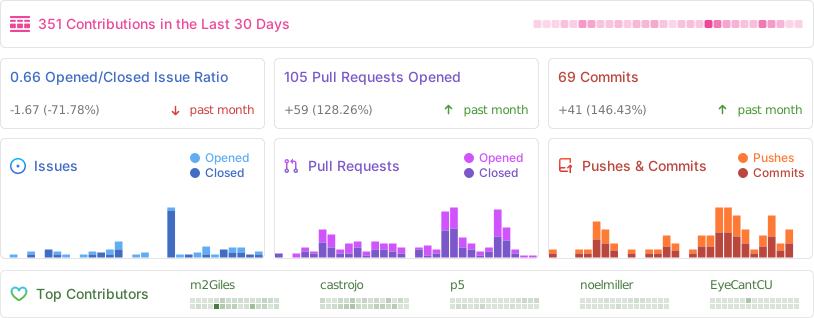
Repobeats
Star History
<a href="https://star-history.com/#ublue-os/bluefin&Date"> <picture> <source media="(prefers-color-scheme: dark)" srcset="https://api.star-history.com/svg?repos=ublue-os/bluefin&type=Date&theme=dark" /> <source media="(prefers-color-scheme: light)" srcset="https://api.star-history.com/svg?repos=ublue-os/bluefin&type=Date" /> <img alt="Star History Chart" src="https://api.star-history.com/svg?repos=ublue-os/bluefin&type=Date" /> </picture> </a>Related Skills
diffs
341.8kUse the diffs tool to produce real, shareable diffs (viewer URL, file artifact, or both) instead of manual edit summaries.
clearshot
Structured screenshot analysis for UI implementation and critique. Analyzes every UI screenshot with a 5×5 spatial grid, full element inventory, and design system extraction — facts and taste together, every time. Escalates to full implementation blueprint when building. Trigger on any digital interface image file (png, jpg, gif, webp — websites, apps, dashboards, mockups, wireframes) or commands like 'analyse this screenshot,' 'rebuild this,' 'match this design,' 'clone this.' Skip for non-UI images (photos, memes, charts) unless the user explicitly wants to build a UI from them. Does NOT trigger on HTML source code, CSS, SVGs, or any code pasted as text.
openpencil
1.9kThe world's first open-source AI-native vector design tool and the first to feature concurrent Agent Teams. Design-as-Code. Turn prompts into UI directly on the live canvas. A modern alternative to Pencil.
ui-ux-designer
Use this agent when you need to design, implement, or improve user interface components and user experience flows. Examples include: creating new pages or components, improving existing UI layouts, implementing responsive designs, optimizing user interactions, building forms or dashboards, analyzing existing UI through browser snapshots, or when you need to ensure UI components follow design system standards and shadcn/ui best practices.\n\n<example>\nContext: User needs to create a new dashboard page for team management.\nuser: "I need to create a team management dashboard where users can view team members, invite new members, and manage roles"\nassistant: "I'll use the ui-ux-designer agent to design and implement this dashboard with proper UX considerations, using shadcn/ui components and our design system tokens."\n</example>\n\n<example>\nContext: User wants to improve the user experience of an existing form.\nuser: "The signup form feels clunky and users are dropping off. Can you improve it?"\nassistant: "Let me use the ui-ux-designer agent to analyze the current form UX and implement improvements using our design system and shadcn/ui components."\n</example>\n\n<example>\nContext: User wants to evaluate and improve existing UI.\nuser: "Can you take a look at our pricing page and see how we can make it more appealing and user-friendly?"\nassistant: "I'll use the ui-ux-designer agent to take a snapshot of the current pricing page, analyze the UX against Notion-inspired design principles, and implement improvements using our design tokens."\n</example>
