
ObdGraphs
ObdGraphs is an Android application is intended to collect and display vehicle telemetry data.
Install / Use
/learn @tzebrowski/ObdGraphsREADME
ObdGraphs is an Android application intended to collect and display vehicle telemetry.

About
The ObdGraphs Android application, is a feature-rich tool designed for real-time vehicle telemetry visualization using ELM327 and STNxxxx OBD2 adapters.
Built atop the ObdMetrics Java framework, it offers a comprehensive suite of functionalities tailored for automotive diagnostics and performance monitoring.
🚀 Key Features and Capabilities
- Broad Adapter Compatibility: Seamlessly connects with ELM327 and STNxxxx OBD2 adapters via Bluetooth, WiFi, or USB.
- Real-Time Data Visualization: Transforms raw sensor data into intuitive, customizable gauges and high-frequency graphs for instant analysis.
- Native Engine Support: Features specialized, native support for high-performance engines, specifically optimized for:
- Alfa Romeo 1.75 TBI - 4C, Giulietta
- Alfa Romeo 2.0 GME - Giulia, and Stelvio
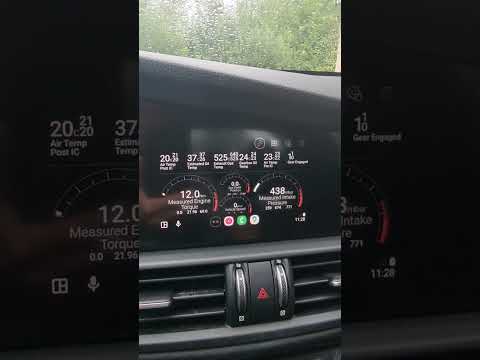
- Android Auto Integration: Extends the diagnostic experience directly to your vehicle’s infotainment screen, allowing you to monitor critical engine parameters safely while on the road.
- Alerting: Ability to set upper and lower threshold for individual metrics
- Adapter Compatibility: Supports various connection types including Wi-Fi, Bluetooth, and USB for ELM327 and STN1170/STN2120 adapters.
- Android Auto Integration: Provides dedicated dashboards for performance metrics and trip information, enhancing the driving experience.
- Data Logging: Automatically records trip data, enabling users to review historical telemetry at any time
- Configurable views - The application offers few different kind of gauges which can visualize telemetry in the real-time, e.g: Boost, MAF, OIL temp
- Vehicle Profiles: Allows creation of customizable profiles with vehicle-specific settings and PID configurations.
📊 Data Analysis & Logging
The application includes native integration with the ObdGraphsLogViewer project. This integration allows users to:
- Export Telemetry Logs: Save detailed session data from the mobile app in the Google Drive.
- Online Log Visualization: Utilize the specialized ObdGraphsLogViewer to analyze logs on a larger screen, enabling deep-dive performance reviews and trend analysis.
🔄 How to Sync Data between Mobile App and Log Viewer
To analyze your vehicle's performance on a larger screen, follow these steps to sync your data:
- Enable Recording: Within the ObdGraphs mobile app, ensure that data logging is active during your drive. The app automatically saves trip data to your local storage.
- Upload to Cloud: Navigate to the synchronization settings in the app and use the Cloud Synchronization feature to upload your recorded trip logs directly to your Google Drive.
- Launch Analyzer: Visit the Online Log Analyzer on your desktop.
- Analyze: Connect your Google Drive account within the web analyzer to instantly access and visualize your uploaded logs.
For a detailed video walkthrough of this process, refer to the official tutorial: ObdGraphs - Online Log Analyzer (YouTube).
🔗 Official Resources
| Resource | Link | | :--- | :--- | | Official Website | https://my-giulia.com/ | | Online Log Analyzer | my-giulia.com/#analyzer | | Google Play Store | Download ObdGraphs | | GitHub (Log Viewer) | ObdGraphsLogViewer Project |
Note: For the best performance and highest data sampling rates, the use of high-quality STNxxxx based adapters is recommended.
Template App
This application can serve as a template to support various vehicles, each with its own set of custom PIDs. Example for such use-case can be found here
Developer-Friendly Aspects
Open Source:Licensed under Apache 2.0, encouraging community contributions and modifications.Modular Architecture:The codebase is organized into distinct modules (e.g., datalogger, screen_renderer, automotive), promoting maintainability and scalability.Custom PID Integration:Supports the addition of new PIDs through external JSON configurations, enabling adaptability to various vehicle models.
YouTube overview video (brake-boosting assistance)
Views
Application offers few configurable screens which visualize vehicle telemetry data.
Android Auto (alerts emitted when upper threshold breached)
| | |
|-----------------------------------------------------|-----------------------------------------------------|
|  |
|
Android Auto (Performance Dashboard)
| | |
|-----------------------------------------------------|-----------------------------------------------------|
|  |
|
Android Auto (Trip Info Dashboard)
| | |
|-----------------------------------------------------|-----------------------------------------------------|
|  |
|
Android Auto (Giulia Renderer)
| | |
|-----------------------------------------------------|-----------------------------------------------------|
|  |
|  |
|
Android Auto (Gauge Renderer)
| | |
|-----------------------------------------------------|-----------------------------------------------------|
|  |
|  |
|
Mobile
| | |
|-------------------------------------------------------------------|--------------------------------------------|
|  |
|  |
|
|
|  |
|  |
|
Tablet
| | |
|------------------------------------------------------|------------------------------------------------------|
|  |
|  |
|
Road map
- Performance optimization
- Support for PIDs creation through application
Instructions
Related Skills
node-connect
335.4kDiagnose OpenClaw node connection and pairing failures for Android, iOS, and macOS companion apps
frontend-design
82.5kCreate distinctive, production-grade frontend interfaces with high design quality. Use this skill when the user asks to build web components, pages, or applications. Generates creative, polished code that avoids generic AI aesthetics.
openai-whisper-api
335.4kTranscribe audio via OpenAI Audio Transcriptions API (Whisper).
commit-push-pr
82.5kCommit, push, and open a PR
